
Kingwear GV68
KingWear GV68 Smart Watch User Manual
Model: GV68
Introduction
Thank you for choosing the KingWear GV68 Smart Watch. This device is designed to enhance your daily life with its comprehensive features, including fitness tracking, heart rate monitoring, and smart notifications. This manual provides detailed instructions on how to set up, operate, and maintain your smart watch to ensure optimal performance and longevity.

Image: The KingWear GV68 Smart Watch displaying a classic analog watch face, showcasing its sleek design and vibrant display.
Package Contents
Please verify that all items are present in your package:
- 1 x KingWear GV68 Smart Watch
- 1 x Magnetic Charging Cable
- 1 x English User Manual (this document)

Image: Contents of the KingWear GV68 Smart Watch package, including the watch, charging cable, and user manual, alongside a view of the watch's dimensions.
Setup
1. Charging the Device
Before first use, fully charge your GV68 Smart Watch. Connect the magnetic charging cable to the charging contacts on the back of the watch and plug the USB end into a power adapter (not included) or a computer's USB port.
- Ensure the magnetic contacts are properly aligned.
- A charging indicator will appear on the screen.
2. Powering On/Off
To power on the watch, press and hold the power button located on the side until the screen lights up. To power off, press and hold the power button, then select "Power Off" on the screen.
3. Pairing with Your Smartphone
The KingWear GV68 is compatible with both iOS and Android devices via Bluetooth 4.0.
- Download the companion app (refer to the manual for app name, usually mentioned in the physical manual or QR code on watch).
- Enable Bluetooth on your smartphone.
- Open the app and follow the on-screen instructions to search for and connect to your GV68 watch.
- Confirm the pairing request on both your phone and the watch.

Image: The KingWear GV68 Smart Watch displaying its digital time, alongside icons indicating compatibility with iOS and Android, and features like sleep monitoring, Bluetooth, pedometer, IP68 waterproofing, and heart rate monitoring.
Operating Instructions
Navigation
The GV68 features a capacitive touch screen for easy navigation. Swipe left/right or up/down to browse through menus and functions. Tap to select an option.
Key Functions
- Heart Rate Monitor: The built-in heart rate sensor allows you to monitor your heart rate in real-time. Access this function from the main menu. Ensure the watch is snug on your wrist for accurate readings.
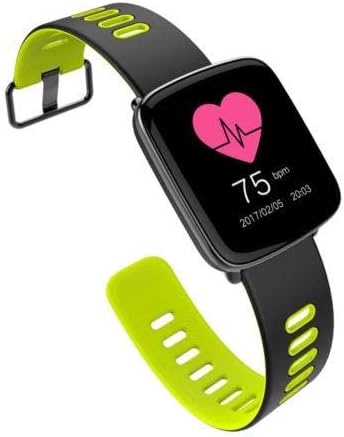
Image: The KingWear GV68 Smart Watch screen showing a heart rate reading of 75 bpm, indicating its heart rate monitoring capability.
- Pedometer: Automatically tracks your steps, calculates calories burned, and distance covered. View your daily activity summary on the watch or in the app.
- Sleep Monitor: Analyzes your sleep quality. Wear the watch to bed to track your sleep patterns.
- Notification Synchronization: Receive real-time notifications for incoming calls, SMS, and other app alerts directly on your watch.
- Remote Control Music: Control music playback on your smartphone from your watch.
- Remote Camera: Use your watch as a remote shutter for your smartphone's camera.
- Anti-lost: Features a bidirectional search function to help you locate your watch or phone if misplaced within Bluetooth range.
- Water Clock: A reminder to drink water at regular intervals.
- Sitting Alert: Reminds you to move after periods of inactivity.
- Watch Faces: Choose from 5 different clock faces to customize your watch's appearance.
Maintenance
Cleaning
Wipe the watch and strap regularly with a soft, damp cloth. Avoid using harsh chemicals or abrasive materials.
Water Resistance (IP68)
The GV68 Smart Watch is IP68 waterproof, meaning it is resistant to dust and can withstand immersion in water up to 3 meters deep for a limited time. You can wear it while swimming.
- Do NOT open the watch while it is in water.
- Do NOT expose the watch to hot water, steam, or extreme temperature changes.
- After exposure to water, dry the watch thoroughly before charging.

Image: The KingWear GV68 Smart Watch partially submerged in water, with text indicating its IP68 waterproof rating and resistance up to 3 meters, emphasizing its suitability for swimming.
Storage
Store the watch in a cool, dry place when not in use. Avoid direct sunlight and extreme temperatures.
Troubleshooting
| Problem | Possible Cause / Solution |
|---|---|
| Watch does not power on. | Battery may be depleted. Charge the watch for at least 30 minutes. |
| Cannot pair with smartphone. | Ensure Bluetooth is enabled on both devices. Restart both the watch and phone. Check if the app is installed and running. |
| Notifications not received. | Check app notification settings on your phone. Ensure the watch is connected via Bluetooth. |
| Inaccurate heart rate/pedometer readings. | Ensure the watch is worn snugly on your wrist. Clean the sensor on the back of the watch. |
Specifications
| Feature | Detail |
|---|---|
| CPU | MT2502D |
| RAM | 32MB |
| ROM | 32MB |
| Display | 1.54 Inch TFT, 240*240 pixel, 260000 colors |
| Touch Screen | Capacitive touch screen, Full bonding processing |
| Bluetooth Version | 4.0 (compatible with iOS and Android) |
| Waterproof Rating | IP68 |
| Battery | 360 mAh High Voltage Lithium Polymer Battery |
| Charger | Magnetic charger cable |
| Sensors | G-sensor, Heart rate sensor |
| Dimensions | 48*39*12.5mm |
| Weight | Approx. 100g (from package dimensions) |
| Casing Material | Aluminum alloy casing, stainless steel lugs, PVD vacuum plating |
Warranty and Support
KingWear products are designed and manufactured to the highest quality standards. For information regarding warranty coverage and customer support, please refer to the warranty card included with your product or visit the official KingWear website.
For technical assistance or inquiries, please contact KingWear customer service through the contact information provided on their official website or through your point of purchase.
- Online Support: www.kingwear.com (Note: This is a placeholder URL, please refer to actual product documentation for official support links.)
- Warranty Period: Please check your purchase receipt or warranty card for specific warranty duration.