
Introduction
The Rockville RCS350-6 is a 350W 6-zone 70V commercial amplifier designed for reliable, high-quality audio distribution in various commercial environments such as restaurants, offices, schools, and retail spaces. This manual provides essential information for setting up, operating, and maintaining your amplifier.
Key Features
- High-Power Audio Performance: 350 watts to power up to 6 zones, ideal for clear and consistent sound across multiple areas.
- 6-Zone Control Flexibility: Independently manage volume for each of the 6 zones, allowing for customized audio in different rooms or areas.
- Versatile Connectivity: Stream music wirelessly via Bluetooth, play MP3 files through USB or SD card, and connect external devices via RCA, optical, and microphone inputs.
- Mic Echo & Chime: Features echo control with speed and repeat adjustments, plus a chime button for professional announcements.
- Commercial Durability: Rugged rack-mount chassis and built-in cooling system ensure dependable operation.
- 70V/100V/8 Ohm/4 Ohm Compatibility: Supports various speaker configurations for flexible installation.
- Built-in Clipping Limiter: Protects the amplifier and speakers from overheating and damage.
What's in the Box
- Rockville RCS350-6 Amplifier
- Quick Start Guide
- Product Warranty Card
- Detachable Rack Mount Brackets
- Mounting Screws for Brackets
- Power Cable
- Remote Control
Setup
Rack Mounting
The RCS350-6 amplifier is 19-inch rack-mountable. To install it into a rack, attach the included rack ears to the sides of the amplifier using the provided screws. Ensure the holes on the rack ears align with the screw holes on the amplifier chassis. Handles can also be attached to the rack ears for easier handling.

Figure 1: Front view of the Rockville RCS350-6 amplifier with rack ears attached.
Speaker Wiring (70V Parallel Wiring)
The RCS350-6 supports 70V, 100V, 8 Ohm, and 4 Ohm speaker configurations. For 70V/100V systems, speakers are wired in parallel. This means connecting the positive terminal of one speaker to the positive terminal of the next, and the negative to the negative, forming a daisy chain. The last speaker in the chain connects to the amplifier.
Each 70V speaker includes a built-in transformer (tap) that allows you to select the wattage drawn from the amplifier. Ensure the total wattage drawn by all speakers in a zone does not exceed the amplifier's wattage capacity per zone (100W per zone for RCS350-6).
Video 1: Learn how to parallel wire your 70V system for optimal performance and speaker distribution.
Zone Setup
The amplifier features 6 independent zones, each with its own volume control. This allows you to distribute audio to different areas (zones) and control their volume levels separately. For example, Zone 1 could be a dining area, Zone 2 a bar, and so on. Each zone can handle a maximum of 100 watts.
Video 2: A detailed overview of the RCS350-6 amplifier's features and zone capabilities.
Video 3: Step-by-step guide on how to set up your Rockville RCS Series amplifier for multi-zone audio.
Operating Instructions
Front Panel Controls
Figure 2: Detailed view of the amplifier's front panel controls.
- Power Switch: Turns the amplifier on or off.
- Bluetooth/MP3 Module: Features an LCD display, mode selection, playback controls (play/pause, next/previous, repeat), and USB/SD card slots for media playback.
- Chime Button: Activates a chime sound for announcements.
- Microphone Volume Controls (MIC 1, MIC 2, MIC 3): Adjusts the volume for each microphone input.
- Line Volume Controls (LINE 1, LINE 2): Adjusts the volume for the RCA line inputs.
- MP3 Volume Control: Adjusts the volume for the Bluetooth/USB/SD media player.
- Echo Controls (Repeat, Speed, Echo): Adjusts the echo effect for microphone inputs 2 and 3.
- Tone Controls (Bass, Treble): Adjusts the low and high frequencies of the audio output.
- Master Volume Control: Adjusts the overall output volume of the amplifier.
- Zone Volume Controls (ZONE 1-6): Independently adjusts the volume for each of the 6 speaker zones.
- Output Spectrum Display: Visual indicator of the amplifier's output level.
Rear Panel Connections
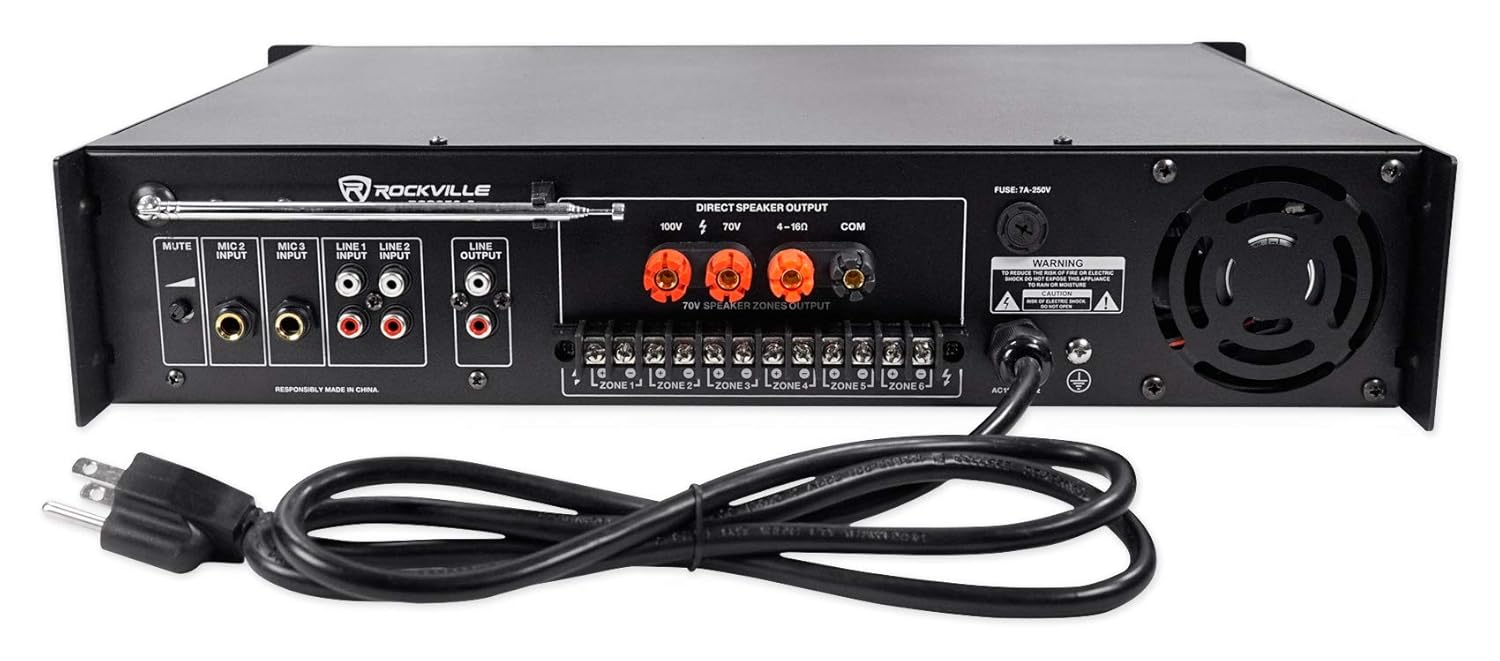
Figure 3: Detailed view of the amplifier's rear panel connections.
- FM Antenna: Connects to the included FM antenna for radio reception.
- Mute Level Knob: Adjusts the level of audio reduction when the priority microphone (MIC 1) is in use.
- Microphone Inputs (MIC 2, MIC 3): 1/4" TRS inputs for connecting microphones.
- Line Inputs (LINE 1, LINE 2): RCA inputs for connecting external audio sources (e.g., CD player, mixer).
- Line Output: RCA output for connecting to additional amplifiers or recording devices.
- Direct Speaker Output: Binding post terminals for 100V, 70V, and 4-16 Ohm speaker connections.
- 70V Speaker Zones Output: Phoenix terminals for connecting speakers to individual zones (ZONE 1-6).
- Power Input: Connects to the AC power cable.
- Cooling Fan: Ensures proper ventilation and prevents overheating.
Microphone Usage
MIC 1 on the front panel is a priority microphone, meaning it will automatically lower the volume of other audio sources when spoken into. The mute level knob on the rear panel adjusts how much the other audio sources are attenuated. MIC 2 and MIC 3 inputs on the rear panel are affected by the echo controls.
Bluetooth/USB/SD Playback
To play media from a USB drive or SD card, insert the device into the corresponding slot on the front panel. Use the mode button to select the input source. For Bluetooth, select Bluetooth mode, then pair your device with "RCS350-6" from your device's Bluetooth settings. Use the playback controls on the front panel or the remote control to manage your media.
FM Radio
Extend the FM antenna on the rear panel to improve radio reception. Use the mode button to select FM radio and the playback controls to tune stations.
Remote Control
The included remote control allows you to manage various functions of the amplifier, including power, mode selection, volume, playback controls, and EQ settings.
Maintenance
To ensure optimal performance and longevity of your Rockville RCS350-6 amplifier, follow these maintenance guidelines:
- Keep the amplifier in a well-ventilated area to prevent overheating. Ensure the cooling fan is not obstructed.
- Regularly clean the exterior with a soft, dry cloth. Avoid using harsh chemicals or abrasive cleaners.
- Check all cable connections periodically to ensure they are secure and free from damage.
- Avoid exposing the amplifier to moisture, extreme temperatures, or direct sunlight.
Troubleshooting
If you encounter any issues with your Rockville RCS350-6 amplifier, refer to the following troubleshooting tips:
- No Power: Ensure the power cable is securely connected and the power switch is in the ON position. Check the power outlet and the amplifier's fuse.
- No Sound: Verify all speaker connections are correct and secure. Check input source selection and volume levels (master, zone, and individual input volumes). Ensure speakers are properly tapped for 70V/100V systems.
- Distorted Sound: Lower the volume levels to prevent clipping. Check speaker impedance and wattage taps to ensure they are within the amplifier's limits. Inspect speaker wires for damage.
- Bluetooth Connection Issues: Ensure the amplifier is in Bluetooth mode and your device's Bluetooth is enabled. Try unpairing and re-pairing the device. Move your device closer to the amplifier.
- Microphone Not Working: Check microphone connections and ensure the microphone volume is raised. If using MIC 1, ensure the mute level is adjusted correctly.
Specifications
| Product Dimensions | 19 x 16 x 4 inches |
| Item Weight | 31.75 Pounds |
| Model Number | RCS350-6 |
| Voltage | 100 Volts, 120 Volts, 70 Volts |
| Maximum Supply Voltage | 120 Volts |
| Minimum Supply Voltage | 70 Volts (DC) |
| Manufacturer | ROCKVILLE |
Support & Warranty
For technical support, warranty information, or any other inquiries, please refer to the contact details provided in your Product Warranty Card or visit the official Rockville website.