
AVLT AVLT-DM26-1
AVLT Triple Monitor Arm Desk Mount User Manual
Model: AVLT-DM26-1
Product Overview
The AVLT Triple Monitor Arm Desk Mount is designed to enhance your workspace by providing a versatile and ergonomic solution for mounting up to three flat or curved monitors. This full-motion desk mount allows for height, swivel, tilt, and rotation adjustments, helping you achieve an optimal viewing experience and reclaim valuable desk space. It supports monitors ranging from 13 to 27 inches, with a maximum weight capacity of 15.4 lbs per screen.

Figure 1: AVLT Triple Monitor Arm Desk Mount
Key Features
- FITS 13" TO 27" SCREEN: Triple monitor desk mount fits most flat/curved computer monitors up to 15.4 lb each in weight with VESA 75x75mm or 100x100mm mounting holes.
- SAVE VALUABLE SPACE: Heavy-duty metal base only takes up 5.7" x 4.3" desk surface. The c-clamp and grommet mounting options support up to 1.9" desk thick.
- ERGONOMIC VIEWING HEIGHT: Mechanical spring monitor arm assists height adjustment up to 33.7". Adjusting the monitor adapts to your posture by arm extension, vertical tilt, horizontal swivel, and landscape or portrait rotation.
- SPECIALTY & BENEFITS: New top mounting design simplifies the assembly process. 22.1" tall pole provides more flexibility to height adjustment. After locking a few screws, the monitor mounts instantly improve working posture, increase workspace, hide cables, and discover the most productive self.
What's in the Box
- Monitor Arm Assembly (includes main pole, arms, VESA plates)
- C-Clamp Mounting Hardware
- Grommet Mounting Hardware
- Installation Tools (e.g., Hex Keys)
- User Manual (this document)
- Cable Management Clips
Setup and Installation
Pre-Installation Checklist
Before beginning installation, please ensure your monitors meet the following specifications:
- Monitor Size: 13" to 27"
- Monitor Weight: Under 15.4 lb per screen
- VESA Mounting Holes: Your monitor must have a 75x75mm or 100x100mm VESA pattern. If your monitor does not have VESA mounting holes, a separate non-VESA adapter (not included) will be required.
Mounting Options
The AVLT Triple Monitor Arm Desk Mount offers two primary installation methods:
- C-Clamp Mount: Attaches to the edge of your desk. Suitable for desk thicknesses between 0.4" and 1.9" (10-50mm).
- Grommet Mount: Utilizes an existing or newly drilled hole in your desk. Suitable for desk thicknesses up to 1.9" (50mm) and grommet hole diameters between 0.4" and 2.3" (10-60mm).

Figure 2: C-Clamp and Grommet Mounting Details
Assembly Steps
- Secure the Base: Choose either the C-clamp or grommet mount. Attach the base securely to your desk according to the chosen method. Ensure the base is stable and tightened to prevent movement.
- Attach the Pole and Arms: Insert the main pole into the secured base. Then, slide the monitor arms onto the pole. The arms can be positioned at desired heights along the pole.
- Mount Monitors: Attach the VESA plates to the back of your monitors using the provided screws. Once attached, simply hook the VESA plate onto the arm's quick-release tab until it clicks into place.
- Cable Management: Utilize the integrated cable management clips along the arms and pole to route and conceal your monitor cables. This helps create a clean and organized workspace.
- Adjust Height and Tension: Adjust the height of the monitors along the pole. For optimal movement, adjust the tension of the mechanical spring arms to match the weight of your monitors. This ensures smooth and stable positioning.

Figure 3: Supported Dimensions and VESA Compatibility
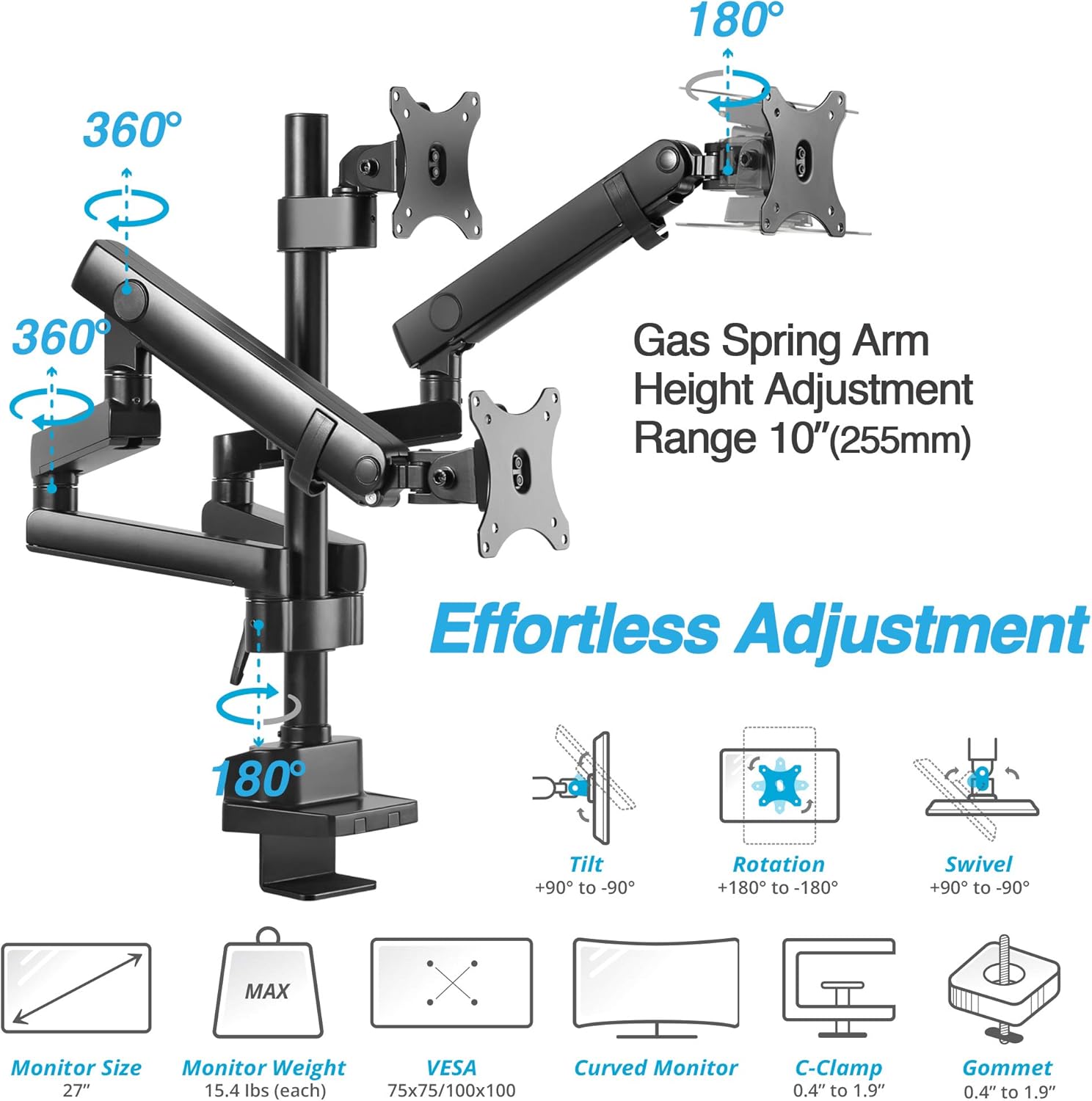
Figure 4: Effortless Adjustment Capabilities (Tilt, Rotation, Swivel)
Operation and Adjustment
The AVLT Triple Monitor Arm provides full motion capabilities for a customized viewing experience:
- Height Adjustment: Easily raise or lower your monitors along the central pole or via the mechanical spring arms to achieve ergonomic eye-level viewing.
- Tilt: Adjust the monitor screen vertically from +90° to -90° to reduce glare and optimize viewing angles.
- Swivel: Pivot your monitors horizontally up to +90° to -90° for collaborative work or to share your screen.
- Rotation: Rotate your monitors 360° from landscape to portrait orientation, allowing for flexible content display.

Figure 5: Example of a three-monitor setup for enhanced productivity.
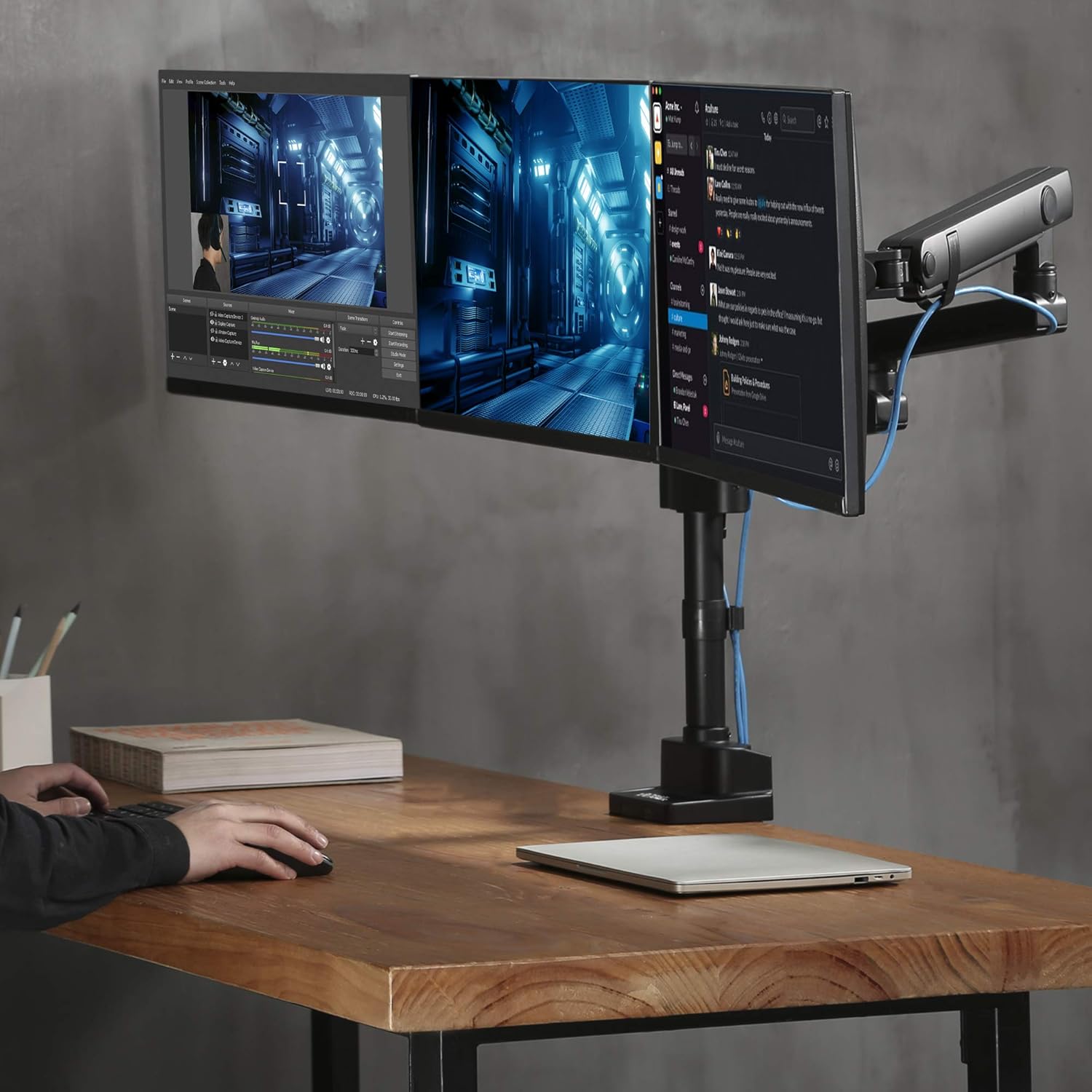
Figure 6: Example of a two-monitor setup, demonstrating flexible arrangement.
Maintenance
To ensure the longevity and optimal performance of your AVLT Triple Monitor Arm Desk Mount, follow these simple maintenance guidelines:
- Cleaning: Wipe down the mount with a soft, damp cloth. Avoid using abrasive cleaners or solvents that could damage the finish.
- Periodic Checks: Periodically check all screws and connections to ensure they remain tight. Re-tighten if necessary.
- Tension Adjustment: If monitors begin to sag or are difficult to move, re-adjust the spring tension on the arms as needed. Refer to the assembly steps for guidance.
Troubleshooting
If you encounter any issues with your monitor arm, please refer to the following common solutions:
- Monitors are sagging or not holding position: The spring tension may be too low for the weight of your monitors. Increase the tension using the adjustment screw on the arm until the monitor holds its position.
- Monitors are difficult to move: The spring tension may be too high. Decrease the tension until the monitors move smoothly.
- Mount feels unstable: Ensure the C-clamp or grommet mount is securely tightened to the desk. Check all connection points on the arms and VESA plates for tightness.
- Cables are not neatly managed: Re-route cables through the designated cable management clips and channels on the arms and pole.
If the issue persists, please contact AVLT customer support for assistance.
Product Specifications
| Specification | Detail |
|---|---|
| Product Dimensions | 54.25 x 4.33 x 22.13 inches |
| Item Weight | 18.11 pounds |
| Manufacturer | AVLT |
| Item Model Number | AVLT-DM26-1 |
| Mounting Type | Tabletop Mount (C-Clamp / Grommet) |
| Movement Type | Articulating |
| Material | Aluminum |
| Maximum Compatible Size | 27 Inches (per monitor) |
| Minimum Compatible Size | 13 Inches (per monitor) |
| Compatible Devices | Monitor |
| VESA Compatibility | 75x75mm, 100x100mm |
Warranty and Support
The AVLT-DM26-1 Triple Monitor Arm Desk Mount is covered by a 3-YEAR MANUFACTURER WARRANTY and LIFETIME TECH SUPPORT.
For any questions, concerns, or technical assistance, please reach out to AVLT customer support. You can also refer to the official installation manual for more detailed instructions:
Ask a question about this manual
Ask about setup, troubleshooting, compatibility, parts, safety, or missing instructions. Manuals+ will review the question and use this page’s manual context to help answer it.