
Apple Barrel DRP024V960W3BN
Delta DRP024V960W3BN DIN Rail Power Supply User Manual
Model: DRP024V960W3BN | Brand: Apple Barrel
Introduction
This manual provides essential information for the safe and efficient operation of the Delta DRP024V960W3BN DIN Rail Power Supply. Please read this manual thoroughly before installation and operation to ensure proper usage and to prevent damage to the unit or connected equipment.
The DRP024V960W3BN is a high-performance DIN Rail Power Supply designed for industrial applications, providing stable 24VDC output with a power rating of 960W. It features a wide input voltage range and robust design for reliable operation in demanding environments.
Safety Instructions
- Always disconnect power before installation or maintenance.
- Ensure proper grounding to prevent electrical shock.
- Do not operate the unit in environments exceeding its specified temperature and humidity limits.
- Only qualified personnel should perform installation and servicing.
- Protect the unit from moisture and direct sunlight.
Product Overview
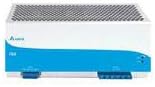
Figure 1: Front view of the Delta DRP024V960W3BN DIN Rail Power Supply. This image shows the compact design suitable for DIN rail mounting, with ventilation grilles on top and connection terminals at the bottom. The blue and white casing indicates the brand's typical color scheme.
The Delta DRP024V960W3BN is a robust power supply designed for industrial control systems. It features a high efficiency design, active power factor correction, and protection against overvoltage, overcurrent, and short circuits. Its compact form factor allows for easy integration into control cabinets.
Setup and Installation
Mounting
The DRP024V960W3BN is designed for mounting on a standard 35mm DIN rail. Ensure adequate clearance around the unit for proper ventilation (minimum 50mm top/bottom, 10mm side).
- Hook the top edge of the power supply onto the DIN rail.
- Push the bottom of the unit firmly until it clicks into place.
- Verify that the unit is securely fastened to the DIN rail.
Wiring Connections
Refer to the terminal block labels for correct wiring. Use appropriate wire gauges for the input and output currents.
- Input (AC): Connect the AC input lines (L1, L2, L3, N, PE) to the designated input terminals. The unit supports 3-phase input from 320 VAC to 600 VAC.
- Output (DC): Connect the DC output lines (+V, -V) to the load. The output is 24 VDC, 40 A.
- Grounding: Ensure a proper protective earth (PE) connection.
Tighten all terminal screws to the recommended torque to ensure secure connections and prevent arcing.
Operating Instructions
Powering On
Once all connections are secure and verified, apply power to the input terminals. The power supply will automatically start up and provide the regulated DC output.
Output Voltage Adjustment
The output voltage can be fine-tuned using the potentiometer located on the front panel. Use a small screwdriver to adjust the voltage within the specified range (typically 24V to 28V).
LED Indicators
The unit features LED indicators to display its operational status:
- DC OK (Green): Illuminates when the output voltage is within the nominal range.
- Alarm (Red): Illuminates in case of an internal fault or protection activation (e.g., overtemperature, overload).
Maintenance
The Delta DRP024V960W3BN is designed for minimal maintenance. However, periodic checks are recommended to ensure optimal performance and longevity.
- Cleaning: Keep the ventilation openings clear of dust and debris. Use a soft, dry cloth for cleaning the exterior. Do not use liquid cleaners.
- Connection Checks: Periodically inspect all wiring connections for tightness and signs of corrosion. Re-tighten if necessary.
- Environmental Conditions: Ensure the operating environment remains within the specified temperature and humidity ranges.
No user-serviceable parts are inside. Refer all servicing to qualified personnel.
Troubleshooting
| Problem | Possible Cause | Solution |
|---|---|---|
| No output voltage / DC OK LED off | No input power; Blown fuse; Internal fault; Overload/Short circuit | Check input power supply; Check external fuses; Disconnect load and re-power; If problem persists, contact support. |
| Alarm LED on | Overtemperature; Overload; Short circuit | Ensure adequate ventilation; Reduce load; Check for short circuits in wiring; Cycle power. |
| Output voltage unstable | Loose connections; Input voltage fluctuations; Faulty load | Check and tighten all connections; Verify stable input power; Test power supply with a different load. |
Specifications
| Parameter | Value |
|---|---|
| Model | DRP024V960W3BN |
| Input Voltage | 320 VAC to 600 VAC (3-Phase) |
| Output Voltage | 24 VDC |
| Output Current | 40 A |
| Output Power | 960 W |
| Dimensions (W x H x D) | 121 x 255 x 117.3 mm |
| Weight | 50 pounds (approx. 22.68 kg) |
| UPC | 763236729557 |
Warranty and Support
This product comes with a standard manufacturer's warranty. For specific warranty terms and conditions, please refer to the documentation included with your purchase or visit the official Apple Barrel (Delta Electronics) website.
For technical support, troubleshooting assistance, or service inquiries, please contact the manufacturer's customer support. Contact information can typically be found on the product packaging or the manufacturer's official website.
Manufacturer: Delta Electronics
Brand: Apple Barrel
For further assistance, you may visit the product page on Amazon.
Related documentsDRP024V960W3BN


Ask a question about this manual
Ask about setup, troubleshooting, compatibility, parts, safety, or missing instructions. Manuals+ will review the question and use this page’s manual context to help answer it.