
1. Introduction
The Holzstar SAA902 Chip Extractor is a powerful solution designed for the efficient extraction of wood chips, shavings, and sawdust generated during woodworking processes such as milling, planing, and sawing. This device is engineered to enhance the efficiency of woodworking machinery and contribute to a healthier working environment by effectively removing airborne particles and debris. Its design incorporates practical features for ease of use and high performance.
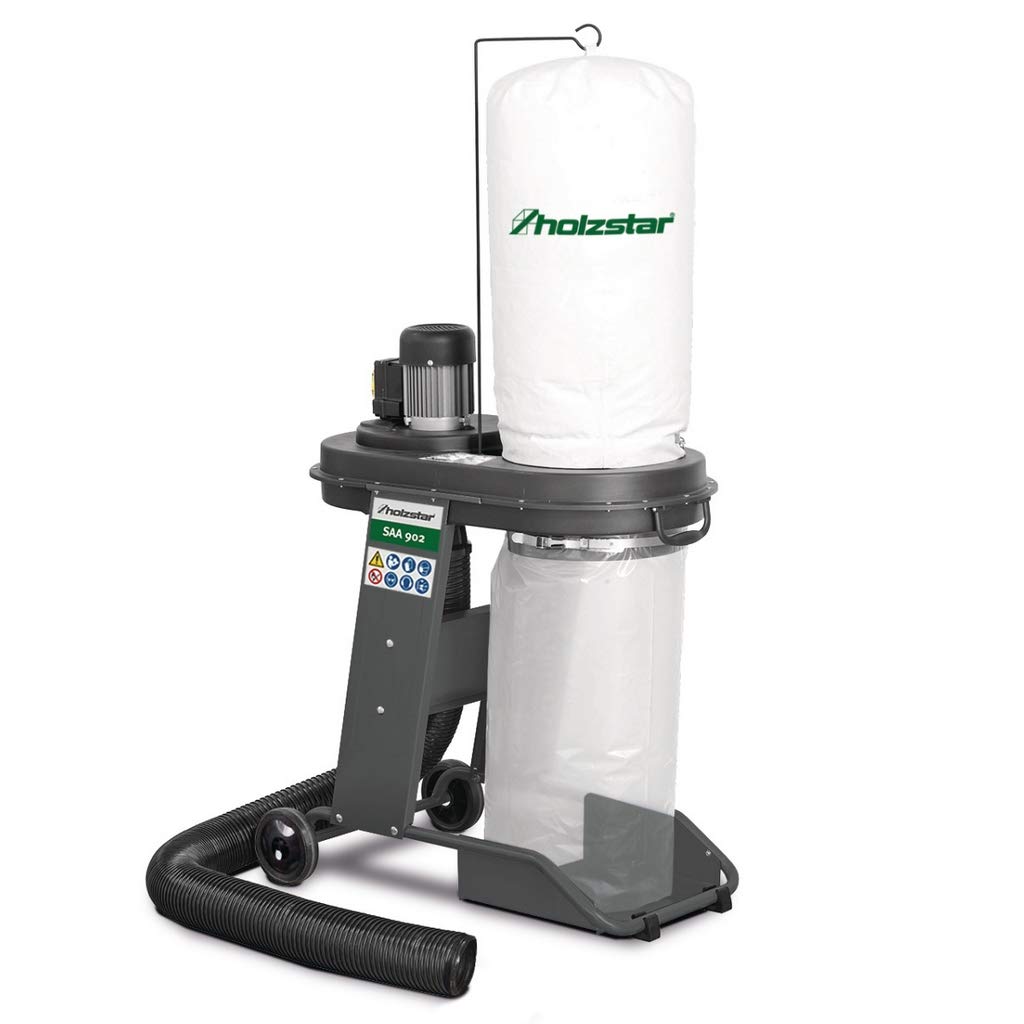
Figure 1: Holzstar SAA902 Chip Extractor. This image shows the main unit with its motor, fan housing, filter bag, and chip collection bag, ready for connection to woodworking machinery.
2. Safety Instructions
Read all safety warnings and instructions carefully before operating this device. Failure to follow these instructions may result in electric shock, fire, and/or serious injury.
- Hearing Protection: This chip extractor can be relatively noisy, with a maximum sound power level of 94.9 dB(A). It is strongly recommended to wear appropriate hearing protection during operation to prevent hearing damage.
- Electrical Safety: Ensure the device is properly grounded when connected to a power supply, especially when using an extension cord. Use only extension cords rated for the power requirements of the SAA902 (230 V, 50 Hz, 0.55 kW). Inspect power cords for damage before each use.
- Personal Protective Equipment (PPE): In addition to hearing protection, wear safety glasses or a face shield to protect against flying debris. A dust mask is also recommended to prevent inhalation of fine dust particles that may escape the system.
- Work Area: Operate the chip extractor in a well-ventilated area. Keep the work area clean and well-lit. Do not operate in explosive atmospheres, such as in the presence of flammable liquids, gases, or dust.
- Stability: Ensure the unit is placed on a stable, level surface. The mobile design allows for easy repositioning, but the unit should be locked in place during operation if possible.
- Maintenance: Disconnect the power supply before performing any maintenance, cleaning, or bag replacement.
- Children and Bystanders: Keep children and bystanders away from the operating chip extractor.
3. Package Contents
Upon unpacking, verify that all components are present and undamaged. If any parts are missing or damaged, contact your dealer immediately.
- Holzstar SAA902 Chip Extractor Unit (main assembly with motor, fan, and frame)
- Filter Bag
- Chip Collection Bag
- Clamping Straps for bags
- Standard Driving Device (wheels and base)
- Instruction Manual (this document)
4. Specifications
| Feature | Specification |
|---|---|
| Model Number | 5923902 |
| Brand | Holzstar |
| Connection Voltage | 230 V |
| Power Frequency | 50 Hz |
| Power Consumption | 0.55 kW |
| Output Power | 0.35 kW |
| Nominal Flow Rate | 1200 m³/h |
| Maximum Negative Pressure | 1100 Pa |
| Max Sound Power Level | 94.9 dB(A) |
| Max Sound Pressure Level | 80.2 dB(A) |
| Unit Length | Approx. 900 mm |
| Unit Width/Depth | Approx. 500 mm |
| Unit Height | Approx. 1550 mm |
| Item Weight | 19 kg |
| Nominal Suction Collector Width (Inlet/Outlet) | 100 mm |
| Filter Bag Diameter | 330 mm |
| Color | Grey |
5. Setup and Assembly
Follow these steps to assemble and set up your Holzstar SAA902 Chip Extractor:
- Unpacking: Carefully remove all components from the packaging. Retain packaging materials for future transport or storage.
- Attach Wheels and Base: Secure the standard driving device (wheels and base frame) to the main unit according to the diagrams in the separate assembly guide (if provided). Ensure all fasteners are tightened securely for stability and mobility.
- Install Filter Bag: Attach the filter bag to the upper outlet of the fan housing. Ensure it is securely fastened using the provided clamping strap to prevent dust leakage.
- Install Chip Collection Bag: Attach the chip collection bag to the lower outlet of the fan housing. Use the clamping strap to ensure a tight seal. This bag collects the extracted wood chips and sawdust.
- Positioning: Place the chip extractor on a stable, level surface near your woodworking machine. The mobile design allows for easy repositioning.
- Connect Suction Hose: Connect a suitable suction hose (not included) to the 100 mm inlet of the chip extractor and to the dust port of your woodworking machine. Ensure connections are tight to maximize suction efficiency.
- Electrical Connection: Connect the power cord to a grounded 230 V, 50 Hz power outlet.
6. Operating Instructions
Before starting, ensure all safety precautions are understood and followed. Wear appropriate PPE, including hearing protection, safety glasses, and a dust mask.
- Pre-Operation Check:
- Verify that the filter bag and chip collection bag are correctly installed and securely fastened.
- Ensure the suction hose is properly connected to both the extractor and the woodworking machine.
- Check that the power cord is undamaged and securely plugged into a grounded outlet.
- Confirm that the work area is clear of obstructions and that the chip extractor is stable.
- Starting the Extractor: Turn on the chip extractor using the power switch. The powerful fan wheel will immediately begin generating suction.
- Operating with Woodworking Machine: Once the chip extractor is running, start your woodworking machine. The extractor will draw chips and sawdust directly from the machine's dust port into the collection bag.
- Monitoring Performance: Periodically check the chip collection bag. Reduced suction power may indicate a full collection bag or a clogged filter.
- Stopping the Extractor: After completing your woodworking task, turn off the woodworking machine first, then turn off the chip extractor using its power switch.
7. Maintenance
Regular maintenance ensures optimal performance and extends the lifespan of your Holzstar SAA902 Chip Extractor. Always disconnect the power supply before performing any maintenance.
- Emptying the Chip Collection Bag:
- Turn off and unplug the chip extractor.
- Loosen the clamping strap securing the chip collection bag.
- Carefully remove the bag and empty its contents into a suitable waste container.
- Reattach the empty bag, ensuring it is securely fastened with the clamping strap to prevent leaks.
- Cleaning the Filter Bag:
The filter bag should be cleaned regularly to maintain optimal suction power. The frequency depends on usage and the type of material being extracted.
- Turn off and unplug the chip extractor.
- Loosen the clamping strap and carefully remove the filter bag.
- Gently shake or tap the bag to dislodge accumulated dust from the inside. For thorough cleaning, use compressed air (from the outside in) or a soft brush. Perform this outdoors or in a well-ventilated area while wearing a dust mask.
- Inspect the filter bag for any tears or damage. Replace if necessary.
- Reattach the clean filter bag, ensuring a tight seal with the clamping strap.
- General Cleaning: Wipe down the exterior of the unit with a damp cloth. Do not use harsh chemicals or abrasive cleaners. Ensure no moisture enters the motor housing.
- Hose Inspection: Regularly inspect the suction hose for blockages, cracks, or wear. Clear any blockages promptly.
8. Troubleshooting
This section addresses common issues you might encounter with your chip extractor. For problems not listed here, contact customer support.
| Problem | Possible Cause | Solution |
|---|---|---|
| Unit does not start | No power supply Faulty power switch Motor overload protection tripped |
Check power cord and outlet. Ensure it's plugged into a grounded 230V, 50Hz supply. Contact qualified service personnel. Allow motor to cool down, then try restarting. Reduce load if possible. |
| Low suction power | Chip collection bag is full Filter bag is clogged Suction hose is blocked Loose hose connections Damaged fan wheel |
Empty the chip collection bag. Clean the filter bag as described in Section 7. Inspect and clear any blockages in the suction hose. Tighten all hose connections. Contact qualified service personnel. |
| Excessive noise or vibration | Loose components Foreign object in fan housing Damaged motor or fan wheel |
Check and tighten all fasteners. Disconnect power, inspect fan housing for debris and remove carefully. Contact qualified service personnel. |
| Dust escaping from unit | Bags not properly sealed Damaged filter bag Loose housing connections |
Ensure clamping straps are tight on both bags. Inspect filter bag for tears and replace if damaged. Check all housing connections for tightness. |
9. Warranty and Support
Holzstar products are manufactured to high-quality standards and are subject to rigorous quality control. This product comes with a standard manufacturer's warranty against defects in materials and workmanship. Please refer to the warranty card included with your purchase or contact your local Holzstar dealer for specific warranty terms and conditions.
For technical support, spare parts, or service inquiries, please contact your authorized Holzstar dealer or visit the official Holzstar website. When contacting support, please have your model number (SAA902) and serial number (if applicable) ready.