
Esperanza EKC006
Esperanza EKC006 Filter Coffee Machine User Manual
Model: EKC006 | Brand: Esperanza
1. Introduction
Thank you for purchasing the Esperanza EKC006 Filter Coffee Machine. This manual provides important information for the safe and efficient operation of your new appliance. Please read it thoroughly before first use and keep it for future reference.
The Esperanza ROBUSTA filter coffee maker is designed for daily use, providing freshly brewed coffee. With a 0.6L capacity, it's ideal for two servings. This coffee maker ensures quick and easy preparation of aromatic coffee. It features an automatic shut-off after 40 minutes for safety and energy efficiency. Equipped with a permanent reusable filter, it eliminates the need for disposable filters, reducing ongoing costs.
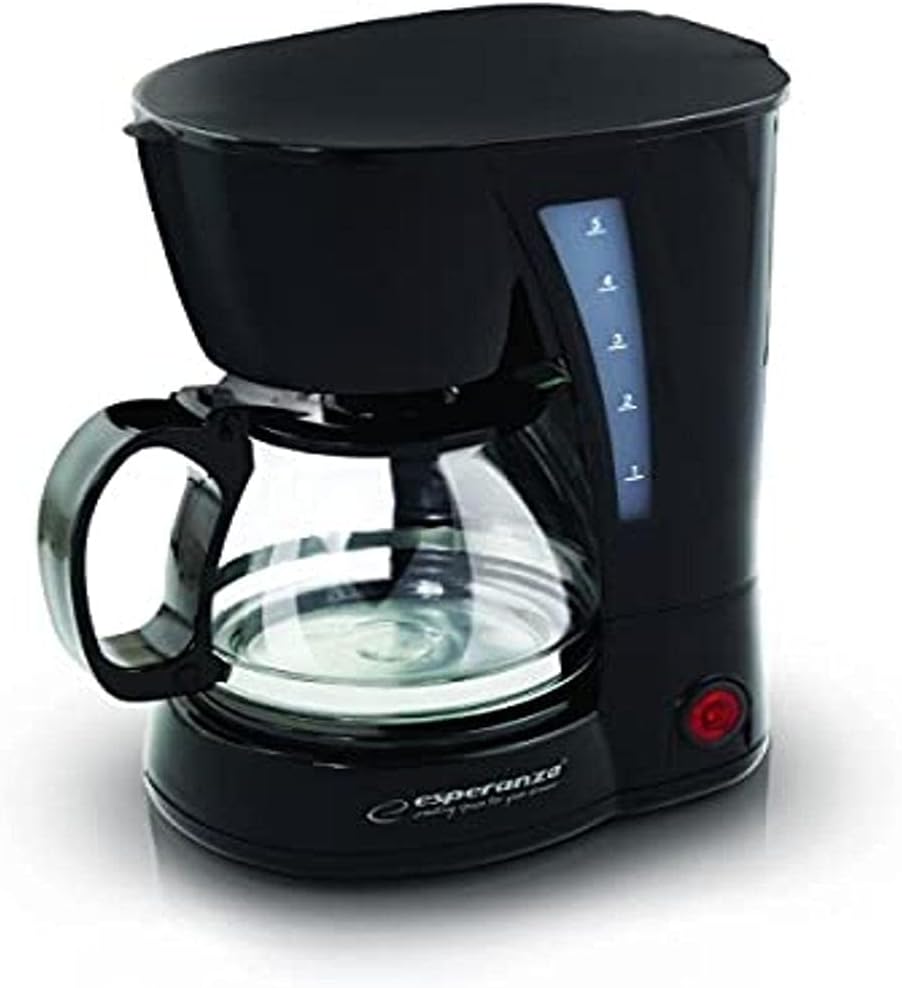
Figure 1: Esperanza EKC006 Filter Coffee Machine. This image shows the compact black coffee machine with its glass carafe, water level indicator, and power button.
2. Important Safety Instructions
When using electrical appliances, basic safety precautions should always be followed to reduce the risk of fire, electric shock, and/or injury to persons, including the following:
- Read all instructions carefully before operating the appliance.
- Do not touch hot surfaces. Use handles or knobs.
- To protect against electric shock, do not immerse cord, plugs, or coffee maker in water or other liquid.
- Close supervision is necessary when any appliance is used by or near children.
- Unplug from outlet when not in use and before cleaning. Allow to cool before putting on or taking off parts, and before cleaning the appliance.
- Do not operate any appliance with a damaged cord or plug or after the appliance malfunctions, or has been damaged in any manner.
- The use of accessory attachments not recommended by the appliance manufacturer may result in fire, electric shock, or injury to persons.
- Do not use outdoors.
- Do not let cord hang over edge of table or counter, or touch hot surfaces.
- Do not place on or near a hot gas or electric burner, or in a heated oven.
- Always attach plug to appliance first, then plug cord into the wall outlet. To disconnect, turn any control to “off,” then remove plug from wall outlet.
- Do not use appliance for other than intended use.
- Scalding may occur if the lid is removed during the brewing cycle.
- The carafe is designed for use with this appliance only. It must never be used on a range top.
- Do not place a hot carafe on a cold or wet surface.
- Do not use a cracked carafe or a carafe having a loose or weakened handle.
- Do not clean carafe with cleansers, steel wool pads, or other abrasive material.
3. Setup and First Use
3.1 Unpacking
Carefully remove all packaging materials and the coffee machine from the box. Ensure all parts are present: the coffee machine unit, glass carafe, and reusable filter.
3.2 Initial Cleaning
- Wash the glass carafe and the reusable filter in warm, soapy water. Rinse thoroughly and dry.
- Wipe the exterior of the coffee machine with a damp cloth. Do not immerse the main unit in water.
- Before brewing coffee for the first time, operate the coffee maker with only water (no coffee grounds) for two full cycles to clean the internal components.
3.3 Placement
Place the coffee machine on a stable, flat, heat-resistant surface, away from the edge of the counter and out of reach of children. Ensure there is adequate ventilation around the unit.
4. Operating Instructions
4.1 Brewing Coffee
- Fill the glass carafe with the desired amount of fresh, cold water. The 0.6L capacity is suitable for up to two servings.
- Open the lid of the coffee machine and pour the water from the carafe into the water reservoir. Ensure the water level does not exceed the 'MAX' mark on the water level indicator.
- Place the reusable filter into the filter basket.
- Add the desired amount of ground coffee into the reusable filter. A general guideline is one tablespoon of coffee grounds per cup (approximately 150ml of water), but adjust to your taste.
- Close the lid securely.
- Place the empty glass carafe onto the warming plate. Ensure it is correctly positioned to activate the anti-drip mechanism.
- Plug the power cord into a suitable electrical outlet.
- Press the power button to start the brewing process. The indicator light will illuminate.
- Once brewing is complete, the coffee will drip into the carafe. The warming plate will keep the coffee warm.
- The coffee machine will automatically switch off approximately 40 minutes after the brewing cycle is completed for safety and energy saving.
4.2 Anti-Drip System
The coffee machine is equipped with an anti-drip system that temporarily stops the flow of coffee when the carafe is removed from the warming plate. This allows you to pour a cup of coffee before the brewing cycle is complete. To avoid overflow, replace the carafe within 20 seconds.
5. Cleaning and Maintenance
Regular cleaning and maintenance will ensure the longevity and optimal performance of your coffee machine.
5.1 Daily Cleaning
- Always unplug the coffee machine from the power outlet and allow it to cool completely before cleaning.
- Remove the reusable filter and discard used coffee grounds. Wash the filter and glass carafe in warm, soapy water. They are also dishwasher safe (top rack only).
- Wipe the exterior of the coffee machine, including the warming plate, with a soft, damp cloth. Do not use abrasive cleaners or scouring pads.
- Do not immerse the main unit in water or any other liquid.
5.2 Descaling
Mineral deposits (limescale) can build up in your coffee machine over time, affecting its performance and the taste of your coffee. Descale your coffee machine every 2-3 months, or more frequently if you have hard water.
- Prepare a descaling solution by mixing white vinegar and water in a 1:2 ratio (e.g., 200ml vinegar to 400ml water), or use a commercial descaling agent according to its instructions.
- Pour the solution into the water reservoir.
- Place the empty carafe on the warming plate.
- Run a brewing cycle without coffee grounds.
- After the cycle, turn off the machine and let the solution sit in the reservoir for about 15-20 minutes.
- Run two full cycles with fresh, clean water to rinse out any remaining descaling solution.
6. Troubleshooting
If you encounter issues with your coffee machine, refer to the following common problems and solutions:
| Problem | Possible Cause | Solution |
|---|---|---|
| Coffee does not brew. | No power; Water reservoir empty; Carafe not correctly placed. | Check power connection; Fill water reservoir; Ensure carafe is centered on warming plate. |
| Coffee is too weak/strong. | Incorrect coffee-to-water ratio; Coffee grind too coarse/fine. | Adjust coffee amount; Use medium grind coffee. |
| Water overflows from filter basket. | Too much coffee grounds; Filter clogged; Carafe removed too long. | Reduce coffee amount; Clean filter; Replace carafe quickly. |
| Machine leaks. | Water reservoir overfilled; Carafe not properly seated. | Do not exceed MAX fill line; Ensure carafe is correctly placed. |
| Coffee tastes bad. | Machine needs descaling; Stale coffee; Dirty carafe/filter. | Perform descaling; Use fresh coffee; Clean carafe and filter thoroughly. |
If the problem persists after trying these solutions, please contact customer support.
7. Technical Specifications
| Feature | Specification |
|---|---|
| Brand | Esperanza |
| Model Number | EKC006 |
| Color | Black |
| Product Dimensions (L x W x H) | 10 x 48 x 50 cm |
| Weight | 1.12 Kilograms |
| Power | 650 Watts |
| Voltage | 220 Volts |
| Material | Acrylonitrile Butadiene Styrene (ABS) |
| Noise Level | 44 dB |
| Special Features | Anti-drip system, Jug coffee reservoir |
| Coffee Maker Type | Electric Filter Coffee Maker |
| Filter Type | Reusable |
8. Warranty Information
This Esperanza EKC006 Filter Coffee Machine comes with a 2-year availability of spare parts from the date of purchase. Please retain your proof of purchase for any warranty claims. The warranty covers defects in materials and workmanship under normal use. It does not cover damage resulting from misuse, neglect, accidents, alteration, or unauthorized repair.
9. Customer Support
For further assistance, troubleshooting not covered in this manual, or warranty inquiries, please contact Esperanza customer support through their official website or the retailer from whom you purchased the product. Please have your model number (EKC006) and proof of purchase ready when contacting support.
Ask a question about this manual
Ask about setup, troubleshooting, compatibility, parts, safety, or missing instructions. Manuals+ will review the question and use this page’s manual context to help answer it.