
1. Introduction
This manual provides essential information for the safe and effective use of your Brilliant Brand Lighting Yellow LED Strip Light. This 12-volt, high-output LED strip (SMD 3528) is designed for indoor use (IP22 rated) and comes in a 16.4-foot length. Please read this manual thoroughly before installation and operation.

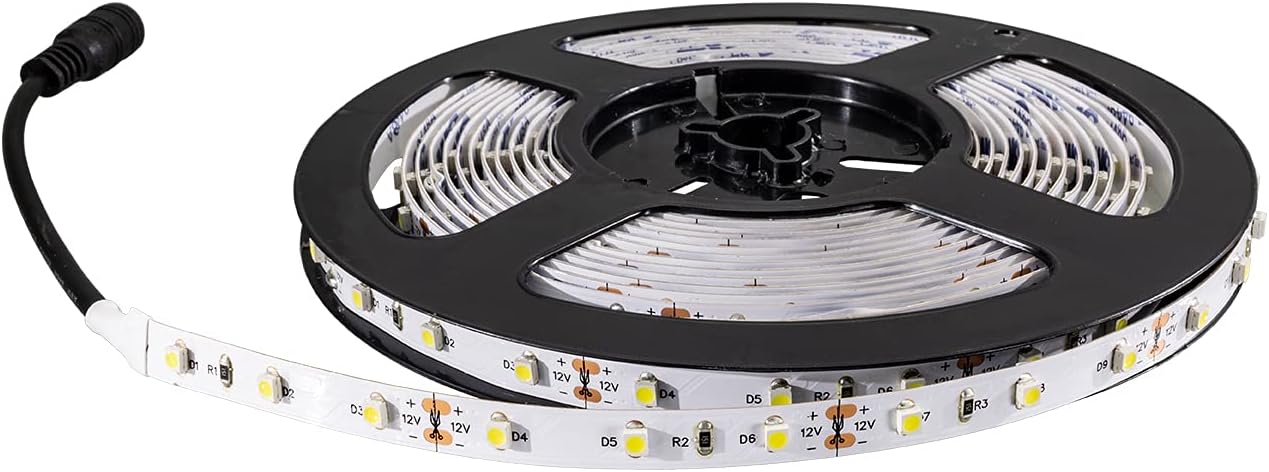
This image displays the complete 16.4-foot reel of the yellow LED strip light, coiled neatly for storage and distribution. The bright yellow LEDs are visible along the strip.
2. Safety Information
Always observe the following safety precautions to prevent injury or damage to the product:
- Indoor Use Only: This product has an IP22 rating, meaning it is protected against solid objects over 12.5mm and dripping water. It is not waterproof and must not be exposed to direct water, high humidity, or outdoor elements.
- Voltage Compatibility: Use only with a compatible 12-volt DC power supply. Connecting to a higher voltage will damage the strip.
- Power Supply: Ensure your power supply has sufficient wattage for the entire length of the LED strip you intend to use. Overloading the power supply can cause overheating and fire hazards.
- Installation Surface: Mount the strip on clean, dry, and non-conductive surfaces. Avoid installing near heat sources or in enclosed spaces without adequate ventilation.
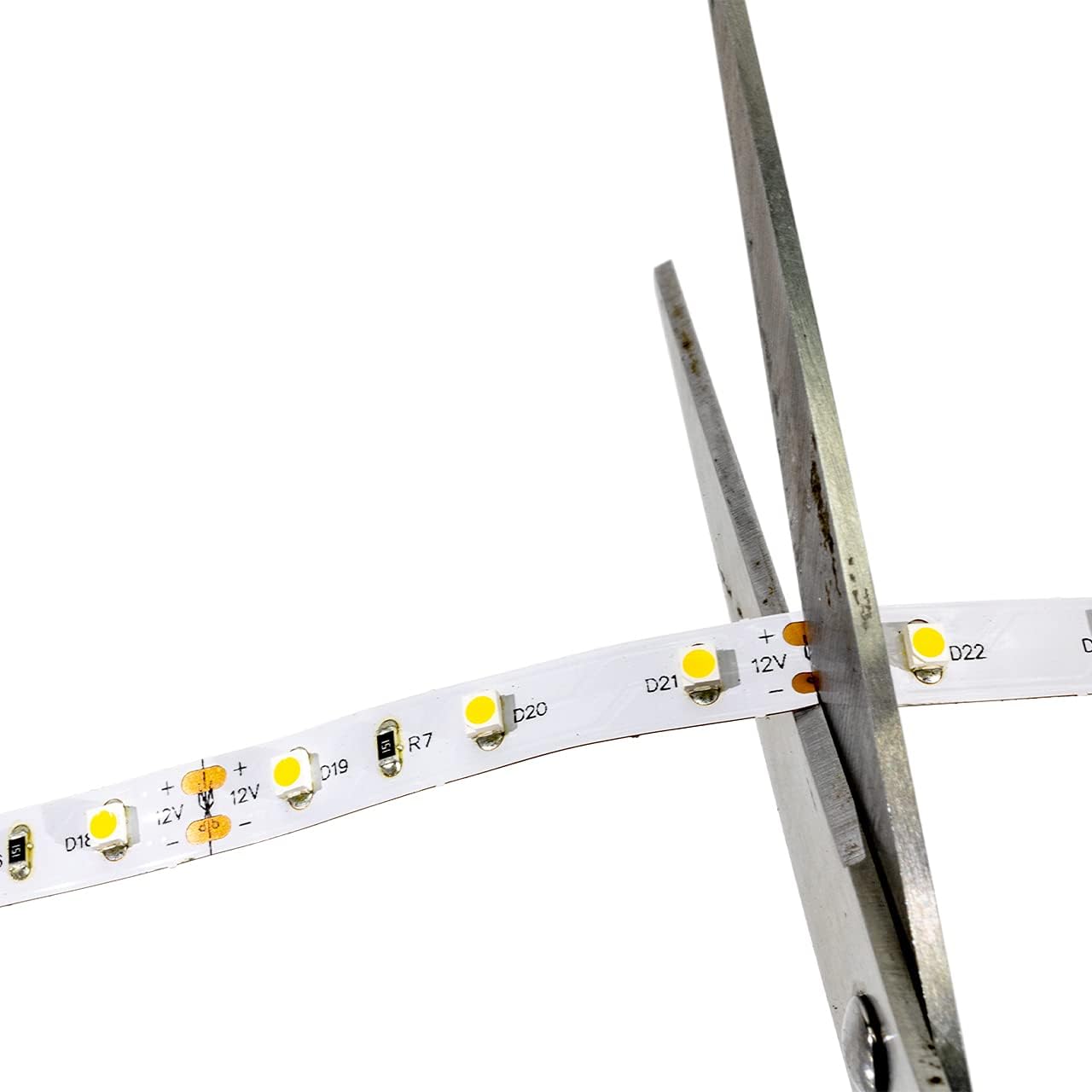
- Cutting: Only cut the LED strip at designated cut marks (indicated by a scissor icon and copper pads). Cutting elsewhere will damage the circuit and render that section unusable.
- Handling: Do not bend the strip sharply or apply excessive force, as this can damage the internal circuitry. Avoid twisting the strip.
- Electrical Connections: Ensure all electrical connections are secure and insulated to prevent short circuits. If you are unsure about wiring, consult a qualified electrician.
- Children and Pets: Keep the product and its components out of reach of children and pets.
3. Package Contents
Your Brilliant Brand Lighting Yellow LED Strip Light package should contain the following items:
- 1 x 16.4 Feet (5 meters) Yellow LED Strip Light (SMD 3528)
- 1 x Pre-attached DC Barrel Jack Power Connector

A section of the yellow LED strip light uncoiled from the reel, showing the pre-attached DC power connector at one end, ready for connection to a 12-volt power supply.
4. Specifications
| Feature | Specification |
|---|---|
| Brand | Brilliant Brand Lighting |
| Color | Yellow |
| Light Source Type | LED (SMD 3528) |
| Voltage | 12 Volt DC |
| Length | 16.4 Feet (5 meters) |
| Ingress Protection (IP) Rating | IP22 (Indoor Use) |
| Item Weight | 2 Pounds |
| ASIN | B07PV54CCR |
| UPC | 738755116584 |
5. Setup & Installation
5.1 Preparation
- Unpack: Carefully unroll the LED strip from its reel.
- Power Supply: Ensure you have a compatible 12V DC power supply (not included) with sufficient current output for the length of the strip you plan to use.
- Surface Preparation: Clean the installation surface thoroughly. It must be smooth, dry, and free of dust, grease, or debris to ensure proper adhesion of the strip's backing.
5.2 Cutting the LED Strip (Optional)
If you need a shorter length, the LED strip can be cut at designated points. These points are typically marked with a scissor icon and copper pads.
- Identify the desired length and locate the nearest designated cut mark.
- Using sharp scissors, carefully cut directly along the line between the copper pads.
- Warning: Cutting anywhere else will damage the circuit and prevent the cut section from working.

A magnified view of the LED strip, highlighting the copper pads and scissor icons that indicate safe cutting points for custom length adjustments. Each segment contains three SMD 3528 LEDs.

A pair of scissors is shown in the process of cutting the LED strip at one of the marked cutting points, demonstrating how to shorten the strip to the desired length.
5.3 Connecting Power
The LED strip comes with a pre-attached DC barrel jack connector.
- Ensure your 12V DC power supply is unplugged from the wall outlet.
- Connect the DC barrel jack from the LED strip to the corresponding port on your 12V DC power supply.
- Once connected, you can plug your power supply into a standard wall outlet.
This image provides a detailed view of the standard DC barrel jack connector, which is used to supply 12-volt power to the LED strip light.
5.4 Mounting the LED Strip
The LED strip features an adhesive backing for easy installation.
- Peel off a small section of the protective paper from the adhesive backing at one end of the strip.
- Carefully press the exposed adhesive onto your prepared surface, starting from one end.
- Gradually peel off more of the protective paper as you press the strip firmly along the desired path, ensuring good contact with the surface.
- For corners or curves, the strip is flexible and can be gently bent. Avoid sharp folds.

The image shows the LED strip light bent and twisted, illustrating its high flexibility for installation around corners and irregular surfaces.
The LED strip is shown curving around a corner, emphasizing its adaptability for various installation layouts.
6. Operating Instructions
Once the LED strip is properly installed and connected to a 12V DC power supply, operation is straightforward:
- Power On/Off: The LED strip will illuminate when the power supply is plugged into an active electrical outlet. To turn off the lights, unplug the power supply or use an inline switch if one is integrated into your power setup.
- Dimming: This basic LED strip does not include built-in dimming capabilities. To dim the lights, you will need to use a compatible 12V DC dimmer switch (sold separately) installed between the power supply and the LED strip.
7. Maintenance
The Yellow LED Strip Light requires minimal maintenance:
- Cleaning: If the strip becomes dusty, gently wipe it with a soft, dry cloth. Do not use liquid cleaners or abrasive materials. Ensure the strip is unplugged before cleaning.
- Inspection: Periodically check the strip and connections for any signs of damage, wear, or loose connections. Address any issues promptly.
8. Troubleshooting
If you encounter issues with your LED strip, refer to the following common problems and solutions:
- No Light:
- Ensure the 12V DC power supply is correctly connected and plugged into a working electrical outlet.
- Check all connections for looseness or damage.
- Verify that the power supply is functioning correctly.
- If only a section of the strip is not lighting up, it may be due to a cut made in the wrong place or damage to that specific segment.
- Dim or Flickering Light:
- Ensure your 12V DC power supply has sufficient wattage for the length of the strip. An underpowered supply can cause dimming or flickering.
- Check for loose connections or damaged wiring.
- Ensure the voltage is stable and not fluctuating.
- Adhesive Not Sticking:
- Ensure the installation surface was clean, dry, and smooth before application.
- Apply firm, even pressure when mounting the strip.
- For rough or porous surfaces, additional mounting clips or adhesive may be required (not included).
9. Warranty and Support
Information regarding product warranty and customer support for the Brilliant Brand Lighting Yellow LED Strip Light (Model B07PV54CCR) is not provided within this manual. Please refer to the product packaging or the retailer's website for details on warranty coverage and how to contact customer support.