1. Introduction
Welcome to the user manual for your LG 86UM8070 86-Inch 4K LED UHD Smart TV. This television offers an immersive viewing experience with its extra-large IPS 4K screen, providing four times the resolution of Full HD, even from wide viewing angles. Powered by the α7 Gen 2 Intelligent Processor, it utilizes AI to enhance images, action, and color. Integrated Dolby technologies further transform your audio and visual experience. The TV also features LG ThinQ, Google Assistant, and Alexa for convenient control of your entertainment and smart home devices.
2. What's in the Box
Upon unboxing your LG 86UM8070 TV, please ensure all the following components are present:
- One LG 86UM8070PUA 86-Inch 4K Ultra HD Smart LED TV (2019 Model)
- One Magic Remote with batteries
- One power cable (not in-wall rated)
- One User Manual (this document)
- One Quick Start Guide
3. Setup
Follow these steps to set up your new LG 86UM8070 Smart TV:
- Unpacking and Placement: Carefully remove the TV from its packaging. Due to its large size (76.5" W x 46.8" H x 13.6" D with stand), it is recommended to have at least two people for safe handling. Place the TV on a stable, flat surface or mount it on a wall using a VESA 600 x 400 compatible mount. Ensure adequate ventilation around the TV.

Figure 3.1: LG 86UM8070 TV Dimensions
- Connecting Peripherals: Connect your external devices such as cable boxes, Blu-ray players, gaming consoles, or sound systems to the TV's input ports. The TV features 4 HDMI inputs (2 rear, 2 side), 3 USB ports (2 rear, 1 side), and an Ethernet port for wired network connection. The HDMI 2 port supports Audio Return Channel (ARC).
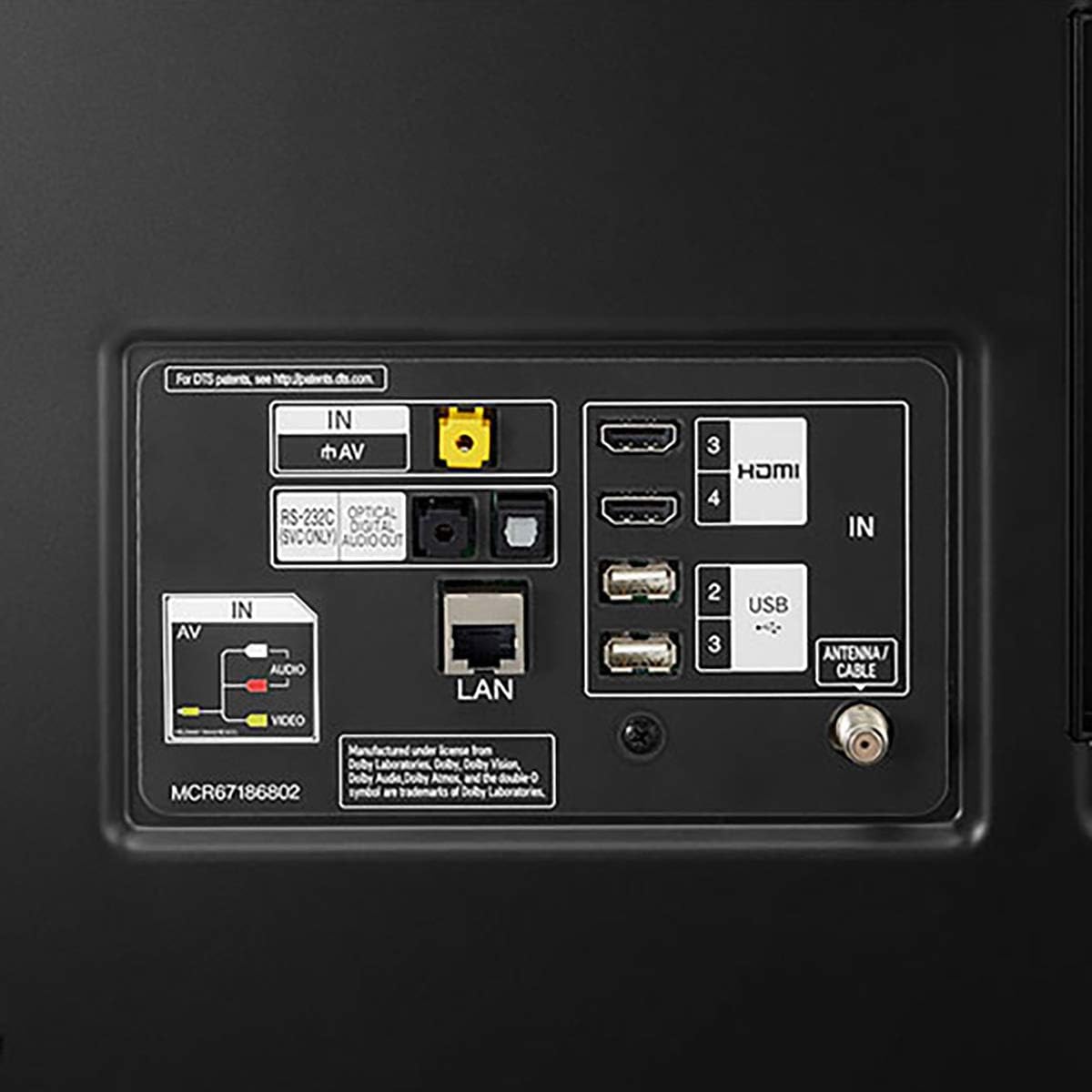
Figure 3.2: Rear Input/Output Ports
- Power Connection: Plug the provided power cable into the TV's power input and then into a wall outlet.
- Initial Power On and Setup Wizard: Press the power button on the TV or the Magic Remote. The TV will guide you through an initial setup wizard, including language selection, network connection (Wi-Fi or Ethernet), and channel scanning.
4. Operating Instructions
Your LG 86UM8070 Smart TV offers a range of features for an enhanced viewing experience:
- Magic Remote: Use the intuitive Magic Remote to navigate menus, launch apps, and control connected devices. Its motion-sensing capabilities allow for easy point-and-click interaction.
- Smart TV Features (LG ThinQ): Access a world of content through LG's webOS Smart TV platform. Enjoy streaming services, browse the web, and manage smart home devices directly from your TV.
- AI Picture and Sound: The α7 Gen 2 Intelligent Processor optimizes picture and sound settings in real-time based on content and ambient light conditions, delivering a spectacular, lifelike experience.
- Voice Assistants: Utilize the built-in Google Assistant and Alexa for voice control. Simply speak into your Magic Remote to search for content, control smart home devices, or get information.
- Connectivity: Seamlessly connect to other devices via Bluetooth, Ethernet, HDMI, and USB.
5. Maintenance
To ensure the longevity and optimal performance of your LG TV, follow these maintenance guidelines:
- Cleaning: Gently wipe the screen and TV frame with a soft, dry microfiber cloth. For stubborn smudges, slightly dampen the cloth with water or a specialized screen cleaner (avoid harsh chemicals).
- Ventilation: Ensure that the ventilation openings on the TV are not blocked. Proper airflow prevents overheating.
- Power Off: When not in use for extended periods, unplug the TV from the power outlet.
6. Troubleshooting
If you encounter issues with your LG TV, refer to the following common troubleshooting tips:
- No Power: Check if the power cable is securely connected to both the TV and the wall outlet. Ensure the outlet is functioning.
- No Picture/Sound: Verify that the correct input source is selected. Check all cable connections (HDMI, antenna, etc.) for looseness or damage.
- Remote Not Working: Replace the batteries in the Magic Remote. Ensure there are no obstructions between the remote and the TV.
- Poor Picture Quality: Adjust picture settings (brightness, contrast, sharpness) in the TV's menu. Ensure your content source is high quality (e.g., 4K content for 4K display).
- Network Connection Issues: For Wi-Fi, try restarting your router. For wired connections, check the Ethernet cable.
For more detailed troubleshooting, please consult the official User Guide PDF linked in the Support section.
7. Specifications
| Feature | Specification |
|---|---|
| Brand Name | LG |
| Model Number | 86UM8070PUA |
| Screen Size | 86 Inches |
| Display Technology | LED |
| Resolution | 4K |
| Refresh Rate | 120 Hz |
| Product Dimensions (with stand) | 13.6"D x 76.5"W x 46.8"H |
| Item Weight | 97.4 Pounds |
| Power Consumption (On-mode) | 156.3 watts |
| Standby Power Consumption | Under 0.5W |
| HDMI Inputs (HDCP 2.2) | 4 (2 rear, 2 side) |
| HDMI Audio Return Channel (ARC) | ARC (HDMI 2) |
| USB Ports (v 2.0) | 3 (2 rear, 1 side) |
| Connectivity Technology | Bluetooth, Ethernet, HDMI, USB, Wireless |
| Supported Internet Services | Browser, YouTube |
8. Warranty and Support
Your LG 86UM8070 86-Inch 4K LED UHD Smart TV comes with a manufacturer's warranty. Please refer to the warranty card included with your product for specific terms and conditions. For technical support, service, or additional information, please visit the official LG support website or contact their customer service.
You can also download the comprehensive User Guide (PDF) for your TV here: LG 86UM8070 User Guide (PDF)