
Introduction
This user manual provides essential information for the safe and efficient operation, maintenance, and troubleshooting of your BLACK+DECKER BXFPA1200E Robotic Ducina Food Processor. Please read this manual thoroughly before first use and keep it for future reference.
The BLACK+DECKER BXFPA1200E is a powerful 1200W food processor designed for various kitchen tasks, including blending, chopping, and slicing. It features a 1.5L capacity bowl and durable stainless steel components.
Safety Instructions
Always follow basic safety precautions when using electrical appliances to reduce the risk of fire, electric shock, and/or injury to persons, including the following:
- Read all instructions.
- Do not immerse the motor base in water or other liquids.
- Unplug from outlet when not in use, before putting on or taking off parts, and before cleaning.
- Avoid contact with moving parts.
- Do not operate any appliance with a damaged cord or plug, or after the appliance malfunctions or has been dropped or damaged in any manner.
- The use of attachments not recommended or sold by the manufacturer may cause fire, electric shock, or injury.
- Do not use outdoors.
- Do not let cord hang over edge of table or counter, or touch hot surfaces.
- Do not place on or near a hot gas or electric burner, or in a heated oven.
- Always ensure the lid is securely locked in place before operating the appliance.
- Blades are sharp. Handle with care.
Product Components
Familiarize yourself with the main components of your food processor:
- Motor Base with Control Dial
- Processing Bowl (1.5L capacity)
- Lid with Feed Tube
- Food Pusher
- S-Blade (Chopping/Mincing)
- Dough Blade (Kneading)
- Reversible Slicing/Shredding Discs (Fine, Medium, Coarse)
- Citrus Juicer Attachment (if included)

Figure 1: Main unit of the Black+Decker BXFPA1200E Food Processor, showing the motor base, processing bowl, and lid with feed tube.

Figure 2: The food processor displayed with its various attachments, including the S-blade, dough blade, and slicing/shredding discs.

Figure 3: Close-up view of the three stainless steel cutting discs, used for various slicing and shredding tasks.

Figure 4: The sharp metal S-blade, ideal for chopping, mincing, and pureeing ingredients.

Figure 5: The plastic dough blade, specifically designed for kneading dough.
Setup and Assembly
Unpacking: Carefully remove all components from the packaging. Retain packaging for storage or future transport. Wash all removable parts (bowl, lid, blades, discs) in warm, soapy water before first use. Rinse thoroughly and dry.
Motor Base Placement: Place the motor base on a clean, dry, stable, and flat surface. Ensure it is away from the edge of the counter and out of reach of children.
Attaching the Processing Bowl: Place the processing bowl onto the motor base, aligning the handle with the right side of the base. Rotate the bowl clockwise until it locks securely into place. You should hear a click.
Inserting Blades/Discs:
- For S-Blade or Dough Blade: Carefully place the desired blade onto the center shaft inside the processing bowl. Ensure it sits firmly on the shaft.
- For Slicing/Shredding Discs: Place the disc adapter onto the center shaft, then carefully place the desired slicing or shredding disc onto the adapter.
Securing the Lid: Place the lid onto the processing bowl, aligning the tab on the lid with the slot on the bowl handle. Rotate the lid clockwise until it locks securely into place. The appliance will not operate unless the bowl and lid are correctly assembled and locked.
Inserting Food Pusher: Insert the food pusher into the feed tube on the lid. This is used to guide food into the blades/discs during operation.
Operating Instructions
The BLACK+DECKER BXFPA1200E features a control dial with multiple settings for versatile food preparation.

Figure 6: The control dial on the motor base, showing the 'P' (Pulse), '0' (Off), 'I' (Low Speed), and 'II' (High Speed) settings.
Preparation: Ensure the food processor is correctly assembled with the desired blade or disc. Cut large food items into smaller pieces that fit easily into the feed tube or bowl.
Adding Ingredients:
- For chopping/mixing with the S-blade or dough blade: Add ingredients directly into the processing bowl. Do not overfill; ensure the liquid level does not exceed the MAX fill line.
- For slicing/shredding: Add ingredients through the feed tube while the appliance is running. Use the food pusher to guide ingredients gently. Never use your fingers or other utensils to push food.

Figure 7: A user adding dry ingredients into the food processor bowl through the feed tube.
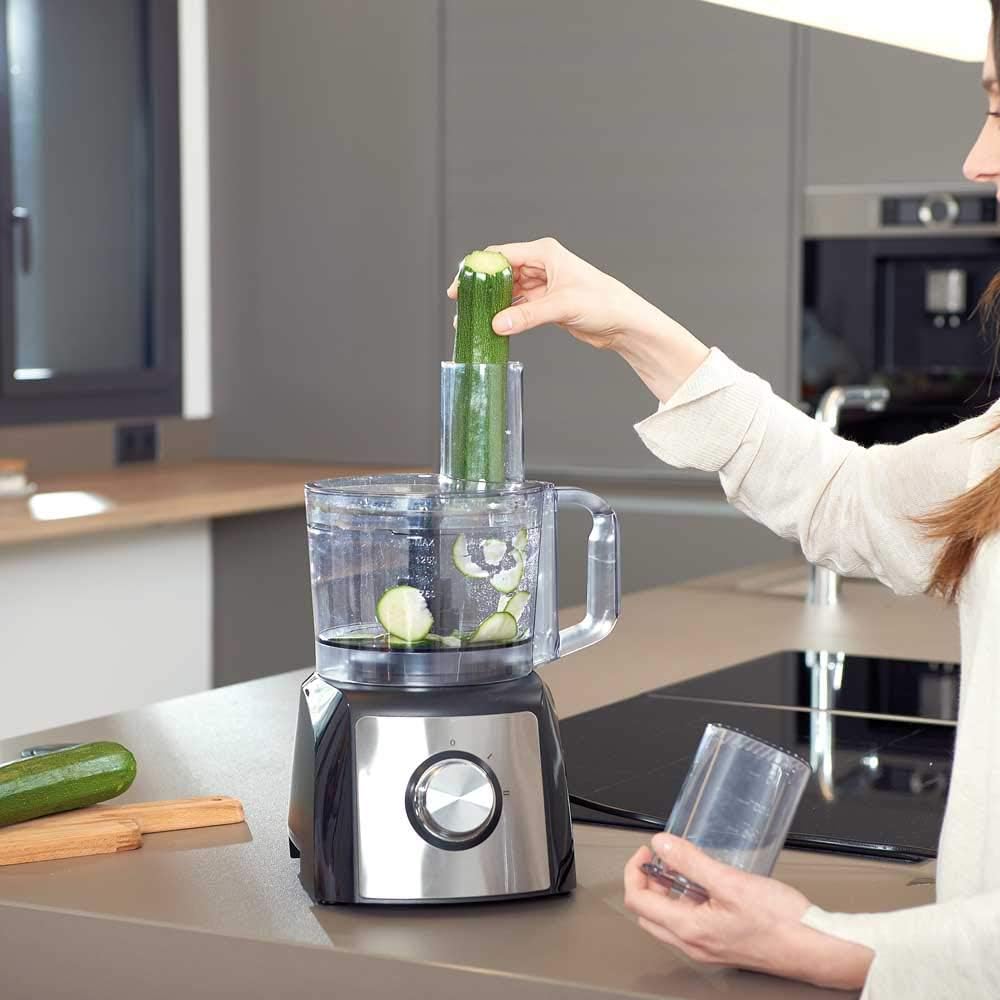
Figure 8: A user inserting a zucchini into the feed tube, demonstrating how to use the slicing/shredding function.
Power On: Plug the appliance into a suitable electrical outlet.
Selecting Speed:
- Position '0' (Off): The appliance is off.
- Position 'I' (Low Speed): Suitable for lighter tasks, softer ingredients, or when more control is needed.
- Position 'II' (High Speed): Ideal for tougher ingredients, larger quantities, or when faster processing is required.
- Position 'P' (Pulse): Provides short bursts of power at maximum speed. Turn the dial to 'P' and hold, then release to stop. This is useful for coarse chopping, controlling texture, or preventing over-processing.

Figure 9: A user turning the control dial to select the desired operating speed or pulse function.
Processing: Turn the dial to the desired speed (I or II) or use the 'P' (Pulse) function. Process ingredients until the desired consistency is achieved. Do not operate continuously for more than 1 minute to prevent overheating. Allow the appliance to cool down if used for extended periods.
Finishing: Once processing is complete, turn the dial back to '0' (Off) and unplug the appliance from the power outlet. Wait for the blades/discs to completely stop before removing the lid and bowl.
Specific Applications:
- Chopping/Mincing: Use the S-blade. For best results, process in short pulses until desired consistency.
- Slicing/Shredding: Use the appropriate disc. Feed ingredients through the feed tube with steady, even pressure using the food pusher.
- Kneading Dough: Use the dough blade. Add ingredients according to your recipe. Use low speed or pulse until dough forms a ball.
- Citrus Juicing: If your model includes the citrus juicer attachment, assemble it according to the instructions. Place a halved citrus fruit onto the reamer and press down gently while the motor is running.

Figure 10: A user demonstrating the use of the citrus juicer attachment to extract juice from an orange.
Cleaning and Maintenance
Proper cleaning and maintenance will ensure the longevity and optimal performance of your food processor.
Before Cleaning: Always unplug the appliance from the power outlet before cleaning. Disassemble all removable parts.
Cleaning Removable Parts: The processing bowl, lid, blades, and discs should be washed immediately after use.
- Hand Wash: It is recommended to hand wash all removable parts in warm, soapy water. Use a brush for hard-to-reach areas. Rinse thoroughly and dry completely before storing. Caution: Blades are extremely sharp. Handle with extreme care.
- Dishwasher Safe: Some parts may be top-rack dishwasher safe, but hand washing is generally preferred to prolong their lifespan and maintain their finish. Refer to specific product markings if available.
Cleaning Motor Base: Wipe the motor base with a damp cloth. Never immerse the motor base in water or any other liquid. Do not use abrasive cleaners or scouring pads, as they may damage the surface.
Storage: Store the assembled food processor or its components in a dry, safe place, out of reach of children. Ensure blades and discs are stored safely to prevent accidental injury.
Troubleshooting
If you encounter issues with your food processor, refer to the following common problems and solutions:
| Problem | Possible Cause | Solution |
|---|---|---|
| Appliance does not turn on. |
|
|
| Motor runs, but blades do not turn. |
|
|
| Loud noise or vibration. |
|
|
| Food is not processed evenly. |
|
|
If the problem persists after trying these solutions, please contact customer support.
Specifications
| Feature | Detail |
|---|---|
| Model Number | BXFPA1200E |
| Brand | BLACK+DECKER |
| Power | 1200W |
| Bowl Capacity | 1.5 Liters (approx. 6.3 cups) |
| Product Dimensions | 7.87 x 11.81 x 15.75 inches (20 x 30 x 40 cm) |
| Item Weight | 8.49 pounds (3.85 kg) |
| Recommended Uses | Blend, Chop, Slice |
| Included Components | Lid, S Blade (and other accessories as described) |
| Care Instructions | Hand Wash (for most parts) |
Warranty and Support
BLACK+DECKER products are manufactured to high quality standards. For information regarding warranty coverage, please refer to the warranty card included with your purchase or visit the official BLACK+DECKER website.
For technical assistance, spare parts, or repair services, please contact BLACK+DECKER customer support. Contact details can typically be found on the official brand website or on your product packaging.
Online Support: www.blackanddecker.com/support


