
1. Introduction
This manual provides instructions for the FocalTop BN59-01199F Replacement Remote Control. This remote is designed to function as a direct replacement for various Samsung TV models, offering immediate usability without complex setup procedures.
Compatible Models: Samsung RMCQTD1, RMCQTD1AP2/ZA, RS01, SS01, T19A350, T20A350, T22A350.
2. Product Overview
The FocalTop BN59-01199F is an ergonomic replacement remote control. It features a standard button layout for intuitive control of your compatible Samsung television.
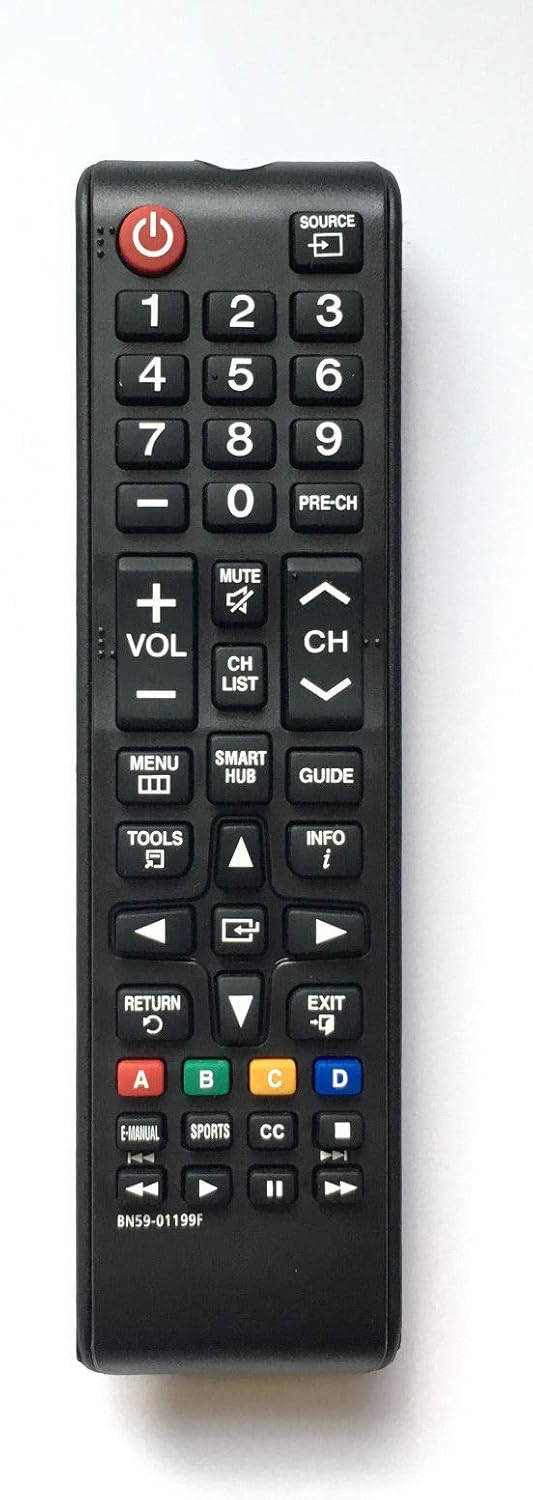
Figure 1: Front view of the FocalTop BN59-01199F replacement remote control, displaying all functional buttons including power, number pad, volume, channel, menu, and smart hub controls.
3. Setup
3.1 Battery Installation
The remote control requires two AAA batteries (not included). Follow these steps to install them:
- Locate the battery compartment on the back of the remote control.
- Slide the battery compartment cover downwards to open it.
- Insert two AAA batteries, ensuring the positive (+) and negative (-) terminals align correctly with the markings inside the compartment.
- Slide the battery compartment cover back into place until it clicks securely.
Once batteries are installed, the remote is ready for use. No programming is required.

Figure 2: Back view of the FocalTop BN59-01199F replacement remote control, illustrating the location of the battery compartment and its cover.
4. Operating Instructions
This remote control operates using infrared technology. Ensure a clear line of sight between the remote's emitter and your TV's infrared receiver for optimal performance.
4.1 Basic Functions
- Power (U): Turns the TV on or off.
- Source: Selects input sources (e.g., HDMI 1, AV).
- Number Pad (0-9): Directly enters channel numbers.
- Volume (+/-): Adjusts the sound volume.
- Mute: Silences the TV audio.
- Channel (CH +/-): Changes TV channels.
- Menu: Accesses the TV's main menu.
- Smart Hub: Opens the Samsung Smart Hub interface.
- Guide: Displays the electronic program guide.
- Tools: Provides quick access to common TV functions.
- Info: Displays information about the current program or input.
- Navigation Buttons (Up, Down, Left, Right, Enter): Used to navigate menus and select options.
- Return: Goes back to the previous screen or menu.
- Exit: Closes the current menu or application.
- Color Buttons (A, B, C, D): Functionality varies depending on the TV model and current application.
5. Maintenance
To ensure the longevity and proper functioning of your remote control, follow these maintenance guidelines:
- Cleaning: Wipe the remote control with a soft, dry cloth. Do not use liquid cleaners or abrasive materials.
- Battery Replacement: Replace batteries when the remote's response becomes sluggish or stops working. Always replace both batteries at the same time with new ones of the same type.
- Storage: If the remote will not be used for an extended period, remove the batteries to prevent leakage and potential damage.
- Avoid Damage: Do not drop the remote, expose it to extreme temperatures, or immerse it in liquids.
6. Troubleshooting
If you encounter issues with your remote control, try the following solutions:
- Remote Not Responding:
- Check if the batteries are inserted correctly with the correct polarity.
- Replace old batteries with new ones.
- Ensure there are no obstructions between the remote and the TV's infrared sensor.
- Confirm you are within the effective range of the TV's sensor.
- Specific Buttons Not Working:
- This may indicate a dirty or faulty button. Try gently pressing the button multiple times. If the issue persists, the remote may require replacement.
- TV Not Responding to Any Remote:
- Unplug the TV from the power outlet for a few minutes, then plug it back in. This can reset the TV's internal systems.
- Ensure the TV's power indicator light is on.
7. Specifications
| Feature | Detail |
|---|---|
| Model Number | BN59-01199F |
| Brand | FocalTop |
| Compatible Devices | Samsung RMCQTD1, RMCQTD1AP2/ZA, RS01, SS01, T19A350, T20A350, T22A350 LCD LED HDTV Smart TVs |
| Connectivity Technology | Infrared (IR) |
| Controller Type | Button Control |
| Special Feature | Ergonomic Design |
| Power Source | 2 x AAA Batteries (not included) |
8. Warranty and Support
For warranty information and customer support regarding your FocalTop BN59-01199F Replacement Remote Control, please refer to the purchase documentation or contact the seller directly. The manufacturer is FocalTop.