
1. Introduction
Thank you for purchasing the MEKE Meike 12mm F/2.8 Ultra Wide Angle Manual Focus Prime Lens. This manual provides essential information for the proper setup, operation, and maintenance of your new lens. Please read this manual thoroughly before using the product to ensure optimal performance and longevity.
2. Product Overview and Contents
The MEKE Meike 12mm F/2.8 is a manual focus ultra-wide-angle prime lens designed for APS-C mirrorless cameras with a Nikon N1/1 mount. It features a robust all-metal construction and multi-layer nano coating for enhanced image quality.
2.1 What's in the Box
- 1 x MEKE Meike 12mm F/2.8 Lens Body
- 1 x Special Lens Hood
- 1 x Lens Pouch
- 1 x Rear Lens Cap
- 1 x Front Lens Cap
- 1 x Lens Cleaning Cloth
- 1 x Warranty Card

Image: The complete package contents of the MEKE Meike 12mm F/2.8 lens.
2.2 Lens Components
The lens features a manual focus ring, an aperture adjustment ring, and a focus distance index for precise control. An all-metal bayonet ensures secure attachment to your camera.

Image: Key components of the MEKE Meike 12mm F/2.8 lens, including the focus and aperture rings.
3. Specifications
| Model | MK-12-F2.8 |
| Lens Type | Manual Focusing Wide-Angle Prime Lens |
| Focal Length | 12mm |
| Aperture Range | F2.8 - F22 |
| Lens Structure | 10 groups, 12 lenses |
| Number of Aperture Blades | 9 blades |
| Minimum Focusing Distance | 0.1m (0.3ft) |
| Magnification | 0.123x |
| Filter Size | 72mm |
| Lens Diameter | 78mm |
| Length | 65.8mm |
| Weight | 360g |
| Coating | Nano-technology multi-layer coating |
| Visual Angle (Full-frame equivalent) | Diagonal 99°, Horizontal 88.5°, Vertical 65.5° |
| Compatible Mountings | Nikon N1/1 Mount (APS-C Mirrorless Cameras) |

Image: Detailed product parameters of the lens.

Image: Physical dimensions of the lens.
4. Setup
4.1 Attaching the Lens to Your Camera
- Ensure your camera is powered off.
- Remove the rear lens cap from the MEKE 12mm F/2.8 lens and the body cap from your camera.
- Align the mounting index (usually a white dot or line) on the lens with the corresponding index on your camera body.
- Insert the lens into the camera mount and rotate it clockwise until it clicks into place, indicating it is securely locked.
- Power on your camera.
This lens is compatible with Nikon N1/1 Mount APS-C Mirrorless Cameras. Please verify your camera's mount type before attachment.
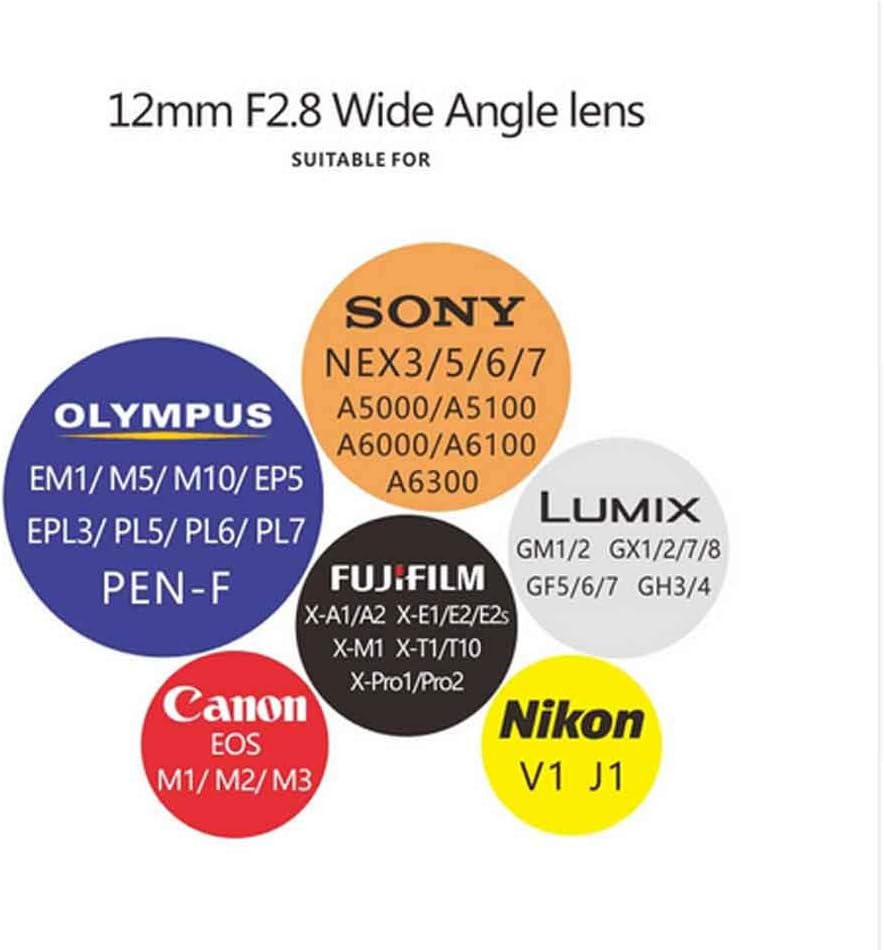
Image: Compatibility chart for the 12mm F2.8 lens, highlighting Nikon N1/1 mount.
4.2 Attaching the Lens Hood
Align the lens hood with the front of the lens and twist it gently until it locks into position. The lens hood helps to prevent flare and protects the front element of the lens.
5. Operating Instructions
This is a manual lens, meaning both focus and aperture must be adjusted manually.
5.1 Manual Focus
To focus, rotate the manual focus ring on the lens until your subject appears sharp in the viewfinder or on your camera's LCD screen. Utilize your camera's focus peaking or magnification features for precise focusing.

Image: Detail of the manual focus ring on the lens.
5.2 Aperture Adjustment
The aperture (f-stop) is adjusted by rotating the aperture ring on the lens. This controls the amount of light entering the lens and affects the depth of field in your images. Rotate the ring to select your desired aperture value, from F2.8 (widest) to F22 (narrowest).
6. Maintenance
6.1 Cleaning the Lens
- Use a blower brush to remove dust and loose particles from the lens surfaces.
- For smudges or fingerprints, use a clean, soft microfiber cloth (like the one provided) and a small amount of lens cleaning solution. Apply the solution to the cloth, not directly to the lens.
- Wipe gently in a circular motion from the center outwards.
- Avoid touching the lens elements with your fingers.
6.2 Storage
- Always attach the front and rear lens caps when the lens is not in use.
- Store the lens in a cool, dry place, away from direct sunlight and extreme temperatures.
- If storing for extended periods, consider using a dehumidifying cabinet or silica gel packets to prevent mold growth.
7. Troubleshooting
7.1 Blurry Images
- Ensure the lens is properly focused. As a manual focus lens, precise adjustment of the focus ring is crucial.
- Check your camera's shutter speed. If it's too slow, camera shake can cause blur. Use a tripod or increase ISO if necessary.
- Verify that the lens elements are clean and free from smudges or dust.
7.2 Lens Not Attaching Securely
- Ensure you are using a compatible camera body (Nikon N1/1 Mount APS-C Mirrorless Cameras).
- Check for any obstructions on the lens mount or camera body mount.
- Align the mounting indexes correctly before rotating the lens.
8. Warranty and Support
This product comes with a manufacturer's warranty. Please refer to the included warranty card for specific terms and conditions. For technical support, service, or inquiries, please contact your retailer or visit the official Meike website for assistance.
