Introduction
This manual provides detailed instructions for the proper use and maintenance of your OneDer V06 Bluetooth Speaker. Please read this manual thoroughly before operating the device to ensure optimal performance and longevity. The OneDer V06 is a versatile audio device featuring Bluetooth connectivity, FM radio, USB/TF card playback, a digital clock, and an integrated mobile stand.
Important Safety Information
- Do not expose the device to extreme temperatures, direct sunlight, or high humidity.
- Avoid dropping or subjecting the device to strong impacts.
- Do not disassemble or attempt to repair the device yourself. Refer all servicing to qualified personnel.
- Keep the device away from water and other liquids.
- Use only the specified charging cable and power adapter.
- Dispose of batteries according to local regulations.
Package Contents
Please check the package for the following items:
- OneDer V06 Bluetooth Speaker
- USB Charging Cable
- Audio Cable (AUX)
- User Manual (this document)
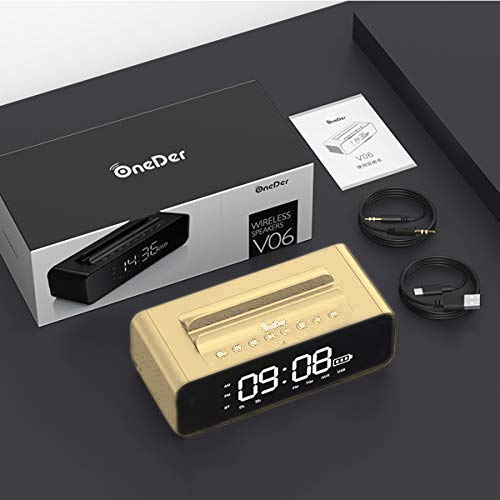
Image: The OneDer V06 speaker, USB charging cable, and audio cable neatly packaged in its box, alongside the user manual.
Product Overview
Familiarize yourself with the various parts and controls of your OneDer V06 speaker.
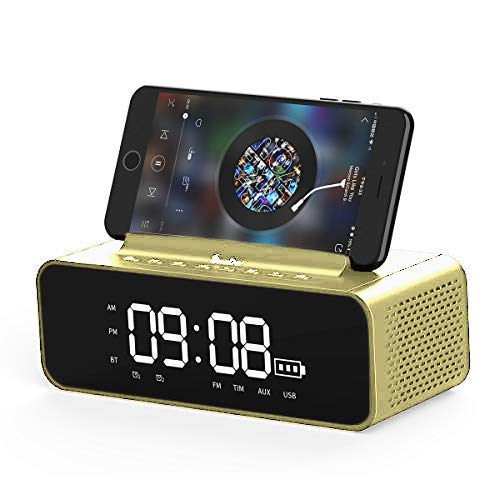
Image: Front view of the OneDer V06 Bluetooth Speaker in gold, displaying the digital clock, battery indicator, and a mobile phone placed in its integrated stand.
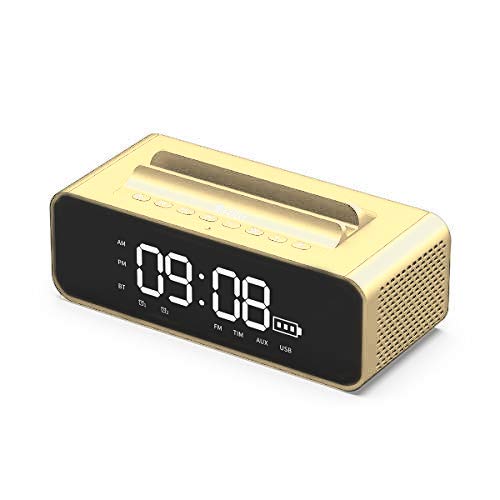
Image: Front view of the OneDer V06 Bluetooth Speaker in gold, showing the digital clock display and control buttons on top, without a phone in the stand.
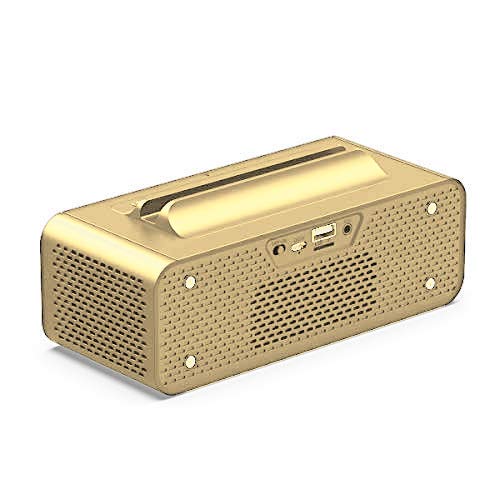
Image: Rear view of the OneDer V06 Bluetooth Speaker, highlighting the various input ports including USB, TF card slot, and AUX input.
Control Buttons (Top Panel)
- Power Button: Press and hold to power on/off. Short press to switch modes (Bluetooth, FM, AUX, USB/TF).
- Play/Pause Button: Play or pause audio. In FM mode, short press to auto-scan stations.
- Volume Up (+)/Next Track: Short press for next track/station. Long press to increase volume.
- Volume Down (-)/Previous Track: Short press for previous track/station. Long press to decrease volume.
- M Button (Mode/Menu): Short press to cycle through modes. Long press to enter clock/alarm settings.
Rear Panel Ports
- USB Port: For USB flash drive playback or charging external devices (if supported).
- TF Card Slot: For TF/MicroSD card playback.
- AUX Input: For connecting external audio devices via 3.5mm audio cable.
- DC 5V Charging Port: For charging the speaker's internal battery.
Setup
1. Charging the Speaker
- Connect the provided USB charging cable to the DC 5V charging port on the rear of the speaker.
- Connect the other end of the USB cable to a USB power adapter (not included) or a computer's USB port.
- The charging indicator on the display will show charging status. A full charge typically takes 3-4 hours.
- Disconnect the cable once fully charged to preserve battery life.
2. Powering On/Off
- To power on, press and hold the Power Button until the display lights up.
- To power off, press and hold the Power Button again until the display turns off.
3. Setting the Clock
- In any mode, long press the M Button to enter clock setting mode. The hour digits will flash.
- Use the Volume Up (+) and Volume Down (-) buttons to adjust the hour.
- Short press the M Button to switch to minute setting. The minute digits will flash.
- Use the Volume Up (+) and Volume Down (-) buttons to adjust the minutes.
- Short press the M Button again to confirm and exit clock setting.
Operating Instructions
1. Bluetooth Mode
- Power on the speaker. It will automatically enter Bluetooth pairing mode, indicated by a flashing "BT" icon on the display.
- On your mobile device, enable Bluetooth and search for available devices.
- Select "OneDer V06" from the list.
- Once paired, the "BT" icon will stop flashing and a confirmation tone may sound.
- You can now play audio from your device through the speaker. Use the speaker's Play/Pause, Next/Previous Track, and Volume buttons to control playback.
2. FM Radio Mode
- Short press the Power Button or M Button to switch to FM mode. The display will show "FM" and a frequency.
- To auto-scan and save available stations, short press the Play/Pause Button. The speaker will scan and store stations automatically.
- Use the Next/Previous Track buttons to navigate between saved stations.
- For better reception, ensure the speaker is placed in an open area.
3. USB/TF Card Playback
- Insert a USB flash drive or TF (MicroSD) card into the corresponding slot on the rear panel.
- The speaker will automatically switch to USB or TF card mode and begin playing audio files. If not, short press the Power Button or M Button to select the correct mode.
- Use the Play/Pause, Next/Previous Track, and Volume buttons to control playback.
4. AUX Input Mode
- Connect one end of the 3.5mm audio cable to the AUX input port on the speaker.
- Connect the other end to the headphone jack of your external audio device (e.g., MP3 player, laptop).
- Short press the Power Button or M Button to switch to AUX mode. The display may show "AUX".
- Control playback and volume from your external audio device.
5. Using the Mobile Stand
The integrated groove on top of the speaker serves as a convenient stand for your smartphone or small tablet, allowing for hands-free viewing while enjoying audio.
Image: The OneDer V06 speaker with a smartphone securely placed in its top-mounted stand, demonstrating its dual functionality.
6. Setting an Alarm
- Long press the M Button to enter clock setting mode. Continue pressing M Button until the alarm time digits flash (e.g., "AL").
- Use the Volume Up (+) and Volume Down (-) buttons to adjust the alarm hour.
- Short press the M Button to switch to alarm minute setting.
- Use the Volume Up (+) and Volume Down (-) buttons to adjust the alarm minutes.
- Short press the M Button again to confirm and activate the alarm. An alarm icon may appear on the display.
- To disable the alarm, repeat the process and set the alarm time to "--:--" or press a specific button (refer to device display for specific icon).
Maintenance
- Cleaning: Use a soft, dry cloth to wipe the surface of the speaker. Do not use abrasive cleaners, alcohol, or chemical solvents.
- Storage: When not in use for extended periods, store the speaker in a cool, dry place, away from direct sunlight and extreme temperatures.
- Battery Care: To prolong battery life, avoid fully discharging the battery frequently. Charge the device regularly, even if not in use.
Troubleshooting
| Problem | Possible Cause | Solution |
|---|---|---|
| Speaker does not power on. | Low battery. | Charge the speaker for at least 30 minutes. |
| No sound. | Volume too low; incorrect mode; device not paired. | Increase volume. Ensure correct mode is selected. Re-pair Bluetooth device. |
| Bluetooth pairing fails. | Speaker not in pairing mode; device too far; interference. | Ensure speaker is in Bluetooth mode and "BT" is flashing. Move devices closer. Turn off other Bluetooth devices. |
| FM radio reception is poor. | Weak signal; environmental interference. | Relocate the speaker to an open area. Perform auto-scan again. |
| USB/TF card not playing. | Incorrect file format; card not inserted correctly; corrupted files. | Ensure files are in supported formats (MP3/WAV/WMA). Reinsert card. Try another card/USB drive. |
Specifications
| Feature | Detail |
|---|---|
| Model | OneDer V06 |
| Wireless Version | 4.2 |
| Support Profile | MP3/WMA/WAV |
| Wireless Range | 10 meters |
| Battery | 2400mAh |
| Speaker Output | 2 x 5W (10W total) |
| Power Source | Battery, AC (via USB charging) |
| Material | Metal |
| Display Type | Digital |
| Special Features | Bluetooth, Wireless, FM Radio, USB/TF Card Playback, Mobile Stand, Digital Clock, Alarm Clock |
| Product Dimensions | L180mm x W78mm x H73mm (approx.) |
| Product Weight | 632g (approx.) |
| Package Dimensions | 23.6 x 11.2 x 8.3 cm |
| Item Weight (Package) | 880 g |
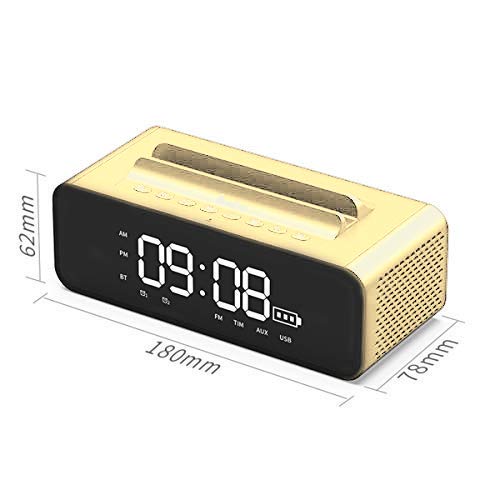
Image: Diagram illustrating the dimensions of the OneDer V06 Bluetooth Speaker: 180mm length, 78mm width, and 62mm height.
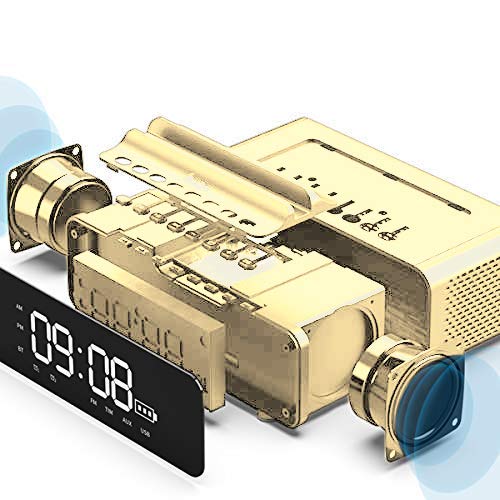
Image: An exploded diagram showing the internal components of the OneDer V06 speaker, including the main circuit board, battery, and speaker drivers.
Warranty and Support
The OneDer V06 Bluetooth Speaker comes with a standard manufacturer's warranty. Please refer to the warranty card included in your package for specific terms and conditions, including warranty duration and coverage details.
For technical support, troubleshooting assistance, or warranty claims, please contact OneDer customer service through the contact information provided on the product packaging or the official OneDer website.
Note: Keep your purchase receipt as proof of purchase for warranty purposes.


