1. Product Overview
The JOWAY H32 is a wireless Bluetooth earphone designed for audio playback and communication. It features Bluetooth connectivity for seamless pairing with compatible devices, active noise cancellation for an enhanced listening experience, and an in-ear design for comfortable wear.
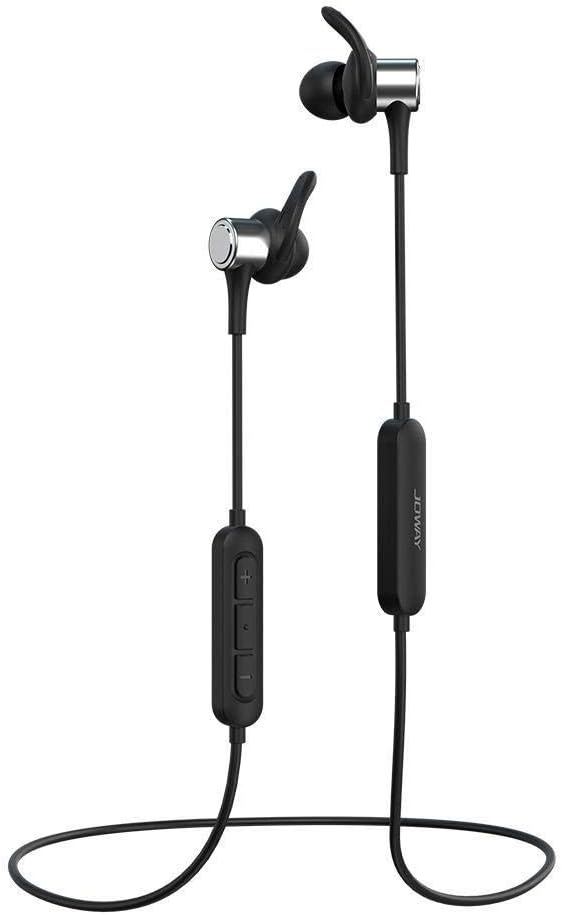
Image 1.1: The JOWAY H32 Bluetooth Earphones, showcasing their in-ear design and inline control panel.
2. Package Contents
Please verify that all items are present in your package:
- JOWAY H32 Bluetooth Earphones
- Ear Cushions (various sizes for optimal fit)
- USB Charging Cable (typically included, for charging the earphones)
- User Manual (this document)
3. Setup
3.1. Charging the Earphones
Before first use, fully charge the earphones. Connect the USB charging cable to the charging port on the earphone's inline control panel and plug the other end into a USB power source (e.g., computer USB port, wall adapter). The indicator light will typically show red during charging and turn blue or off when fully charged. A full charge usually takes approximately 1-2 hours.
3.2. Bluetooth Pairing
- Ensure the earphones are turned off.
- Press and hold the multi-function button (usually the center button on the inline control) for approximately 5-7 seconds until the indicator light flashes red and blue alternately. This indicates pairing mode.
- On your device (smartphone, tablet, computer), enable Bluetooth and search for available devices.
- Select "JOWAY H32" from the list of found devices.
- Once paired, the indicator light on the earphones will typically flash blue slowly or turn off, and you will hear an audible confirmation.
- If prompted for a password, enter "0000".

Image 3.1: The JOWAY H32 earphones featuring the inline control panel for power, volume, and call management.
4. Operating the Earphones
4.1. Basic Functions
- Power On: Press and hold the multi-function button for 3 seconds.
- Power Off: Press and hold the multi-function button for 3-5 seconds.
- Play/Pause: Press the multi-function button once.
- Volume Up: Press the '+' button.
- Volume Down: Press the '-' button.
- Next Track: Press and hold the '+' button.
- Previous Track: Press and hold the '-' button.
4.2. Call Management
- Answer/End Call: Press the multi-function button once.
- Reject Call: Press and hold the multi-function button for 2 seconds.
- Redial Last Number: Double-press the multi-function button.
4.3. Noise Cancellation
The JOWAY H32 earphones feature active noise cancellation to reduce ambient sounds, providing a clearer audio experience. This function is typically activated automatically or via a dedicated button (refer to specific product markings if available). The DSP (Digital Signal Processing) technology further enhances sound quality.

Image 4.1: The JOWAY H32 earphones, illustrating their advanced sound processing capabilities for an immersive audio experience.

Image 4.2: A detailed view of the JOWAY H32 earphone's design, showing how the ear tip and ear hanger provide a secure fit and contribute to sound insulation within the ear canal.
5. Maintenance
5.1. Cleaning
Regularly clean your earphones to maintain optimal performance and hygiene. Use a soft, dry, lint-free cloth to wipe the exterior. For ear tips, remove them and clean with a mild soap solution, then rinse thoroughly and allow to dry completely before reattaching. Avoid using harsh chemicals or abrasive materials.
5.2. Storage
When not in use, store the earphones in a cool, dry place, away from direct sunlight and extreme temperatures. Avoid tangling the cable to prevent damage. The cable is designed for durability, as shown in Image 5.1.

Image 5.1: An illustration demonstrating the tensile strength of the JOWAY H32 earphone cable, indicating its robust construction.
6. Troubleshooting
If you encounter issues with your JOWAY H32 earphones, refer to the following common solutions:
- No Power: Ensure the earphones are fully charged. Connect them to a power source and check the charging indicator.
- Cannot Pair: Make sure the earphones are in pairing mode (flashing red and blue). Turn off and on your device's Bluetooth. Ensure the earphones are within range (typically 10 meters) and not connected to another device.
- No Sound: Check the volume level on both the earphones and your connected device. Ensure the earphones are properly paired and connected. Try playing audio from a different application or device.
- Poor Sound Quality: Ensure the earphones are fully charged. Move closer to your connected device to reduce interference. Check for any physical obstructions between the earphones and the device.
7. Specifications
| Brand | JOWAY |
| Model Number | H32 |
| Connectivity Technology | Wireless (Bluetooth) |
| Ear Placement | On Ear (In-Ear design with ear hangers) |
| Form Factor | On Ear |
| Noise Control | Active Noise Cancellation |
| Microphone Included | Yes |
| Compatible With | All Bluetooth-enabled devices |
| Color | Black |
| Package Dimensions | 18 x 12 x 4.2 cm |
| Item Weight | 89.99 g |
| Included Components | Ear Cushions |
8. Warranty and Support
For warranty information and customer support, please refer to the documentation provided at the time of purchase or contact your retailer. Keep your proof of purchase for any warranty claims.