Introduction
This manual provides detailed instructions for the installation, operation, and maintenance of your National Hardware N109-080 SmartKey Security Gate Lock. Designed for durability and ease of use, this gate lock features WeatherGuard rust-resistant finish and the convenience of SmartKey re-keying technology.
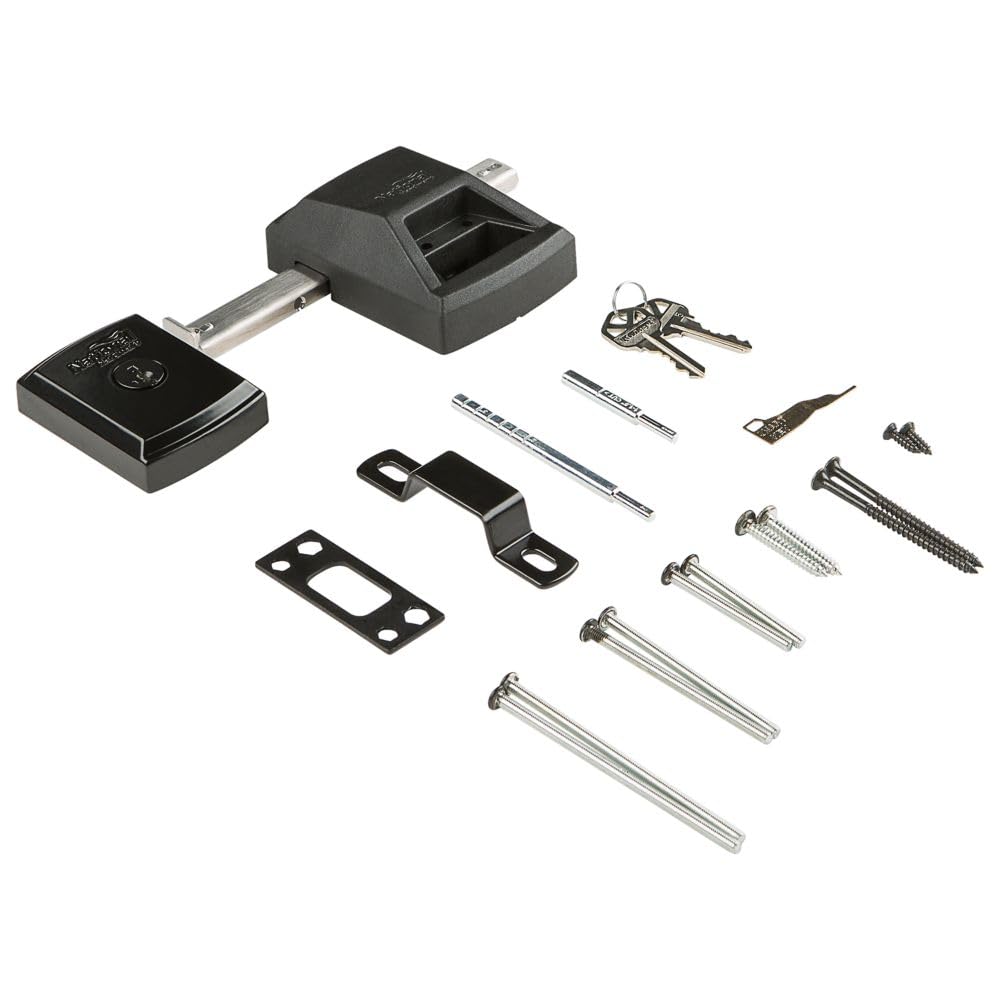
Image: The National Hardware N109-080 SmartKey Security Gate Lock, black finish, shown with included keys and components.
Setup and Installation
Before beginning installation, ensure you have measured your door's backset, cross bore, and thickness to confirm proper fit. The SmartKey Gate Lock is designed for installation in both left and right-handed applications.
Included Components:
- Gate lock assembly
- Latch
- Strike plate
- Kwikset KW01 Key
- SmartKey Learn Tool
- All necessary mounting fasteners
Follow the detailed instructions provided with your hardware for specific drilling and mounting procedures. Ensure all fasteners are securely tightened for optimal security and function.
Video: An overview of the National Hardware N109-080 SmartKey Gate Lock, demonstrating its components and basic installation steps. This video is provided by the merchant.
Operating the Lock
The SmartKey Gate Lock provides a straightforward locking mechanism. Insert the key and turn to engage or disengage the lock. The unique SmartKey feature allows you to re-key the lock to match an existing Kwikset key, providing convenience and reducing the number of keys you need to carry.
SmartKey Re-Keying Procedure:
- Insert the currently programmed key into the lock cylinder and rotate it 90 degrees clockwise.
- While the key is in the 90-degree position, insert the SmartKey Learn Tool fully into the small hole next to the keyway. Remove the SmartKey tool and the original key.
- Insert the new key you wish to use into the lock cylinder and rotate it 180 degrees counter-clockwise. Your lock is now re-keyed to the new key.
Video: Detailed instructions on how to re-key your National Hardware SmartKey Gate Lock using the SmartKey Learn Tool. This video is provided by Kwikset Corporation.
Maintenance
The N109-080 SmartKey Gate Lock is coated with WeatherGuard Protection, providing rust resistance and durability against harsh weather conditions. To ensure long-lasting performance, periodically inspect the lock for any debris or wear.
For optimal function, it is recommended to lubricate the latch slider with silicone or white lithium spray and the keyway with graphite or Teflon spray a few times a year. Avoid using WD-40 as a lubricant, as it is a degreaser and can remove necessary lubrication.

Image: Close-up view of the WeatherGuard finish, highlighting its protective qualities against environmental elements.
Troubleshooting
- Key Not Turning: Ensure the correct key is being used. If re-keying was recently performed, verify the new key is fully inserted and rotated correctly. If the key is new and does not turn, the lock may need to be reset or replaced.
- Latch Sticking or Jamming: Inspect the latch mechanism for any obstructions. Lubricate the slider as described in the Maintenance section. If the issue persists, check for proper alignment of the lock and strike plate.
- Lock Not Re-keying: Ensure the original key is fully inserted and rotated 90 degrees clockwise before inserting the SmartKey Learn Tool. The SmartKey tool must be fully inserted. If the process fails, repeat carefully.
Specifications
| Brand: | National Hardware |
| Model Name: | N109-080 |
| Lock Type: | Key Lock |
| Special Feature: | Key Lock, Rust Resistant |
| Material: | Plastic |
| Color: | Black |
| Item Dimensions (L x W x H): | 3.35 x 8.86 x 6.5 inches |
| Item Weight: | 0.01 Ounces |
| Included Components: | SmartKey Gate Lock |
Warranty
This National Hardware N109-080 SmartKey Security Gate Lock is covered by National Hardware's Lifespan Limited Lifetime Warranty. Please refer to the warranty documentation included with your product for full terms and conditions.
Support
For further assistance, technical support, or to inquire about replacement parts, please visit the official National Hardware website or contact their customer service department. Contact information can typically be found on the product packaging or the manufacturer's website.


