
1. Introduction
This manual provides essential information for the safe and effective use of your YESWELDER LYG-R100A True Color Auto Darkening Welding Goggles. Please read these instructions thoroughly before operation to ensure proper function and personal safety. These goggles are designed for various welding and cutting applications, offering enhanced visibility and protection.

Figure 1: YESWELDER LYG-R100A Welding Goggles and accessories.
2. Safety Information
Always prioritize safety when performing welding, cutting, or grinding operations. Failure to follow safety guidelines can result in serious injury.
- These goggles are designed to protect against harmful UV/IR radiation and intense visible light during welding. They are not suitable for laser welding.
- Always inspect the goggles and face shield for damage before each use. Replace any damaged parts immediately.
- Ensure the auto-darkening function is working correctly by performing a test before starting work.
- Wear appropriate personal protective equipment (PPE) in addition to these goggles, including flame-resistant clothing, gloves, and safety footwear.
- Do not immerse the goggles in water or other liquids.
- Keep the lenses clean to maintain optimal visibility and auto-darkening performance.
3. Product Components
The YESWELDER LYG-R100A package typically includes the following items:
- Auto Darkening Welding Goggles (LYG-R100A)
- Detachable Face Shield/Mask
- Replacement Outer Lenses (2x)
- CR2450 Lithium Battery (pre-installed or included separately)
- Storage Bag
4. Setup
4.1 Battery Installation/Check
The goggles are powered by a CR2450 lithium battery. A battery is typically pre-installed. If replacement is needed:
- Locate the battery compartment on the side of the goggles.
- Carefully unscrew the small Philips head screw securing the battery cover.
- Remove the old battery and insert a new CR2450 battery with the positive (+) side facing up.
- Replace the cover and secure it with the screw.
4.2 Attaching the Face Shield
The included face shield provides additional protection for the face and neck from sparks and spatter.
- Align the clips on the face shield with the corresponding slots on the bottom edge of the goggles.
- Press firmly until the shield clicks securely into place.
- To remove, gently pull the clips outward and detach the shield.

Figure 2: Goggles with attached face shield for enhanced protection.
4.3 Head Strap Adjustment
Adjust the elastic head strap for a comfortable and secure fit. The strap should hold the goggles firmly against your face without causing discomfort.
4.4 Function Test
Before each use, perform a function test:
- Put on the goggles.
- Point the front of the goggles towards a bright light source (e.g., a lamp, but not direct sunlight or a welding arc).
- The lens should darken instantly. If it does not, check the battery and ensure the sensors are clean.
5. Operating Instructions
The LYG-R100A goggles feature adjustable settings for shade, sensitivity, and delay to suit various applications.
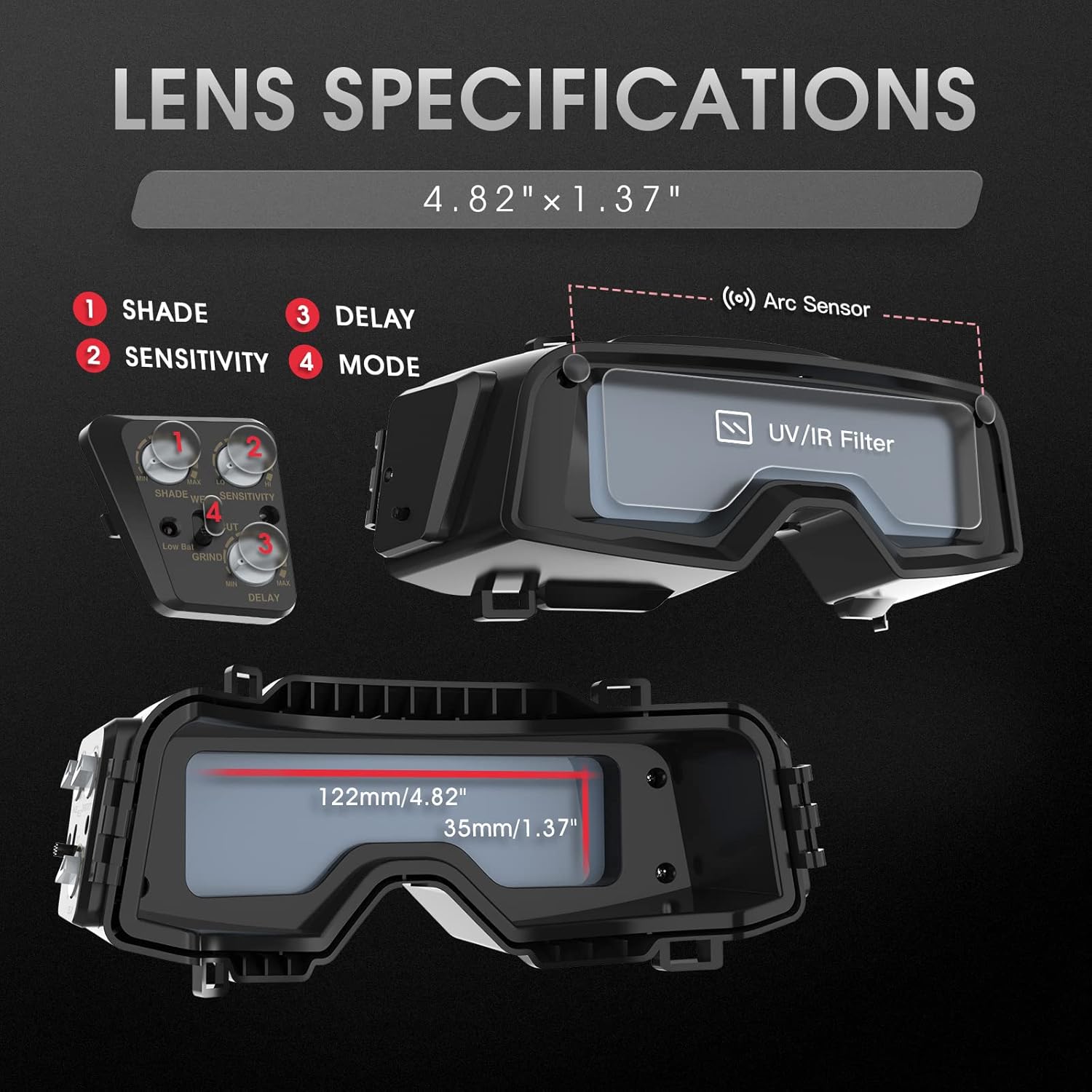
Figure 3: Lens specifications and control layout.
5.1 Mode Selection
Use the mode switch to select the appropriate operation:
- WELD: For TIG, MIG, MMA, and ARC welding.
- CUT: For plasma cutting.
- GRIND: For grinding operations. In grind mode, the auto-darkening function is deactivated, and the lens remains in a light shade (Shade 4) for clear visibility.

Figure 4: Goggles applicable to Welding, Cutting, and Grinding modes.
5.2 Shade Adjustment
The shade knob allows you to select the desired darkness level. The goggles offer a wide shade range from 4/5-9 to 9-13.
- Grind Mode: Fixed Shade 4.
- Cut Mode: Adjustable Shade 5-9.
- Weld Mode: Adjustable Shade 9-13.
Refer to welding standards for appropriate shade levels based on amperage and welding process.
5.3 Sensitivity Adjustment
The sensitivity knob controls how easily the sensors detect the welding arc and trigger the darkening function. Adjust sensitivity based on ambient light conditions and arc intensity.
- High Sensitivity: For low amperage welding or when the arc is partially obscured.
- Low Sensitivity: For high amperage welding or when working near other welders to prevent false triggering.
5.4 Delay Control
The delay knob adjusts the time it takes for the lens to return from the dark state to the light state after the arc ceases. This helps protect eyes from afterglow and allows the weld pool to cool slightly.
- Adjustable from 0.1 to 0.8 seconds.
- Short Delay: For tack welding or short welds.
- Long Delay: For high amperage welding or when eye fatigue is a concern.

Figure 5: Explanation of Delay, Shade, and Sensitivity controls.
5.5 True Color Technology
The LYG-R100A goggles incorporate True Color technology, which provides a clearer and more natural color view of the work area in both light and dark states. This reduces the traditional green tint found in older auto-darkening lenses, improving visibility and reducing eye strain.

Figure 6: True Color Lens Technology provides better clarity and real color view.
5.6 Low Battery Indicator
A red LED indicator will illuminate when the battery level is low, signaling that the CR2450 battery needs to be replaced soon.

Figure 7: Low battery reminder light.
6. Maintenance
6.1 Cleaning
- Lenses: Clean the inner and outer protective lenses regularly with a soft, clean cloth. Do not use abrasive cleaners or solvents.
- Goggle Body: Wipe the goggle body with a damp cloth. Avoid getting moisture into the electronic components.
- Sensors: Ensure the two arc sensors on the front of the goggles are kept clean and free from obstructions to guarantee proper auto-darkening function.
6.2 Battery Replacement
Replace the CR2450 battery when the low battery indicator illuminates or if the auto-darkening function becomes inconsistent. Refer to Section 4.1 for instructions.
6.3 Storage
Store the goggles in the provided storage bag in a dry, cool place, away from direct sunlight and extreme temperatures. This helps protect the lenses and electronic components.
7. Troubleshooting
| Problem | Possible Cause | Solution |
|---|---|---|
| Lens does not darken when arc is struck. | Low or dead battery; dirty/blocked sensors; incorrect sensitivity setting; goggles in GRIND mode. | Replace battery; clean sensors; increase sensitivity; switch to WELD or CUT mode. |
| Lens darkens intermittently or flashes. | Low battery; sensitivity too low; interference from other light sources. | Replace battery; increase sensitivity; reposition to block interfering light. |
| Poor visibility through the lens. | Dirty protective lenses; incorrect shade setting. | Clean or replace protective lenses; adjust shade to a lighter setting. |
| Goggles feel uncomfortable. | Head strap too tight or loose; improper fit. | Adjust head strap for a snug but comfortable fit. |
8. Specifications

Figure 8: Technical Specifications.
- Filter Model: LYG-R100A
- Active Viewing Area: 4.82" x 1.38" (122mm x 35mm)
- Light Shade: DIN 4
- Dark Shade: DIN 5-9 / DIN 9-13 (Adjustable)
- Way to Shift Dark State: Outer, stepless shift
- Sensitivity Adjustment: Stepless control
- Switching Time: <1/30000s
- Delay Time: 0.1-0.8s (Adjustable)
- Power Supply: CR2450 Lithium battery
- Rated Capacity of Lithium Battery: 600mAh
- Operating Temperature: -5°C to +55°C
- Sensors to Weld Arc: 2
- UV/IR Protection: DIN 16
- Grind Function: Yes
- Low Battery Indicator: Yes
- Material: ABS+PP
- Item Weight: 7 ounces
9. Warranty and Support
YESWELDER provides a 1-year warranty for the LYG-R100A welding goggles, covering manufacturing defects. For technical assistance, warranty claims, or general inquiries, please contact YESWELDER customer support.

Figure 9: Warranty and Support Information.
For the most up-to-date contact information, please visit the official YESWELDER website or refer to the product packaging.