
RYOBI R18JS-0 ONE+ 18V Cordless Orbital Jigsaw Instruction Manual
Model: R18JS-0 (P5231)
1. Product Overview
The RYOBI R18JS-0 ONE+ 18V Cordless Orbital Jigsaw is designed for efficient and precise cutting in various materials. This tool offers the convenience of cordless operation with performance comparable to corded models. It features a variable speed control, four orbital settings, an integrated LED light, a dust blower, and a blade-saving base for extended blade life. This manual provides essential information for the safe and effective use of your jigsaw.

Image 1: The RYOBI R18JS-0 ONE+ 18V Cordless Orbital Jigsaw, showcasing its ergonomic design and key features.
2. Safety Information
Always observe basic safety precautions when using power tools to reduce the risk of fire, electric shock, and personal injury. Read and understand all instructions before operation.
- Wear appropriate personal protective equipment, including eye protection, hearing protection, and gloves.
- Ensure the workpiece is securely clamped or held to prevent movement during cutting.
- Keep hands and fingers away from the cutting area and the blade.
- Do not operate the tool in damp or wet conditions.
- Disconnect the battery pack before making any adjustments, changing accessories, or storing the tool.
- Use only RYOBI ONE+ 18V battery packs and chargers.
- Maintain a firm grip on the tool during operation.
3. Components
Familiarize yourself with the main parts of your RYOBI R18JS-0 Jigsaw:
- Blade Clamp: Secures the jigsaw blade.
- Base Plate: Supports the tool on the workpiece and can be adjusted.
- Orbital Selector: Adjusts the orbital action for different cutting speeds and materials (settings 0-3).
- Variable Speed Dial: Controls the strokes per minute (SPM) from 1100 to 3000.
- Trigger: Activates the tool.
- Trigger Lock Button: Locks the trigger for continuous operation.
- LED Light: Illuminates the cutting line.
- Dust Blower: Clears debris from the cutting line.
- Battery Port: Receptacle for the 18V ONE+ battery pack (battery not included).
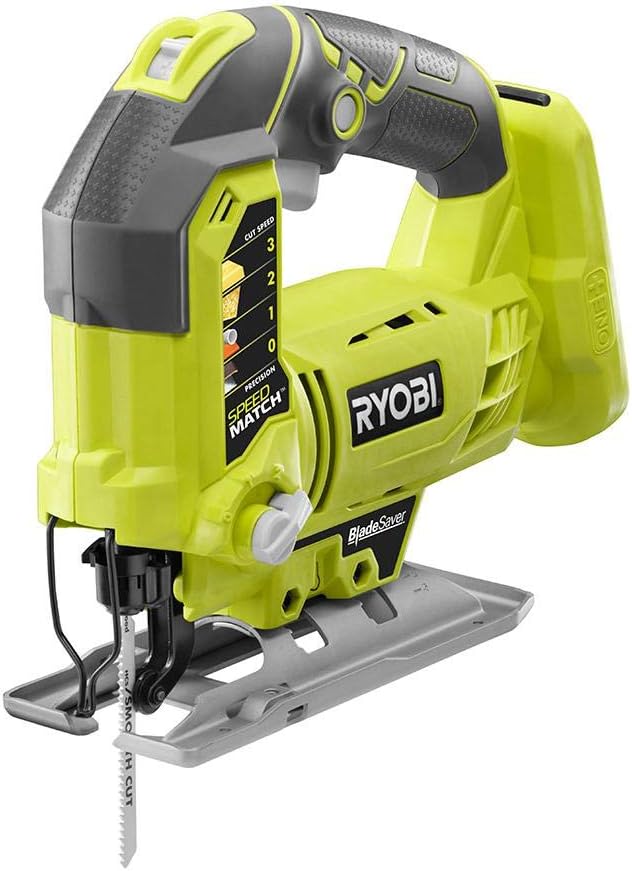
Image 2: Angled view of the jigsaw, highlighting the handle, base plate, and blade area.
4. Setup
4.1. Battery Installation and Removal
- To install: Align the ribs on the battery pack with the grooves in the tool's battery port. Push the battery pack into the tool until the latch locks into place.
- To remove: Press the latch button on the battery pack and pull the battery out of the tool.
Note: The battery pack is not included with the tool body and must be purchased separately.
4.2. Blade Installation and Removal
- Ensure the battery pack is removed before installing or removing a blade.
- Locate the blade clamp mechanism. This model features a tool-free blade change system for quick and easy blade swaps.
- Insert the blade into the clamp with the teeth facing forward. Ensure the blade is fully seated and securely locked.
- To remove, activate the quick-release lever or button and pull the blade out.
4.3. Adjusting the Base Plate (Blade Saver Feature)
The adjustable base plate allows you to utilize unused teeth on your jigsaw blade, extending its lifespan. Consult the tool's markings or specific instructions for adjusting the base plate forward or backward to expose fresh blade sections.
5. Operating Instructions
5.1. Powering On and Off
- To start the tool, depress the trigger. The LED light will illuminate the work area.
- For continuous operation, depress the trigger and then press the trigger lock button on the side of the unit. Release the trigger, and the tool will continue to run.
- To stop the tool from continuous operation, depress the trigger fully and then release it.
5.2. Adjusting Orbital Settings
The orbital selector allows you to choose from four settings (0-3) to match the cutting action to the material and desired cut quality. Rotate the orbital selector knob to the desired setting.
- Setting 0 (Straight Cut): No orbital action. Ideal for fine cuts, metal, and plastics.
- Setting 1 (Low Orbital): Slight orbital action. Suitable for cutting hard wood and plywood.
- Setting 2 (Medium Orbital): Moderate orbital action. Good for general wood cutting.
- Setting 3 (High Orbital): Aggressive orbital action. Best for fast, rough cuts in soft wood.

Image 3: Close-up view of the orbital selector dial, indicating settings for various materials and cut types.
5.3. Variable Speed Control
The variable speed dial allows you to select a specific strokes per minute (SPM) range from 1100 to 3000, independent of the trigger. Adjust the dial to the appropriate speed for your material and cutting task. Lower speeds are generally used for harder materials or intricate cuts, while higher speeds are for softer materials and faster cutting.
5.4. Cutting Techniques
- Always ensure the base plate is flat against the workpiece before starting a cut.
- Apply steady, even pressure. Do not force the tool, as this can lead to blade breakage or poor cut quality.
- For plunge cuts, refer to specific instructions in the full product manual or safety guidelines for proper technique.
- The built-in dust blower will help keep your cutting line clear of debris, improving visibility.

Image 4: A user demonstrating the RYOBI R18JS-0 Jigsaw in use, cutting a wooden board.
6. Maintenance
- Cleaning: Regularly clean the tool's ventilation openings and the area around the blade clamp to prevent dust buildup. Use a dry cloth or compressed air. Do not use solvents.
- Blade Care: Utilize the blade-saving base feature to maximize blade life. Replace dull or damaged blades promptly.
- Storage: Store the tool in a dry, secure location out of reach of children. Remove the battery pack before storage.
- Inspection: Periodically inspect the tool for any signs of damage, loose fasteners, or worn parts. Do not operate a damaged tool.
7. Troubleshooting
This section addresses common issues you might encounter with your jigsaw.
| Problem | Possible Cause | Solution |
|---|---|---|
| Tool does not start | Battery not installed correctly or discharged. | Ensure battery is fully inserted. Charge or replace battery. |
| Poor cut quality / Blade binding | Dull or incorrect blade. Incorrect orbital or speed setting. Forcing the tool. | Replace blade. Select appropriate orbital and speed settings. Allow the tool to cut at its own pace. |
| Excessive vibration | Loose blade. Damaged blade. | Ensure blade is securely clamped. Replace damaged blade. |
For issues not listed here, please contact RYOBI customer support.
8. Specifications
| Feature | Detail |
|---|---|
| Brand | RYOBI |
| Model Number | R18JS-0 (Item model number: P5231) |
| Power Source | 18V Battery Powered (RYOBI ONE+ system) |
| Speed (SPM) | 1100 - 3000 (Variable) |
| Orbital Settings | 4 (0-3) |
| Blade Material | Metal |
| Surface Recommendation | Metal, Wood |
| Item Weight | 5.02 pounds (2.28 kg) |
| Product Dimensions | 9.84"L x 8.74"W x 3.39"H |
| Special Features | Brushless motor, LED light, Dust Blower, Blade Saving Base, Trigger Lock System |
9. Warranty and Support
This RYOBI product is covered by a limited warranty. For specific warranty terms, conditions, and registration information, please refer to the documentation included with your purchase or visit the official RYOBI website.
For technical assistance, replacement parts, or further support, please contact RYOBI customer service. Contact information can typically be found on the manufacturer's website or in your product packaging.


