
1. Product Overview
The TIAMAT 24.0 MP Waterproof Digital Camera is designed for capturing photos and videos in various environments, including underwater up to 3 meters (10 feet). It features dual screens for easy operation and selfie capture, along with a range of shooting modes.
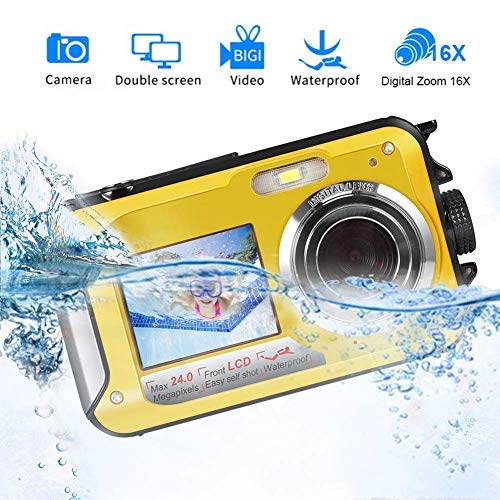
Image: Front view of the TIAMAT 24.0 MP Waterproof Digital Camera, showcasing its compact design and front screen.
2. Setup
2.1 Battery Installation and Charging
- Open the Battery Compartment: The battery compartment is securely sealed to ensure waterproofing. To open, press the cover lock with one hand and simultaneously push out the battery cover with the other hand or a small screwdriver.
- Insert Battery: Insert the provided 550mAh Li-ion battery into the compartment, ensuring correct polarity.
- Close Compartment: Securely close the battery compartment until it clicks into place. Ensure it is fully sealed before any water exposure.
- Charge Battery: Connect the camera to a power source using the supplied USB cable and charger. A full charge typically takes approximately 3 hours. The camera features low battery alerts.
2.2 Micro SD Card Installation
- Open Compartment: Open the battery compartment as described above.
- Insert Micro SD Card: Insert a Micro SD card (up to 32GB, not included) into the designated slot. Ensure the card is inserted correctly until it locks into place.
- Close Compartment: Securely close the battery compartment.
3. Operating Instructions
3.1 Power On/Off
- Power On: Press and hold the power button until the screen illuminates.
- Power Off: Press and hold the power button again. The camera also features an auto power-off function (60s/180s/300s).
3.2 Basic Functions and Modes
The camera supports various functions and modes to enhance your photography experience:
- Continuous Shooting: Capture a rapid sequence of photos.
- Flash Light: Use for low-light conditions. Options include automatic flash, mandatory flash, and red-eye reduction.
- Anti-Shake: Electronic image stabilization helps reduce blur from camera movement.
- Face Detection: Automatically detects faces in the frame for optimal focus and exposure.
- Smile Capture: Automatically takes a photo when a smile is detected.
- Self-Timer: Set a delay (2s, 5s, 10s) before a photo is taken.
Available Modes: Auto, Night Portrait, Night Scenery, Portrait, Scenery, Beach, High Sensitivity.
3.3 Using Dual Screens
The camera is equipped with a 2.7-inch rear TFT-LCD screen and a 1.8-inch front TFT-LCD screen. The front screen is particularly useful for framing self-portraits or group photos where the photographer is also in the shot.
3.4 Underwater Use
This camera is waterproof up to 3 meters (10 feet) for one hour per use. Ensure the battery compartment is securely sealed before submerging the camera. After use in saltwater, rinse the camera with fresh water and dry thoroughly.
4. Maintenance
- Cleaning: Use a soft, dry cloth to clean the camera body. For lenses, use a specialized lens cleaning cloth and solution. Do not use abrasive cleaners.
- Water Exposure: After using the camera in water, especially saltwater, rinse it with fresh water and wipe it dry with a soft cloth. Ensure no water remains in crevices.
- Storage: Store the camera in a cool, dry place away from direct sunlight and extreme temperatures. If storing for extended periods, remove the battery.
- Battery Care: To prolong battery life, avoid fully discharging the battery frequently. Charge the battery regularly, even if the camera is not in use.
5. Troubleshooting
| Problem | Possible Cause | Solution |
|---|---|---|
| Camera does not power on | Low or uncharged battery; incorrectly inserted battery. | Charge the battery fully. Ensure the battery is inserted with correct polarity. |
| Battery not charging | Faulty USB cable/charger; damaged charging port. | Try a different USB cable and charger. Ensure the charging port is clean and undamaged. Contact support if the issue persists. |
| Poor image focus | Incorrect mode; dirty lens; subject too close/far. | Check shooting mode settings. Clean the lens. Ensure subject is within focal distance (Macro: 20-30cm, Normal: 1.0m-infinity). |
| Memory card error or stuck | Card not inserted correctly; incompatible card; physical damage. | Reinsert the Micro SD card. Ensure it is a compatible card (up to 32GB). If stuck, gently try to remove it. Do not force. |
| Accidental photo/video deletion | User error during navigation. | Exercise caution when navigating menus, especially during preview. There is no undo function for deletion. |
| Water leakage | Battery compartment not sealed properly. | Immediately remove the camera from water. Open the compartment and dry thoroughly. Ensure the compartment is fully and correctly sealed before future water use. |
6. Specifications
- Max. Pixels: 24.0 MP
- Still Image Resolution: 24M (5600x4200), 20M (5200x3900), 14M (4416x3312), 10M (3648x2736), 8M (3264x2448), 5M (2592x1944), 2M (1920x1080)
- Video Format: AVI
- Video Resolution: FHD 1920x1080, HD 1280x720P, VGA, QVGA
- Dual Screens: Rear 2.7 inches TFT-LCD (4:3); Front 1.8 inches TFT-LCD (4:3)
- Waterproof Capability: 3 meters / 10 feet for one hour per time
- Digital Zoom: 16x
- Aperture: f/2.9
- ISO: Auto, 100, 200, 400
- Focal Distance: 1.0M~infinity
- Focus: Macro: 20~30cm, Normal: 1.0m~infinity
- Image Stabilization: Electronic
- Battery: 550mAh Li-ion
- Charging Time: 3 hours
- External Memory: Micro SD card, Max. 32GB (not included)
- Output Interface: Micro USB 2.0
- Dimensions: 4.45 x 2.56 x 1.26 inches (11.3 x 6.5 x 3.2 cm)
- Weight: 4.41 oz (125 g)
- Working Temperature: 0-40 Degree Celsius
7. Warranty and Support
7.1 Warranty Information
Gongpon provides a one-year warranty for this product.
7.2 Customer Support
For any after-sale questions or technical assistance, please contact customer support. Inquiries will be replied to within 24 hours during working days.


