Introduction
This user manual provides comprehensive instructions for the setup, operation, and maintenance of your Opta CF006-SB-112 Stainless-Steel O-MI Band Bluetooth Fitness Smartwatch. Please read this manual carefully before using the device to ensure proper functionality and to maximize your experience.
The Opta CF006-SB-112 is designed as an all-in-one activity tracker, offering features such as heart rate monitoring, blood pressure detection, sleep tracking, and various fitness activity records, compatible with both Android and iOS smartphones.
Product Overview
Package Contents
Upon unboxing, please verify that all the following items are included:
- 1 x Opta CF006-SB-112 Smartwatch
- 1 x USB Data Cable (Charger)
- 1 x User Manual
Key Features
The Opta CF006-SB-112 Smartwatch offers a range of functionalities to support your health and fitness:
- Dynamic Heart Rate Monitoring: Real-time heart rate tracking.
- Blood Pressure Monitoring: Built-in sensor for blood pressure detection.
- All-Day Activity Tracking: Records steps, distance, calories burned, and supports various activities like walking, cycling, climbing, and swimming.
- Sleep Quality Monitoring: Analyzes sleep patterns.
- Smart Notifications: Receives call notifications and SNS alerts when paired with a smartphone.
- Additional Features: Pedometer, weather display, date and time sync, drink water reminders, sedentary alerts, and remote camera control.
- Durable Design: Features a stainless-steel band and a tempered glass touch panel.
- Water Resistance: IP67 regular waterproof rating.
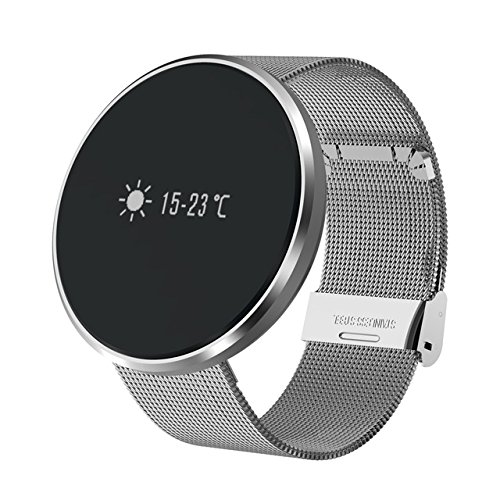
Figure 1: The Opta CF006-SB-112 Smartwatch with its stainless-steel band, displaying the current weather information on its OLED screen.

Figure 2: An illustration showcasing various features of the Opta Smart Bracelet, including heart rate, distance, calorie tracking, step counter, sleep monitoring, and notification capabilities.
Setup
1. Charging the Device
Before initial use, fully charge your smartwatch. Connect the provided USB data cable to the charging port on the smartwatch and plug the other end into a standard USB power adapter (not included) or a computer's USB port. The charging indicator on the screen will show the charging status. A full charge typically takes approximately 1-2 hours.
2. App Installation
To unlock the full potential of your smartwatch, you need to install the companion application, "Fun Do Pro," on your smartphone. You can download the app by scanning the QR code provided in the physical user manual or by searching for "Fun Do Pro" in your smartphone's app store (Google Play Store for Android or Apple App Store for iOS).
- For Android: Requires Android 4.0 or above.
- For iOS: Requires iOS 7.0 or above.
Ensure your smartphone's Bluetooth is enabled before proceeding to the next step.
3. Pairing with Your Smartphone
- Open the "Fun Do Pro" app on your smartphone.
- Follow the on-screen instructions to create an account or log in.
- Navigate to the device pairing section within the app (usually labeled "Device," "My Device," or a similar option).
- The app will search for available Bluetooth devices. Select "Opta CF006-SB-112" or a similar device name from the list.
- Confirm the pairing request on both your smartphone and the smartwatch if prompted.
- Once successfully paired, the smartwatch will synchronize its date and time with your phone, and you will be able to view data and receive notifications through the app.
The Bluetooth transmission distance is approximately 8 meters. Maintain proximity between your smartwatch and smartphone for stable connection.
Operating Instructions
Basic Navigation
The Opta CF006-SB-112 features a single-point touch panel. Tap the screen to cycle through different display modes and functions. A long press may activate certain features or enter sub-menus, depending on the context.
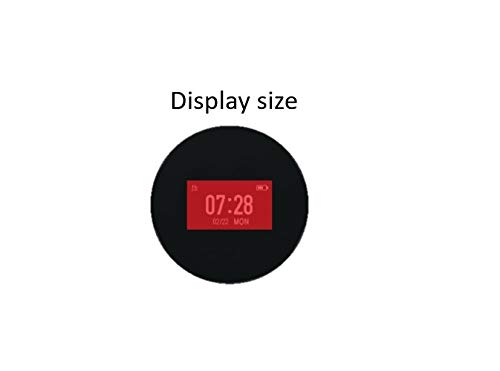
Figure 3: A close-up view of the smartwatch's 0.96-inch OLED display, showing the time and date.
Activity Tracking
The smartwatch automatically tracks your daily activities. You can view your steps, distance, and calories burned directly on the watch or in more detail within the "Fun Do Pro" app. The device supports tracking for walking, cycling, climbing, and swimming.
Heart Rate Monitoring
To measure your heart rate, navigate to the heart rate interface on the smartwatch. Ensure the watch is worn snugly on your wrist. The device will automatically detect your heart rate every 30 minutes. For manual measurement, remain still during the process. Detailed heart rate data and historical trends can be viewed in the app.

Figure 4: The smartwatch actively monitoring heart rate on a user's wrist, with the companion app displaying real-time heart rate data.
Blood Pressure Monitoring
Similar to heart rate, you can initiate blood pressure measurement from the corresponding interface on the smartwatch. Keep your arm still and relaxed. The built-in optical blood pressure sensor will provide a reading. For accurate results, it is recommended to measure at consistent times and under similar conditions. Consult a medical professional for any health concerns.

Figure 5: A user wearing the smartwatch, which is detecting blood pressure, with a smartphone displaying the health index within the app.
Notifications
Once paired with your smartphone, the smartwatch will display incoming call notifications and alerts from social media applications (SNS). Ensure that notification permissions are enabled for the "Fun Do Pro" app in your phone's settings.

Figure 6: The smartwatch displaying direct notifications such as call reminders, SMS messages, and social media alerts, enhancing convenience for the user.
Sleep Monitoring
Wear the smartwatch to bed, and it will automatically monitor your sleep quality. The "Fun Do Pro" app will provide a comprehensive analysis of your sleep patterns, including deep sleep, light sleep, and awake times.

Figure 7: The smartwatch tracking activity and sleep, with the companion app displaying detailed sleep analysis data.
Other Features
- Pedometer & Calories: Tracks steps taken and calories burned throughout the day.
- Weather: Displays current weather conditions (requires app sync).
- Sedentary Alert: Reminds you to move after periods of inactivity.
- Drink Water Reminder: Prompts you to hydrate at set intervals.
- Remote Camera: Allows you to remotely control your smartphone's camera from the smartwatch.
Maintenance
Proper care will extend the life and maintain the performance of your Opta CF006-SB-112 Smartwatch.
- Cleaning: Wipe the screen and band regularly with a soft, dry cloth. For stubborn dirt, a slightly damp cloth can be used, followed by immediate drying. Avoid using harsh chemicals or abrasive materials.
- Water Resistance: The smartwatch has an IP67 waterproof rating, meaning it is resistant to splashes and brief immersion. It is suitable for daily use and activities like hand washing or light rain. However, it is not recommended for showering, swimming (beyond light surface swimming), or diving, as prolonged exposure to water or high-pressure water jets may cause damage.
- Battery Care: Avoid fully discharging the battery frequently. Charge the device when the battery level is low. Store the device in a cool, dry place if not used for extended periods.
- Temperature: Do not expose the device to extreme temperatures (very hot or very cold) as this can affect battery life and overall performance.
Troubleshooting
If you encounter issues with your smartwatch, refer to the table below for common problems and their solutions.
| Problem | Possible Cause | Solution |
|---|---|---|
| Smartwatch does not turn on. | Low battery. | Charge the device for at least 30 minutes. |
| Cannot pair with smartphone. | Bluetooth is off; app not running; device out of range; previous pairing issues. | Ensure Bluetooth is on. Restart the "Fun Do Pro" app. Move smartwatch closer to phone. Forget device in phone's Bluetooth settings and re-pair. |
| Notifications not received. | App permissions not granted; app not running in background; phone's notification settings. | Check app notification permissions in phone settings. Ensure "Fun Do Pro" is running. Verify phone's notification settings for relevant apps. |
| Inaccurate heart rate/blood pressure readings. | Loose fit; movement during measurement; sensor obstruction. | Ensure the watch is snug on your wrist. Remain still during measurement. Clean the sensor on the back of the watch. |
| Screen unresponsive. | Temporary software glitch. | Restart the smartwatch (if possible, or let battery drain and recharge). |
If the problem persists, please contact customer support for further assistance.
Specifications
Detailed technical specifications for the Opta CF006-SB-112 Smartwatch:
| Feature | Detail |
|---|---|
| Model | CF006-SB-112 |
| Screen Type | OLED |
| Screen Size | 0.96 inches |
| Resolution | 128x64 pixels |
| Touch Panel Type | Single-point touch, Tempered Glass |
| Waterproof Rating | IP67 (Regular waterproof) |
| Battery Capacity | 100mAh |
| Compatible OS | Android 4.0 and above, iOS 7.0 and above |
| Bluetooth Version | Bluetooth 4.0 |
| Transmission Distance | Approximately 8 meters |
| Chipset | NRF51822 |
| RAM | 32K |
| ROM | 256K |
| Sensors | G-sensor, Heart Rate Sensor, Blood Pressure Sensor, Blood Oxygen Sensor |
| Material | Stainless-Steel |
| Item Weight | 100 g |
Warranty and Support
For information regarding warranty coverage, please refer to the warranty card included with your product or visit the official OPTA website. For technical support, troubleshooting assistance beyond this manual, or service inquiries, please contact OPTA customer support through their official channels.
Keep your purchase receipt as proof of purchase for warranty claims.


