
Pyle PD3000BA
Pyle 4 Channel Wireless Bluetooth Amplifier User Manual
Model: PD3000BA | Brand: Pyle
Introduction
Experience immersive audio and video performance with the Bluetooth Home Theater Amplifier Receiver, a powerful 3000-watt multimedia system that combines superior sound quality with versatile connectivity options. Designed for home entertainment enthusiasts, this receiver system features a 4-channel amplifier capable of powering up to four loudspeakers, bringing vibrant sound and deep bass into any room. It is equipped with a front-loading CD/DVD player and an integrated AM/FM radio with 50 station presets, offering endless options for enjoying music and movies.
The system is Bluetooth-enabled, allowing for seamless wireless streaming from your smartphone, tablet, or other Bluetooth-enabled devices. With its comprehensive connectivity options—including MP3/USB readers, SD memory card slots, multiple RCA inputs, and a variety of video outputs—the receiver integrates effortlessly with TVs, soundbars, and speaker systems for an enriched home theater experience. Its user-friendly front panel control center with a digital LCD display makes it easy to switch between inputs and customize your audio settings.
This amplifier receiver stands out for its combination of robust performance, modern design, and user-friendly features. Whether you're streaming music wirelessly or enjoying high-definition movies, the system's exceptional audio fidelity and visual clarity will transform your home entertainment. With its built-in cooling fan and rack-mountable design, this system is engineered for longevity and convenience, making it the perfect addition to any home theater setup. Enjoy a dynamic multimedia experience with unparalleled ease and versatility.
Safety Information
Please read all safety and operating instructions carefully before using this product. Retain these instructions for future reference.
- Power Source: Connect the unit to a power supply of the type described in the operating instructions or as marked on the appliance.
- Ventilation: Ensure proper ventilation. Do not block any ventilation openings. Install in accordance with the manufacturer's instructions.
- Water and Moisture: Do not use this apparatus near water or expose it to dripping or splashing.
- Heat: Do not install near any heat sources such as radiators, heat registers, stoves, or other apparatus (including amplifiers) that produce heat.
- Cleaning: Clean only with a dry cloth.
- Servicing: Do not attempt to service this product yourself. Refer all servicing to qualified service personnel.
What's in the Box

Image: All components included with the Pyle PD3000BA Preamplifier Receiver.
Upon opening the package, please verify that all listed items are present and in good condition:
- Preamplifier Receiver (PD3000BA)
- Remote Control
- Audio Video Cable
- Rack Mount Bracket (2 pieces)
- AM Loop Antenna
- AC Power Cord
- FM Antenna
Product Overview
Front Panel Features

Image: Front and Rear Panel Layout of the PD3000BA Amplifier.
- Power ON/OFF Button: Toggles the unit's power.
- Input Selector: Switches between various audio/video inputs (USB/MP3, Headphone, AUX, FM Tuner, CD/DVD Player).
- Headphone Jack: For private listening.
- Microphone Inputs (MIC1, MIC2): Connect microphones for karaoke or public address.
- Echo Control: Adjusts the echo effect for microphones.
- Mic Treble/Bass: Adjusts tone for microphone inputs.
- Mic Volume: Controls the volume of connected microphones.
- Sub Out Volume: Adjusts the output level for the subwoofer.
- Master Volume: Controls the overall output volume.
- USB Input: For connecting USB flash drives for MP3 playback.
- Digital Fluorescent Display Meter: Shows active functions and input.
- Control Buttons: Play/Pause, Stop, Forward, Reverse, Open/Close (for CD/DVD tray), Number Keys for direct track selection.
- Bluetooth Indicator: Illuminates when Bluetooth is active.
Rear Panel Features
- FM/AM Antenna Inputs: Connect the included FM and AM antennas for radio reception.
- Audio/Video Inputs (RCA): Connect external audio/video sources like DVD players, game consoles, or other media devices.
- Speaker Output Terminals (L/R, A/B): Connect passive speakers. Supports 2-8 ohms impedance.
- Cooling Fan: Ensures proper heat dissipation for stable operation.
- Optical/Coaxial Digital Inputs: For connecting digital audio sources.
- Subwoofer Output: Connects to a powered subwoofer.
- Voltage Selector: Allows switching between 110V and 220V power supply.
- AC Power Input: Connect the AC power cord.
Setup
1. Placement
Place the Pyle PD3000BA on a stable, flat surface. Ensure there is adequate ventilation around the unit to prevent overheating. If using the rack mount brackets, secure the unit properly in a standard audio rack.
2. Speaker Connection
Connect your passive speakers to the speaker output terminals on the rear panel. Ensure correct polarity (+ to + and - to -) for each speaker. The unit supports speakers with an impedance of 2-8 ohms. You can connect up to four speakers using the A/B speaker outputs.
Note: Incorrect speaker impedance or wiring can damage the amplifier.
3. Audio/Video Source Connection
- RCA Inputs: Use RCA cables to connect external audio/video devices (e.g., DVD player, game console, cable box) to the corresponding RCA input jacks on the rear panel.
- Digital Inputs (Optical/Coaxial): For high-quality digital audio, connect compatible devices to the Optical or Coaxial inputs.
- Subwoofer Output: Connect a powered subwoofer to the "Subwoofer Output" RCA jack for enhanced bass.
4. Antenna Connection
- FM Antenna: Connect the included FM antenna to the "FM Antenna" terminal. Extend the antenna fully for optimal reception.
- AM Loop Antenna: Connect the AM loop antenna to the "AM Antenna" terminals. Position it away from the unit for better reception.
5. Power Connection
Before connecting power, ensure the voltage selector on the rear panel matches your local power supply (110V or 220V). Connect the supplied AC power cord to the unit's AC power input and then to a wall outlet.
Operating Instructions
1. Power On/Off
Press the POWER button on the front panel to turn the unit on or off. The blue LED illumination will indicate power status.
2. Input Selection
Use the INPUT selector knob or the corresponding buttons on the remote control to choose your desired audio/video source (e.g., CD/DVD, USB, Bluetooth, FM/AM, AUX).
3. Volume Control
Adjust the overall sound level using the large MASTER VOLUME knob on the front panel or the volume buttons on the remote control.
4. Bluetooth Pairing

Image: Bluetooth connectivity with various devices.
- Select Bluetooth as the input source. The display will show "BLUE" and the Bluetooth indicator will flash.
- On your mobile device (smartphone, tablet, laptop), enable Bluetooth and search for available devices.
- Select "Pyle PD3000BA" from the list. Once paired, the Bluetooth indicator will stop flashing and remain solid.
- You can now stream audio wirelessly from your device to the amplifier.
5. FM/AM Radio Operation
Select FM or AM as the input. Use the TUNING +/- buttons on the front panel or remote to scan for stations. You can save your favorite stations using the MEMORY function (refer to the full user manual for detailed steps).
6. CD/DVD Playback
Insert a CD or DVD into the disc tray. Select CD/DVD as the input. Use the PLAY/PAUSE, STOP, FORWARD, and REVERSE buttons for playback control.
7. USB/MP3 Playback
Insert a USB flash drive containing MP3 files into the USB INPUT on the front panel. Select USB/MP3 as the input. The unit will automatically begin playing compatible audio files. Use the playback controls to navigate tracks.
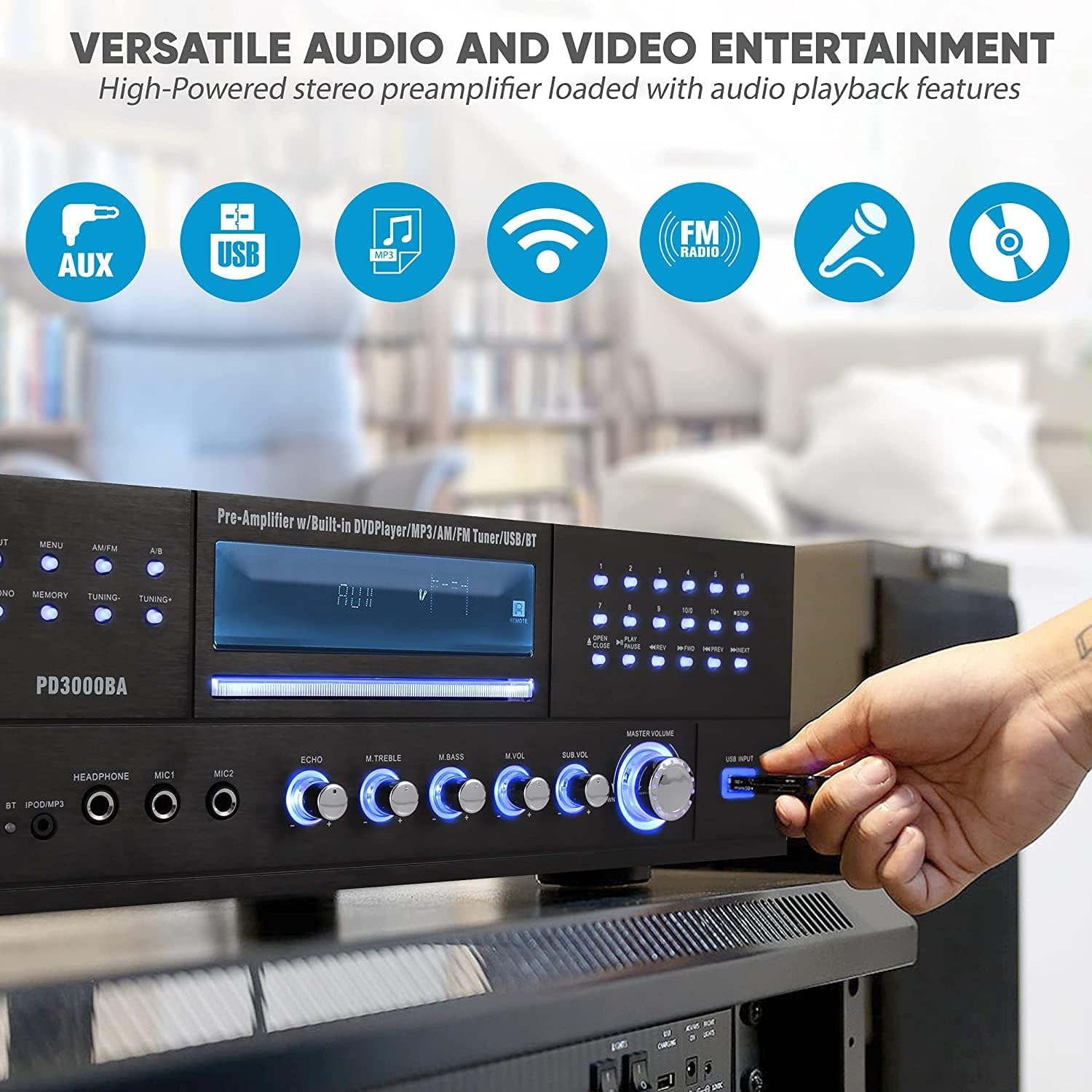
Image: Versatile audio and video entertainment options.
8. Microphone Usage (Karaoke)

Image: Using the amplifier for karaoke.
Connect up to two microphones to the MIC1 and MIC2 inputs. Adjust the microphone volume using the MIC VOL knob. Use the ECHO, M.TREBLE, and M.BASS controls to fine-tune the microphone sound.
9. Tone Controls
The amplifier features dedicated controls for TREBLE and BASS to adjust the overall audio tone to your preference.
Maintenance
- Cleaning: Disconnect the power cord before cleaning. Use a soft, dry cloth to clean the exterior of the unit. Do not use liquid cleaners or aerosol cleaners.
- Ventilation: Regularly check that the ventilation openings are clear of dust and debris to ensure proper airflow and prevent overheating.
- Storage: If storing the unit for an extended period, disconnect it from power and store it in a cool, dry place away from direct sunlight and extreme temperatures.
Troubleshooting
| Problem | Possible Cause | Solution |
|---|---|---|
| No power | Power cord not connected; Power outlet not active; Voltage selector incorrect. | Ensure power cord is securely plugged in. Check the power outlet. Verify voltage selector matches local supply. |
| No sound output | Incorrect input selected; Volume too low; Speakers not connected or faulty; Mute function active. | Select the correct input source. Increase master volume. Check speaker connections and ensure they are working. Deactivate mute. |
| Bluetooth not connecting | Unit not in Bluetooth mode; Device too far; Interference; Previously paired device connected. | Ensure Bluetooth input is selected. Move device closer to the amplifier. Turn off other Bluetooth devices. Disconnect from other devices. |
| Poor radio reception | Antennas not connected or poorly positioned; Weak signal. | Connect and fully extend FM antenna. Adjust position of AM loop antenna. Try manual tuning. |
| CD/DVD not playing | Disc inserted incorrectly; Disc is dirty or scratched; Incorrect input selected. | Ensure disc is inserted correctly. Clean the disc. Select CD/DVD input. |
Specifications
| Feature | Detail |
|---|---|
| Brand | Pyle |
| Model Number | PD3000BA |
| Product Dimensions | 14.17 x 16.93 x 5.47 inches |
| Item Weight | 22.3 pounds |
| Connectivity Technology | Bluetooth |
| Controller Type | Mechanical knob |
| Special Feature | Built-In Bluetooth |
| Compatible Devices | Smartphone |
| Total HDMI Ports | 1 |
| Connector Type | USB Type A |
| Audio Output Mode | Stereo |
| Surround Sound Channel Configuration | 4 |
| Color | Black |
| Manufacturer | Sound Around |
| First Available Date | March 4, 2019 |
Official Product Video
Video: A closer look at the Pyle 4 Channel Wireless Bluetooth Amplifier (PD3000BA), demonstrating its features and design. This video is provided by the seller.
Warranty and Support
Pyle products are designed for reliability and performance. For specific warranty information, please refer to the documentation included with your purchase or visit the official Pyle website.
For technical support, troubleshooting assistance, or service inquiries, please contact Pyle customer support. You may also find additional resources, including a detailed user manual, on the Pyle website or through the provided PDF documents:
Related documentsPD3000BA


Ask a question about this manual
Ask about setup, troubleshooting, compatibility, parts, safety, or missing instructions. Manuals+ will review the question and use this page’s manual context to help answer it.