
1. Introduction
The Pyle PD1000BA is a versatile 4-channel home theater preamplifier receiver designed to enhance your audio and video entertainment experience. It features a built-in Bluetooth receiver for wireless audio streaming, a front-loading CD/DVD player, AM/FM radio, and multiple input options including USB, SD card, and microphone inputs. This manual provides detailed instructions for setting up, operating, and maintaining your PD1000BA receiver.

Figure 1.1: Pyle PD1000BA 4-Channel 1000W Bluetooth Home Theater Preamplifier Receiver front view.
2. Safety Instructions
Please read all safety and operating instructions carefully before using this product. Retain these instructions for future reference.
- Power Source: Connect the unit only to the power supply type marked on the unit.
- Ventilation: Ensure proper ventilation. Do not block ventilation openings.
- Water and Moisture: Do not expose the unit to rain or moisture. Do not place objects filled with liquids on the unit.
- Heat: Keep the unit away from heat sources such as radiators, heat registers, stoves, or other heat-producing appliances.
- Cleaning: Clean only with a dry cloth.
- Servicing: Do not attempt to service this product yourself. Refer all servicing to qualified service personnel.
3. Package Contents
Verify that all items are included in the package:
- Preamplifier Receiver (PD1000BA)
- Remote Control
- Detachable Rack Mount Brackets
- RCA Connection Cable
- AM + FM Antennas
- Power Cable

Figure 3.1: Included accessories with the Pyle PD1000BA receiver.
4. Product Features
The Pyle PD1000BA offers a range of features for a comprehensive home audio and video experience:
- Audio + Video Home Theater System
- Built-in Bluetooth for Wireless Audio Streaming (Up to 35 ft range)
- Connects to TVs, Soundbars, and Speaker Systems
- Powers up to (4) Loud Speakers
- Front Loading CD/DVD Player
- 4-Channel Receiver System
- Front Panel Control Center with Digital LCD Display
- AM/FM Radio with 50 Station Memory Presets
- MP3 Digital Audio File Playback via USB Flash Drive & SD Memory Card Readers
- Aux (3.5mm) Input Jack
- Two 1/4'' Microphone Inputs with Echo, Treble, Bass, and Volume Controls
- 1/4'' Headphone Jack
- Video Outputs: S-Video, RCA, YPbPr (Component Video)
- Output dB (Decibel) Level LED Display
- Subwoofer RCA (L/R) Output
- Optical (Digital) Audio Output
- Built-in Ventilation Cooling Fan
- Rack Mountable System

Figure 4.1: The PD1000BA supports numerous audio input methods.

Figure 4.2: The PD1000BA supports dual microphone inputs for karaoke with echo effect.
5. Setup and Connections
Follow these steps to properly set up your Pyle PD1000BA receiver.
5.1 Unit Placement
Place the receiver on a stable, flat surface or install it in a standard audio rack using the provided brackets. Ensure adequate ventilation around the unit to prevent overheating.
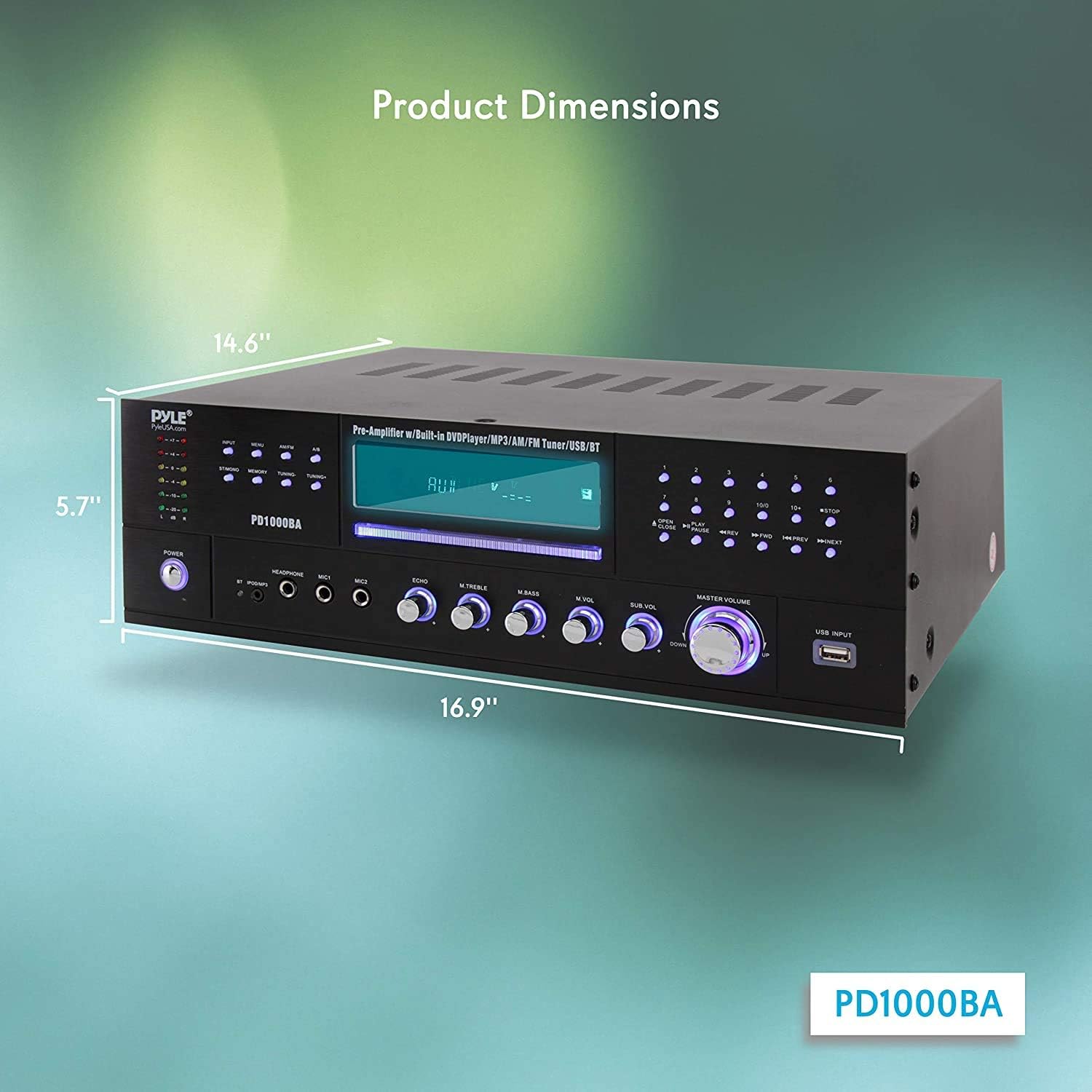
Figure 5.1: Product dimensions for placement and rack mounting.
5.2 Speaker Connections
The PD1000BA can power up to four speakers. Connect your speakers to the speaker terminal binding posts on the rear panel. Ensure correct polarity (positive to positive, negative to negative) for optimal sound quality.
5.3 Audio Inputs
- RCA (L/R) Audio Inputs: Connect external audio sources like a turntable (with a pre-amp), cassette deck, or other audio players using RCA cables.
- Aux (3.5mm) Input: Use the 3.5mm jack on the front panel for quick connection of portable audio devices.
- USB & SD Card Readers: Insert a USB flash drive or SD memory card into the front panel slots for MP3 audio playback.
5.4 Video Outputs
Connect the receiver to your TV or display using one of the following video output options:
- S-Video Output: For S-Video compatible displays.
- RCA Video Output: Standard composite video output.
- YPbPr (Component Video) Output: For higher quality component video connections.
5.5 Microphone Inputs
Plug up to two 1/4'' microphones into the front panel MIC1 and MIC2 jacks for karaoke or public address functions.
5.6 Bluetooth Connectivity
The built-in Bluetooth receiver allows wireless audio streaming from compatible devices. The Bluetooth wireless network name is 'PYLE'.

Figure 5.2: Wireless Bluetooth connectivity for streaming audio.

Figure 5.3: Rear panel connections for speakers, audio, and video.
6. Operation
This section details the operation of various functions of your PD1000BA receiver.
6.1 Power On/Off
Press the POWER button on the front panel to turn the unit on or off. The remote control also has a standby button.
6.2 Source Selection
Use the input selector buttons on the front panel or the remote control to choose your desired audio/video source (e.g., CD/DVD, FM/AM, Bluetooth, USB, AUX, RCA).
6.3 CD/DVD Player
Insert a CD or DVD into the front-loading slot. The unit will automatically detect the disc and begin playback. Use the playback controls (Play, Pause, Stop, Skip) on the front panel or remote.
6.4 AM/FM Radio
Select the FM/AM input. Use the tuning buttons to scan for stations. You can save up to 50 stations in memory presets.
6.5 Bluetooth Streaming
Select the Bluetooth input. On your device (smartphone, tablet, etc.), search for Bluetooth devices and select 'PYLE' to pair. Once paired, you can stream audio wirelessly.
6.6 USB/SD Playback
Insert a USB flash drive or SD card containing MP3 audio files into the respective front panel slot. The unit will automatically switch to USB/SD mode and begin playback. Use the playback controls.
6.7 Microphone and Echo Control
Adjust the microphone volume using the 'MIC VOL' knob. The 'ECHO' knob controls the echo effect for the microphones.
6.8 Equalizer (EQ) Controls
Use the 'TREBLE' and 'BASS' rotary controls on the front panel to adjust the high and low frequencies of the audio output.
6.9 Headphone Output
Connect headphones to the 1/4'' headphone jack on the front panel for private listening.
Video 6.1: Overview of the Pyle PD1000BA 4-Channel Wireless Bluetooth Power Amplifier, highlighting its features and connectivity options.
7. Troubleshooting
If you encounter issues with your PD1000BA, refer to the following common problems and solutions:
- No Power: Ensure the power cable is securely connected and the power outlet is functional. Check the power switch on the unit.
- No Sound: Verify speaker connections and polarity. Check the input source selection and volume levels. Ensure headphones are not plugged in if expecting speaker output.
- Bluetooth Pairing Issues: Make sure the unit is in Bluetooth mode. Ensure your device's Bluetooth is enabled and within range (up to 35 ft). Try unpairing and re-pairing the device.
- CD/DVD Not Playing: Ensure the disc is inserted correctly and is clean and free of scratches. Check disc compatibility (DVD/CD/VCD/CD-R/CD-RW/MP4).
- Poor Radio Reception: Extend and adjust the AM and FM antennas for better signal reception.
- Microphone Not Working: Ensure microphones are securely plugged in and the 'MIC VOL' knob is turned up.
If the problem persists, contact Pyle customer support for assistance.
8. Specifications
| Feature | Specification |
|---|---|
| MAX Output Power | 1000 Watt |
| Output Power (RMS) | 200 Watts x 2 @ 8 Ohm, 360 Watts x 2 @ 4 Ohm, 450 Watts x 2 @ 2 Ohm |
| Impedance | 8 Ohm |
| Aspect Ratio | 4:3 / 16:9 |
| Video System | PAL/NTSC |
| Audio S/N Ratio | >90dB |
| Frequency Range | +/-14 dB |
| CD/DVD Disc Compatibility | DVD/CD/VCD/CD-R/CD-RW/MP4 |
| Bluetooth Version | 3.0 |
| Bluetooth Wireless Range | Up to 35 ft. |
| Power | 110/220 Volt Switchable |
| Dimensions (L x W x H) | 16.9'' x 14.6'' x 5.7'' inches |
| Item Weight | 20.5 pounds |
9. Warranty and Support
Pyle products are designed for reliability and performance. For warranty information or technical support, please refer to the documentation included with your purchase or visit the official Pyle website. Keep your proof of purchase for warranty claims.


