
chenyang CY-PW-008
Chenyang ATX 6Pin 180 Degree Angled Power Connector Adapter User Manual
Model: CY-PW-008
Introduction
This manual provides comprehensive instructions for the installation and use of the Chenyang ATX 6Pin 180 Degree Angled Power Connector Adapter. This adapter is designed to optimize cable management and facilitate GPU installation in chassis with limited space by changing the direction of the 6PIN power cable connection from vertical to horizontal.
Product Features
- Angled Design: 180-degree angled connector for efficient cable routing.
- Compatibility: Designed for ATX 6Pin female to 6pin male connections, suitable for desktop graphics cards.
- Space Optimization: Enables horizontal power cable installation, addressing challenges in limited height chassis.
- Package Contents: Each package includes two adapters (one up-angled and one down-angled, or two of the same type depending on the specific product variant).
Setup and Installation
Follow these steps to properly install the ATX 6Pin 180 Degree Angled Power Connector Adapter:
-
Identify Adapter Type: The package typically includes two adapters, often referred to as Type-A and Type-B, which offer different orientations for the angled connection. Select the adapter that best suits your GPU's power connector orientation and chassis space.

Image: Top view of Type-A and Type-B 6-pin angled adapters, illustrating their distinct pin orientations.
- Prepare GPU: Ensure your graphics card is securely installed in its PCIe slot.
-
Connect Adapter to GPU: Carefully align the male end of the 180-degree angled adapter with the 6-pin power input on your graphics card. Gently push the adapter firmly into place until it is fully seated.
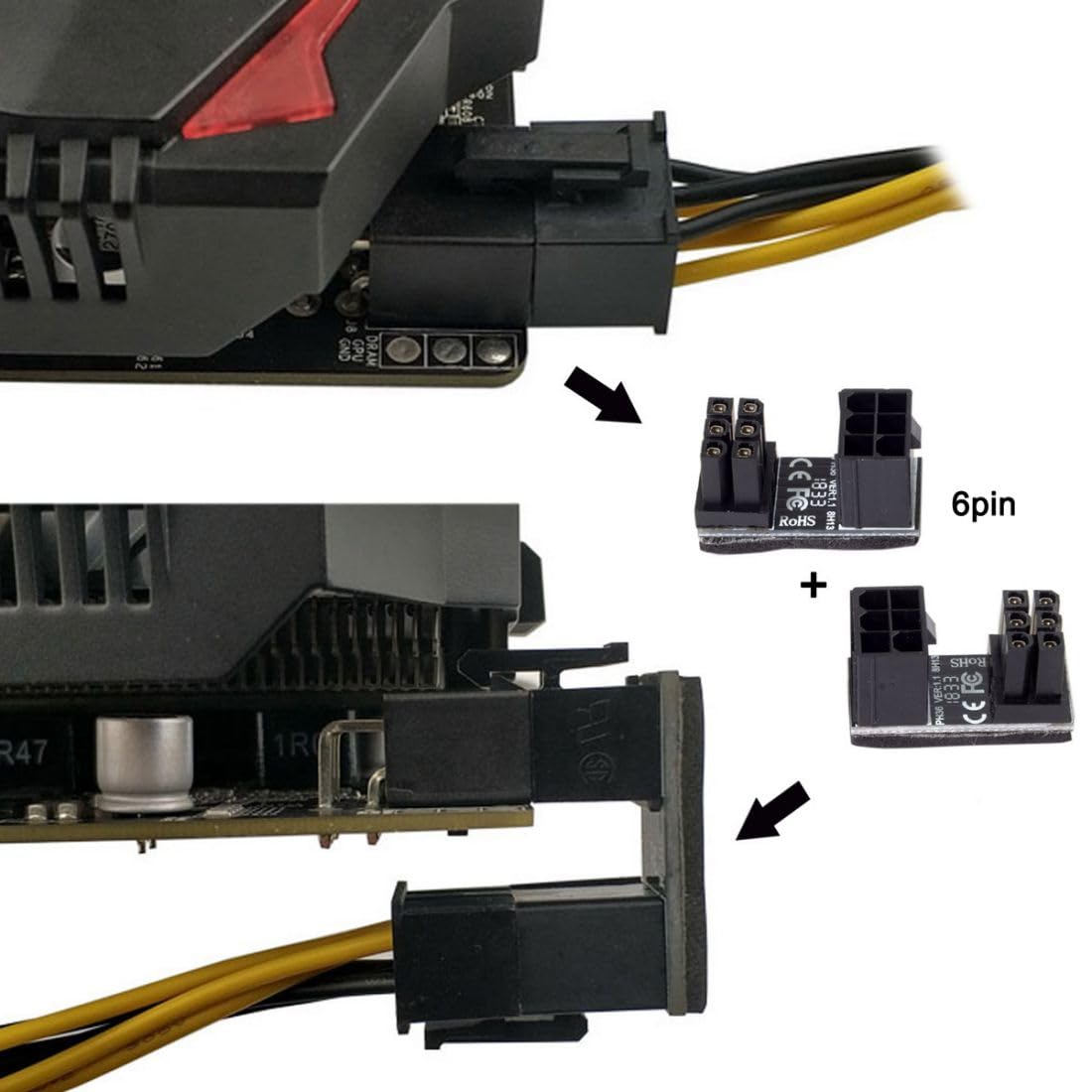
Image: Illustration of the 6-pin angled adapter connecting to a graphics card, demonstrating how it changes the cable's direction.
-
Connect Power Cable to Adapter: Take your ATX 6-pin power cable from your power supply unit (PSU) and connect its female end to the female input on the angled adapter. Ensure a secure connection.

Image: Side view demonstrating the adapter's effect on cable routing, allowing the power cable to run horizontally along the GPU.
- Verify Connection: Double-check that both connections (adapter to GPU, and power cable to adapter) are firm and fully seated to prevent power delivery issues.
Operation
The Chenyang ATX 6Pin 180 Degree Angled Power Connector Adapter operates passively. Once correctly installed, it simply redirects the power cable, allowing for improved aesthetics and compatibility within your PC chassis. No additional configuration or software is required.
Maintenance and Care
- Cleaning: If necessary, gently wipe the adapter with a dry, lint-free cloth. Do not use liquid cleaners or solvents.
- Handling: Always handle the adapter by its plastic housing. Avoid pulling on the pins or applying excessive force during installation or removal.
- Storage: Store unused adapters in a cool, dry place, away from direct sunlight and extreme temperatures.
Troubleshooting
- Issue: Adapter does not fit or is difficult to insert.
-
Solution: Ensure you are using the correct adapter type (Type-A or Type-B) for your GPU's power connector orientation. Some GPUs may have specific pin layouts that require a particular adapter orientation. Do not force the adapter; verify alignment before applying gentle pressure.
- Issue: System does not power on or GPU is not detected after installation.
-
Solution:
- Verify that both the adapter-to-GPU connection and the power cable-to-adapter connection are fully seated and secure.
- Ensure the power supply unit (PSU) is providing sufficient wattage for your graphics card.
- Temporarily remove the adapter and connect the power cable directly to the GPU to rule out the adapter as the cause.
- Issue: Adapter feels loose or wobbly.
-
Solution: Re-seat the adapter firmly. While the adapter is designed to be compact, ensure it is not obstructed by other components or cables within the chassis, which could prevent a full connection.
Specifications
| Brand | chenyang |
| Model Number | CY-PW-008 |
| Connector Type | ATX 6Pin Female to 6Pin Male |
| Angle | 180 Degree |
| Compatible Devices | Desktop Graphics Cards (GPU) |
| Color | Black (6PIN-6PIN*2) |
| Finish Type | Metallic |
| Package Dimensions | 4.49 x 2.01 x 0.87 inches |
| Item Weight | 1.76 ounces |
| Date First Available | February 26, 2019 |

Image: Detailed dimensions of the 6-pin angled adapter, showing its compact size.
Warranty and Support
For warranty information or technical support, please contact Chenyang customer service. You can find more information and contact details on the official Chenyang website: www.cablecc.com.


Image: Front and back views of the product packaging, which includes manufacturer contact details and certifications.
Ask a question about this manual
Ask about setup, troubleshooting, compatibility, parts, safety, or missing instructions. Manuals+ will review the question and use this page’s manual context to help answer it.