1. Introduction
The Mad Catz R.A.T. 8+ Optical Gaming Mouse is engineered for precision and customization, offering an unparalleled gaming experience. This manual provides comprehensive instructions for setting up, operating, maintaining, and troubleshooting your R.A.T. 8+ mouse, ensuring you can fully utilize its advanced features.

Figure 1: Mad Catz R.A.T. 8+ Gaming Mouse
2. Package Contents
Please verify that all items listed below are included in your package:
- R.A.T. 8+ Mouse
- 2 Additional Palm Rests
- 2 Additional Pinky Supports
- Quick Start Guide
- Technical Support and Warranty Information
- Set of 6 Logo Stickers
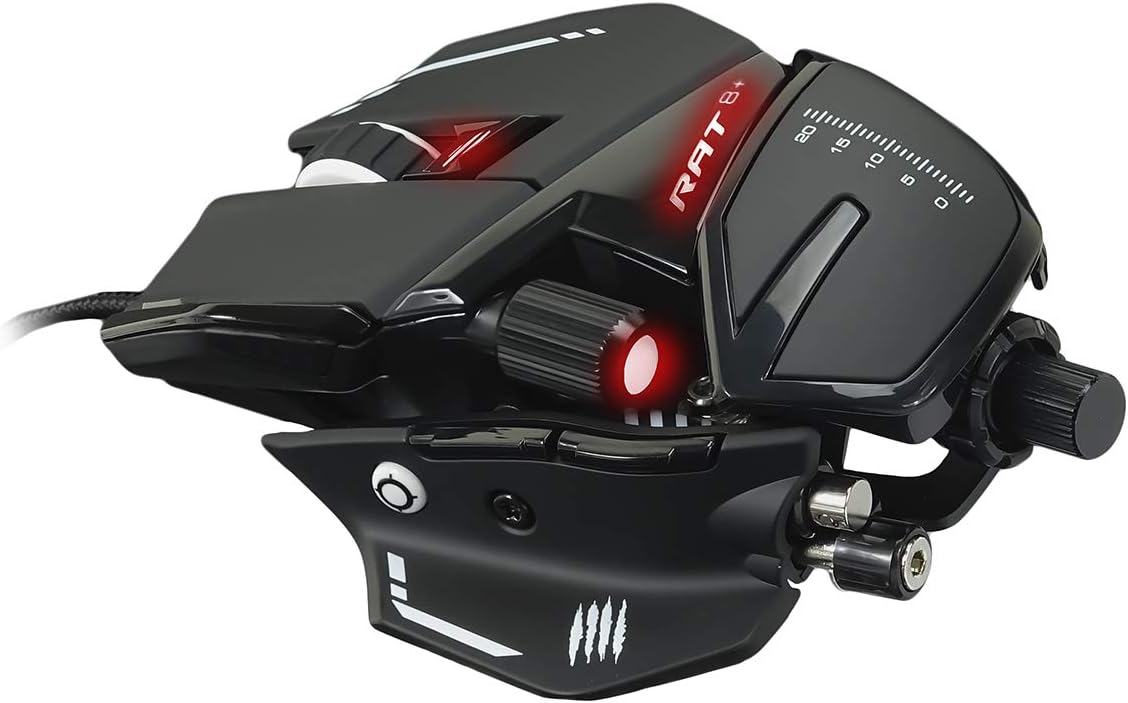
Figure 2: R.A.T. 8+ Package Contents
3. Setup
3.1 Connecting the Mouse
- Uncoil the braided USB cable from the R.A.T. 8+ mouse.
- Insert the USB connector into an available USB port on your computer.
- The mouse will be automatically recognized as a standard HID device.
3.2 Software Installation (F.L.U.X. Software)
To unlock the full customization potential of your R.A.T. 8+ mouse, download and install the F.L.U.X. software (Windows 7 and higher compatible) from the official Mad Catz website. This software allows for unlimited user profiles, button programming, and RGB lighting customization.
3.3 Physical Adjustments
The R.A.T. 8+ offers extensive physical customization to fit your grip style and comfort needs.
- Adjustable Palm Rest: The palm rest can be adjusted in length to suit different grip styles (palm, claw, or fingertip). You can also swap it out with the additional palm rests provided for further customization.
- Adjustable Thumb Rest: The thumb rest moves along two axes, allowing you to optimize comfort and access to the side buttons.
- Optional Pinky Supports: Utilize the two additional pinky supports to enhance your grip and prevent your pinky finger from dragging on the mousepad.
- Tunable Weight System: The mouse features a tunable weight system. Weights can be added or removed to customize the mouse's feel and balance according to your preference. The included tool facilitates easy swapping of support parts.

Thumb Rest

Palm Rest

Pinky Supports

Tunable Weight System

Extra Parts
Figure 3: Customizable Components of the R.A.T. 8+
4. Operating the Mouse
4.1 Button Functionality
The R.A.T. 8+ features 11 programmable buttons for maximum control:
- Scroll Wheel: Standard vertical scrolling.
- Left Click: Primary mouse button.
- Right Click: Secondary mouse button.
- DPI Button: Instantly increases or decreases DPI settings.
- Forward Button: Navigates forward in web browsers or applications.
- Backward Button: Navigates backward in web browsers or applications.
- Precision Button: Instantly adjusts sensitivity for precise movements, ideal for in-game sniping.
- Profile Button: Cycles through the 4 on-board user profiles.
- Side Scroll Wheel: Fully customizable within the F.L.U.X. software for additional functionality.

Figure 4: R.A.T. 8+ Button Layout
4.2 DPI Adjustment
The R.A.T. 8+ features a PIXART PMW3389 optical sensor, capable of up to 16000 DPI. Use the dedicated DPI button to cycle through preset DPI levels. Fine-tune these levels and create custom stages using the F.L.U.X. software.

Figure 5: Superior Optical Sensor and DPI Adjustment
4.3 User Profiles and On-board Memory
The mouse can store up to 4 user profiles directly on its on-board memory. These profiles can be quickly switched using the Profile button, allowing you to have different configurations ready for various games or applications without needing the software running in the background.
4.4 RGB LED Customization
Personalize your gaming experience with up to 16.8 million customizable colors across 3 RGB LED zones. Use the F.L.U.X. software to set your preferred lighting effects and colors.

Figure 6: Programmable Buttons and OMRON Switches
5. Maintenance
5.1 Cleaning
To maintain optimal performance and appearance, regularly clean your R.A.T. 8+ mouse:
- Use a soft, dry, lint-free cloth to wipe down the mouse surface.
- For stubborn dirt, slightly dampen the cloth with water. Avoid harsh chemicals or abrasive cleaners.
- Use a small brush or compressed air to clear dust and debris from crevices and around buttons.
- Ensure the optical sensor on the underside is clean and free of obstructions.
5.2 Care for Adjustable Parts
When adjusting or swapping components like palm rests, pinky supports, or weights, do so gently to avoid damage. Store unused components in a safe place to prevent loss.
6. Troubleshooting
If you encounter issues with your R.A.T. 8+ mouse, please refer to the following common solutions:
- Mouse Not Responding:
- Ensure the USB cable is securely connected to your computer.
- Try connecting the mouse to a different USB port.
- Restart your computer.
- Buttons Not Functioning as Expected:
- Verify that the F.L.U.X. software is installed and updated.
- Check your current active profile using the Profile button on the mouse.
- Open the F.L.U.X. software to review and reconfigure button assignments for the active profile.
- DPI/Sensitivity Issues:
- Use the DPI button to cycle through sensitivity levels.
- Adjust DPI settings within the F.L.U.X. software.
- Ensure your mousepad surface is clean and suitable for optical sensors.
- RGB Lighting Not Working:
- Confirm that the F.L.U.X. software is running and lighting settings are configured.
- Check for any software conflicts with other RGB control applications.
For further assistance, refer to the Technical Support and Warranty Information included in your package or visit the official Mad Catz support website.
7. Specifications
| Feature | Specification |
|---|---|
| Sensor | PIXART PMW3389 |
| Programmable Buttons | 11 |
| DPI Range | Up to 16000 |
| USB Report Rate | Up to 2000Hz |
| On-board Memory | 4 Profiles |
| Acceleration | 50G |
| Tracking Speed | 400 IPS |
| Frame Rate | 16,000 |
| Left and Right Button Lifetime | Up to 50 Million Clicks (OMRON Switches) |
| Weight | 145g (without cable) |
| F.L.U.X. Software Compatibility | Windows 7 and higher |
| Cable Length | 71 inches |
| Cable Type | Braided |
| Hardware Platform | PC |
| Color | Black |
8. Warranty and Support
Your Mad Catz R.A.T. 8+ mouse comes with a manufacturer's warranty. Please refer to the 'Technical Support and Warranty Information' document included in your product package for detailed terms and conditions, including warranty period and claim procedures.
For technical assistance, product registration, or to download the latest F.L.U.X. software and drivers, please visit the official Mad Catz support website. Keep your proof of purchase for warranty claims.


