
1. Introduction
Thank you for choosing the V-Guard GLADO 400.1200 Ceiling Fan. This manual provides essential information for the safe installation, operation, and maintenance of your new ceiling fan. Please read these instructions carefully before installation and retain them for future reference.
2. Important Safety Instructions
To reduce the risk of fire, electric shock, or injury to persons, please observe the following:
- Ensure the power is turned off at the main circuit breaker before installation or servicing.
- All electrical connections must be made in accordance with local codes, ordinances, and the National Electrical Code.
- Consult a qualified electrician if you are unsure about wiring or installation.
- Mount the fan directly to a structural ceiling joist or an outlet box marked "Acceptable for Fan Support of 35 lbs (15.9 kg) or less."
- Keep hands, feet, and other objects away from the rotating fan blades.
- Do not operate the fan with a damaged power cord or plug.
- Do not use the fan in wet locations or near water.
- This appliance is not intended for use by persons (including children) with reduced physical, sensory or mental capabilities, or lack of experience and knowledge, unless they have been given supervision or instruction concerning use of the appliance by a person responsible for their safety.
3. What's in the Box
Upon opening the package, verify that all components are present and undamaged:
- Fan Blades (3 included)
- Fan Motor Assembly
- Down Rod
- Canopies Pair (Upper and Lower)
- Shackle Set (for hanging)
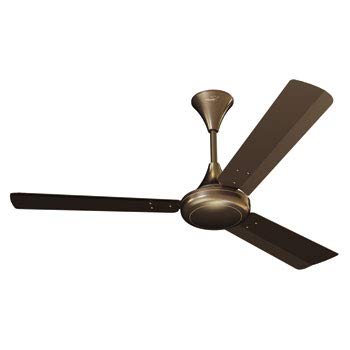
Image: All components of the V-Guard GLADO 400.1200 Ceiling Fan laid out, including the motor, blades, downrod, and canopies.
4. Product Specifications
| Feature | Detail |
|---|---|
| Brand | V-Guard |
| Model Name/Number | GLADO 400.1200 |
| Electric Fan Design | Ceiling Fan |
| Colour | BROWN (Pearl Brown finish) |
| Number of Blades | 3 |
| Blade Material | Aluminium Alloy |
| Material Type | Metal Body, Aluminium Alloy Blade |
| Wattage | 5 Watts (Note: This seems unusually low for a ceiling fan, typically it's much higher. User should verify actual power consumption.) |
| Power Source | Corded Electric |
| Mounting Type | Downrod Mount |
| Control Method | Remote and Button Control |
| Indoor/Outdoor Usage | Indoor |
| Special Feature | Double shielded ball bearing, performs well in low voltage conditions, strong metal construction. |
5. Setup and Installation
Note: Installation should be performed by a qualified electrician or a competent person. Always ensure power is disconnected at the main circuit breaker before beginning installation.
- Prepare the Mounting Location: Ensure the ceiling joist or outlet box can support the fan's weight (refer to safety instructions).
- Install the Mounting Bracket: Securely attach the mounting bracket to the ceiling outlet box using the provided hardware.
- Assemble the Down Rod: Insert the down rod through the canopy and attach it to the fan motor assembly. Ensure all screws are tightened.
- Hang the Fan: Carefully lift the fan assembly and hang it on the mounting bracket.
- Make Electrical Connections: Connect the fan's electrical wires to the house wiring according to the wiring diagram in the separate wiring guide (not included in this manual, typically provided with the product). Ensure all connections are secure and insulated.
- Attach Fan Blades: Securely attach the three fan blades to the motor housing using the provided screws.
- Install Canopies: Slide the upper and lower canopies into position to cover the wiring and mounting bracket, securing them as per the product's specific design.
- Final Check: Double-check all connections and ensure the fan is securely mounted and all components are properly assembled.
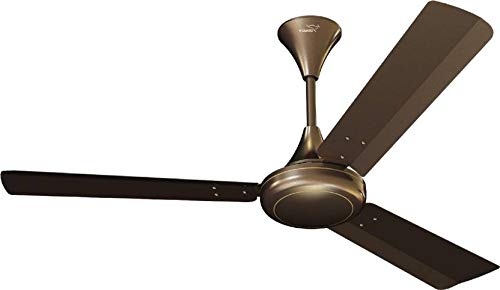
Image: A V-Guard GLADO 400.1200 Ceiling Fan with three brown blades, fully assembled and ready for installation.
6. Operating Instructions
The V-Guard GLADO 400.1200 Ceiling Fan can be operated via a wall-mounted button control or a remote control (if included with your model).
6.1. Using Button Control
- Power On/Off: Press the main power button on the wall control to turn the fan on or off.
- Speed Control: Use the speed control buttons (usually marked 1-5 or with arrows) to adjust the fan speed.
6.2. Using Remote Control (if applicable)
- Insert Batteries: Open the battery compartment on the remote control and insert the required batteries (typically AAA, not included).
- Power Button: Press the ON/OFF button to start or stop the fan.
- Speed Adjustment: Use the speed buttons to cycle through or directly select desired fan speeds.
- Timer Function: If available, use the timer button to set the fan to turn off automatically after a set period.
The fan is designed for steady performance even in low voltage conditions, ensuring consistent airflow.
7. Maintenance
Regular maintenance ensures the longevity and optimal performance of your V-Guard GLADO 400.1200 Ceiling Fan.
- Cleaning: Dust the fan blades and motor housing regularly with a soft, damp cloth. Do not use abrasive cleaners or solvents. Ensure the fan is turned off and power is disconnected before cleaning.
- Blade Tightness: Periodically check that all blade screws are tight. Over time, they may loosen due to vibration.
- Motor Lubrication: The fan features double shielded ball bearings, which are typically sealed and do not require lubrication. Do not attempt to lubricate the motor.
- Wiring Check: Annually, have a qualified electrician inspect the wiring connections for any signs of wear or loosening.
8. Troubleshooting
Before contacting customer service, refer to the following common issues and solutions:
| Problem | Possible Cause | Solution |
|---|---|---|
| Fan does not start | No power, loose wiring, remote control batteries dead. | Check circuit breaker. Ensure all wiring connections are secure. Replace remote control batteries. |
| Fan wobbles | Loose blade screws, unbalanced blades, loose mounting. | Tighten all blade screws. Ensure blades are balanced (use a balancing kit if necessary). Check mounting bracket for secure attachment. |
| Noisy operation | Loose screws, internal motor issue, fan rubbing against canopy. | Check and tighten all screws. Ensure canopies are not touching the fan motor. If noise persists, contact customer support. |
| Remote control not working | Dead batteries, remote not paired, obstruction. | Replace batteries. Refer to remote control pairing instructions (if applicable). Ensure no obstructions between remote and fan receiver. |
9. Warranty and Support
The V-Guard GLADO 400.1200 Ceiling Fan comes with a standard brand warranty. For specific warranty terms and conditions, please refer to the warranty card included with your product or visit the official V-Guard website.
For technical assistance, troubleshooting beyond this manual, or to inquire about replacement parts, please contact V-Guard customer support. Contact details can typically be found on the product packaging or the official V-Guard website.
Extended warranty plans may be available from third-party providers like Onsitego. Please check with your retailer for details on such plans.
10. Product Overview Video
Video: A short product overview video for the V-Guard GLADO 400.1200 Ceiling Fan, highlighting its features such as strong metal construction, performance in low voltage, double shielded ball bearings, and included components. This video provides a visual summary of the product's key attributes.

