
OTYTY W52
OTYTY LED Work Light (Model W52) Instruction Manual
Rechargeable, Portable, 5 Modes, Magnetic Base, and Hanging Hook
Introduction
Thank you for choosing the OTYTY LED Work Light. This manual provides essential information for the safe and effective operation, maintenance, and troubleshooting of your new work light. Please read it thoroughly before use and retain it for future reference.

Image: Two OTYTY LED Work Lights, each with a foldable head and magnetic base, shown alongside two USB charging cables.
Important Safety Information
- Do not look directly into the LED light when it is on, as it may cause eye strain or temporary vision impairment.
- Keep the device away from extreme temperatures, direct sunlight, and corrosive liquids.
- Do not attempt to disassemble or modify the work light. This will void the warranty and may cause damage or injury.
- Ensure the USB charging port cover is securely closed when not charging to maintain water resistance.
- Keep out of reach of children.
Product Overview and Features
The OTYTY LED Work Light is a versatile and portable lighting solution designed for various tasks. Key features include:
- 5 Lighting Modes: High Brightness, Medium Brightness, Front Light, Red Warning, and Strobe Red.
- Magnetic Base: Strong built-in magnet for attachment to metal surfaces.
- Hanging Hook: Convenient for suspending the light in various locations.
- 360-Degree Rotation: Adjustable head for multi-angle illumination.
- Rechargeable Battery: Built-in 2000mAh battery, charged via USB.
- Water-Resistant: IP44 rating for use in rainy conditions.
- Durable Construction: Made from Acrylonitrile Butadiene Styrene (ABS).
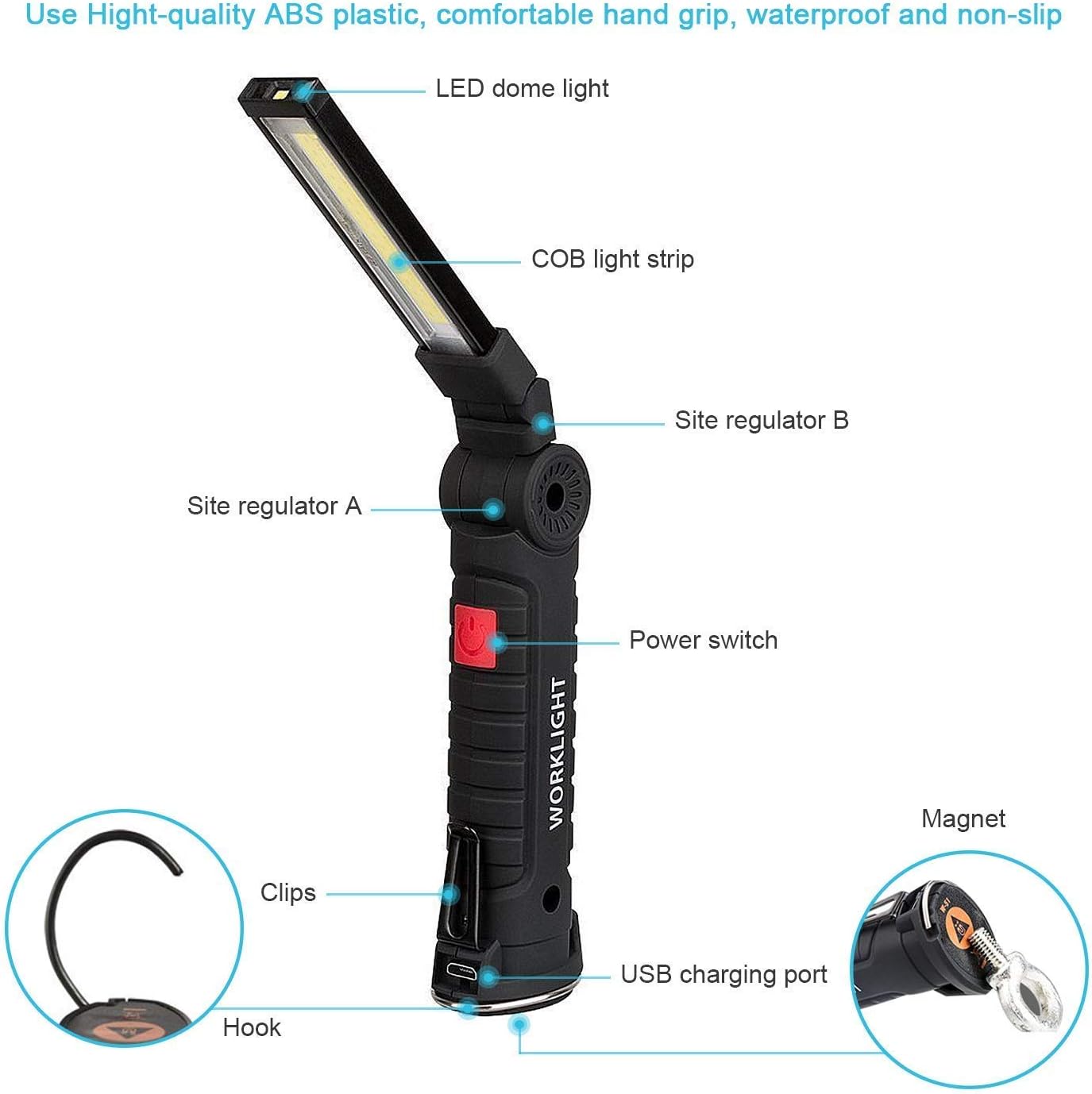
Image: Detailed diagram illustrating the various components of the work light, including the LED dome light, COB light strip, power switch, USB charging port, magnetic base, and hanging hook.
Setup
Charging the Work Light
- Locate the USB charging port at the base of the work light. It is protected by a rubber cover.
- Gently open the rubber cover to expose the USB port.
- Connect the provided USB cable to the work light's port and to a compatible USB power source (e.g., wall adapter, computer USB port, power bank).
- The charging indicator light will illuminate during charging. Once fully charged, the indicator light may change color or turn off, depending on the model.
- After charging, securely close the rubber cover to ensure the device maintains its IP44 water resistance.
Video: Demonstrates the unboxing, folding mechanism, and charging process of the OTYTY LED Work Light. It also shows the magnetic base and hanging hook in use.
Operating Instructions
Power On/Off and Mode Selection
The work light features a single power button for controlling power and cycling through lighting modes.
- To Power On: Press the power button once. The light will typically start in High Brightness mode.
- To Change Modes: Press the power button repeatedly to cycle through the 5 modes in the following order:
- High Brightness (COB light)
- Medium Brightness (COB light)
- Front Light (LED dome light)
- Red Warning (COB red light) - Press and hold for 3 seconds to activate Red Warning mode from any other mode.
- Strobe Red (COB red light flashing)
- To Power Off: Continue pressing the power button until the light turns off, or press and hold the button for a few seconds in any mode.

Image: Visual representation of the five distinct lighting modes available on the work light, including high and medium COB brightness, front LED light, and red warning/strobe modes.
Using the Magnetic Base and Hanging Hook
- Magnetic Base: The strong magnet at the base allows you to attach the work light to any ferrous metal surface for hands-free operation. This is ideal for car repairs, working under a hood, or attaching to metal shelving.
- Hanging Hook: Extend the integrated hook from the base to hang the light from non-magnetic objects such as tent poles, branches, or overhead fixtures.
Adjusting the Light Head
The light head can be rotated 360 degrees horizontally and adjusted vertically to direct illumination precisely where needed. This flexibility allows for optimal lighting in various working environments.
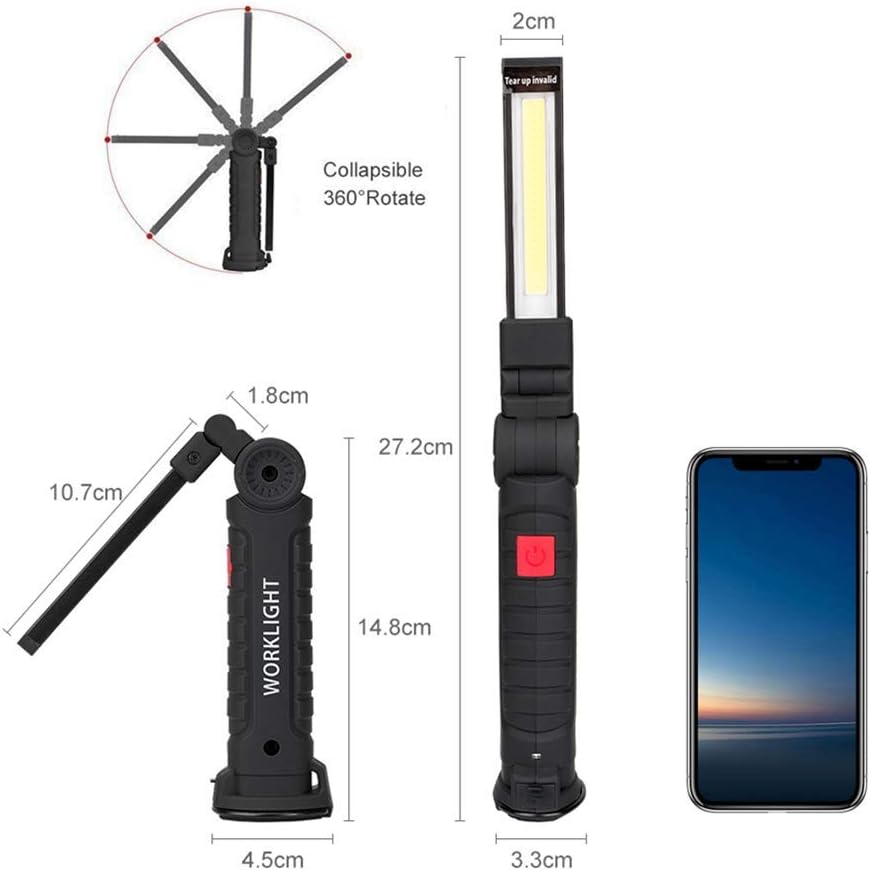
Image: Diagram illustrating the collapsible and 360-degree rotatable design of the work light, highlighting its flexibility and compact dimensions.
Maintenance
- Cleaning: Wipe the work light with a soft, damp cloth. Do not use abrasive cleaners or solvents.
- Storage: Store the work light in a cool, dry place when not in use. Ensure the USB port cover is sealed.
- Battery Care: To prolong battery life, avoid fully discharging the battery frequently. Recharge the light regularly, even if not in constant use.
Troubleshooting
| Problem | Possible Cause | Solution |
|---|---|---|
| Light does not turn on. | Battery is depleted. | Charge the work light using the provided USB cable. |
| Light does not charge. | Faulty USB cable or power source. | Try a different USB cable or power adapter. Ensure the cable is fully inserted. |
| Light flickers or is dim. | Low battery or incorrect mode. | Recharge the battery. Cycle through modes to ensure desired brightness is selected. |
| Water entered the device. | USB port cover not sealed. | Immediately power off the device and allow it to dry completely. Do not attempt to charge or use until fully dry. Ensure the USB port cover is always sealed when not charging. |
Specifications
- Brand: OTYTY
- Model Number: W52
- Light Source Type: LED (COB)
- Brightness: 1000 Lumens (Maximum)
- Power Source: Rechargeable Battery (Built-in 2000mAh)
- Material: Acrylonitrile Butadiene Styrene (ABS)
- Water Resistance: IP44
- Product Dimensions: 10.7"L x 1.77"W x 1.29"H (27.2 x 4.5 x 3.3 cm)
- Item Weight: 5.1 ounces (145 Grams)
- Special Features: Adjustable, Magnetic Mount, Hanging Hook
- UPC: 694563239290
Warranty and Support
For warranty information or technical support, please refer to the product packaging or contact OTYTY customer service through the retailer where the product was purchased. Please have your model number (W52) and purchase date available.

Image: OTYTY brand logo.
Related Documents - W52
 |
Olight Swivel Pro User Manual User manual for the Olight Swivel Pro, a foldable COB LED work light with 1100 lumens, magnetic base, and hanging hook. Includes specifications, operating instructions, safety warnings, and warranty information. |
 |
NoEnName_Null Wall Hook Installation Guide & Safety Information Comprehensive guide for installing the NoEnName_Null wall hook, including important safety warnings, step-by-step instructions, and suitable wall surface compatibility for suction cups and drilled installations. |
 |
Magnetic Hook Product Manual - Features, Usage, and Safety Comprehensive product manual for the mognot Magnetic Hook, detailing its features, installation, usage instructions, surface requirements, weight limits, and safety warnings. |
 |
NEBO SLIM+ Rechargeable LED Worklight & Power Bank User Guide A guide to the NEBO SLIM+ worklight, featuring a 700-lumen LED spotlight, PowerBank functionality, a rugged plastic body, belt/pocket clip, hanging hook, full dimming, and a magnetic base. Includes specifications, operating modes, and charging instructions. |
 |
ESMARTER W51/W52 Rechargeable LED Flashlight User Manual User manual for the ESMARTER W51/W52 portable COB LED flashlight. Learn how to use, charge, and care for your rechargeable flashlight with magnetic base, featuring multi-gear adjustment and built-in battery for outdoor activities, emergencies, and more. |
 |
Hook RY-00001 Product Manual Product manual for the Hook RY-00001 (J-hook), including instructions for use, safety warnings, maintenance, and technical specifications from Yiwu ruyi e-commerce co., ltd. This manual covers the 6Pcs Strong Self-Adhesive J-hook. |
Ask a question about this manual
Ask about setup, troubleshooting, compatibility, parts, safety, or missing instructions. Manuals+ will review the question and use this page’s manual context to help answer it.