
VONDIOR 0
Vondior NOAA Weather Radio User Manual
Model: 0
Your essential companion for emergency weather alerts and reliable broadcasting.
1. Product Overview
The Vondior NOAA Weather Radio is a compact, battery-operated portable radio designed to provide critical weather alerts and standard AM/FM broadcasting. Its robust design and simple controls make it an ideal device for everyday use and emergency preparedness.
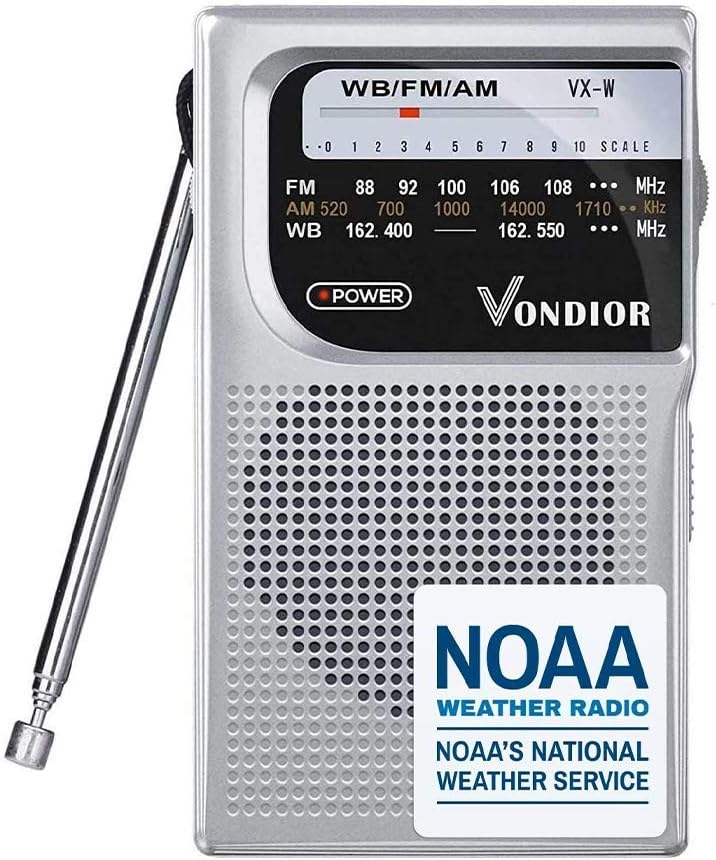
Figure 1: Front view of the Vondior NOAA Weather Radio, highlighting its compact size and clear display.
Key Features:
- NOAA Weather Alert: Receive timely notifications for severe weather events.
- AM/FM Bands: Access standard radio broadcasts for news, music, and entertainment.
- Portable Design: Lightweight and compact, easily fits into pockets or emergency kits.
- Battery Operated: Powered by 2 AA batteries for extended use during power outages.
- Telescoping Antenna: Enhances reception for clear audio.
- Headphone Socket: For private listening.

Figure 2: The Vondior radio positioned against a backdrop of a storm and damaged buildings, emphasizing its role in providing crucial weather alerts during emergencies.

Figure 3: Diagram illustrating the radio's capability to receive AM, FM, and NOAA weather band frequencies, with visual representations of signal reception.
2. Setup
2.1 Battery Installation
The Vondior NOAA Weather Radio operates on 2 AA batteries (not included). Follow these steps to install the batteries:
- Locate the battery compartment cover on the back of the radio.
- Slide the cover downwards or in the direction indicated by an arrow to open it.
- Insert 2 AA batteries, ensuring the positive (+) and negative (-) terminals align correctly with the markings inside the compartment.
- Replace the battery compartment cover by sliding it back into place until it clicks securely.
Note: Always use fresh batteries for optimal performance. Remove batteries if the radio will not be used for an extended period to prevent leakage.
3. Operating Instructions
Familiarize yourself with the radio's controls for effective operation.

Figure 4: Detailed view of the radio's controls, including the telescoping antenna, tuning dial, built-in headphone port, and FM/AM switch.
3.1 Power On/Off and Volume Control
- The radio is turned on and off using the Volume Knob, typically located on the side or top. Rotate the knob clockwise to turn the radio on and increase the volume.
- Rotate the knob counter-clockwise until it clicks to turn the radio off.
3.2 Band Selection (AM/FM/NOAA)
- Use the Band Selector Switch (often labeled FM/AM/WB) to choose your desired frequency band.
- FM: 87-108MHz for standard FM broadcasts.
- AM: 520-1710KHz for standard AM broadcasts.
- WB (Weather Band): 162.400-162.550MHz for NOAA weather radio broadcasts.
3.3 Tuning for Stations
- Extend the Telescoping Antenna fully for best reception, especially for FM and Weather Band.
- Slowly rotate the Tuning Dial to scan for stations. The frequency scale on the front panel will indicate the approximate frequency.
- Adjust the antenna position for clearer reception.
3.4 Headphone Use
- Plug any standard 3.5mm stereo headphones into the Mono Headphone Socket for private listening.
- When headphones are plugged in, the internal speaker will be muted.

Figure 5: A user listening to the Vondior radio with headphones, demonstrating its portability and private listening option.
4. Specifications
| Feature | Detail |
|---|---|
| Brand | VONDIOR |
| Model Number | 0 |
| Color | Silver |
| Product Dimensions | 4.9 x 3.12 x 1.28 inches |
| Item Weight | 6.2 ounces |
| Power Source | 2 AA Batteries |
| Radio Bands Supported | NOAA, AM, FM |
| FM Frequency Range | 87-108MHz |
| AM Frequency Range | 520-1710KHz |
| WB Frequency Range | 162.400-162.550MHz |
| Water Resistance Level | Not Water Resistant |

Figure 6: Visual representation of the radio's compact dimensions, shown alongside a credit card for size comparison.
5. Troubleshooting
If you encounter issues with your Vondior NOAA Weather Radio, refer to the following common problems and solutions:
| Problem | Possible Cause | Solution |
|---|---|---|
| No power / Radio does not turn on | Dead or incorrectly installed batteries. | Replace with fresh AA batteries, ensuring correct polarity (+/-). |
| Poor or no reception | Antenna not extended, weak signal area, interference. | Fully extend the telescoping antenna. Try repositioning the radio or moving to an open area. |
| Static or distorted sound | Weak signal, incorrect tuning, interference. | Fine-tune the station slowly. Adjust antenna. Move away from electronic devices that may cause interference. |
| Batteries drain quickly | Radio not fully turned off, old batteries. | Ensure the volume knob is turned completely counter-clockwise until it clicks off. Use high-quality batteries. Remove batteries if storing for long periods. |
6. Maintenance
- Cleaning: Wipe the radio with a soft, dry cloth. Do not use liquid cleaners or abrasive materials.
- Storage: Store the radio in a cool, dry place away from direct sunlight and extreme temperatures. Remove batteries if storing for extended periods to prevent corrosion.
- Handling: Avoid dropping the radio or subjecting it to strong impacts, as this may damage internal components.
7. Warranty and Support
Vondior stands behind the quality of its products.
- Warranty: This Vondior NOAA Weather Radio comes with a 3-year warranty.
- Customer Service: Our dedicated customer service team is available 24/7 to assist you with any questions or concerns regarding your product. Please refer to the product packaging or the Vondior website for contact information.
Ask a question about this manual
Ask about setup, troubleshooting, compatibility, parts, safety, or missing instructions. Manuals+ will review the question and use this page’s manual context to help answer it.