
1. Product Overview
The Poshshine Fiber Optic HDMI Cable is designed for high-fidelity video and audio transmission over longer distances without signal loss. Utilizing a premium photoelectric conversion module and optic fiber conductor core, it converts electrical signals to optical signals, ensuring uncompressed, high-quality data transfer.
This cable supports HDMI 2.0 specifications, including 18Gbps bandwidth, Dolby 7.1 audio, HEC (HDMI Ethernet Channel), and is backward compatible with HDMI 1.4 and 1.3. It is ideal for connecting devices such as TVs, HDTVs, TV Boxes, Home Theater systems, and gaming consoles like PS4.

Image 1.1: The Poshshine Fiber Optic HDMI Cable in a coiled state, showcasing its design.
Key Features:
- Fiber Optic Technology: Converts electrical signals to optical for lossless transmission over long distances.
- High Bandwidth: Supports 18Gbps for 4K@60Hz, 3D, and 4K HDR content.
- EMI Resistance: Optical signal transmission is immune to electromagnetic interference, ensuring a stable picture without flicker.
- Flexible and Lightweight: Slim design for easier installation compared to traditional copper cables.
- Low Power Consumption: Operates efficiently without requiring external power.
- Connector Type: Male to Male HDMI.
- Cable Diameter: φ4.8mm.
2. Important Notes
- One-Way Transmission: This fiber optic HDMI cable is designed for one-way signal transmission only. It is not bidirectional.
- Connector Orientation: Ensure the connector labeled "Source" is connected to the signal-generating device (e.g., Blu-ray player, PS4) and the connector labeled "Display" is connected to the receiving device (e.g., TV, projector). Incorrect connection will prevent signal transmission.
- Handle with Care: While flexible, avoid excessive bending or sharp turns, especially near the connectors, to prevent damage to the internal optical fibers.
3. Setup Instructions
Follow these steps to properly connect your Poshshine Fiber Optic HDMI Cable:
- Identify Connectors: Locate the two HDMI connectors on the cable. One will be clearly labeled "Source" and the other "Display".
- Connect to Source Device: Plug the HDMI connector labeled "Source" into the HDMI output port of your source device (e.g., media player, gaming console, PC).
- Connect to Display Device: Plug the HDMI connector labeled "Display" into the HDMI input port of your display device (e.g., TV, monitor, projector).
- Power On Devices: Ensure both your source and display devices are powered on.
- Select Input: On your display device, select the correct HDMI input channel to view the content from your source device.
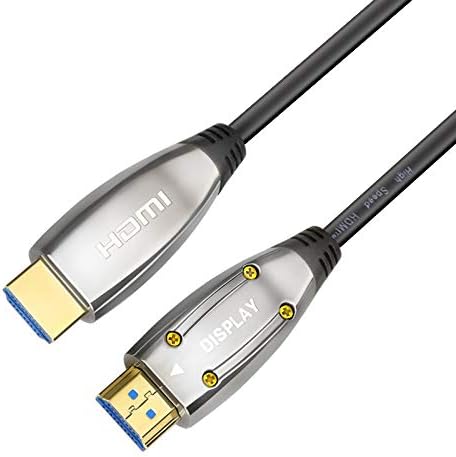
Image 3.1: Close-up view of the 'Display' end of the fiber optic HDMI cable, showing the connector and label.
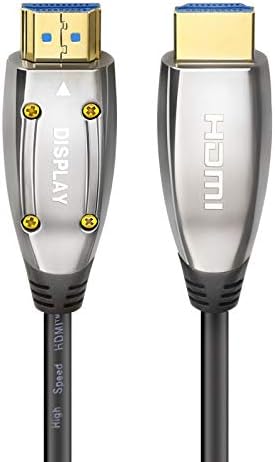
Image 3.2: Both 'Source' and 'Display' connectors of the fiber optic HDMI cable, highlighting their distinct labels.
4. Operating Instructions
Once the cable is correctly connected and devices are powered on, the Poshshine Fiber Optic HDMI Cable operates automatically. It will transmit the audio and video signal from your source device to your display device.
- High-Resolution Content: For optimal performance with 4K HDR content, ensure both your source and display devices support 4K@60Hz and HDR.
- Audio Settings: Verify your display or audio receiver settings are configured to receive audio via HDMI if you are experiencing no sound.
- CEC/HEC Functionality: If your devices support HDMI CEC (Consumer Electronics Control) or HEC (HDMI Ethernet Channel), these features should function automatically through the cable, provided they are enabled on your devices.
5. Maintenance
To ensure the longevity and optimal performance of your fiber optic HDMI cable, follow these maintenance guidelines:
- Storage: When not in use, store the cable in a clean, dry place, preferably coiled loosely to avoid kinks.
- Cleaning: If the connectors become dusty, gently wipe them with a clean, dry, lint-free cloth. Avoid using liquids or abrasive cleaners.
- Physical Protection: Protect the cable from physical damage, such as being stepped on, pinched, or exposed to extreme temperatures.
- Connector Care: Avoid pulling the cable by the cord itself; always grasp the connector housing when plugging or unplugging.
6. Troubleshooting
If you encounter issues with your Poshshine Fiber Optic HDMI Cable, refer to the following table for common problems and solutions:
| Problem | Possible Cause | Solution |
|---|---|---|
| No picture or sound | Incorrect connector orientation ("Source" and "Display" reversed). Loose connection. Incorrect input selected on display. | Ensure "Source" is connected to the source device and "Display" to the display device. Firmly plug in both ends of the cable. Select the correct HDMI input on your TV/monitor. |
| Flickering or intermittent signal | Cable damage. Source/display device issue. | Inspect the cable for visible damage. Try a different HDMI cable to isolate the problem. Restart both source and display devices. |
| No 4K@60Hz or HDR | Source/display device does not support the feature. Device settings not configured for 4K/HDR. | Verify that both your source and display devices are 4K@60Hz and HDR compatible. Check the video output settings on your source device and input settings on your display device. |
| No audio | Audio settings on source/display device. Cable not fully seated. | Check audio output settings on your source device and input settings on your display/audio receiver. Ensure the cable is securely connected. |
7. Specifications
Detailed technical specifications for the Poshshine Fiber Optic HDMI Cable (Model LC-LC OM5):

Image 7.1: Example packaging and cable reel for the Poshshine Fiber Optic HDMI Cable.
- Brand: Poshshine
- Model Number: LC-LC OM5
- ASIN: B07P5RLCTQ
- Connector Type: HDMI, Optical
- Cable Type: Fiber Optic, HDMI
- Compatible Devices: Television, HDTV, TV Box, Home Theater, PS4, etc.
- Special Feature: Optic (Fiber Optic Transmission)
- Connector Gender: Male-to-Male
- Data Transfer Rate: 18 Gigabits Per Second (Gbps)
- Supported Resolutions: Up to 4K@60Hz (2160p)
- Supported Technologies: 3D, 4K HDR, HEC (HDMI Ethernet Channel), Dolby 7.1 Audio
- Backward Compatibility: HDMI 1.4, 1.3
- Cable Diameter: φ4.8mm
- Power Consumption: Less than 250 mW (no external power required)
- Transmission Direction: One-way (Source to Display)
8. Warranty and Support
For information regarding warranty coverage, technical support, or service inquiries for your Poshshine Fiber Optic HDMI Cable, please refer to the product packaging or contact the retailer from whom the product was purchased. Keep your proof of purchase for warranty claims.