
SAMTRONIC SM-2126
SAMTRONIC 2.1ch Bluetooth Sound Bar with Subwoofer User Manual
Model: SM-2126
1. Introduction
Thank you for purchasing the SAMTRONIC 2.1ch Bluetooth Sound Bar with Subwoofer. This system is designed to enhance your audio experience for televisions, monitors, gaming, and home theater setups. Featuring a powerful 80W output, a wired subwoofer, and versatile connectivity options, this sound system delivers clear, immersive sound. Please read this manual carefully before use to ensure proper operation and to maximize the product's lifespan.
2. Safety Information
- Do not expose this product to rain, moisture, or extreme temperatures.
- Do not disassemble or modify the unit. Refer all servicing to qualified personnel.
- Ensure the power adapter is compatible with your local power supply (AC110V~240V 50/60Hz).
- Keep the product away from heat sources, direct sunlight, and strong magnetic fields.
- Clean only with a dry cloth. Do not use liquid cleaners or aerosol sprays.
- Ensure proper ventilation around the unit to prevent overheating.
3. Package Contents
Please check the package carefully to ensure all items are present and in good condition:
- Soundbar Speaker
- Subwoofer
- Power Adaptor
- Remote Control
- User Manual
- Audio Cable (3.5mm to RCA)
- Optical Cable
- Mount Screws (for wall mounting)
- Rubble Pads / Stand Pads

Figure 3.1: All components included in the SAMTRONIC Sound Bar system package.
4. Product Features
- 2.1 Channel System: Features a 36-inch sound bar and a wired subwoofer for powerful, crystal-clear audio with booming bass.
- Superior Surround Sound: Equipped with four 2.0-inch full-range speaker drivers in the soundbar and a 5.25-inch unit driver for the subwoofer, providing 360° surround Hi-Fi sound.
- Detachable Design: The soundbar can be split into two separate tower speakers for flexible placement options.
- Versatile Connectivity: Supports Bluetooth V5.0 for wireless connection (up to 33 feet/10 meters), and wired connections including 3.5mm AUX, Optical input, USB Disk, and TF Card MP3 Player (supports MP3, WMA, WAV formats, up to 32GB).
- Multiple Equalizer Modes: Six preset equalizer modes (FLAT, CLAS, ROC, POP, JAZZ, LIVE) to optimize sound for different content types like music, news, movies, and games.
- Dual Control Methods: Easily control the system via the included remote control or the integrated buttons on the soundbar.
- LED Display: Clear LED display indicates the current mode and settings.
5. Setup and Installation
5.1 Detachable Soundbar Assembly
The soundbar features a unique detachable design, allowing it to be used as a single horizontal unit or two vertical tower speakers.
- For Single Soundbar Mode: Align the two halves of the soundbar and gently push them together until they click securely into place. Ensure the connection is firm.
- For Two Tower Speaker Mode: Gently pull the two halves of the soundbar apart. Attach the included stand pads to the base of each speaker half. Connect the two halves using the provided 80cm cable to maintain stereo separation.

Figure 5.1: Detachable design assembly and disassembly.
5.2 Placement Options
The versatile design allows for three main placement configurations:
- Horizontal Soundbar: Place the assembled soundbar directly below your TV on a stand or cabinet.
- Vertical Tower Speakers: Place the two separated speaker halves vertically on either side of your TV.
- Wall Mount: The soundbar can be mounted on the wall below your TV using the included mount screws. Ensure the wall can support the weight of the soundbar and use appropriate tools for installation.

Figure 5.2: Various placement options for the sound system.
5.3 Subwoofer Connection
Connect the wired subwoofer to the main soundbar unit using the provided subwoofer cable. Ensure the connection is secure.
6. Operating Instructions
6.1 Power On/Off
Connect the power adapter to the soundbar and plug it into a wall outlet. Press the Power button on the soundbar or the remote control to turn the unit on or off.
6.2 Input Selection
Press the 'MODE' button on the soundbar or the remote control to cycle through the available input modes: Bluetooth (BT), Optical (OPT), AUX, USB, and TF Card. The LED display will indicate the current mode.
6.3 Volume Control
Use the '+' and '-' buttons on the soundbar or the remote control to adjust the volume level.
6.4 Equalizer Settings
Press the 'EQ' button on the remote control to switch between the six preset equalizer modes:
- FLAT: Neutral sound profile.
- CLAS (Classical): Optimized for classical music.
- ROC (Rock): Enhanced for rock music.
- POP: Suitable for pop music.
- JAZZ: Tailored for jazz music.
- LIVE: Simulates a live performance sound.
7. Connections
7.1 Bluetooth Connection
- Turn on the soundbar and switch to Bluetooth mode (BT). The LED display will show 'BT' and flash, indicating it's in pairing mode.
- Enable Bluetooth on your device (smartphone, tablet, TV, etc.).
- Search for 'SM-2126' or 'SAMTRONIC Soundbar' in your device's Bluetooth list and select it to pair.
- Once successfully paired, the soundbar will emit a confirmation tone, and the 'BT' indicator will stop flashing.
- The soundbar will automatically reconnect to the last paired device when powered on, if the device is within range.
7.2 Optical Input Connection
For high-quality digital audio from your TV or other devices:
- Connect one end of the optical cable to the OPTICAL OUT port on your TV/device.
- Connect the other end to the OPTICAL IN port on the soundbar.
- Switch the soundbar to Optical mode (OPT).
- Ensure your TV's audio output settings are set to 'PCM' or 'Stereo' for optical output, as the soundbar may not support Dolby Digital or DTS formats directly via optical.
7.3 3.5mm Line In (AUX) Connection
For analog audio from devices with a 3.5mm headphone jack or RCA outputs:
- Connect one end of the 3.5mm audio cable (or 3.5mm to RCA cable) to the AUX OUT/Headphone OUT port on your device.
- Connect the other end to the AUX IN port on the soundbar.
- Switch the soundbar to AUX mode.
7.4 USB Disk and TF Card Playback
The soundbar supports MP3, WMA, and WAV audio formats from USB disks and TF cards (up to 32GB).
- Insert a USB disk into the USB port or a TF card into the TF card slot on the soundbar.
- The soundbar will automatically switch to USB or TF mode and begin playing audio files.
- Use the remote control to navigate tracks (Previous/Next) and play/pause.
8. Remote Control
The included remote control provides full functionality for your soundbar. Ensure two AAA batteries (not included) are inserted correctly.

Figure 8.1: SAMTRONIC Sound Bar Remote Control.
| Button | Function |
|---|---|
| Power | Turns the soundbar On/Off. |
| MODE | Switches between input modes (BT/OPT/AUX/USB/TF). |
| VOL+ / VOL- | Increases / Decreases volume. |
| Play/Pause | Plays or pauses audio playback (in BT/USB/TF modes). |
| Previous / Next | Skips to the previous or next track (in BT/USB/TF modes). |
| EQ | Cycles through equalizer presets (FLAT, CLAS, ROC, POP, JAZZ, LIVE). |
| Mute | Mutes or unmutes the sound. |
9. Maintenance
To ensure the longevity and optimal performance of your soundbar system, follow these maintenance guidelines:
- Cleaning: Use a soft, dry, lint-free cloth to clean the surfaces of the soundbar and subwoofer. Do not use abrasive cleaners, waxes, or solvents.
- Dust: Regularly dust the speaker grilles and vents to prevent accumulation, which can affect sound quality and ventilation.
- Placement: Avoid placing the unit in direct sunlight, near heat sources, or in areas with high humidity or excessive dust.
- Cables: Periodically check all cables for any signs of damage or fraying. Replace damaged cables immediately.
- Storage: If storing the unit for an extended period, disconnect it from power, clean it, and store it in a cool, dry place.
10. Troubleshooting
If you encounter any issues with your SAMTRONIC Sound Bar, please refer to the following common problems and solutions:
| Problem | Possible Solution |
|---|---|
| No power | Ensure the power adapter is securely connected to the soundbar and a working power outlet. Check if the power outlet is active. |
| No sound |
|
| Bluetooth pairing fails |
|
| Remote control not working |
|
| Distorted sound |
|
11. Specifications
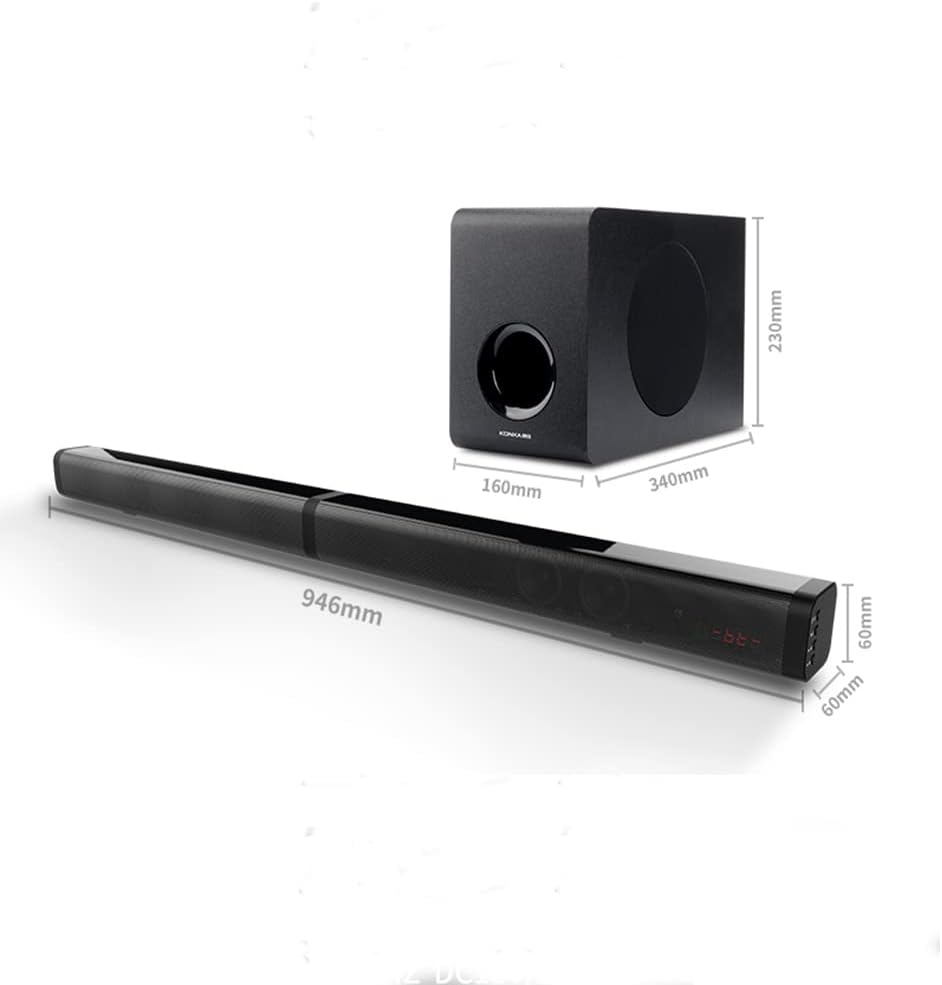
Figure 11.1: Product dimensions for the soundbar and subwoofer.
| Feature | Detail |
|---|---|
| Model Name | SM-2126 |
| Speaker Type | Soundbar with Subwoofer |
| Surround Sound Channel Configuration | 2.1 |
| Speaker Maximum Output Power | 120 Watts |
| Connectivity Technology | Bluetooth, Auxiliary, Optical, USB, TF Card |
| Bluetooth Version | V5.0 |
| Bluetooth Range | 10 Meters (33 Feet) |
| Subwoofer Diameter | 5.25 Inches |
| Speaker Size (Soundbar Drivers) | 2 Inches (x4) |
| Input Voltage | AC110V~240V 50/60Hz |
| Power Source | DC 18V/2A |
| Product Dimensions (Soundbar) | 2.4"D x 37.2"W x 2.4"H (approx. 60mm x 946mm x 60mm) |
| Item Weight | 5 Kilograms (11 pounds) |
| Material | Subwoofer: Wooden, Soundbar: ABS+Metal Cover |
| Mounting Type | Wall Mount supported |
| Remote Control Batteries | 2 AAA batteries (not included) |
12. Warranty and Support
SAMTRONIC provides an 18-month warranty for this product, covering manufacturing defects from the date of purchase. This warranty does not cover damage caused by misuse, accident, unauthorized modification, or normal wear and tear.
For technical support, troubleshooting assistance, or warranty claims, please contact SAMTRONIC customer service. Please have your product model number (SM-2126) and proof of purchase ready when contacting support.
For the most up-to-date support information, please visit the official SAMTRONIC website or refer to the contact details provided with your purchase documentation.
Related Documents - SM-2126
 |
Samtronic SM-2138 2.0CH SoundBar User Manual This manual provides instructions for the Samtronic SM-2138 2.0CH SoundBar, covering button functions, connectivity, operation modes (Bluetooth, USB, Line-in), and remote control usage. |
 |
HUASHENG (SHENZHEN) TECHNOLOGY LIMITED Agent Authorization for SAMTRONIC Soundbar Speaker Agent Authorization document from HUASHENG (SHENZHEN) TECHNOLOGY LIMITED for the SAMTRONIC Soundbar Speaker models (SM-2126, SM-2120, etc.), authorizing MiCOM Labs Inc. for FCC certification. |
 |
Woodland Winter Buddies Crochet Pattern - Premier Yarns Free crochet pattern from Premier Yarns to create adorable Woodland Winter Buddies, including a reindeer and a fox. Step-by-step instructions for amigurumi enthusiasts using Premier Basix Chenille Brights yarn. |
 |
Premier Yarns Cross Checked Scarf Free Crochet Pattern Download the free crochet pattern for the Premier Yarns Cross Checked Scarf. This easy-to-follow guide includes materials, stitch instructions, and a color diagram for creating a stylish, oversized scarf. |
 |
Star Bright Throw Knitting Pattern A detailed knitting pattern for the Star Bright Throw blanket by Premier Yarns, featuring intarsia technique and garter stitch. Includes materials, gauge, and step-by-step instructions for squares and borders. |
 |
Komercinė garantija Samsung Galaxy Fold7 ir Flip7: Taisyklės ir sąlygos Komercinė garantija Samsung Galaxy Fold7 ir Flip7 įrenginiams, siūlanti ekrano keitimą pirmųjų naudojimo metų laikotarpiu. Aprašomos taisyklės, sąlygos, organizatorius, trukmė, teritorija, dalyviai ir paslaugų teikimo tvarka. |