
1. Introduction
This manual provides essential information for the safe and efficient operation of your Philips HD6975/00 Digital Oven Toaster Grill. Please read these instructions thoroughly before using the appliance and retain them for future reference.

Image 1.1: Front view of the Philips HD6975/00 Digital Oven Toaster Grill, showcasing its design and a pizza being cooked inside.
2. Important Safety Instructions
When using electrical appliances, basic safety precautions should always be followed to reduce the risk of fire, electric shock, and injury to persons, including the following:
- Read all instructions.
- Do not touch hot surfaces. Use handles or knobs.
- To protect against electric shock, do not immerse cord, plugs, or appliance in water or other liquid.
- Close supervision is necessary when any appliance is used by or near children.
- Unplug from outlet when not in use and before cleaning. Allow to cool before putting on or taking off parts.
- Do not operate any appliance with a damaged cord or plug or after the appliance malfunctions or has been damaged in any manner.
- Do not use outdoors.
- Do not let cord hang over edge of table or counter, or touch hot surfaces.
- Do not place on or near a hot gas or electric burner, or in a heated oven.
- Extreme caution must be used when moving an appliance containing hot oil or other hot liquids.
- Do not use appliance for other than intended use.
3. Product Features
The Philips HD6975/00 OTG is equipped with advanced features for versatile cooking:
- Opti Temp Technology: Ensures uniform cooking and even browning.
- 10 Preset Menus: One-touch selection for various dishes.
- Digital Display Panel: For easy indication and adjustment of time, temperature, and mode.
- 90 Minutes Auto Cut-off: Enhances safety and prevents overcooking.
- Motorised Rotisserie: For perfect browning of roasted items.
- Chamber Light: For easy viewing of food during cooking.

Image 3.1: Visual representation of key features of the Philips HD6975/00 OTG, highlighting its technological advantages.
4. Setup and Installation
4.1 Unpacking
Carefully remove the appliance and all accessories from the packaging. Retain packaging materials for future transport or storage if needed. Verify that all included components are present:
- Oven Toaster Grill unit
- Baking Tray
- Grill Rack
- Tong
- Crumb Tray
- Skewer Rods
- User manual
- India Specific Recipe Book
4.2 Placement
Place the OTG on a stable, flat, heat-resistant surface. Ensure adequate clearance (at least 10 cm) on all sides and above the appliance for proper ventilation. Do not place the appliance near flammable materials or heat sources.
4.3 Power Connection
Ensure the operating voltage (220 - 240 volts, 50/60 Hz) matches your household power supply. Plug the power cord into a grounded electrical outlet.
4.4 Initial Cleaning
Before first use, wipe the interior and exterior of the oven with a damp cloth. Wash the baking tray, grill rack, and other accessories in warm, soapy water. Dry thoroughly. Run the oven empty for about 15 minutes at 200°C to burn off any manufacturing residues. A slight odor or smoke may be present during this initial operation; this is normal.
5. Operating Instructions
5.1 Control Panel Overview
The Philips HD6975/00 features a digital display and intuitive control knobs for precise adjustments.

Image 5.1: Detail of the digital display, illustrating its functionality for time, temperature, and preset mode selection.

Image 5.2: The control knobs for adjusting timer settings (0-90 minutes) and temperature (65-230 degrees Celsius).
5.2 Using Preset Menus
The appliance offers 10 pre-programmed modes for convenience. Select the desired mode using the control panel. Each mode has pre-set time, temperature, and heating element configurations for optimal results.
- Toast: 7 browning levels.
- Bagel: 7 browning levels.
- Pizza
- Bake
- Broil
- Cookies
- Roast
- Grill
- Tikka
- Preheat
5.3 Pre-heat Mode
The pre-heat mode prepares the oven for perfect baking and cooking output by bringing it to the desired temperature before food insertion. This ensures consistent results, especially for items like cakes and grilled dishes.

Image 5.3: The oven in pre-heat mode, demonstrating its readiness for baking and grilling tasks.
5.4 Timer and Temperature Settings
Adjust the cooking time from 0 to 90 minutes in 1-minute intervals. The temperature range is 65°C to 230°C, adjustable in 5-degree intervals. The 90-minute auto cut-off feature automatically switches off the oven after the set time, preventing overcooking.

Image 5.4: The oven's auto cut-off feature, beneficial for cooking larger quantities for family meals.
5.5 Motorised Rotisserie Function
Utilize the motorised rotisserie function for even browning of roasts. The rust-free rotisserie rod ensures durability and hygiene.
5.6 Opti Temp Technology
This technology ensures uniform heat distribution throughout the oven chamber, resulting in consistent cooking on all sides and even browning for bread and cakes, eliminating dark spots.

Image 5.5: Illustration of Opti-temp technology, emphasizing its role in achieving uniform cooking results.
6. Maintenance and Cleaning
6.1 General Cleaning
Always unplug the appliance and allow it to cool completely before cleaning. Do not use abrasive cleaners or sharp objects to clean the oven interior or exterior. Wipe surfaces with a damp cloth and mild detergent. For stubborn stains, a non-abrasive cleaning pad can be used.
6.2 Cleaning Accessories
The baking tray, grill rack, crumb tray, and skewer rods can be washed in warm, soapy water. Rinse thoroughly and dry completely before storing or re-inserting into the oven.
6.3 Double Glass Door
The double glass door is designed for heat retention and safety. Clean with a soft cloth and glass cleaner if necessary. Avoid harsh chemicals that could damage the glass or seals.
7. Troubleshooting
If you encounter issues with your Philips HD6975/00 OTG, refer to the following common problems and solutions:
- Appliance does not turn on: Check if the power cord is securely plugged into a working outlet. Ensure the timer is set and the mode is selected.
- Food not cooking evenly: Ensure the oven is preheated properly. Distribute food evenly on the tray. Verify that the correct temperature and cooking mode are selected.
- Excessive smoke during cooking: This may be due to food residue or grease buildup. Clean the oven interior and accessories thoroughly. Reduce the amount of oil or fat used in cooking.
- Rotisserie not rotating: Ensure the rotisserie rod is correctly inserted and secured. Check that the rotisserie function is activated.
For persistent issues, please contact customer support.
8. Specifications
| Feature | Specification |
|---|---|
| Brand | PHILIPS |
| Model Name | HD6975/00 |
| Capacity | 25 Litres |
| Power | 1500 Watts |
| Operating Voltage | 220 - 240 Volts |
| Frequency | 50/60 Hz |
| Temperature Range | 65 - 230 Degrees Celsius (5-degree interval) |
| Timer | 0 - 90 minutes (1-minute interval) |
| Control Type | Touch Control |
| Special Feature | Adjustable Rack, Opti Temp Technology, Motorised Rotisserie, Chamber Light, 10 Preset Menus, 90 Minutes Auto Cut-off |
| Product Dimensions (D x W x H) | 40.2D x 52W x 35.6H Centimeters |
| Item Weight | 6 kg 400 g |
| Door Material Type | Tempered Glass |
| Included Components | Oven Toaster Grill, Baking Tray, Grill Rack, Tong, Crumb Tray, Skewer Rods, User manual, India Specific Recipe Book |
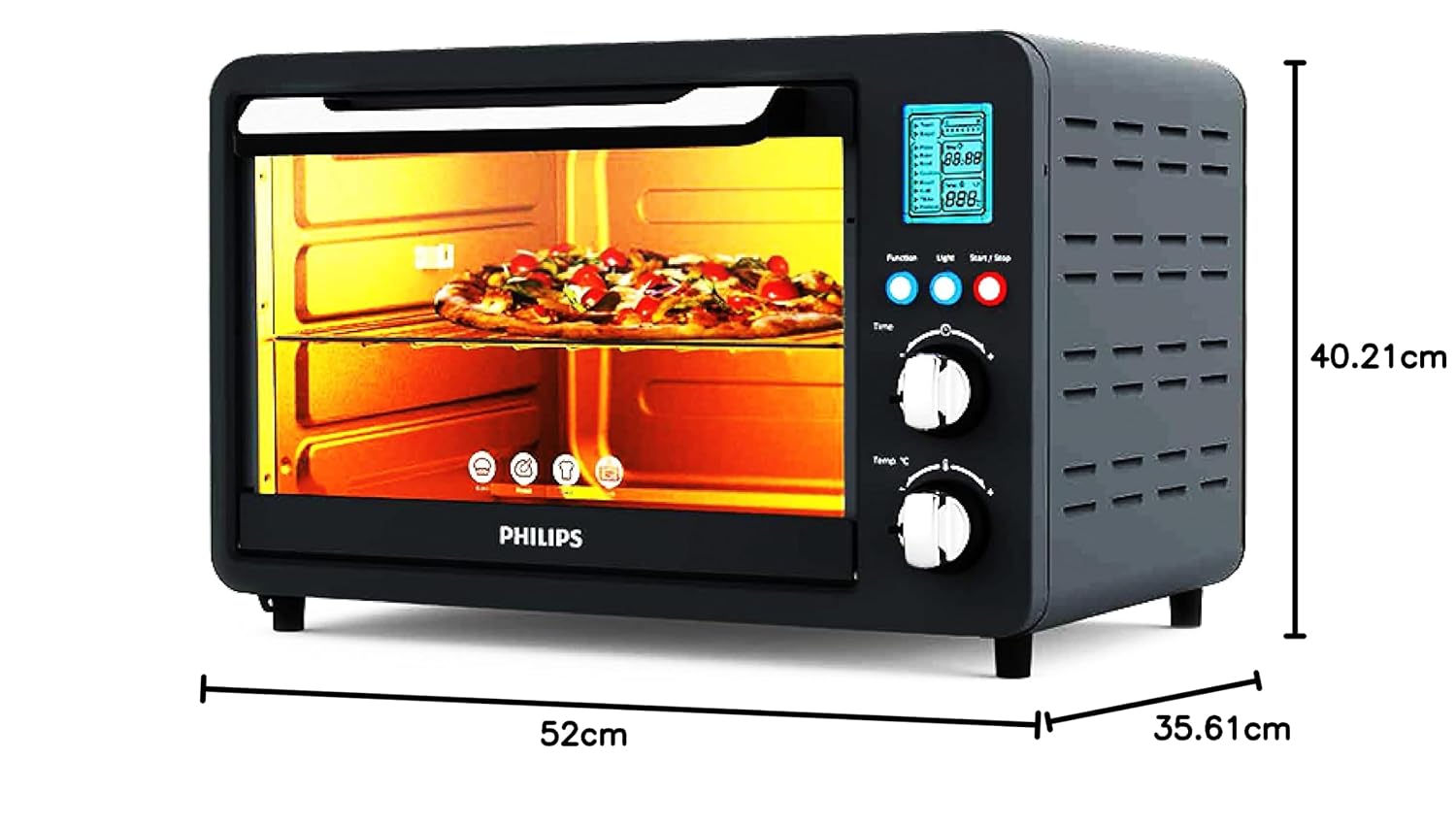
Image 8.1: Product dimensions for placement and installation planning.
9. Warranty and Support
9.1 Warranty Information
The Philips HD6975/00 Digital Oven Toaster Grill comes with a 2-year warranty on the product from the date of purchase. Please retain your purchase receipt as proof of warranty.
9.2 Manufacturer and Importer Details
Manufacturer: Versuni Home Solutions, China B.V
Importer: Versuni India Home Solutions Ltd. (3rd Floor, Tower A, DLF IT Park, 08 Block AF Major Arterial Road, New Town (Rajarhat) Kolkata WB 700156 IN)
For customer support, service, or warranty claims, please contact Philips customer care using the details provided in your product's warranty card or visit the official Philips website.


