
1. Product Overview
The Aramox Car TPMS is designed to provide real-time monitoring of your vehicle's tire pressure and temperature, enhancing driving safety and optimizing tire performance. This system includes a high-definition LCD display unit and four internal sensors.
Key Features:
- High-Definition LCD Display: Clearly shows pressure and temperature data for all four tires simultaneously.
- 4 Internal Sensors: Designed for durability with an IP5K4K waterproof rating, suitable for various environmental conditions.
- Cigarette Lighter Power Supply: Conveniently powers the display unit and includes a USB port for charging other devices.
- Real-time Monitoring: Continuously tracks tire pressure and temperature.
- Unique Sensor IDs: Each sensor has a separate ID, allowing for flexible tire position interchangeability.
- Enhanced Safety: Improves driving safety by providing timely alerts for abnormal tire conditions.

Image 1.1: The Aramox Car TPMS display unit showing real-time tire pressure and temperature for four tires.

Image 1.2: Overview of the Aramox Car TPMS components, including the display unit, four internal sensors, and power accessories.
2. Package Contents
Please verify that all items are present and in good condition upon opening the package:
- 1 x TPMS Monitor Display Unit
- 4 x Internal Tire Pressure Sensors
- 1 x Cigarette Lighter Power Cable with USB Charging Port
- Installation Accessories (e.g., mounting bracket, tools)
- User Manual
Image 2.1: The complete Aramox Car TPMS kit, showing the monitor, internal sensors, and various accessories.
3. Setup and Installation
Proper installation is crucial for accurate performance. It is recommended to have the internal sensors installed by a professional tire technician.
3.1 Internal Sensor Installation:
- Tire Removal: The vehicle's tires must be removed from the wheels.
- Valve Stem Replacement: The original valve stems are replaced with the TPMS internal sensors. Ensure the correct sensor (LF, RF, LR, RR) is installed on its corresponding wheel.
- Tire Remounting and Balancing: After sensor installation, the tires are remounted and balanced.
- Inflation: Inflate tires to the manufacturer's recommended pressure.

Image 3.1: The four internal sensors, labeled for specific tire positions (LF, RF, RR, LR).
3.2 Display Unit Setup:
- Mounting: Attach the display unit to a suitable location in your vehicle using the provided mounting bracket. Ensure it does not obstruct your view or interfere with driving.
- Power Connection: Plug the cigarette lighter power cable into your vehicle's 12V power outlet. The display unit will power on automatically.
- Sensor Pairing (if necessary): The sensors are typically pre-paired. If not, refer to the 'Operating Instructions' for manual pairing.
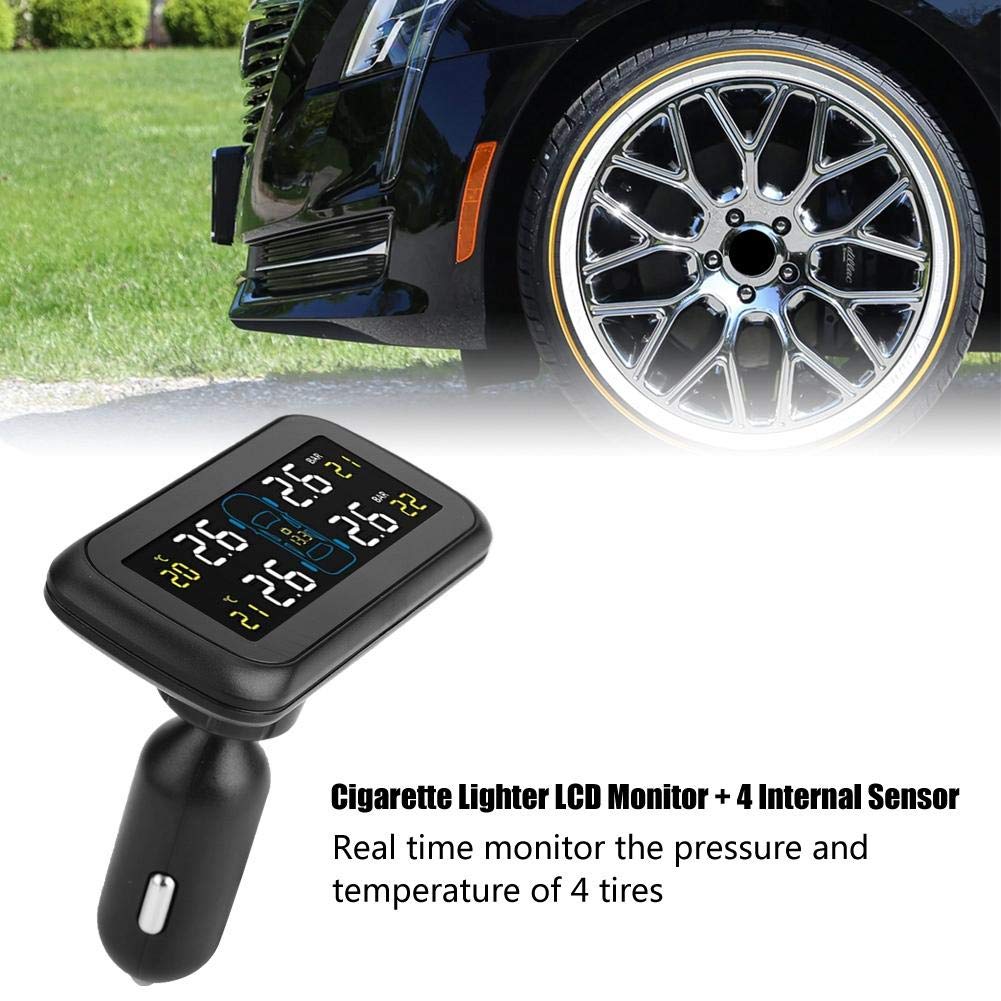
Image 3.2: The display unit connected via the cigarette lighter power supply, ready for use.

Image 3.3: Example of the display unit mounted within a vehicle's interior for easy viewing.
Video 3.1: This video demonstrates the components of a similar tire pressure sensor system and basic assembly steps. Note that the specific product in this manual uses internal sensors, which require professional installation.
Video 3.2: This video provides an unboxing and overview of a tire pressure monitor system kit, showing how the display unit and sensors might be presented. The installation process for internal sensors will differ from external ones shown in some general videos.
4. Operating Instructions
Once installed and powered on, the Aramox Car TPMS will automatically begin monitoring your tires.
4.1 Display Readings:
- The LCD screen will show the current pressure (in Bar or PSI) and temperature (in °C or °F) for each of the four tires.
- A car icon on the display indicates the tire positions.
- Battery voltage of the display unit may also be shown.
4.2 Alarm Functions:
The system is designed to alert you to abnormal tire conditions:
- High/Low Pressure Alarm: An audible and visual alert will activate if tire pressure falls below or rises above preset thresholds.
- High Temperature Alarm: An alert will sound if a tire's temperature exceeds a safe limit.
- Sensor Battery Low Alarm: Indicates when a sensor's battery needs replacement.
- Sensor Signal Loss Alarm: Alerts if communication with a sensor is lost.
4.3 Setting Parameters:
The display unit typically has buttons (e.g., 'SET', 'UP', 'DOWN') to access and adjust settings. Common adjustable parameters include:
- Pressure Unit: Switch between PSI and Bar.
- Temperature Unit: Switch between °C and °F.
- High/Low Pressure Thresholds: Adjust the alarm limits according to your vehicle's specifications.
- High Temperature Threshold: Set the maximum safe temperature.
- Sensor Pairing: If a sensor needs re-pairing or replacement, follow the instructions in the manual to enter pairing mode.
Refer to the specific button functions and menu navigation detailed in the included printed manual for precise adjustments.
5. Maintenance
To ensure the longevity and optimal performance of your Aramox Car TPMS, follow these maintenance guidelines:
- Display Unit Cleaning: Wipe the display unit with a soft, dry cloth. Avoid using abrasive cleaners or solvents.
- Sensor Battery Replacement: Internal sensors typically have a long battery life. When a low battery alert appears, professional assistance is required for battery replacement, as it involves dismounting the tire.
- Regular Checks: Periodically check the display unit's connection to the cigarette lighter to ensure it is secure.
- Software Updates: Check the manufacturer's website for any available firmware updates for the display unit.
6. Troubleshooting
If you encounter issues with your Aramox Car TPMS, refer to the following common problems and solutions:
| Problem | Possible Cause | Solution |
|---|---|---|
| Display unit not powering on | No power from cigarette lighter; loose connection | Check cigarette lighter fuse; ensure cable is securely plugged in. |
| Sensor data not displayed / Sensor signal loss | Sensor battery low; sensor malfunction; interference | Check sensor battery status; re-pair sensor (refer to manual); consult professional for sensor inspection. |
| Inaccurate readings | Incorrect tire pressure calibration; sensor issue | Verify tire pressure with a reliable gauge; recalibrate or re-pair sensors. |
| Frequent sensor disconnection (as noted in reviews) | Interference; sensor going to sleep and not waking up reliably | Ensure no strong electronic interference sources nearby. If persistent, try re-teaching sensors in learn mode. Contact customer support if the issue continues. |
If the problem persists after attempting these solutions, please contact Aramox customer support.
7. Specifications
Technical details for the Aramox Car TPMS (Model: Aramox-TPMS-xxxx):
| Feature | Detail |
|---|---|
| Model Number | Aramox-TPMS-xxxx |
| Monitor Working Temperature | -20°C to +80°C |
| Monitor Storage Temperature | -30°C to +85°C |
| Input Voltage | DC 8V-16V |
| Transmitting Frequency | 433.92 MHz |
| Sensor Working Temperature | -40°C to +105°C |
| Sensor Storage Temperature | -40°C to +120°C |
| Pressure Range | 0-116 psi (0-8 bar) |
| Pressure Accuracy | ±1.5 PSI (±0.1 bar) |
| Temperature Accuracy | ±3°C |
| Sensor Waterproof Rating | IP5K4K |
| Transmitting Distance | >80m |
| Product Dimensions | 10.01 x 10.01 x 10.01 cm |
| Item Weight | 408.23 g (0.9 lbs) |
| Country of Origin | China |
8. Warranty and Support
Aramox products are designed for reliability and performance. For specific warranty details, please refer to the warranty card included with your product or visit the official Aramox website.
For technical support, troubleshooting assistance, or inquiries regarding your Aramox Car TPMS, please contact Aramox customer service through the contact information provided in your product packaging or on the official Aramox brand store page.
Manufacturer Contact Information: Shen zhen shi, Guang dong sheng 518109, CN