
1. Important Safety Information
Please read and understand all instructions before assembling and using your Baby Jogger City Mini 2 Stroller. Failure to follow these instructions could result in serious injury or death to your child.
- Always secure your child with the harness system.
- Never leave your child unattended in the stroller.
- Do not overload the storage basket (maximum 10 pounds).
- Ensure the stroller is fully open and locked before placing a child inside.
- The stroller is suitable for children from 1 month to 54 months, with a maximum weight recommendation of 55 pounds.
- Engage the brake when parking the stroller.
2. Package Contents
Verify that all items are present before assembly:
- Baby Jogger City Mini 2 Stroller Frame and Seat
- Wheels (Front and Rear)
- UV50 Canopy
- City GO Infant Car Seat Adapters
3. Setup
3.1. Attaching the Wheels
Attach the front and rear wheels to the stroller frame until they click securely into place. Ensure all wheels are firmly attached before use.
3.2. Unfolding the Stroller
To unfold the stroller, release any locking mechanisms. Grasp the handlebar and lift upwards until the frame locks into place. Ensure all locking mechanisms are engaged before placing a child in the stroller.

Figure 3.2.1: The Baby Jogger City Mini 2 Stroller ready for use.
4. Operating Instructions
4.1. Folding the Stroller
The City Mini 2 features a signature one-hand compact fold. Lift the strap located in the seat area with one hand, and the stroller will fold itself simply and compactly. The auto-lock will engage to secure the fold for transportation or storage.
Video 4.1.1: Demonstration of the Baby Jogger City Mini 2 stroller's convenient one-handed folding feature.
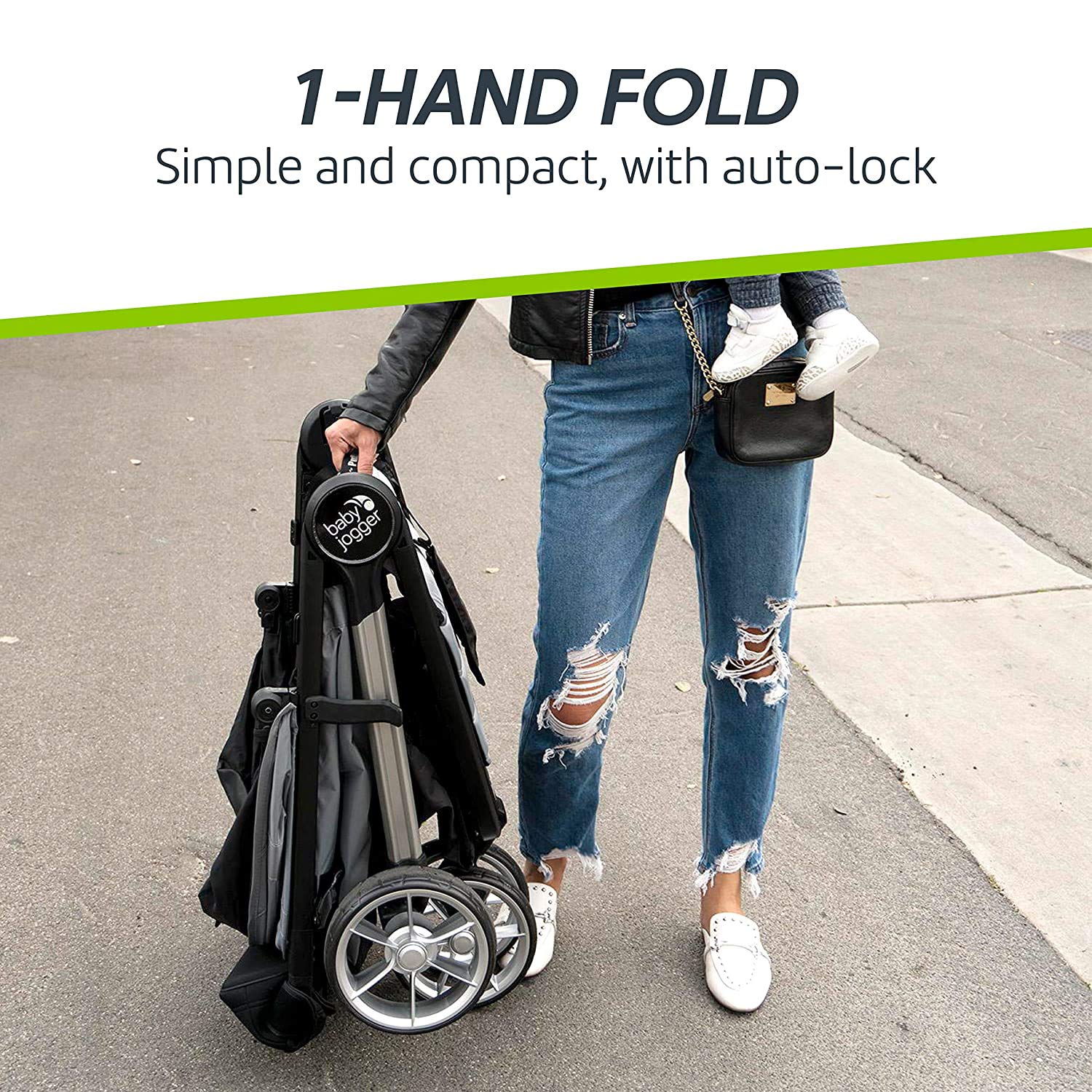
Figure 4.1.2: The Baby Jogger City Mini 2 stroller folded compactly.
4.2. Seat Recline
The seat reclines to a near-flat position, providing optimal comfort for your child during naps or extended outings. Adjust the recline mechanism located at the back of the seat to your desired position.

Figure 4.2.1: Stroller seat reclined to a near-flat position.
4.3. Canopy Adjustment
The UV50 canopy offers extensive sun protection and features peek-a-boo windows, allowing you to check on your child without disturbing them. Adjust the canopy by pulling it forward or pushing it back.

Figure 4.3.1: Stroller with UV 50 canopy extended.
4.4. Harness System
The stroller is equipped with a secure 5-point harness system to keep your child safely restrained. Adjust the straps to fit snugly around your child's shoulders and waist, and ensure the buckle is securely fastened.

Figure 4.4.1: Detail of the 5-point harness system.
4.5. Brake System
The stroller features a foot-operated brake system. Press down on the brake pedal located near the rear wheels to engage the brake. Lift the pedal to release. Always engage the brake when the stroller is stationary.
4.6. Adjustable Calf Support
The adjustable calf support provides on-the-go comfort for your baby, allowing them to rest their legs in a comfortable position.

Figure 4.6.1: Adjustable calf support for child comfort.
4.7. Storage Basket
An extra-large storage basket is located under the seat, accessible from both the front and rear, providing ample space for essentials.

Figure 4.7.1: Under-seat storage basket.
5. Maintenance
Proper maintenance ensures the longevity and safety of your stroller:
- Seat Fabric: Machine wash seat on cold, gentle or delicate cycle and drip dry. Do not use bleach, solvents, or abrasive cleaning materials. Do not press, iron, dry clean, or tumble dry. Always remove the metal frame and PE boards from the seat before washing. If the seat cover requires replacing, only use parts from a Baby Jogger authorized dealer.
- Plastic and Metal Parts: May be surface washed only using warm water and mild soap; towel dry.
- Wheels: Can be cleaned using a damp cloth and must be dried completely with a soft towel or cloth before use.
- Storage: Do not store outside or near a direct heat source such as a radiator or fire. Always store in a dry and safe environment.
6. Troubleshooting
If you encounter any issues with your stroller, please refer to the following general advice:
- Stroller not folding/unfolding smoothly: Check for any obstructions in the folding mechanism. Ensure all parts are aligned correctly.
- Wheels not turning freely: Clean any debris from the wheel axles. Ensure wheels are properly attached and lubricated if necessary.
- Harness not securing: Check that all buckle components are free of debris and engage properly. Adjust straps for a snug fit.
- Brake not engaging: Inspect the brake mechanism for obstructions or damage. Ensure the pedal is fully depressed.
For persistent issues, please contact Baby Jogger customer support.
7. Specifications
| Feature | Specification |
|---|---|
| Item Weight | 18.8 Pounds |
| Folded Size | 31.5*24.5*9.75 Inches |
| Rear Facing Stroller Maximum Height | 40 Inches |
| Basket Weight Capacity Maximum | 10 Pounds |
| Front Wheel Diameter | 8 Inches |
| Harness Type | 5 Point |
| Stroller Type | Standard Stroller |
| Is Car Seat Compatible | Yes |
| Number of Cup Holders | 1 |
| Seating Capacity | 1 |
| Number of Wheels | 3 |
| Has Stroller Brake System | Yes |
| Fabric Type | Polyester |
| Frame Material | Aluminum |
| Canopy Material | Polyester |
| Seat Material | Polyester |
| Tire Material | Rubber |
| Age Range Description | Baby |
| Maximum Weight Recommendation | 55 Pounds |
| Color | Jet |
8. Warranty and Support
For warranty information and customer support, please refer to the documentation included with your purchase or visit the official Baby Jogger website. Keep your proof of purchase for any warranty claims.


