
1. Introduction
This manual provides detailed instructions for the installation, setup, operation, and maintenance of your KeyWe GKW-1000A Smart IoT Bluetooth Digital Door Lock. Please read this manual thoroughly before installation and use to ensure proper function and safety. Keep this manual for future reference.
2. Product Overview
The KeyWe GKW-1000A is a smart digital door lock designed for easy DIY installation, offering enhanced security and convenient access control via Bluetooth and a mobile application.
2.1 Key Features
- Smartphone Control: Unlock your door using the mobile app via Bluetooth.
- Enhanced Security: Features triple encryption for robust protection.
- Smart Open: Automatic IoT unlock system interacts with your smartphone using advanced Bluetooth location tracking.
- Push Notifications: Receive real-time alerts on your smartphone when the lock is operated by other users.
- No Wi-Fi Required: Operates via Bluetooth and cellular data for server communication, eliminating the need for a dedicated Wi-Fi connection.
- Magic Touch: An optional feature for automatic door opening by touching the lock with your smartphone.
- Multiple Operation Methods: Access via password (4-20 digits) or smartphone app.
- App Features: Easy invitation management, real-time push alarms, entry/access record checks, smart door lock functionalities (battery alarm, one-off passcodes, location-based opening), management of multiple doors with one app, and easy registration via QR code.

This image presents a summary of the KeyWe GKW-1000A Smart IoT Bluetooth Digital Door Lock's key features, including smartphone control, triple encryption, automatic IoT unlock, push notifications, no Wi-Fi requirement, Magic Touch option, compatibility with door thickness 30-80mm, operation methods (password, smartphone), indoor and outdoor unit sizes, power requirements (4x AA batteries), material (aluminum die-cast), and smartphone compatibility (Android 4.3+, iOS 8.0+, Bluetooth 4.0+).
2.2 Components
The KeyWe GKW-1000A package typically includes:
- Outdoor Unit (Keypad)
- Indoor Unit (Main Body)
- Inner Fixing Plate
- Strike Plate
- Mounting Screws and Bolts
- User Manual
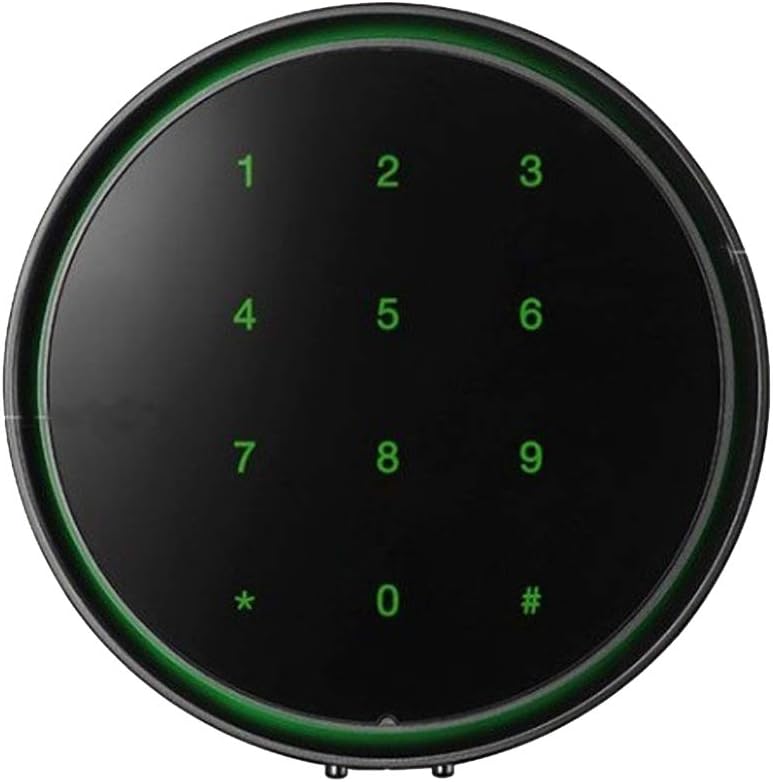
This image displays the circular outdoor unit of the KeyWe GKW-1000A digital door lock, featuring a black surface with green illuminated numbers (0-9, *, #) for code entry.

This image shows two KeyWe GKW-1000A digital door lock units, highlighting the sleek design. One unit is silver, and the other is black, demonstrating available color options.
3. Specifications
| Feature | Specification |
|---|---|
| Model | GKW-1000A |
| Brand | KeyWe |
| Color | Black |
| Material | Aluminum Die-cast |
| Indoor Unit Dimensions (W x D x H) | 90.5 mm x 50.5 mm x 157.5 mm |
| Outdoor Unit Dimensions (D x W) | 22 mm x 99 mm |
| Power Source | DC 6V (1.5V LR6 AA Alkaline Battery x 4) |
| Door Thickness Compatibility | 30 - 80 mm (1.1 - 3.1 inches) |
| Control Method | App, Password |
| Bluetooth Version | Bluetooth 4.0 or higher |
| Android Compatibility | Android 4.3 or higher |
| iOS Compatibility | iOS 8.0 or higher (iPhone 5s or newer) |
4. Installation
Before beginning installation, ensure your door is compatible with the KeyWe GKW-1000A lock. The lock is designed for doors with a thickness between 30 mm and 80 mm (1.1 to 3.1 inches).

This diagram illustrates various door types, categorizing them into 'Installable door' and 'Non-installable door' for the KeyWe GKW-1000A digital door lock. It helps users determine if their door is suitable for installation.
4.1 Step-by-Step Installation Guide
Follow these steps carefully for proper installation:
- Mark Perforation Hole: With the door closed, place the provided construction manual template on the inner line of the door and accurately mark the perforation hole location.
- Drill Hole: Drill a 32 mm diameter hole at the marked position. Ensure the hole is clean and smooth.
- Connect Outdoor Unit and Inner Fixing Plate: Loosely connect the outdoor unit to the inner fixing plate. Do not fully tighten yet.
- Adjust Distance: Adjust the distance between the strike plate and the inner fixing plate to fit your door's dimensions.
- Tighten Outdoor Unit Bolts: Fully tighten the three fixing bolts for the outdoor unit.
- Fix Strike Plate: Secure the strike plate to the door frame using the direct screw.
- Tighten Inner Fixing Plate Screws: Tighten the direct fixing screws at the four points on the inner fixing plate, as indicated by the arrows.
- Fix Indoor Unit: Attach the indoor unit to the inner fixing plate, ensuring all cables are properly connected and secured.

This image provides a step-by-step visual guide for installing the KeyWe GKW-1000A digital door lock. It covers marking the door, drilling, connecting components, adjusting, tightening, fixing the strike, and securing the inbody unit.
5. Setup
5.1 Battery Installation
The KeyWe GKW-1000A requires four (4) 1.5V LR6 AA alkaline batteries. Open the battery cover on the indoor unit and insert the batteries according to the polarity markings. Close the cover securely.
5.2 App Download and Registration
To utilize the smart features of your lock, download the KeyWe mobile application.
- Search for "KeyWe" in your smartphone's app store (Google Play Store for Android, Apple App Store for iOS).
- Download and install the application.
- Open the app and follow the on-screen instructions to create an account and register your lock. This typically involves scanning a QR code provided with your lock.

This image displays the KeyWe mobile application interface, showcasing features such as Easy Invitation, Real-time Push Alarm, Entry/Access Record Checks, Smart Door Lock functionalities, Multiple Doors with One App management, and Easy Registration.
5.3 Initial Pairing and Password Setup
After registration, follow the app's instructions to pair your smartphone with the lock via Bluetooth. You will also be prompted to set up your initial master password (4-20 digits) for keypad access.

This diagram explains the connectivity of the KeyWe GKW-1000A system, showing how the KeyWe Door Lock communicates with the KeyWe App via Bluetooth Low Energy (BLE), and how the app interacts with the KeyWe DB & Server via cellular connection.
6. Operating the Lock
6.1 Unlocking the Door
- Via Smartphone App: Open the KeyWe app on your smartphone. Ensure Bluetooth is enabled. Select your lock and tap the unlock icon.
- Via Keypad: Enter your registered password (4-20 digits) on the outdoor unit's keypad, then press the '#' key.
- Magic Touch (Optional): If enabled in the app, simply touch the outdoor unit with your paired smartphone to unlock.
6.2 Locking the Door
- Automatic Locking: The lock will automatically engage after a set period (configurable in the app) once the door is closed.
- Manual Locking (from outside): Press the '#' key on the outdoor unit's keypad.
- Manual Locking (from inside): Use the manual lock button/lever on the indoor unit.
6.3 Managing Passwords and Access
The KeyWe app allows you to manage various access settings:
- Add/Delete User Passwords: Create temporary or permanent passwords for family members or guests.
- One-Time Passcodes: Generate single-use passcodes for deliveries or service personnel.
- View Access History: Review a log of who entered and when.
7. Maintenance
- Battery Replacement: The app will notify you when battery levels are low. Replace all four AA batteries promptly to ensure continuous operation. Use only 1.5V LR6 AA alkaline batteries.
- Cleaning: Wipe the lock's surface with a soft, dry cloth. Avoid using abrasive cleaners, solvents, or harsh chemicals, as these can damage the finish or electronic components.
- Firmware Updates: Periodically check the KeyWe app for available firmware updates for your lock. Updates can improve performance, security, and add new features.
8. Troubleshooting
- Lock Not Responding: Check battery levels. If batteries are low or depleted, replace them. Ensure your smartphone's Bluetooth is enabled and you are within range.
- App Connectivity Issues: Restart the KeyWe app and your smartphone's Bluetooth. If the issue persists, try restarting your phone. Ensure the app is updated to the latest version.
- Keypad Not Working: Verify that the batteries are correctly installed and have sufficient charge. Ensure you are entering the correct password.
- Door Not Locking/Unlocking Properly: Check for any obstructions around the deadbolt or strike plate. Ensure the lock is properly aligned with the door frame. Re-check installation steps if necessary.
- Forgot Password: Use the KeyWe app to reset or retrieve your password. If app access is also lost, refer to the app's support section for recovery options.
9. Warranty Information
Please refer to the product packaging or the official KeyWe website for detailed warranty terms and conditions. Typically, a limited warranty covers manufacturing defects for a specified period from the date of purchase.
10. Support
For technical assistance, troubleshooting not covered in this manual, or warranty claims, please contact KeyWe customer support through their official website or the contact information provided with your product packaging.
KeyWe Official Website: www.keywe.co.kr (Example link, please verify actual website)


