

Introduction
This manual provides comprehensive instructions for the Aurabeam replacement TV remote control, model MKJ61841804. This remote is designed to function as a direct replacement for your original LG TV remote, offering full functionality without the need for complex programming.

Description: An angled view of the black Aurabeam replacement remote control, showcasing its array of buttons.
Safety Information
Battery Safety
- Always use the correct size and type of batteries as specified.
- Do not mix old and new batteries, or different types of batteries.
- Ensure batteries are inserted with correct polarity (+ and -).
- Remove batteries if the remote control will not be used for an extended period.
- Dispose of used batteries properly according to local regulations.
General Safety
- Keep the remote control away from water, moisture, and extreme temperatures.
- Avoid dropping or subjecting the remote control to strong impacts.
- Do not attempt to disassemble or modify the remote control.
Package Contents
Please check that your package contains the following item:
- 1 x Aurabeam Replacement TV Remote Control (Model: MKJ61841804)
Note: Batteries are not included and must be purchased separately.
Product Overview
The Aurabeam replacement remote control is designed for intuitive use, mirroring the layout and functionality of your original LG TV remote. Below is an image highlighting the remote's design.
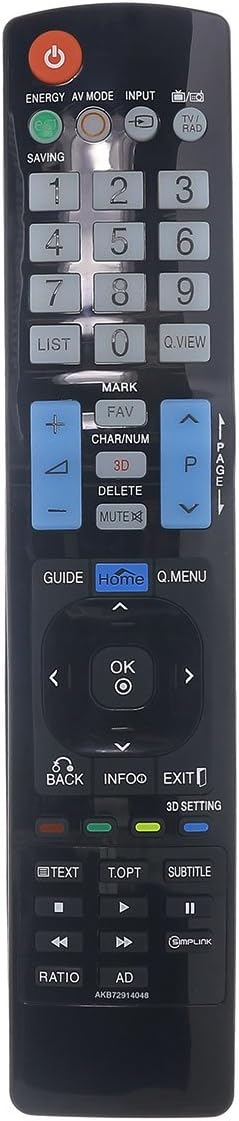
Description: A clear, straight-on view of the black Aurabeam replacement remote control, showing all buttons and their labels.
The remote features standard TV control buttons including power, channel, volume, numeric keypad, navigation, and specific function buttons for LG TVs such as GUIDE, HOME, Q.MENU, TEXT, and 3D settings.
Setup
Inserting Batteries
The Aurabeam replacement remote control does not require any programming. Simply insert the batteries, and it will be ready for immediate use with compatible LG TV models.
- Locate the battery compartment on the back of the remote control.
- Slide the battery compartment cover downwards to open it.
- Insert two AAA batteries (not included), ensuring the correct polarity (+ and -) as indicated inside the compartment.
- Slide the battery compartment cover back into place until it clicks securely.

Description: The back of the Aurabeam remote control, clearly showing the battery compartment cover.
Operating Instructions
This remote control provides full functionality for your compatible LG TV. Below are common functions and their corresponding buttons:

Description: An angled view of the remote control, highlighting the numeric keypad and navigation buttons.
Basic Functions
- Power (⏻): Turns the TV on or off.
- Numeric Keypad (0-9): Directly enter channel numbers.
- Volume Up/Down (⮝ / ⮟): Adjusts the volume level.
- Channel Up/Down (⮛ / ⮜): Changes the TV channel.
- Mute (🔇): Mutes or unmutes the TV sound.
- Input: Selects the input source (HDMI, AV, etc.).
- Navigation (Up, Down, Left, Right, OK): Navigates menus and confirms selections.
Special Functions
- GUIDE: Displays the electronic program guide.
- Home: Accesses the TV's main home screen or smart features.
- Q.MENU: Opens the Quick Menu for common settings.
- TEXT: Activates or deactivates Teletext.
- T.OPT: Teletext options.
- SUBTITLE: Toggles subtitles on or off.
- 3D SETTING: Adjusts 3D display settings (if applicable to your TV).
- RATIO: Changes the screen aspect ratio.
- AD: Audio Description.
- Simplink: Controls compatible HDMI-CEC devices.
Compatible TV Models
This remote control is compatible with a wide range of LG TV models, including but not limited to:
MKJ61841804-CN, 19LE3300, 22LD350, 22LE3300, 22LE5500, 22LV5500, 26LC7D, 26LD350, 26LE3300, 26LE5500, 26LG4000, 26LV5500, 2PM4700, 32LA620S, 32LA660S, 32LD350, 32LD350C, 32LD351, 32LD420, 32LD450, 32LE3300, 32LH202C, 32LH250C, 32LM3400, 32LM611S, 32LM620, 32LM620S, 32LM620T, 32LM660, 32LM660S, 32LN536B, 32LS3450, 32LS570S, 32LS570SZB, 32LS570S-ZB, 32LV3550, 32LV375S, 32LV4500, 32LW4500, 32LW450U, 32LW570S, 32WL30MS, 32WL30MSB, 37LD450, 37LM, C/G, 6710T00008BCG, 6710T00017B/H, 6710T00017BH, 6710T00017M/Q/V, 6710T00017MQV, 6710T00019F, 6710T00022D/F/S, 6710T00022DFS, 6710V00091A/G/Z, 6710V00091AGZ, 6710V00124V, 6710V00126L/Q, 6710V00126LQ, 6710V00126R/M, 6710V00126RM, 6710V00138L/M, 6710V00138LM, 6710V00138N/T/F, 6710V00138NTF, 6710V00141A/D/K, 6710V00141ADK, 6710V00151S, 84LM960V, 84WS70BS, 84WS70BSB, BMLDS201, BM-LDS201, M2380DFPZ, M2380-DF-PZ, M3704, M3704CCBA, M4210N, M4210NB21, M4213CG, M4225C, M4225CCBA, MKJ61841804, MKJ61841813.
Maintenance
Cleaning
To clean the remote control, gently wipe it with a soft, dry cloth. Do not use abrasive cleaners, solvents, or chemical sprays, as these may damage the surface or internal components.
Battery Replacement
If the remote control's range decreases or it becomes unresponsive, it may be time to replace the batteries. Follow the steps in the "Inserting Batteries" section to replace them.
Troubleshooting
| Problem | Possible Cause | Solution |
|---|---|---|
| Remote not working. | Batteries are dead or inserted incorrectly. | Replace batteries, ensuring correct polarity. |
| Remote has short range. | Low batteries; Obstruction between remote and TV. | Replace batteries; Remove any obstructions; Ensure direct line of sight to TV's IR receiver. |
| Certain buttons not responding. | Dust or debris under buttons; Remote damage. | Clean the remote; If problem persists, the remote may be damaged and require replacement. |
Specifications
| Feature | Detail |
|---|---|
| Brand | Aurabeam |
| Model | MKJ61841804 |
| Connectivity Technology | Infrared |
| Controller Type | Button Control |
| Maximum Range | 10 Meters |
| Product Dimensions | 20.32 x 5.08 x 1.27 cm |
| Weight | 110 Grams |
| Manufacturer Reference | AKB72914048-MKJ61841804-CN |
| UPC | 794207092509 |
Warranty and Support
Warranty Information
This Aurabeam product comes with a 1-year warranty from the date of purchase. This warranty covers manufacturing defects and ensures the product functions as intended under normal use. Please retain your proof of purchase for warranty claims.
Customer Support
For further assistance, troubleshooting, or warranty inquiries, please contact your retailer or the Aurabeam customer support. Refer to the product packaging or the retailer's website for contact details.