
sodastream 1101178010
SodaStream Fountain Jet Sparkling Water Maker Instruction Manual
Model: 1101178010 | Brand: SodaStream
Introduction
The SodaStream Fountain Jet Sparkling Water Maker allows you to transform ordinary tap water into fresh, sparkling water in seconds. This manual provides essential information for the safe and efficient operation, maintenance, and troubleshooting of your device.

Image: The SodaStream Fountain Jet Sparkling Water Maker, including two CO2 cylinders and two carbonating bottles, ready for use.
Important Safety Information
- Use only SodaStream carbonating bottles with your SodaStream Fountain Jet.
- Carbonate only plain water. Do not carbonate anything other than water.
- Do not add flavorings before carbonation. Add flavors only after water has been carbonated.
- Do not use the machine if the carbonating bottle is damaged, deformed, or scratched.
- Keep the machine away from heat sources and direct sunlight.
- Ensure the machine is placed on a flat, stable surface during use.
- Do not remove the carbonating bottle during carbonation.
- Keep out of reach of children.
Setup
1. Unboxing and Initial Preparation
Carefully remove all components from the packaging. Ensure you have the SodaStream Fountain Jet machine, carbonating bottle(s), and CO2 cylinder(s).
2. Installing the CO2 Cylinder
- Place the SodaStream machine on a flat, stable surface.
- Remove the back cover of the machine by gently pulling it outwards.
- Remove the seal and cap from the CO2 cylinder.
- Insert the CO2 cylinder into the back of the machine, screwing it in firmly until it is securely in place. Do not overtighten.
- Replace the back cover, ensuring it clicks into position.
Operating Your SodaStream Fountain Jet
1. Filling the Carbonating Bottle
Fill a SodaStream carbonating bottle with cold tap water up to the fill line. Ensure the water is cold for best carbonation results.
2. Attaching the Bottle
- Tilt the SodaStream Fountain Jet machine forward slightly.
- Insert the carbonating bottle into the snap-lock mechanism.
- Push the bottle upwards and backwards until it locks into place. The bottle should be held firmly by the machine.
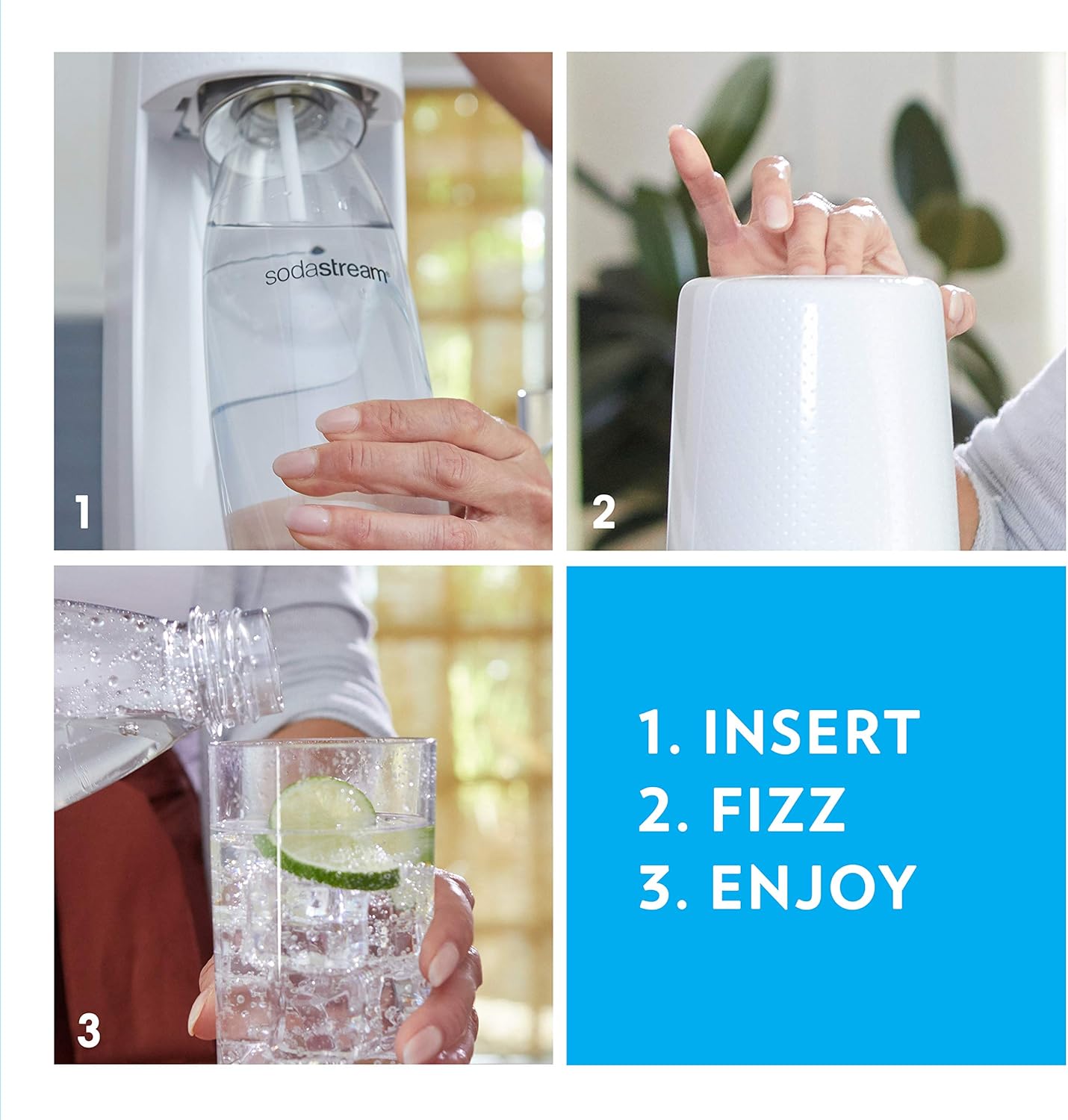
Image: Visual guide showing the three simple steps: inserting the bottle, pressing the carbonation button, and pouring the sparkling water.
3. Carbonating the Water
Press the carbonating button firmly for 1-2 seconds, then release. Repeat this process 3-5 times for standard carbonation, or more for stronger fizz. You will hear a buzzing sound as the water carbonates.

Image: Close-up of the SodaStream machine actively carbonating water, illustrating the process of turning plain water into sparkling water.
4. Removing the Bottle
Once carbonation is complete, gently pull the carbonating bottle forward and then down to release it from the snap-lock mechanism.
5. Adding Flavors (Optional)
After carbonating, you can add SodaStream flavorings or other concentrates to your sparkling water. Always add flavors after carbonation, never before.

Image: A selection of SodaStream flavor drops, demonstrating the variety of options available to customize your sparkling beverages.
Maintenance and Care
Cleaning the Machine
Wipe the SodaStream Fountain Jet machine with a soft, damp cloth. Do not immerse the machine in water or wash it in a dishwasher. Avoid abrasive cleaners or sharp objects.
Cleaning Carbonating Bottles
Wash carbonating bottles with lukewarm water and a mild dish soap. Use a bottle brush if necessary. Do not wash bottles in a dishwasher or expose them to extreme temperatures, as this can damage the plastic. Replace bottles if they are scratched, deformed, or discolored.
CO2 Cylinder Replacement
When your CO2 cylinder is empty, replace it with a new SodaStream CO2 cylinder. Follow the installation steps outlined in the "Setup" section. Empty cylinders can often be exchanged for a discount on a new one at authorized retailers.
Troubleshooting
| Problem | Possible Cause | Solution |
|---|---|---|
| No fizz or weak fizz | CO2 cylinder empty or not properly installed; water not cold enough; insufficient carbonation presses. | Replace or re-install CO2 cylinder; use colder water; press carbonation button 3-5 times firmly. |
| Water overflowing during carbonation | Bottle filled above the fill line; carbonating flavored water; bottle not securely attached. | Fill bottle only to the fill line; carbonate only plain water; ensure bottle is securely locked in place. |
| Machine not holding bottle securely | Bottle not inserted correctly into snap-lock. | Ensure bottle is pushed upwards and backwards until it clicks firmly into place. |
Specifications
- Model Name: Jet bundle
- Model Number: 1101178010
- Brand: SodaStream
- Dimensions (L x W x H): 7.76 x 7.76 x 16.93 inches
- Item Weight: 11.65 pounds
- Carbonating Bottle Capacity: 1 Liters
- CO2 Cylinder Capacity: Up to 60 Liters of sparkling water
- Power Source: CO2 canister (no electricity required)
- Operation Mode: Manual pump action
- Material: Plastic
- Color: Black
- UPC: 818558023187
Warranty and Support
SodaStream products typically come with a limited warranty. For detailed warranty information, product registration, and customer support, please visit the official SodaStream website or contact their customer service department.
You can find more information and support at: www.sodastream.com
Ask a question about this manual
Ask about setup, troubleshooting, compatibility, parts, safety, or missing instructions. Manuals+ will review the question and use this page’s manual context to help answer it.