
1. Product Overview
The ASHATA Corded Wall Telephone is a compact and energy-efficient analog phone designed for both desktop and wall-mounted use. It operates via a standard telephone line, requiring no external power source or batteries. This telephone is equipped with essential functions such as flash, call mute, and last number redial, making it suitable for home, office, or hotel environments.

Figure 1.1: Overview of the ASHATA Corded Wall Telephone, showcasing its compact design and standard components.
2. Package Contents
Please verify that all items listed below are present in your package:
- 1 x ASHATA Corded Wall Telephone Base Unit
- 1 x Handset
- 1 x Coiled Handset Cord
- 1 x Telephone Line Cord (straight)
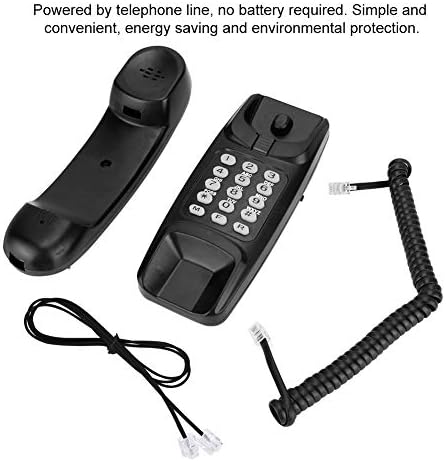
Figure 2.1: All components included in the ASHATA Corded Wall Telephone package, ready for assembly.
3. Setup
3.1 Connecting the Telephone
- Connect one end of the coiled handset cord to the handset and the other end to the designated port on the telephone base unit.
- Connect one end of the telephone line cord to the line-in port on the telephone base unit.
- Connect the other end of the telephone line cord to your wall telephone jack. The phone is powered directly by the telephone line and does not require batteries or an external power adapter.
3.2 Placement Options
The ASHATA Corded Wall Telephone is designed for versatile placement, allowing it to be used on a desktop or mounted on a wall.
- Desktop Placement: Simply place the telephone on any flat surface. Ensure the cords are not tangled and the phone is stable.
- Wall Mounting: The base unit features keyhole slots on the back for easy wall installation. Use appropriate screws (not included) to secure the phone to a wall. Ensure the handset cradle is oriented correctly for wall mounting to prevent the handset from falling.

Figure 3.1: The telephone can be conveniently placed on a desktop or securely mounted on a wall, offering flexible installation options.
4. Operating Instructions
4.1 Making a Call
- Lift the handset.
- Wait for a dial tone.
- Dial the desired telephone number using the keypad.
4.2 Answering a Call
When the telephone rings, simply lift the handset to answer the call.
4.3 Ending a Call
To end a call, place the handset back into its cradle on the telephone base unit.
4.4 Flash Function
The flash function is used to access network services such as call waiting or three-way calling (if supported by your telephone service provider). Press the FLASH button briefly during a call to activate this feature.
4.5 Mute Function
To temporarily mute your microphone during a call, press the MUTE button. The other party will not be able to hear you, but you will still be able to hear them. Press the MUTE button again to unmute the microphone.
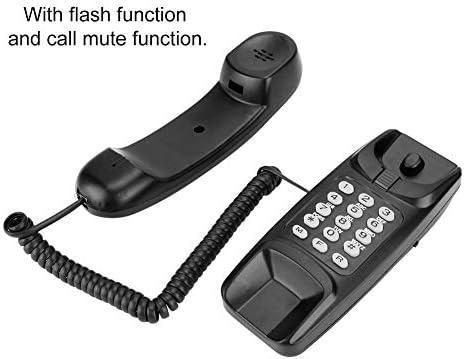
Figure 4.1: The telephone's keypad, highlighting the Flash and Mute functions for enhanced call management.
4.6 Last Number Redial
To redial the last number called, lift the handset and press the REDIAL button.

Figure 4.2: The telephone's keypad, indicating the Redial button for quickly calling the last dialed number.
5. Features
- Compact Design: Can be placed on a desktop or mounted on a wall, saving space.
- Energy Efficient: Powered directly by the telephone line, eliminating the need for batteries or external power.
- Basic Call Functions: Includes flash function for network services and mute function for privacy during calls.
- Last Number Redial: Conveniently redial the most recently called number.
- Durable Construction: Made from plastic material for everyday use.
6. Maintenance and Care
To ensure the longevity and proper functioning of your ASHATA Corded Wall Telephone, follow these simple maintenance guidelines:
- Cleaning: Wipe the telephone's surface with a soft, damp cloth. Avoid using harsh chemicals or abrasive cleaners, as they may damage the finish.
- Storage: If storing the telephone for an extended period, keep it in a cool, dry place away from direct sunlight and extreme temperatures.
- Cord Management: Ensure the coiled handset cord and telephone line cord are not excessively stretched or tangled to prevent damage.
7. Troubleshooting
If you encounter issues with your ASHATA Corded Wall Telephone, please refer to the following troubleshooting steps:
| Problem | Possible Cause | Solution |
|---|---|---|
| No dial tone | Telephone line cord is disconnected or faulty. | Ensure the telephone line cord is securely connected to both the phone and the wall jack. Test with another phone if available. |
| Cannot hear caller / Caller cannot hear me | Handset cord is loose or faulty; Mute function is active. | Check that the coiled handset cord is securely connected. If the mute function is active, press the MUTE button to deactivate it. |
| Buttons not responding | Temporary system glitch. | Disconnect the telephone line cord from the wall jack for a few minutes, then reconnect it. |
| Handset does not stay in cradle when wall mounted | Improper wall mounting or cradle orientation. | Ensure the phone is securely mounted and the handset cradle is correctly positioned for wall use. Some models have a reversible tab in the cradle. |
8. Specifications
| Feature | Detail |
|---|---|
| Model Number | ASHATAni0d2w8htb-01 |
| Dimensions (L x W x H) | 18 x 6 x 7 cm (7.1 x 2.4 x 2.8 inches) |
| Weight | 283 grams (0.62 lbs) |
| Color | Black |
| Material | Plastic |
| Power Source | Telephone Line Powered (Corded) |
| Dial Type | Single Keypad |
| Compatible Devices | PSTN (Public Switched Telephone Network) |

Figure 8.1: Top and bottom views of the telephone, including the model number label on the underside.
9. Warranty and Support
ASHATA is committed to providing high-quality products and customer satisfaction. While specific warranty details are not provided in this manual, please contact ASHATA customer service for any inquiries regarding product support, troubleshooting beyond this guide, or warranty claims.
For further assistance, please visit the official ASHATA store or contact their support channels. Keep your purchase receipt as proof of purchase.
ASHATA Brand Store: Visit ASHATA Store on Amazon