
Introduction
Botzees is an innovative coding robotics kit designed for children aged 4 and up. It integrates construction, coding, and creative play through augmented reality. This kit allows users to build and program six distinct pre-designed robots, or to invent their own unique creations. Botzees robots can be programmed to perform various actions including movement, drumming, dancing, sound production, and lighting up, all controlled via a free, user-friendly application. The kit includes 130 specially shaped, easy-to-handle blocks with smooth, rounded edges, promoting tactile and hands-on learning. Additionally, 30 interactive augmented reality puzzles are included to introduce fundamental coding concepts through visual cues.

Image: The Botzees robot, constructed from colorful blocks, stands next to a tablet displaying its interactive augmented reality coding application. A child's hands are visible holding the tablet, demonstrating the hands-on interaction with the robot and its digital interface.
Safety Information
Warning: Choking Hazard - Not suitable for children under 3 years of age due to small parts.
Setup Guide
1. Unboxing and Components
Carefully unpack all items from the Botzees kit. Verify that all components are present according to the packing list.
- 130 uniquely shaped building blocks
- 2 motors
- 1 sensor
- 1 USB charging cable
- Instruction manual (this document)

Image: A detailed layout of all the components included in the Botzees kit, featuring various colorful building blocks, wheels, electronic modules like motors and sensors, and a USB charging cable, illustrating the complete set of parts for assembly.
2. Initial Charging
Before first use, ensure the main robot body (containing the battery) is fully charged. Connect the provided USB charging cable to the robot body and a compatible USB power source (e.g., computer USB port, wall adapter). The charging indicator light will show the charging status. A full charge typically takes approximately 2-3 hours.
3. App Download and Installation
The Botzees experience requires the companion application. Download the free "Botzees" app from your device's app store (Apple App Store for iOS, Google Play Store for Android).
- Compatibility: The app is compatible with iOS 12+ and Android 8.0+. Ensure your device's operating system is updated to the latest version for optimal performance.
- Installation: Follow the on-screen prompts to install the app.

Image: The Botzees Robotics Kit packaging, featuring the assembled robot, a child interacting with the app on a tablet, and various educational and design awards received by the product. The box highlights "Easy-to-Build Robots" and "30 Augmented Reality Programming Puzzles."
Operating Instructions
1. Connecting to the App
Once the robot is charged and the app is installed, open the Botzees app on your device. Ensure Bluetooth is enabled on your device. The app will guide you through the process of connecting to your Botzees robot. Select your robot from the list of available devices.
2. Building Your Robot
The Botzees kit allows for the construction of 6 pre-designed robots or your own custom creations. The app provides interactive 3D building instructions for the pre-designed models. Follow the step-by-step visual guides within the app to assemble your chosen robot using the provided blocks, motors, and sensor.
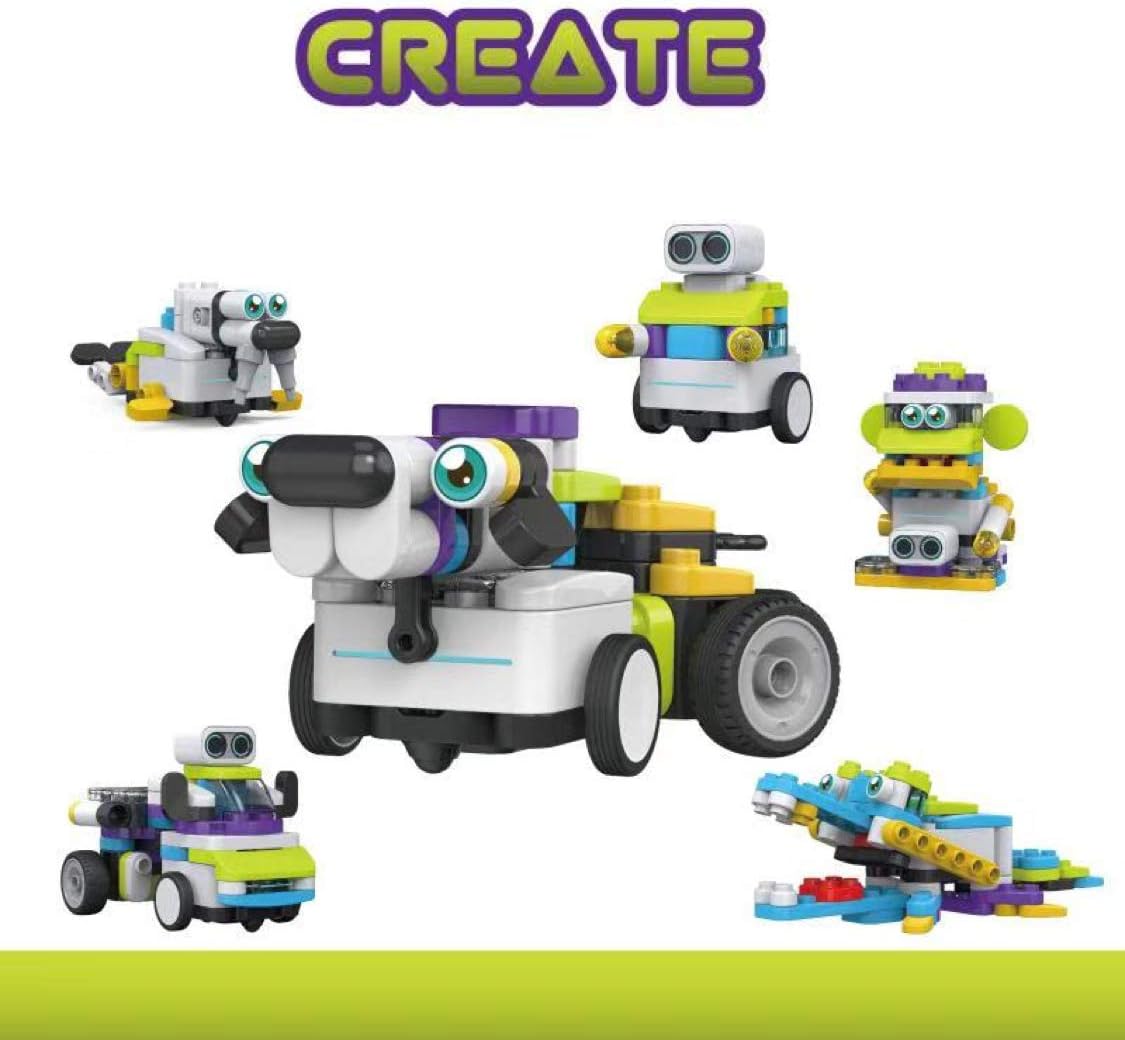
Image: A collection of five distinct robot designs, labeled "CREATE," showcasing the versatility of the Botzees building blocks. Each robot has a unique shape and function, demonstrating the various possibilities for construction.
3. Coding and Programming
The Botzees app features an intuitive visual coding interface. Drag and drop coding blocks to create sequences of commands for your robot. You can program your Botzees to:
- Move forward, backward, turn
- Drum and play sounds
- Dance routines
- Light up with various colors
- Respond to sensor input
The app also includes 30 augmented reality puzzles that teach foundational coding concepts such as sequencing, looping, and conditional coding in an engaging and visual manner.

Image: A screenshot of the Botzees app's programming interface on a tablet, showing a visual block-based coding environment. The screen displays a virtual robot within an augmented reality scene, with various command blocks arranged in a sequence to control its actions.
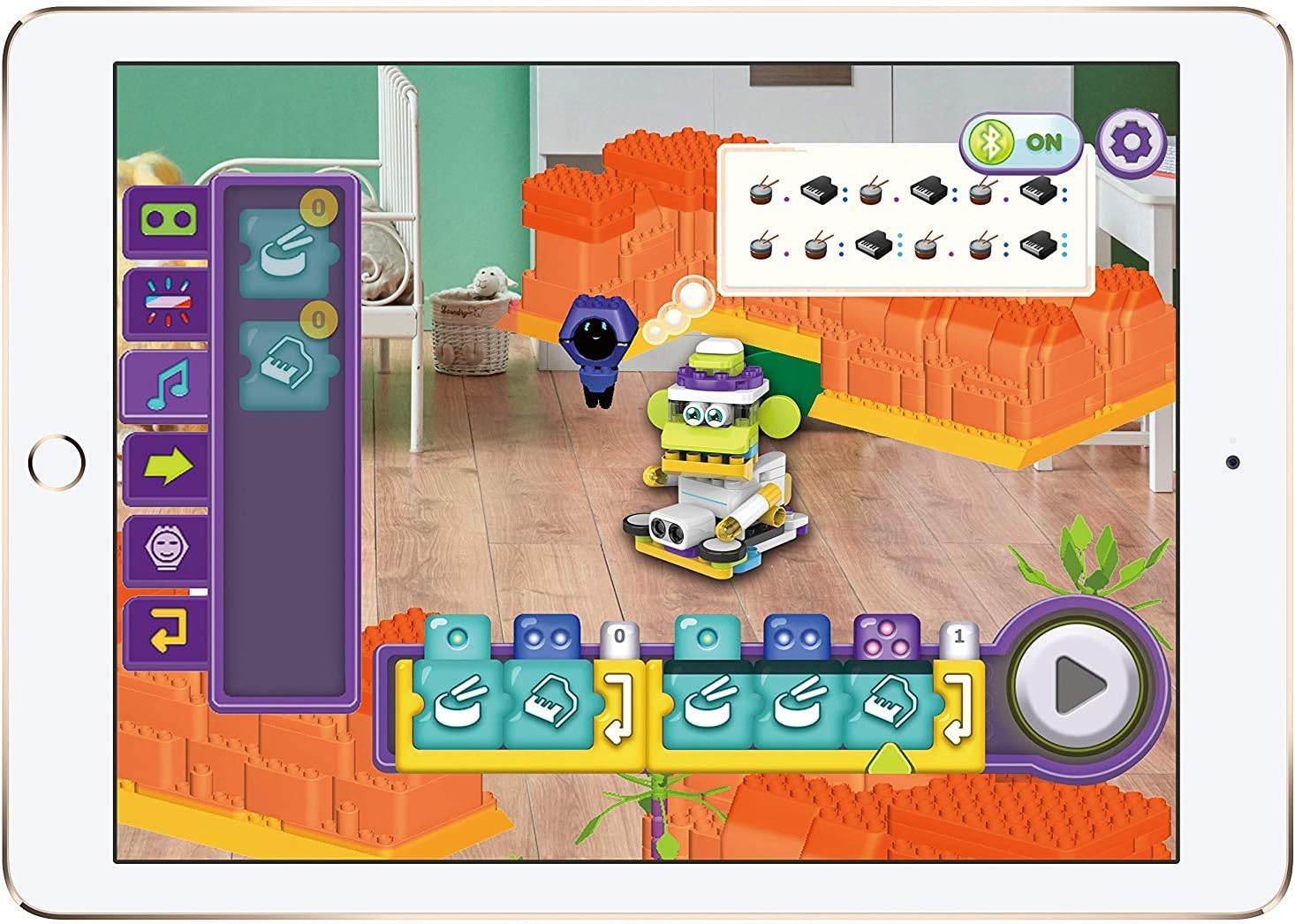
Image: A screenshot of the Botzees app interface focused on sound and drumming programming. The tablet displays a virtual robot in an augmented reality setting, with musical note and drum icon blocks available for users to create sound sequences for their robot.
4. Playing and Interacting
After programming, press the "Play" button within the app to execute your code and watch your Botzees robot come to life. Experiment with different code sequences and building configurations to explore the full potential of your Botzees kit.

Image: Two children, a boy and a girl, are seated at a table, actively engaged in playing with their Botzees robots and a tablet. The scene, labeled "PLAY," illustrates collaborative and interactive play with the STEM toy.
Maintenance
Cleaning
To clean the Botzees blocks and robot components, gently wipe them with a soft, dry cloth. For stubborn dirt, a slightly damp cloth can be used, followed by immediate drying. Do not submerge electronic components (motors, sensor, main body) in water. Avoid using harsh chemicals or abrasive cleaners.
Battery Care
The Botzees robot uses a Lithium Ion battery. To prolong battery life:
- Charge the battery fully before first use.
- Avoid completely draining the battery before recharging.
- Store the robot in a cool, dry place when not in use for extended periods.
- Use only the provided USB charging cable.
Troubleshooting
Robot Not Connecting to App
- Ensure the robot's main body is powered on and fully charged.
- Verify Bluetooth is enabled on your smart device.
- Make sure the Botzees app is updated to the latest version.
- Restart both the robot (turn off and on) and the app.
- Try connecting from a closer proximity to the robot.
App Compatibility Issues
- Confirm your device meets the minimum operating system requirements (iOS 12+ or Android 8.0+).
- Update your device's operating system if it is below the minimum requirement.
- If issues persist, try installing the app on a different compatible device.
Robot Not Moving Correctly
- Check the battery level of the robot.
- Ensure all building blocks and components are securely attached and not obstructing movement.
- Review your code in the app for any logical errors or incorrect sequences.
- Calibrate the robot if an option is available within the app settings.
Specifications
| Product Dimensions | 1 x 1 x 1 inches |
| Item Weight | 3.34 pounds |
| Model Number | 83101 |
| Recommended Age | 4 years and up |
| Batteries | 1 Lithium Ion battery (included) |
| Manufacturer | PAI TECHNOLOGY |
| Release Date | May 6, 2019 |
Warranty and Support
For detailed warranty information and customer support, please refer to the official PAI TECHNOLOGY website or contact their customer service directly. Contact information can typically be found on the product packaging or the manufacturer's official website.
Visit the PAI TECHNOLOGY Store: PAI TECHNOLOGY Store on Amazon