
1. Introduction
Thank you for choosing the POWEROWL LCD Fast Charger. This charger is designed for Ni-MH and Ni-Cd AA/AAA rechargeable batteries, featuring independent charging slots and an intelligent LCD display for monitoring the charging process. Please read this manual carefully before use to ensure safe and optimal performance.
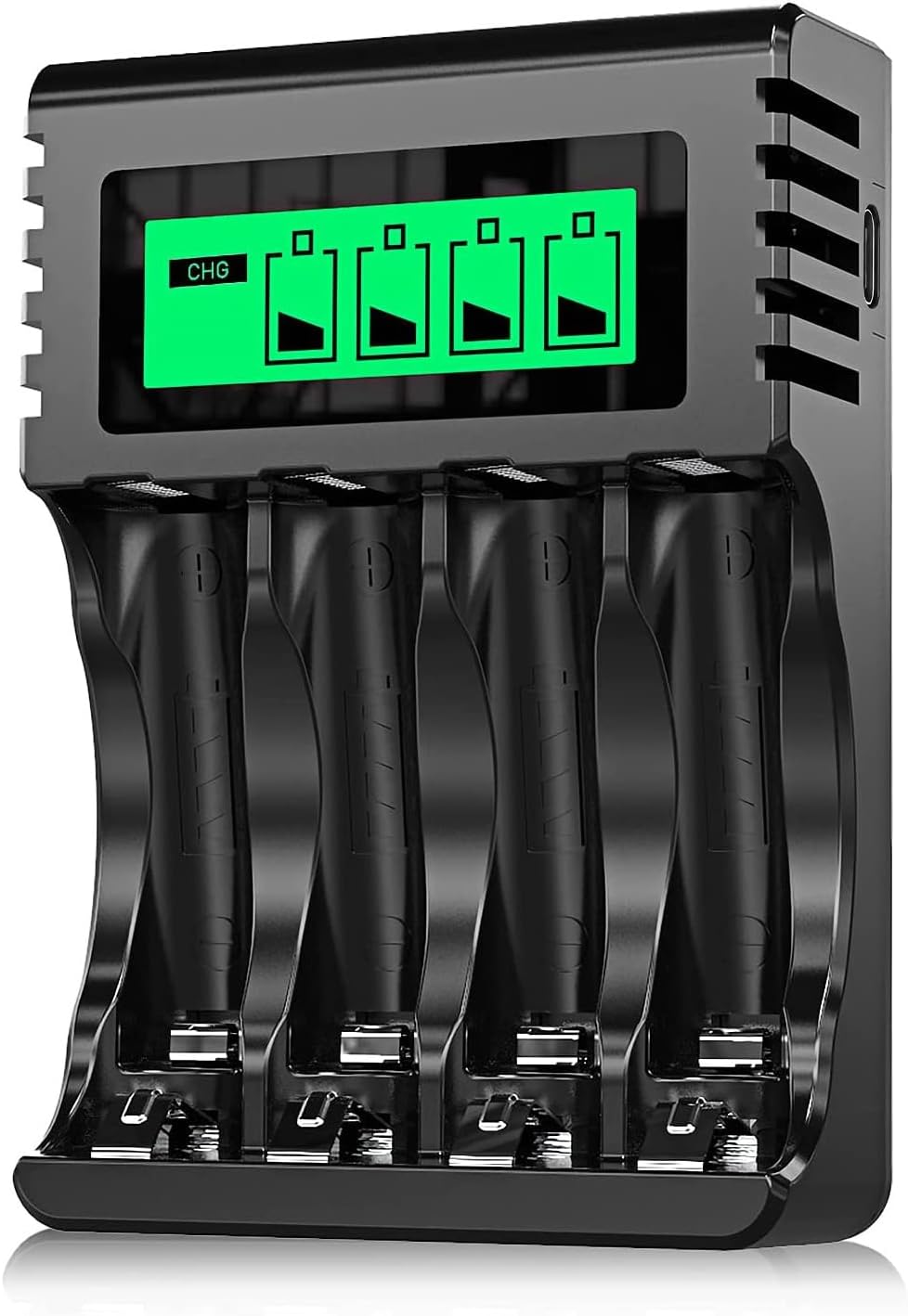
Figure 1: POWEROWL LCD Fast Charger for AA/AAA Batteries. This image shows the compact design of the charger with its four independent charging slots and LCD screen.
2. Important Safety Instructions
- This charger is designed exclusively for Ni-MH and Ni-Cd AA/AAA rechargeable batteries. DO NOT attempt to charge alkaline, carbon-zinc, lithium, or any other non-rechargeable battery types. Charging incompatible batteries may lead to leakage, rupture, or explosion, causing personal injury and property damage.
- Use the charger only in dry indoor conditions. Avoid exposure to rain, moisture, or extreme temperatures.
- Do not disassemble, modify, or repair the charger. Contact customer support if service is required.
- Keep the charger away from children and pets.
- Ensure proper ventilation during charging. Do not cover the charger.
- Unplug the charger from the power source when not in use or before cleaning.
- If the charger or batteries become excessively hot during charging, discontinue use immediately and unplug the charger.

Figure 2: Safety Warning for Battery Types. This image highlights the critical warning against charging alkaline or carbon batteries with this device.
3. Product Features
- Universal Compatibility: Supports Ni-MH and Ni-Cd AA/AAA rechargeable batteries.
- Independent Charging Slots: Each of the four slots charges independently, allowing for flexible charging of 1 to 4 batteries simultaneously, regardless of their charge level or type (AA/AAA).
- Intelligent LCD Display: A clear LCD screen shows the charging status of each individual battery, indicating "Charging," "Fully Charged," "Charging Process," or "Error."
- Smart Charging Technology: Features intelligent constant current and constant voltage charging, controlling voltage and temperature to ensure optimal charging and battery safety. The charger automatically stops charging when batteries reach full capacity.
- Advanced Safety Protections: Built-in safeguards against overcharge, over-temperature, overvoltage, overcurrent, and earth leakage protection.
- Efficient Heat Dissipation: Designed with heat dissipation windows at both ends to manage heat generated during the charging process, ensuring stable operation.
- USB Input: Conveniently powered via a 5V/2A USB input, compatible with various USB power sources.

Figure 3: Individual Charging Mode. This image illustrates the charger's ability to charge each battery independently, unlike some other chargers that require batteries to be charged in pairs.

Figure 4: Multiple Safety Protections. This image displays icons representing the charger's safety features, including overcurrent, overcharge, earth leakage, over-temperature, and overvoltage protection.
4. Package Contents
- 1 x POWEROWL LCD Fast Charger (Model MY-C001)
5. Setup
- Connect Power: Plug the USB cable into the charger's USB input port. Connect the other end of the USB cable to a compatible 5V/2A USB power source (e.g., USB wall adapter, power bank, computer USB port).
- Insert Batteries: Insert 1 to 4 Ni-MH or Ni-Cd AA/AAA rechargeable batteries into the charging slots. Ensure the positive (+) and negative (-) terminals of the batteries match the polarity indicators inside the charger slots.

Figure 5: Correct Battery Insertion. This image shows batteries correctly inserted into the charger, aligning with the polarity markings.
6. Operating Instructions
6.1 Understanding the LCD Display
The intelligent LCD screen provides real-time status for each battery slot:
| LCD Indicator | Status | Description |
|---|---|---|
| CHG | Charging | The battery is currently being charged. The battery icon will show a filling animation. |
| Full Battery Icon | Fully Charged | The battery has reached full capacity. The charger will automatically stop charging this battery. |
| Filling Battery Icon | Charging Process | Indicates the progress of the charging cycle. |
| ERROR | Error | Indicates incorrectly installed batteries, defective batteries, or incompatible battery types (e.g., alkaline). Remove the battery and check. |

Figure 6: LCD Display Status Table. This image visually represents the different indicators on the LCD screen and their meanings.

Figure 7: Close-up of LCD Indicator. A detailed view of the LCD screen showing the charging status for each battery slot.
6.2 Charging Process
- Once batteries are correctly inserted and the charger is powered, the LCD screen will activate.
- Each battery's status will be displayed individually. If a battery is charging, its icon will animate, and "CHG" might appear.
- When a battery is fully charged, its corresponding icon on the LCD will show a full battery symbol, and the charger will cease charging that specific battery.
- You can remove fully charged batteries at any time. The remaining batteries will continue to charge.
7. Maintenance
- Cleaning: Disconnect the charger from the power source before cleaning. Use a soft, dry cloth to wipe the exterior. Do not use abrasive cleaners or solvents.
- Storage: Store the charger in a cool, dry place away from direct sunlight and moisture when not in use.
- Battery Terminals: Periodically check the battery terminals in the charger for any dirt or corrosion. Clean gently if necessary to ensure good contact.
8. Troubleshooting
| Problem | Possible Cause | Solution |
|---|---|---|
| LCD shows "ERROR" |
|
|
| Batteries not charging / LCD off |
|
|
| Charger feels warm during operation | Normal operation. | Some heat generation is normal during charging. Ensure the charger is in a well-ventilated area and not covered. If it becomes excessively hot, unplug immediately. |
9. Specifications
| Feature | Detail |
|---|---|
| Model Number | MY-C001 |
| Compatible Battery Types | Ni-MH, Ni-Cd (AA, AAA) |
| Input Voltage | DC 5V |
| Input Current | 2A |
| Output Voltage | DC 5V |
| Output Current | 2A (Total) |
| Number of Charging Slots | 4 (Independent) |
| Dimensions (L x W x H) | 92.5 x 64.2 x 26.1 mm |
| Color | Black |
| Certifications | CE |

Figure 8: Charger Dimensions. This image provides a visual representation of the charger's physical dimensions and key features like USB input and polarity markings.
10. Warranty and Support
POWEROWL is committed to providing reliable products. For any questions, concerns, or technical support regarding your charger, please contact POWEROWL customer service through the retailer's platform or the official POWEROWL website. Please retain your purchase receipt for warranty purposes.


