
1. Introduction
This manual provides detailed instructions for the installation, operation, and maintenance of the Dioche Passive IP Coaxial Transceiver. This device is designed to transmit real-time digital signals from IP cameras over existing coaxial cables, offering a cost-effective solution for upgrading surveillance systems without replacing extensive cabling infrastructure.
The transceiver pair allows for efficient data transmission up to 220 meters, supporting 10/100Mbps speeds. It is a passive device, requiring no external power, which simplifies installation and reduces operational costs.

Image 1.1: The Dioche Passive IP Coaxial Transceiver pair, showing the RJ45 and BNC connectors.
2. Package Contents
Please verify that all items listed below are present in your package. If any items are missing or damaged, contact your retailer.
- 1 Pair of Dioche Passive IP Coaxial Transceivers
- User Manual (this document)

Image 2.1: A close-up view of the transceiver's RJ45 and BNC connectors.
3. Key Features
- Coaxial Transmission: Utilizes existing coaxial lines for real-time digital signal transmission.
- Extended Range: Supports transmission distances up to 220 meters (721 feet).
- Easy Installation: Designed for quick and straightforward setup, reducing installation costs and time.
- Passive Operation: No external power supply is required for the device to function.
- Surge Protection: Built-in surge guard enhances safety and device longevity.
- System Upgrade Facilitation: Enables replacement of analog cameras with network digital cameras without changing existing coaxial cables.
4. Technical Specifications
| Parameter | Value |
|---|---|
| Video Standard | PAL, NTSC, SECAM |
| Network Standard | IEEE802.3 10base-T |
| Data Transfer Rate | 10/100Mbps |
| Maximum Transmission Distance | 220 meters (721 feet) |
| Compatible Cable | Coax Cable (RG59 recommended) |
| Working Temperature | -20 ℃ to +70 ℃ (-4°F to +158°F) |
| Storage Temperature | -40 ℃ to +150 ℃ (-40°F to +302°F) |
| Humidity (non-condensing) | 0-95% |
| Dimensions (Cable Excluded) | 2.0 x 6.7 x 1.8 cm (0.8 x 2.6 x 0.7 inches) |
| Weight (per pair) | 49g (1.7 oz) |
| Model Number | Diochedut02gpvzf |
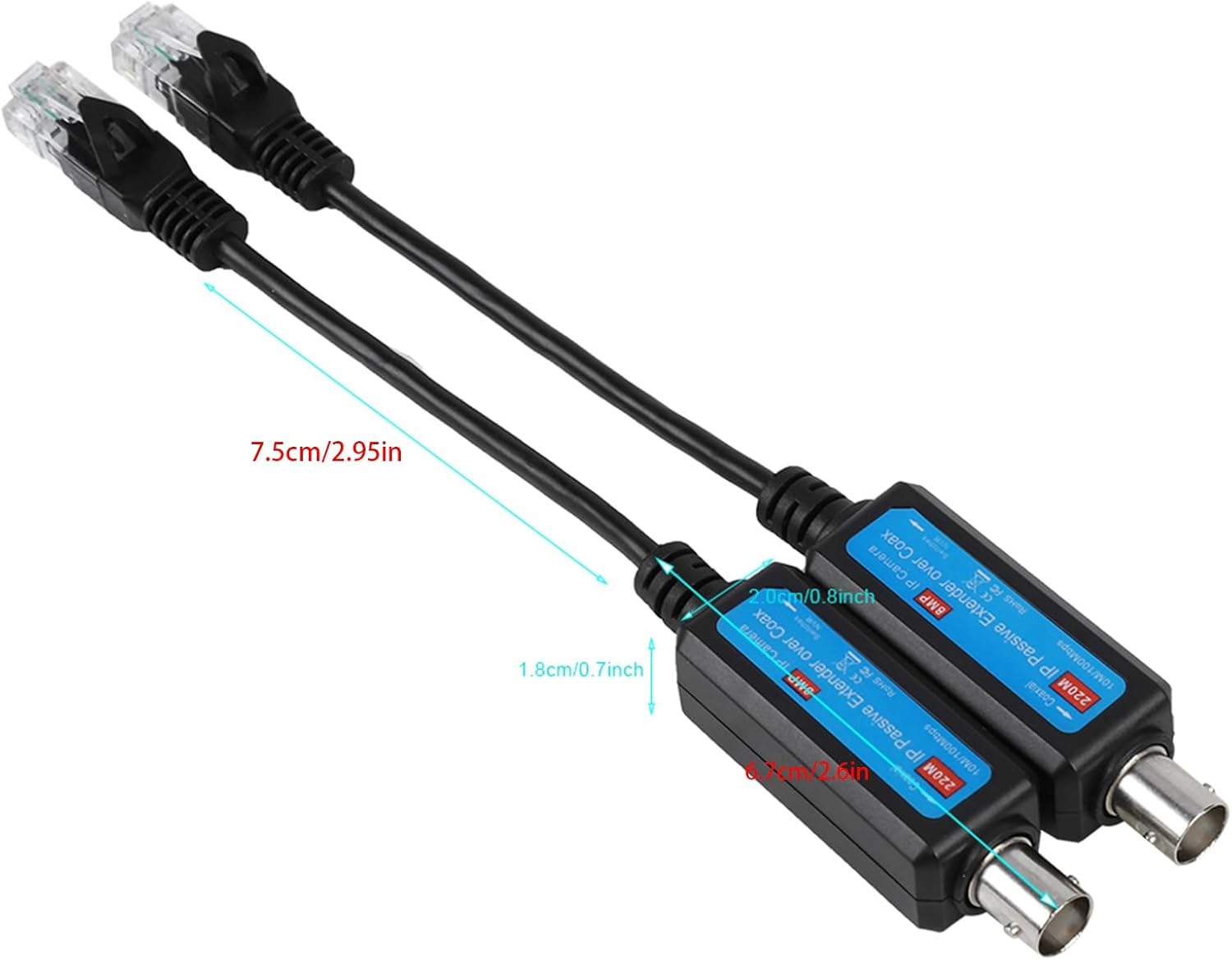
Image 4.1: Physical dimensions of the transceiver unit.
5. Setup Instructions
The Dioche Passive IP Coaxial Transceiver is designed for straightforward installation. Follow these steps to connect your IP camera to an NVR system using existing coaxial cables.
- Identify Components: Locate one transceiver for the camera side and one for the NVR side. Both units are identical.
- Connect to IP Camera:
- Connect the RJ45 (Ethernet) connector of one transceiver to the Ethernet port of your IP camera.
- Connect the BNC (coaxial) connector of the same transceiver to one end of your coaxial cable (e.g., RG59).
- Connect to NVR/Network Switch:
- Connect the other end of the coaxial cable to the BNC connector of the second transceiver.
- Connect the RJ45 (Ethernet) connector of this second transceiver to an available Ethernet port on your NVR (Network Video Recorder) or a network switch connected to your NVR.
- Verify Connection: Once both transceivers are connected, the IP camera should be able to communicate with the NVR system over the coaxial cable. No additional power supply is needed for the transceivers.
Important Note:
- This product is exclusively designed for use with IP Cameras (IPCs) and NVR systems.
- It is not intended for general computer network networking applications.

Image 5.1: Connection diagram illustrating how to integrate the transceivers into an IP surveillance system.
6. Operation
The Dioche Passive IP Coaxial Transceiver operates automatically once connected correctly. As a passive device, it does not require any configuration or external power. It functions by converting the Ethernet signal from the IP camera into a format suitable for transmission over coaxial cable, and then converting it back to Ethernet at the NVR end.
Ensure that your IP camera and NVR are powered on and configured according to their respective manuals. The transceivers will facilitate the network connection between them over the coaxial infrastructure.
7. Maintenance
The Dioche Passive IP Coaxial Transceiver is a low-maintenance device. To ensure optimal performance and longevity:
- Keep the devices clean and free from dust and debris. Use a soft, dry cloth for cleaning.
- Avoid exposing the transceivers to extreme temperatures or high humidity beyond the specified operating conditions.
- Ensure all cable connections are secure and free from damage.
- Do not attempt to open or modify the device, as this will void any potential warranty and may cause damage.
8. Troubleshooting
If you encounter issues with your Dioche Passive IP Coaxial Transceiver, refer to the following common troubleshooting steps:
- No Network Connection:
- Verify that both transceivers are securely connected to the IP camera, coaxial cable, and NVR/network switch.
- Ensure the coaxial cable is intact and not damaged. Test the cable if possible.
- Confirm that the IP camera and NVR are powered on and functioning correctly.
- Check if the coaxial cable length exceeds the maximum recommended distance of 220 meters.
- Intermittent Connection:
- Inspect all connectors (RJ45 and BNC) for loose connections or corrosion.
- Ensure the coaxial cable is of good quality (e.g., RG59) and free from interference sources.
- Device Not Working:
- Remember that this is a passive device and does not have indicator lights or require external power. Its functionality is dependent on proper connections and the operational status of the connected IP camera and NVR.
- Confirm that the application is for IP cameras and NVRs, not general computer networking.
If problems persist after following these steps, please contact customer support.
9. Warranty and Support
Warranty Information:
Dioche products are manufactured to high-quality standards. For specific warranty terms and conditions, please refer to the warranty card included with your purchase or consult the retailer from whom you purchased the product. Keep your proof of purchase for warranty claims.
Customer Support:
If you require technical assistance or have questions regarding your Dioche Passive IP Coaxial Transceiver, please contact your point of purchase or visit the official Dioche brand store for further information and support resources.