
FunniPets CDT0114
FunniPets Dog Training Collar CDT0114 User Manual
Model: CDT0114
Introduction
This manual provides detailed instructions for the proper use, setup, and maintenance of your FunniPets Dog Training Collar CDT0114. Please read this manual thoroughly before operating the device to ensure safe and effective training for your dog. This system is designed to assist in correcting undesirable behaviors and reinforcing positive ones through various training modes.
Product Components
The FunniPets Dog Training Collar system includes the following components:
- Remote Transmitter
- Collar Receivers (2 units for 2-pack)
- Adjustable Collar Straps (Orange and Black)
- USB Charging Cable
- Test Light Tool
- Conductive Silicone Contact Points

Image: Overview of the FunniPets Dog Training Collar system, showing the remote, two collars, and accessories.
Setup
1. Charging the Devices
Before first use, fully charge both the remote transmitter and the collar receivers. Use the provided USB charging cable. The charging port on the receiver must be securely closed when not charging to maintain its waterproof integrity.

Image: Illustration of the remote and collar receiver being charged via USB, highlighting long battery life.
2. Attaching Contact Points
Screw the conductive silicone contact points onto the receiver. These silicone covers are designed to be safer and more comfortable for your dog's skin compared to direct metal contact.

Image: Detail of the collar receiver with soft rubber caps on the contact points, emphasizing skin protection.
3. Fitting the Collar
Proper fit of the collar is crucial for effective operation and your dog's comfort. The collar strap is adjustable and can be cut to size. Ensure the contact points touch your dog's skin. The collar should be snug enough that two fingers can fit between the strap and your dog's neck, but not too tight. The collar is suitable for dogs with neck sizes from 7.1 to 25.6 inches, typically for medium and large dogs above 20 lbs.

Image: Visual guide on adjusting the collar strap and its durable buckle, indicating suitability for dogs from 10-110 lbs.
4. Pairing the Remote and Receiver(s)
The remote transmitter can control up to three collar receivers. Follow these steps to pair your devices:
- Turn on the remote transmitter.
- Select the desired channel (CH1, CH2, or CH3) using the 'CH' button.
- With the receiver turned off, press and hold the power button on the receiver until the indicator light flashes rapidly.
- While the receiver light is flashing, press any training mode button (Shock, Vibration, or Beep) on the remote transmitter.
- If pairing is successful, the receiver light will stop flashing and remain solid.
- Repeat for additional receivers on different channels if applicable.
Operating Instructions
Training Modes
The FunniPets Dog Training Collar offers four distinct training modes:
- Static Shock Mode: Provides a static stimulation. Levels 0-99 are adjustable via the remote. Use this mode cautiously and at the lowest effective level.
- Vibration Mode: Delivers a non-harmful vibration. Levels 0-99 are adjustable.
- Beep Mode: Emits an audible tone. This mode is often used for initial attention-getting or as a warning before other stimulations.
- Anti-Lost Light Mode: Activates an LED light on the collar receiver, useful for locating your dog in low-light conditions.
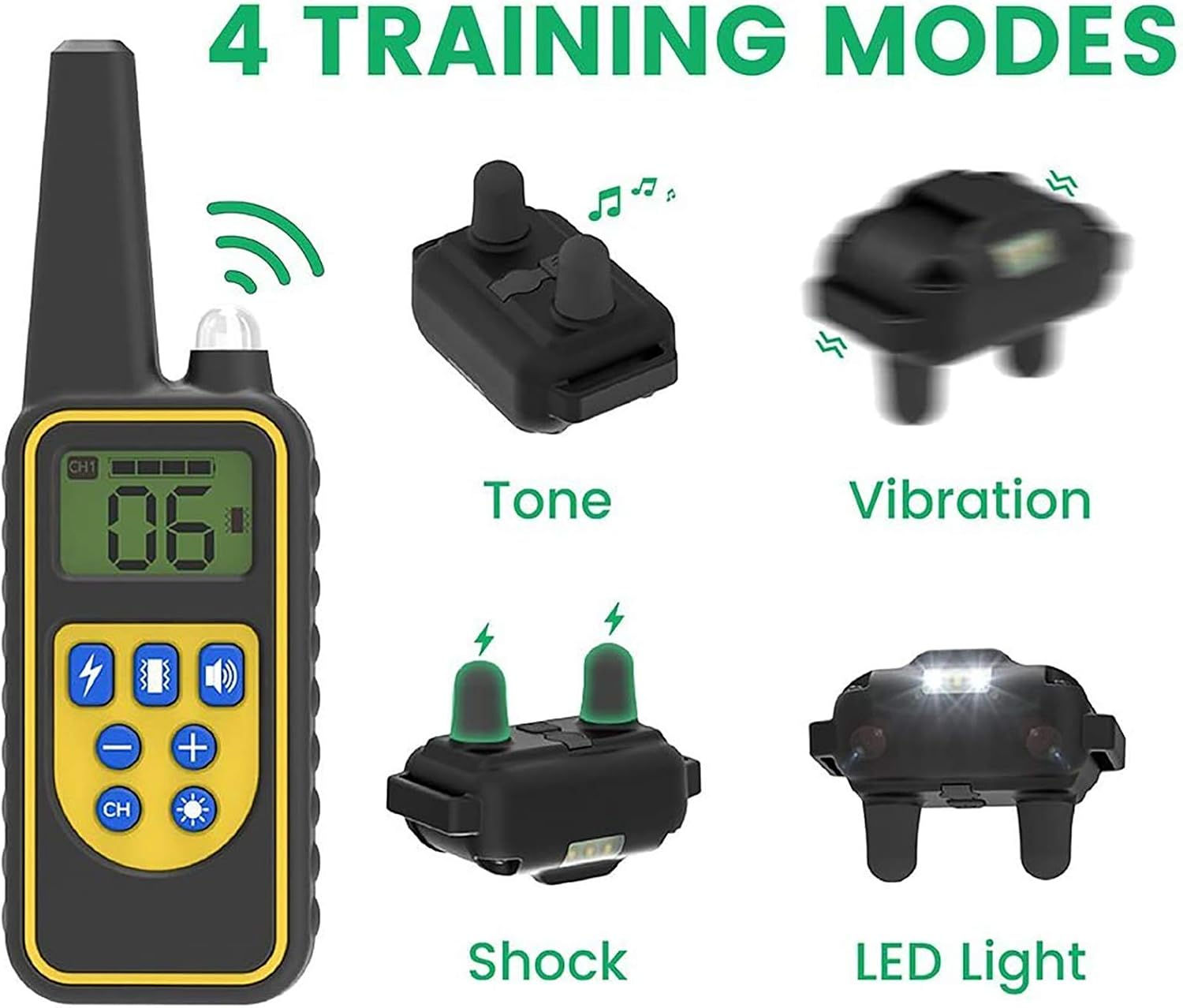
Image: Visual representation of the remote and collar, detailing the four available training modes.
Remote Control Range
The remote transmitter provides a significant operating range, allowing for training in various environments:
- Up to 2600 feet (875 yards) in open, unobstructed areas.
- Approximately 350 feet when obstructions like walls are present.

Image: Illustration demonstrating the remote control's effective range under different environmental conditions.
Multi-Dog Training
The remote transmitter features a 1+3 channel design, enabling you to train up to three dogs simultaneously without needing to reset settings. Simply switch between channels using the 'CH' button to control the corresponding collar receiver.

Image: A trainer working with two dogs, illustrating the capability to train multiple dogs with one remote.
Maintenance
Waterproof Durability
The collar receiver is IP65 waterproof, allowing your dog to swim or bathe while wearing it. However, it is essential to ensure the charging port is securely closed when the receiver is immersed in water. Avoid prolonged submersion of the receiver in water.

Image: Dogs in water with collars, demonstrating the IP65 waterproof capability of the collar receiver.
Cleaning
Clean the collar and receiver with water as needed. Regularly inspect the contact points and the area under the collar for any signs of irritation or dirt buildup. Ensure the collar is dry before charging.
Safety Guidelines
- Do not leave the collar on your dog for more than 12 hours per day to prevent skin irritation.
- Regularly check your dog's neck for any signs of redness, sores, or irritation. If irritation occurs, discontinue use until the skin heals.
- Always use the lowest effective stimulation level. Test the static shock on yourself at a low setting to understand the sensation before using it on your dog.
- This training collar is designed for dogs weighing over 20 lbs. Consult a veterinarian or professional trainer if you have concerns about using it with smaller or younger dogs.
- Do not attach a leash to the training collar. Always use a separate, non-metallic collar for leash attachment.

Image: Important safety reminder: place the collar on the side of the neck and do not attach a leash to it.
Troubleshooting
- Collar not responding: Ensure both the remote and receiver are charged and turned on. Re-pair the devices if necessary. Check that the collar is fitted correctly and the contact points are touching the dog's skin.
- Stimulation seems weak or inconsistent: Recharge the receiver. Ensure contact points are clean and making good contact with the dog's skin. Trim your dog's fur if it is too thick and interfering with contact.
- Remote display is blank: Recharge the remote transmitter.
- Shortened remote range: Ensure there are no significant obstructions between the remote and the receiver. Large metal objects or dense foliage can reduce range.
Specifications
| Feature | Detail |
|---|---|
| Model Number | CDT0114 |
| Brand | FunniPets |
| Training Modes | Static Shock (0-99 levels), Vibration (0-99 levels), Beep, Anti-Lost Light |
| Remote Range | Up to 2600ft (unobstructed) |
| Waterproof Rating | IP65 (Receiver) |
| Collar Fit | Neck size 7.1 to 25.6 inches |
| Recommended Dog Weight | Above 20 lbs |
| Battery Type | Rechargeable (1 AA battery included for remote, internal for receiver) |
| Material | Metal, Rubber, Silicone |
| Item Weight | 12.3 ounces |
| Product Dimensions | 5.71 x 0.87 x 0.1 inches (collar receiver) |
Warranty and Support
FunniPets products are designed for reliability and performance. For any questions, technical support, or warranty claims, please contact the FunniPets customer service team. Refer to your purchase documentation for specific warranty details and contact information. The manufacturer is Funnipets.
Ask a question about this manual
Ask about setup, troubleshooting, compatibility, parts, safety, or missing instructions. Manuals+ will review the question and use this page’s manual context to help answer it.