Introduction
Welcome to the user manual for your Swintec 2600 Typewriter. This guide provides essential information for setting up, operating, maintaining, and troubleshooting your renewed Swintec 2600 electronic typewriter. Designed for efficiency and ease of use, the Swintec 2600 offers reliable typing with advanced features such as correction memory and automatic formatting.
As a renewed product, this typewriter has been professionally inspected and tested to ensure it functions and appears like new, providing a sustainable and cost-effective solution for your typing needs.
Setup
1. Unpacking
Carefully remove the typewriter from its packaging. Retain all packing materials for future transport or storage. Ensure all accessories, such as the power cord and any included ribbon cartridges, are present.
2. Power Connection
Place the typewriter on a stable, flat surface. Connect the power cord to the power input on the typewriter and then to a standard electrical outlet. The power switch is typically located on the side or rear of the unit.
3. Ribbon Installation
Open the ribbon cover, usually located above the keyboard. Follow the instructions on the ribbon cartridge or the diagrams within the typewriter to correctly install the new ribbon. Ensure the ribbon is properly seated and threaded through any guides.
4. Loading Paper
Insert paper into the paper feed slot at the rear of the typewriter. Use the paper bail rollers to hold the paper securely against the platen. Rotate the platen knob (typically on the right side) to advance the paper to the desired starting position. The Swintec 2600 accommodates up to 15-inch wide paper.
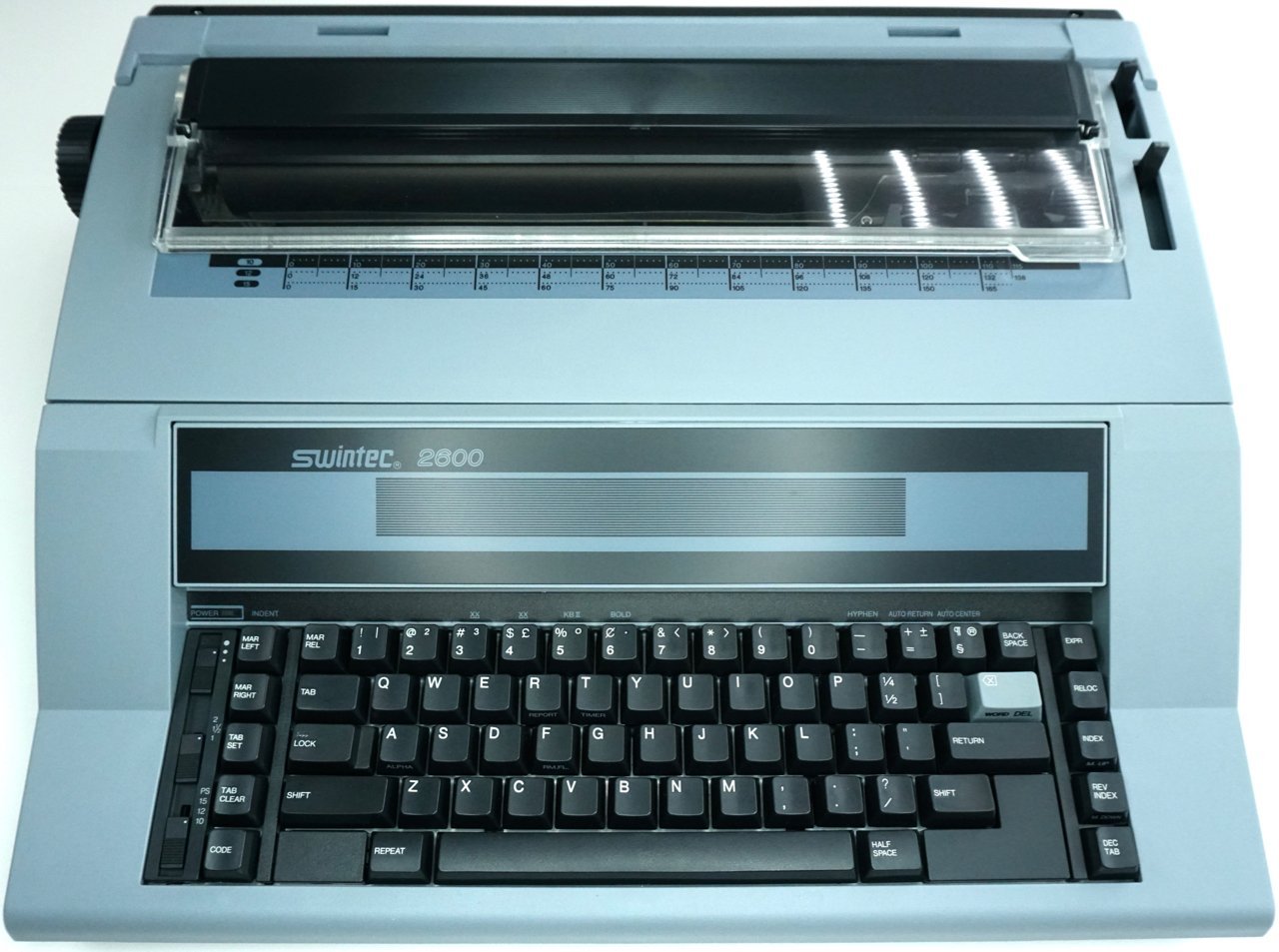
Figure 1: Front view of the Swintec 2600 Typewriter, showing the keyboard, display area, and paper feed mechanism. This image illustrates the overall design and key components of the machine.
Operating Instructions
Basic Typing
Turn on the power. Begin typing on the keyboard. The characters will appear on the paper as you type. The 11.5-inch writing line provides ample space for standard documents.
Correction Memory
The Swintec 2600 features a 700-character correction memory, allowing you to correct errors within the last 10 lines typed. To correct an error, press the CORRECT or BACK SPACE key (depending on model variation) to move the print head back to the error, then press the CORRECT key again to lift off the incorrect character. Type the correct character.
Formatting Features
- Automatic Centering: Use this feature to automatically center text on the page. Consult the display or specific key for activation.
- Bolding: To bold text, activate the bold function (often a dedicated key or a combination) before typing the desired characters.
- Underlining: Similar to bolding, activate the underline function before typing.
- Automatic Return: This feature automatically advances the paper to the next line when the print head reaches the right margin, eliminating the need for manual carriage return.
Pitch Selection
The typewriter supports various character pitches: 10 (Pica), 12 (Elite), 15 (Micro), and proportional spacing. Use the PITCH selector key to cycle through these options, adjusting the number of characters per inch to suit your document's needs.
Keyboard Layout Overview
The keyboard features a standard QWERTY layout with additional function keys for typewriter-specific operations. Key areas include:
- Power/Indent: Controls power and indentation settings.
- Margin Controls: Keys for setting left and right margins (MAR LEFT, MAR RIGHT).
- Tab Controls: Keys for setting and clearing tabs (TAB SET, TAB CLEAR).
- Correction/Deletion: Keys like BACK SPACE, WORD DEL, RELOC for error correction.
- Index/Reverse Index: For precise vertical paper movement.
- Repeat: To continuously type a character or function.
- Half Space: For fine horizontal adjustments.
Figure 2: Detailed view of the Swintec 2600 Typewriter keyboard, highlighting the layout of alphanumeric keys, function keys, and special controls such as margin and tab settings. This image helps in identifying specific keys for operation.
Maintenance
Cleaning
Regular cleaning helps maintain optimal performance. Turn off and unplug the typewriter before cleaning.
- Exterior: Wipe the exterior surfaces with a soft, damp cloth. Avoid abrasive cleaners or solvents.
- Platen and Print Area: Gently clean the platen (rubber roller) and the area around the print head with a lint-free cloth to remove paper dust and ink residue.
- Keyboard: Use a soft brush or compressed air to remove dust and debris from between the keys.
Ribbon Replacement
Replace the ribbon cartridge when print quality deteriorates or the ribbon is exhausted. Refer to the ribbon installation steps in the Setup section. Always use genuine Swintec or compatible ribbon cartridges for best results.
Troubleshooting
This section addresses common issues you might encounter with your Swintec 2600 Typewriter.
| Problem | Possible Cause | Solution |
|---|---|---|
| Typewriter does not power on. | Power cord not connected; power outlet issue; power switch off. | Ensure power cord is securely plugged in. Test the outlet with another device. Turn the power switch to the ON position. |
| Faint or no print. | Ribbon exhausted or incorrectly installed; print head dirty. | Replace the ribbon cartridge. Reinstall the ribbon correctly. Clean the print head area. |
| Paper jams. | Paper not loaded correctly; wrinkled paper; foreign object. | Remove jammed paper carefully. Ensure paper is loaded straight and flat. Use fresh, unwrinkled paper. Check for and remove any obstructions. |
| Keys are sticky or unresponsive. | Dust or debris under keys. | Use compressed air to clear debris from around and under the keys. |
If you encounter issues not listed here or if the suggested solutions do not resolve the problem, please refer to the Warranty and Support section for further assistance.
Specifications
- Model: Swintec 2600
- Manufacturer Part Number: 2600-cr
- Brand: Swintec
- Dimensions: Approximately 10 x 22 x 23 inches
- Paper Capacity: 15 inches
- Writing Line: 11.5 inches
- Correction Memory: 700 characters (within 10 lines)
- Pitch Selection: 10, 12, 15, and proportional spacing
- Features: Automatic Centering, Bolding, Underlining, Automatic Return, Format Memory
- ASIN: B07NP7MV7P
- Date First Available: February 12, 2019
Warranty and Support
This Swintec 2600 Typewriter is a renewed product and is eligible for replacement or refund under the Amazon Renewed Guarantee if you are not satisfied with your purchase. For specific warranty details, return policies, or technical support, please refer to the Amazon Renewed program guidelines or contact Amazon customer service directly.
For general inquiries or assistance with your renewed product, please visit the Amazon Renewed section on Amazon.com or contact their support channels.


