
1. Introduction
This manual provides essential information for the proper use and care of your NAKAJIMA AE 800 Wide Carriage Typewriter. The AE 800 is a robust office typewriter featuring a 17-inch wide carriage, a print speed of 22 characters per second (cps), and advanced memory functions. This unit has been certified refurbished, ensuring it functions as new, though some plastic case parts may show minor discoloration.
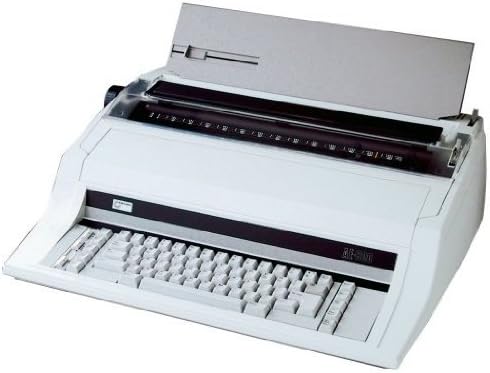
Image 1.1: The NAKAJIMA AE 800 Wide Carriage Typewriter. This image displays the full typewriter unit, highlighting its wide carriage, keyboard, and overall design.
2. Setup
2.1 Unpacking
Carefully remove the typewriter from its packaging. Retain all packing materials for future transport or storage.
2.2 Power Connection
Connect the power cord to the typewriter's power input and then to a standard electrical outlet. Ensure the power switch is in the 'Off' position before connecting.
2.3 Ribbon Installation
Open the ribbon cover, typically located above the keyboard. Follow the diagrams inside the cover or refer to the specific ribbon cartridge instructions to correctly install the ink ribbon. Ensure the ribbon is properly threaded through the guides and tensioned.
2.4 Paper Loading
Insert paper into the paper feed slot at the rear of the carriage. Use the paper bail rollers to secure the paper. Adjust the paper guide to ensure the paper is aligned for straight typing.
3. Operating Instructions
3.1 Basic Typing
- Turn on the power switch.
- Adjust the margin settings using the margin stops on the carriage.
- Begin typing on the keyboard. The typewriter will automatically advance the carriage and paper.
- Use the Space key for single character spacing, Half space for finer adjustments, and Back space or Express Back space to move the carriage backward.
3.2 Advanced Features
- Wide Carriage: Accommodates paper up to 17 inches wide.
- Print Speed: Operates at 22 characters per second for efficient document creation.
- Correction Memory: Features a 5-line correction memory to easily correct errors.
- Programmable Tabulation Memory: Store up to 30 tabulation positions for quick alignment in tables or forms.
- Automatic Carrier Return: The carriage automatically returns to the left margin at the end of a line.
- Automatic Centering: Automatically centers text on the page.
- Automatic Underlining: Applies underlining to text automatically.
- Bidirectional Printing: Optimizes printing speed by printing in both directions.
- Bold Type: Enables printing of bold characters for emphasis.
- Pitch Settings: Select between 10, 12, and 15 pitch for character density.
- Index Forward/Reverse: Adjust paper vertically in small increments.
- Micro Up/Down: Provides fine vertical paper adjustment.
- Repeat Key: Repeats the last typed character or function.
- Caps Lock: Locks the keyboard into capital letters.
- Automatic Relocation: Full page relocation feature.
- Margin Left/Right & Margin Release: Control and override page margins.
- Paragraph Indent: Automatically indents the first line of a paragraph.
- Decimal Tab: Aligns numbers by their decimal points.
- Required Space/Hyphen: Prevents words from breaking across lines.
- Framing (Line Drawing): Allows for drawing lines and borders.
4. Maintenance
4.1 Cleaning
Regularly clean the typewriter to ensure optimal performance. Use a soft, dry cloth to wipe the exterior. For the platen and type elements, use a specialized typewriter cleaning brush or a lint-free cloth lightly dampened with isopropyl alcohol. Ensure the typewriter is powered off and unplugged before cleaning.
4.2 Ribbon Replacement
When the print quality diminishes, it is time to replace the ribbon. Follow the installation instructions provided with your new ribbon cartridge. Always use ribbons compatible with the NAKAJIMA AE 800 model.
5. Troubleshooting
- No Power: Ensure the power cord is securely plugged into both the typewriter and the electrical outlet. Check the power switch position.
- Faint Printing: The ribbon may be old or incorrectly installed. Replace the ribbon or re-install it correctly.
- Paper Jams: Ensure paper is loaded correctly and not wrinkled. Remove any jammed paper carefully to avoid damaging internal components.
- Incorrect Character Spacing: Verify the pitch setting is appropriate for your needs.
- Keys Sticking: Clean around the keys with a soft brush or compressed air to remove debris.
If problems persist, contact the seller or a qualified service technician.
6. Specifications
- Model: NAKAJIMA AE 800
- Carriage Width: 17 inches
- Print Speed: 22 characters per second (cps)
- Correction Memory: 5 lines
- Tabulation Memory: 30 programmable positions
- Pitch Settings: 10, 12, 15
- Features: Automatic Carrier Return, Automatic Centering, Automatic Underlining, Bidirectional Printing, Bold Type, Index Forward/Reverse, Micro Up/Down, Repeat Key, Caps Lock, Automatic Relocation, Space, Half space, Back space, Express Back space, Margin Left/Right, Margin Release, Paragraph Indent, Decimal Tab, Required Space/Hyphen, Framing (Line Drawing).
- ASIN: B07NP33RKQ
- Date First Available: February 12, 2019
- Manufacturer: NAKAJIMA
7. Warranty and Support
As a certified refurbished product, this NAKAJIMA AE 800 typewriter is guaranteed to function as new. For specific warranty details, return policies, or technical support, please refer to the information provided by the seller, EBS - Hard to Find Office Supplies, or the Amazon Renewed program under which this product was purchased.