
Introduction
Thank you for purchasing the Merkury Innovations Cascading Curtain Lights. These battery-operated LED lights are designed for both indoor and outdoor use, featuring multiple flashing modes to enhance any setting. Please read this manual carefully before use to ensure proper operation and to maximize the lifespan of your product.
Safety Information
- Keep away from open flames and direct heat sources.
- Do not submerge the battery box in water. The lights are weatherproof, but the battery box requires protection from heavy rain or prolonged moisture.
- Ensure batteries are inserted with correct polarity.
- Remove batteries if the product is not used for an extended period.
- Dispose of batteries properly according to local regulations.
Package Contents
- 1 x Merkury Innovations Cascading Curtain Light set
- Batteries (3 AA batteries required, included)
Setup
- Battery Installation: Locate the battery compartment on the control box. Open the compartment and insert 3 AA batteries, ensuring correct polarity (+/-). Close the compartment securely.
- Unpacking and Untangling: Carefully uncoil the light strands. It is recommended to unroll the main horizontal wire first, then gently untangle each vertical cascading strand.
- Placement: Hang the curtain lights in your desired location. The main horizontal wire should be secured first, then allow the vertical strands to cascade downwards. These lights are suitable for both indoor and outdoor environments.

Operating Instructions
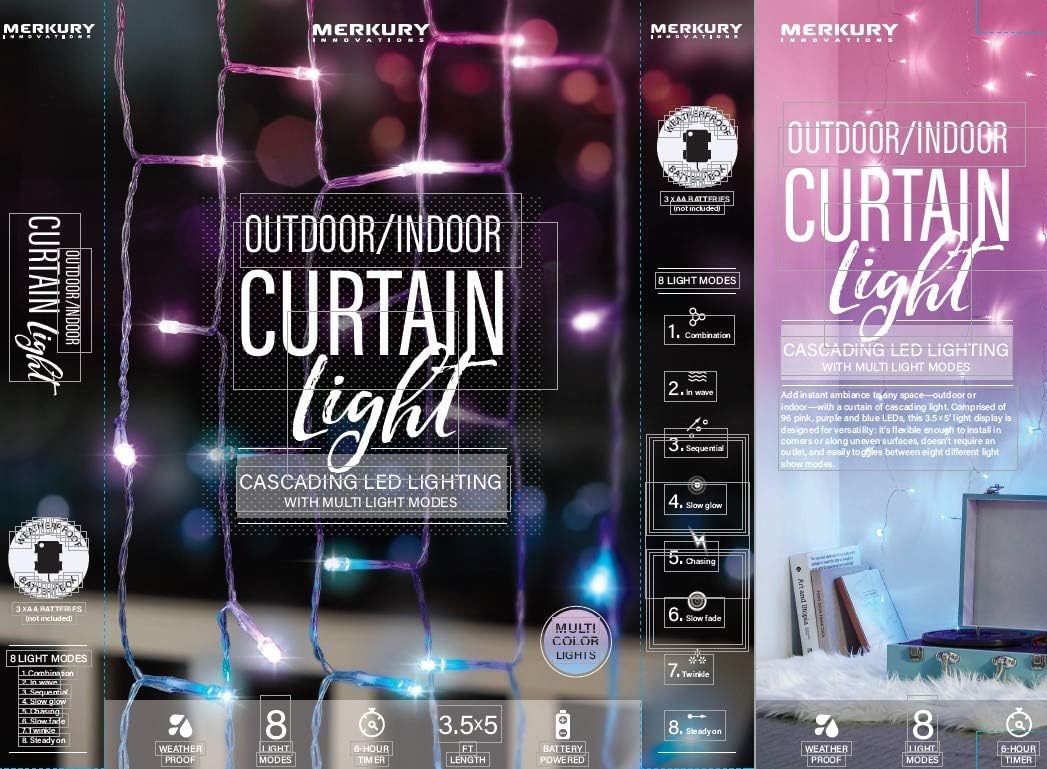
The Merkury Innovations Cascading Curtain Lights feature a control button on the battery box to manage power and light modes.
- Power On/Off: Press the button once to turn the lights ON. Press and hold the button for approximately 3 seconds to turn the lights OFF.
- Changing Light Modes: With the lights ON, repeatedly press the button to cycle through the 8 available light modes. These modes include Combination, In Wave, Sequential, Slow Glow, Chasing, Slow Fade, Twinkle, and Steady On.
- Timer Function: The lights include a built-in 6-hour timer. When the timer is activated (by selecting a mode), the lights will stay on for 6 hours, then turn off for 18 hours, and automatically repeat this cycle daily. To reset the timer, turn the lights off and then on again.

Maintenance
- Cleaning: Gently wipe the lights with a soft, dry cloth. Do not use abrasive cleaners or solvents.
- Battery Replacement: When the lights dim or stop working, replace all 3 AA batteries with new ones. Do not mix old and new batteries or different types of batteries.
- Storage: When not in use, carefully coil the lights and store them in a cool, dry place away from direct sunlight and extreme temperatures.
Troubleshooting
| Problem | Possible Cause | Solution |
|---|---|---|
| Lights do not turn on. | Batteries are dead or incorrectly inserted. | Replace batteries with new ones, ensuring correct polarity. |
| Lights are dim. | Batteries are low. | Replace batteries with new ones. |
| Lights flicker or change modes unexpectedly. | Loose battery connection or low battery power. | Check battery compartment for secure connection. Replace batteries if necessary. |
| Timer function is not working correctly. | Timer needs to be reset. | Turn the lights off and then on again to reset the 6-hour timer cycle. |
Specifications
- Brand: Merkury Innovations
- Model: B07NP2S23S
- Light Source Type: LED
- Number of Light Sources: 96
- Power Source: Battery Powered (3 AA batteries)
- Wattage: 3 watts
- Light Color: Multicolor
- Dimensions: Approximately 3.5 ft (width) x 5 ft (height)
- Control Method: Button Control
- Light Modes: 8 (Combination, In Wave, Sequential, Slow Glow, Chasing, Slow Fade, Twinkle, Steady On)
- Timer: 6-hour automatic timer
- Weather Resistance: Weatherproof (battery box requires protection from heavy rain)
Warranty and Support
Merkury Innovations products are manufactured to high-quality standards. For specific warranty information or technical support, please refer to the product packaging or contact Merkury Innovations customer service directly. Keep your purchase receipt for warranty claims.
Customer Support: Please visit the official Merkury Innovations website for contact details and further assistance.