
1. Introduction
This manual provides instructions for the installation, operation, and maintenance of the Sharelife Wireless Remote Controller Receiver for fog smoke machines. This product is designed to provide convenient wireless control for compatible fog machines.
Compatibility Note: This remote control system operates on a 315MHz frequency and is designed for fog machines with a 3-pin manual controller input. It is compatible with most 400W, 500W, and 900W fog machines. It is not a DMX adapter and does not support DMX functions.
2. Safety Information
- Ensure the fog machine is powered off and unplugged before connecting or disconnecting the receiver.
- Verify the frequency compatibility (315MHz) of your fog machine before use. Incompatible frequencies will prevent the remote from functioning.
- This device is for indoor use only.
- Do not expose the remote or receiver to moisture or extreme temperatures.
- Keep out of reach of children.
- If the product appears damaged, do not use it.
3. Package Contents
Upon opening the package, please verify that all components are present and undamaged:
- 1 x Wireless Remote Controller
- 1 x Wireless Remote Receiver
- 1 x 12V Alkaline Battery (pre-installed in remote)
4. Product Overview
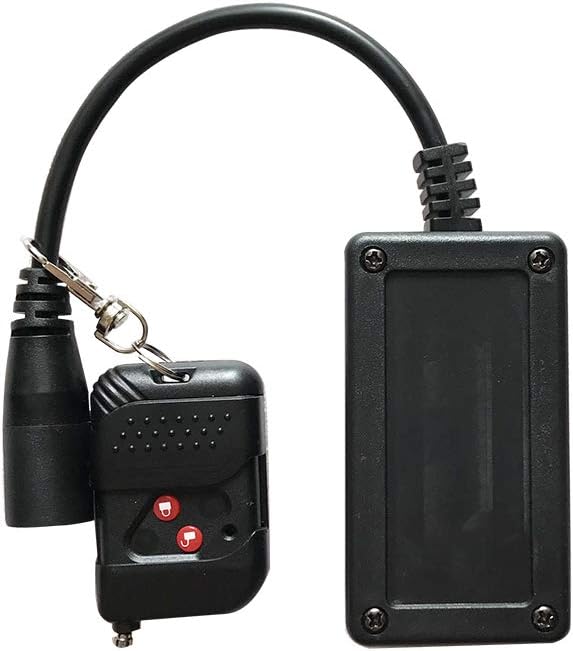
Figure 1: The complete Sharelife Wireless Remote Controller and Receiver system. The receiver connects to the fog machine, and the remote controls it wirelessly.

Figure 2: Front view of the remote controller showing the ON/OFF buttons (labeled A/B or lock/unlock icons). The back view confirms the 315MHz operating frequency.

Figure 3: Example of a fog machine's 3-pin manual controller input, where the receiver should be connected. This is a manual controller, not a DMX input.
5. Setup Instructions
- Verify Fog Machine Compatibility:
Before connecting, ensure your fog machine has a 3-pin manual controller input and operates on a 315MHz frequency. Some fog machines use a 433MHz frequency, which is not compatible with this remote system. If unsure, consult your fog machine's manual or check for frequency markings on its existing remote or internal board.

Figure 4: Internal view of the remote, showing the circuit board and 12V battery. This image can help identify the frequency if marked on the board.
- Connect the Receiver:
Locate the 3-pin manual controller input on your fog machine. With the fog machine powered off, firmly insert the 3-pin connector of the wireless receiver into this input port. Ensure a secure connection.

Figure 5: The wireless receiver properly connected to a fog machine's 3-pin input.
- Power On Fog Machine:
Once the receiver is connected, power on your fog machine. Allow it to warm up according to its own instructions until it is ready to produce fog.
- Remote Battery:
The remote controller comes with a pre-installed 12V battery. If the remote does not respond, check or replace the battery.
6. Operation
The wireless remote controller features two buttons, typically marked with lock/unlock icons or A/B. Both buttons perform the same function: to activate or deactivate the fog output.

Figure 6: The remote controller showing the ON (lock icon) and OFF (unlock icon) buttons. Both buttons typically trigger the fog output.
- Activate Fog: Press either button on the remote controller to activate the fog output from the connected machine. The fog machine will produce fog as long as the button is held down (or for a preset duration if your fog machine has such a feature).
- Deactivate Fog: Release the button to stop the fog output.
The effective range of the wireless remote may vary depending on environmental factors and obstacles.
7. Maintenance
- Cleaning: Wipe the remote and receiver with a soft, dry cloth. Do not use abrasive cleaners or solvents.
- Battery Replacement: If the remote's range decreases or it becomes unresponsive, replace the 12V battery inside the remote controller. To do this, carefully open the remote casing (often secured by a small screw) and replace the battery, ensuring correct polarity.
- Storage: Store the remote and receiver in a cool, dry place when not in use.
8. Troubleshooting
| Problem | Possible Cause | Solution |
|---|---|---|
| Remote does not activate fog machine. |
|
|
| Short operating range. |
|
|
9. Specifications
- Model: B07NMDJL71
- Brand: Sharelife
- Frequency: 315MHz
- Compatibility: Most 400W, 500W, 900W fog machines with 3-pin manual controller input.
- Remote Battery: 1 x 12V Alkaline battery (included)
- Item Weight: 4.2 ounces (approx. 119 grams)
- Product Dimensions: 2.76 x 1.97 x 1.57 inches (approx. 7 x 5 x 4 cm)
10. Warranty and Support
For warranty information or technical support, please contact Sharelife customer service through the retailer where the product was purchased. Please have your product model number (B07NMDJL71) and purchase date available when contacting support.
You can also visit the Sharelife Store on Amazon for additional product information and contact options.