
Hyper Tough B07NKGHKMB
Hyper Tough 43-Piece Ratcheting Screwdriver & Socket Set
Model: B07NKGHKMB
1. Product Overview
The Hyper Tough 43-piece socket set and screwdriver set with case is designed for various household and DIY projects. This comprehensive kit includes a full-sized ratchet drive handle, a two-way T-handle, and a wide assortment of bits and sockets, all organized in a clear view storage case.

Image: All components of the Hyper Tough 43-Piece Ratcheting Screwdriver & Socket Set, including the ratcheting screwdriver, T-handle, various bits, and sockets.
Set Includes:
- 1 - T Handle Two Way Driver
- 1 - Ratchet Screwdriver
- 9 - 1/4 in. Dr. Socket: 5/32, 3/16, 1/4, 9/32, 5/16, 11/32, 3/8, 7/16 and 1/2 in.
- 32 - 1 in. Screwdriver Bits:
- Slotted: 3, 4(2), 5(2) and 6 mm
- Phillips: #0, #1(2), #2(2) and #3
- Star: T10, T15, T20, T25, T27, T30, T35 and T40
- Square: S0, S1, S2 and S3
- Hex: 3, 4, 5 and 6 mm
- Pz: Pz1, Pz2 and Pz3
- Bit Adapter

Image: Detailed list of all 43 components included in the Hyper Tough set.
2. Setup
Before first use, carefully unpack all components from the storage case. Verify that all 43 pieces are present according to the included list. Familiarize yourself with the main tools: the ratcheting screwdriver handle and the T-handle. Ensure the storage case is intact and can securely hold all pieces for future storage.
3. Operating Instructions
Using the Ratcheting Screwdriver:
- Select the Correct Bit/Socket: Choose the appropriate screwdriver bit or socket size for your fastener.
- Insert Bit/Socket: Firmly insert the chosen bit or socket into the magnetic tip of the ratcheting screwdriver handle. Ensure it is fully seated.
- Set Ratchet Direction: Locate the directional switch on the screwdriver handle. Move it to the 'R' position for tightening (clockwise) or 'L' position for loosening (counter-clockwise). The middle position locks the ratchet for fixed use.
- Apply Pressure and Turn: Place the bit/socket onto the fastener. Apply steady downward pressure and turn the handle. The ratcheting mechanism allows you to turn without repositioning your hand.

Image: A hand demonstrating the use of the ratcheting screwdriver to tighten a screw on a metal shelf.
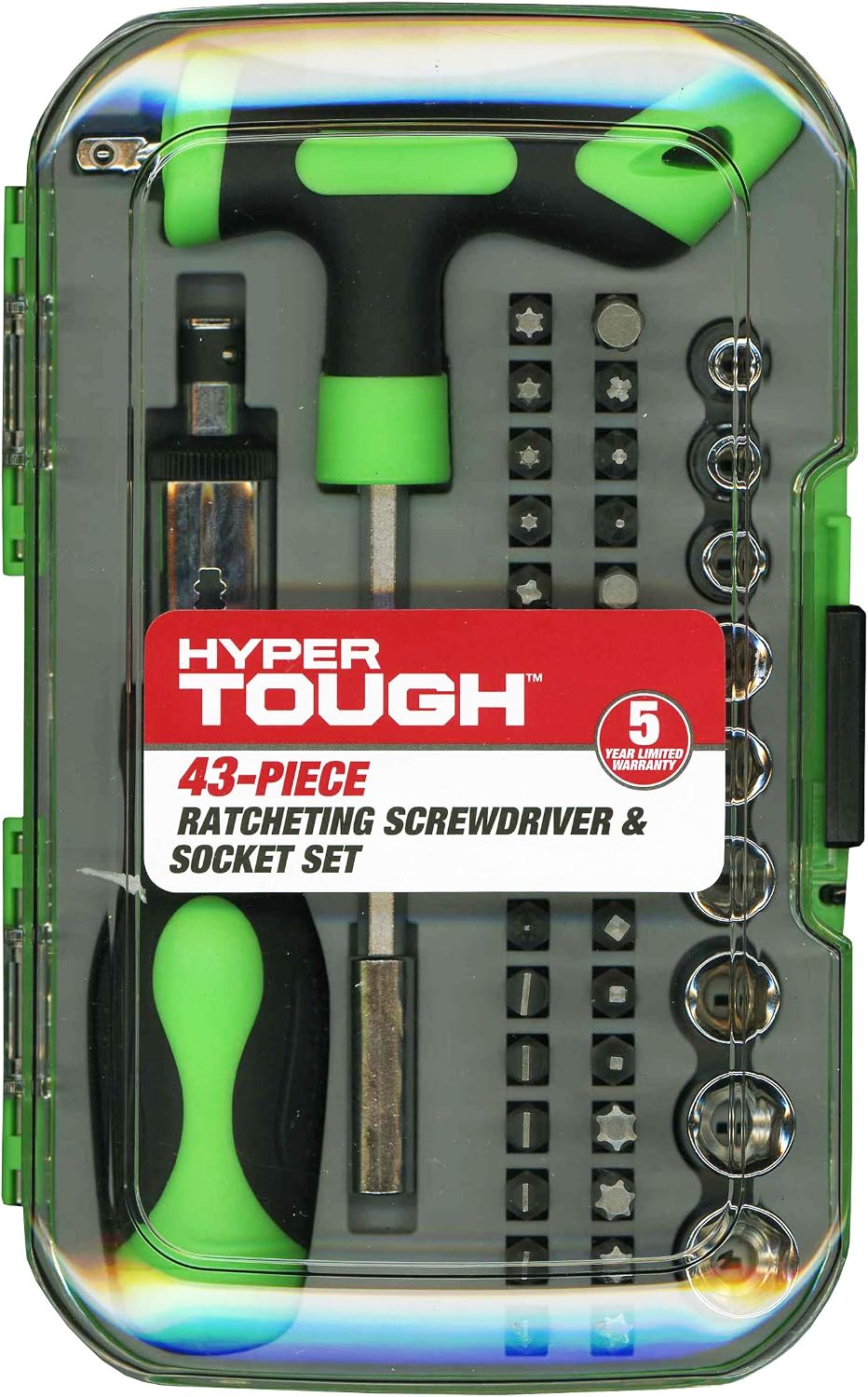
Image: A hand using the ratcheting screwdriver with an extension to access a fastener on a bicycle seat post, demonstrating versatility.
Using the T-Handle Two-Way Driver:
- Insert Bit/Socket: Insert the desired bit or socket into the end of the T-handle. The T-handle can accept bits directly or sockets via the adapter.
- Apply Leverage: The T-handle design provides increased torque and leverage, making it ideal for stubborn fasteners or when extra turning power is needed.
- Two-Way Use: The T-handle can be used with the long shaft for reach or with the shorter side for maximum leverage.

Image: A hand using the T-handle driver to tighten a bolt on a workbench, illustrating the leverage provided by its design.
4. Maintenance
To ensure the longevity and optimal performance of your Hyper Tough tool set, follow these maintenance guidelines:
- Cleaning: After each use, wipe down all tools to remove dirt, grease, or debris. A clean, dry cloth is usually sufficient. For stubborn grime, a mild cleaner can be used, followed by thorough drying.
- Storage: Always store all components neatly in the provided clear view storage case. This prevents loss, protects the tools from damage, and keeps them organized.
- Environment: Keep the set in a dry environment to prevent rust and corrosion, especially for the metal components. Avoid storing in areas with high humidity or extreme temperatures.

Image: The Hyper Tough 43-Piece Ratcheting Screwdriver & Socket Set neatly organized within its clear, durable storage case, highlighting its portability and ease of storage.
5. Troubleshooting
If you encounter any issues while using your Hyper Tough set, consider the following common solutions:
- Bit/Socket Slipping: Ensure the bit or socket is fully and securely inserted into the driver or adapter. A loose connection can cause slipping.
- Difficulty Turning Fastener: Verify that you are using the correct bit or socket size for the fastener. An ill-fitting tool can strip the fastener or make it difficult to turn. Apply steady, firm pressure.
- Stuck or Rusted Fasteners: For fasteners that are particularly tight, rusted, or difficult to move, utilize the T-handle. Its design provides significantly more leverage than the standard ratcheting screwdriver.
- Ratcheting Mechanism Not Engaging: Check the directional switch on the ratcheting screwdriver. Ensure it is fully engaged in either the 'R' (tighten) or 'L' (loosen) position, and not in the neutral (locked) position.
6. Specifications
| Feature | Detail |
|---|---|
| Manufacturer | Hyper Tough |
| Colour | Green |
| Material | Alloy Steel |
| Head Style | Box End, T-handle |
| Special Features | Soft Grip |
| Number of Items | 43 |
| Package Dimensions | 20.6 x 13 x 4.9 cm |
| Package Weight | 678 g |
| UPC | 889526138974 |
7. Warranty and Support
This Hyper Tough product comes with a 5-year limited warranty. For warranty claims, technical support, or any inquiries regarding your product, please refer to the contact information provided with your original purchase documentation. You may also visit the official Hyper Tough website for further assistance and support resources.
Ask a question about this manual
Ask about setup, troubleshooting, compatibility, parts, safety, or missing instructions. Manuals+ will review the question and use this page’s manual context to help answer it.