
Philips 8711500221322
Philips ADR900 Dash Camera User Manual
Model: 8711500221322
1. Product Overview
The Philips ADR900 Dash Camera is designed to provide peace of mind while driving and when your vehicle is parked. It features automatic recording upon vehicle start, collision detection with emergency recording, and Philips' unique Wave Guard parking monitoring system. The camera captures vivid details in 1080p Full HD with excellent night view capabilities and a wide 171-degree viewing angle.

Front view of the Philips ADR900 Dash Camera, highlighting the F/2.0 fixed lens and 1080p Full HD capability.

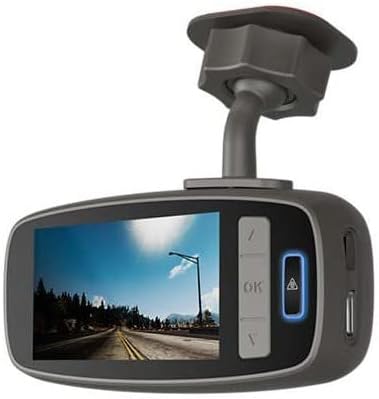
Rear view of the Philips ADR900 Dash Camera, showing the display screen and control buttons for navigation and settings.

Included accessories for the Philips ADR900 Dash Camera, featuring the suction cup mount and the power cable with a USB connector.
Key Features:
- Wave Guard Parking Monitoring: Automatically activates to monitor your vehicle when parked.
- Fatigue Index and Driver Alert: Provides warnings to help prevent driver fatigue.
- 171 Degree Super Wide Angle: Captures a broad view of the road ahead.
- Automatic Recording: Initiates recording automatically when the vehicle starts.
- Collision Detection and Emergency Recording: Automatically saves footage in the event of an impact.
- 1080p Full HD Definition: Records high-quality video for clear details.
- Perfect Night View: Enhanced low-light performance for clear recordings at night.
2. Setup Guide
2.1 Package Contents
Before you begin, ensure all items are present in the package:
- 1 x Philips ADR900 Dash Camera
- 1 x Suction Cup Mount
- 1 x Car Charger Power Cable
- 1 x USB Cable
- User Manual (this document)
2.2 Installation Steps
- Choose a Location: Select a position on your windshield that does not obstruct your view of the road. Typically, this is behind the rearview mirror.
- Clean the Windshield: Ensure the chosen area on the windshield is clean and dry for optimal suction cup adhesion.
- Attach the Mount: Secure the suction cup mount to the cleaned area of the windshield. Press firmly and engage the locking mechanism if present.
- Attach the Dash Camera: Slide the Philips ADR900 Dash Camera onto the mount until it clicks into place.
- Connect Power: Plug the car charger power cable into the dash camera's power port. Route the cable neatly along the windshield edge and dashboard to your vehicle's 12V power outlet (cigarette lighter socket).
- Adjust Angle: Power on your vehicle to activate the dash camera. Adjust the camera's angle to ensure it captures the desired view of the road. The screen on the back of the camera will assist you in this.
The Philips ADR900 Dash Camera installed on a car windshield, displaying its live view on the integrated screen, ready for operation.

A driver smiling, indicating satisfaction with the discreet and effective placement of the Philips ADR900 Dash Camera on the windshield.
3. Operating Instructions
3.1 Power On/Off
- Automatic Power On: The dash camera will automatically power on and begin recording when your vehicle's ignition is turned on and power is supplied to the 12V outlet.
- Automatic Power Off: The dash camera will automatically power off a few seconds after your vehicle's ignition is turned off and power supply is cut.
3.2 Recording Modes
- Continuous Recording: The camera records continuously in a loop. When the memory card is full, the oldest unprotected files will be overwritten.
- Emergency Recording (G-Sensor): In the event of a sudden impact or collision, the built-in G-sensor will detect the event and automatically lock the current video segment, preventing it from being overwritten.
- Wave Guard Parking Monitoring: When your vehicle is parked and the ignition is off, the Wave Guard system will activate. If motion is detected around the vehicle, the camera will automatically start recording.
3.3 Menu Navigation
Use the buttons on the side of the camera (Up, Down, OK, Menu/Emergency) to navigate through settings and playback options. Refer to the on-screen prompts for specific functions.
3.4 Driver Alert System
The Philips ADR900 includes a fatigue index and driver alert feature. This system monitors driving patterns and provides alerts if signs of driver fatigue are detected. Pay attention to these alerts and take breaks as needed for safe driving.
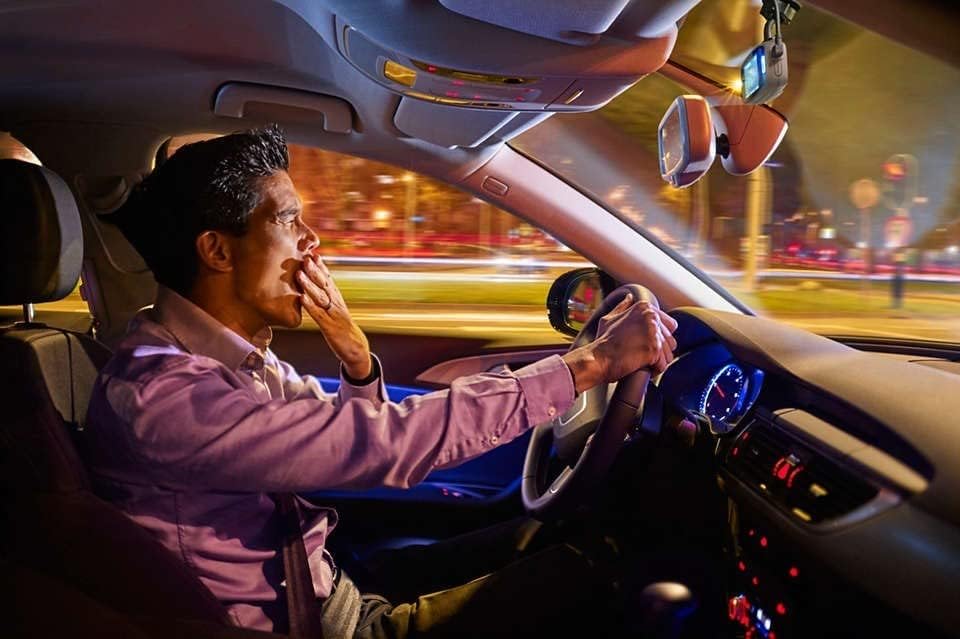
A driver yawning, illustrating the importance of the dash camera's fatigue detection feature to promote safe driving habits.

The Philips ADR900 Dash Camera capturing a clear night view from inside a vehicle, demonstrating its enhanced low-light recording capabilities.
4. Maintenance
4.1 Cleaning the Camera
- Use a soft, dry cloth to clean the camera body.
- For the lens, use a specialized lens cleaning cloth and solution to avoid scratches.
- Do not use abrasive cleaners or solvents.
4.2 Memory Card Management
- Regularly format the memory card (e.g., once a month) to maintain optimal performance and prevent data corruption. This can usually be done through the camera's menu settings.
- Use a high-quality Class 10 or higher microSD card for reliable recording.
- Replace the memory card if you experience frequent errors or recording issues.
4.3 Firmware Updates
Check the official Philips website periodically for any available firmware updates. Firmware updates can improve performance, add new features, or fix bugs. Follow the instructions provided with the firmware update carefully.
5. Troubleshooting
| Problem | Possible Cause | Solution |
|---|---|---|
| Camera does not power on. | No power supply; faulty cable; vehicle's 12V outlet not working. | Check power cable connection. Test 12V outlet with another device. Try a different power cable if available. |
| Recording stops unexpectedly. | Memory card full or corrupted; low power; camera overheating. | Format or replace memory card. Ensure stable power supply. Allow camera to cool down if hot. |
| Video quality is poor. | Dirty lens; incorrect resolution setting; extreme lighting conditions. | Clean the camera lens. Check video resolution settings in the menu. |
| G-sensor is too sensitive/not sensitive enough. | G-sensor sensitivity setting is too high/low. | Adjust G-sensor sensitivity in the camera's settings menu. |
6. Specifications
| Feature | Detail |
|---|---|
| Model Name | Dash Camera (ADR900) |
| Item Model Number | 8711500221322 |
| Video Resolution | 1080p Full HD |
| Viewing Angle | 171 degrees (Super Wide Angle) |
| Dimensions (Product) | 8.5 x 9.5 x 16 cm |
| Item Weight | 395 Grams |
| Special Features | Wave Guard Parking Monitoring, Fatigue Index and Driver Alert, Collision Detection (G-Sensor) |
| Included Components | 1 x Philips ADR900 Dash Camera |
7. Warranty and Support
For warranty information and technical support, please refer to the official Philips website or contact Philips customer service directly. Keep your purchase receipt as proof of purchase for warranty claims.
Philips Official Website: www.philips.com
For specific regional support, please visit the Philips support page relevant to your country.
Ask a question about this manual
Ask about setup, troubleshooting, compatibility, parts, safety, or missing instructions. Manuals+ will review the question and use this page’s manual context to help answer it.