
1. Product Overview
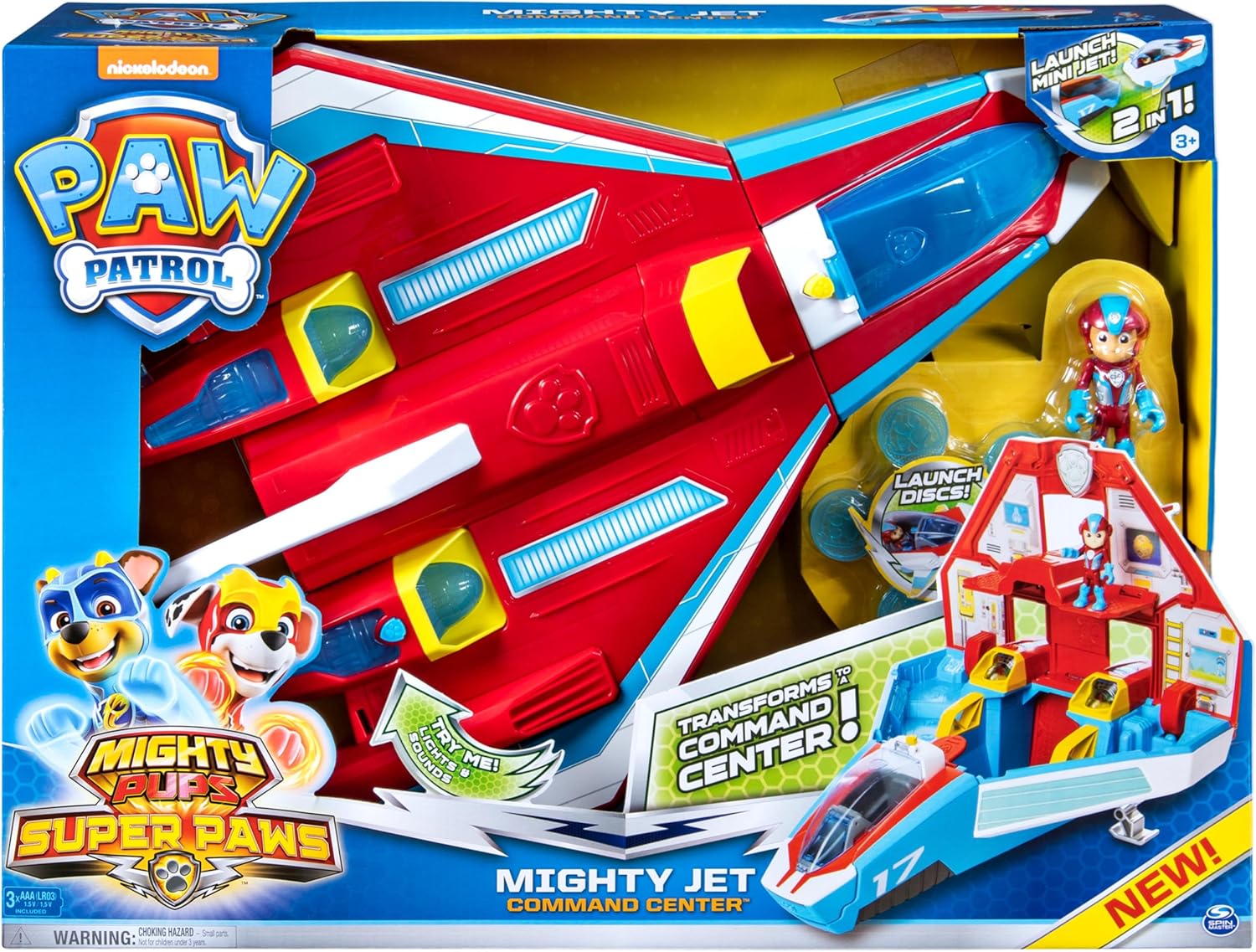
The PAW Patrol Super PAWs Mighty Jet Command Center is a versatile 2-in-1 deluxe vehicle designed for imaginative play. It transforms from a jet into a mobile command center, offering multiple play configurations. This set includes an exclusive Mighty Ryder figure and features lights, sounds, and disc-launching capabilities for engaging rescue missions.
2. What's in the Box
- 1 x Mighty Jet/Playset
- 1 x Mini Jet
- 1 x Mighty Ryder Figure
- 5 x Launcher Discs
- 1 x Sticker Sheet
- 1 x Instruction Sheet (this document)
3. Setup
3.1 Battery Installation
The Mighty Jet Command Center requires 3 AAA batteries for its lights and sounds features. These batteries are included with the product. To install or replace batteries:
- Locate the battery compartment on the underside of the jet.
- Using a Phillips head screwdriver (not included), unscrew the battery compartment cover.
- Insert 3 new AAA batteries, ensuring correct polarity (+/-).
- Replace the cover and secure it with the screw.
3.2 Applying Stickers
Refer to the included sticker sheet and the product packaging for guidance on applying decorative stickers to the Mighty Jet and Command Center. Ensure surfaces are clean and dry before application for best adhesion.
4. Operating Instructions
4.1 Transforming from Jet to Command Center
To transform the Mighty Jet into the mobile command headquarters:
- Ensure the mini jet is detached from the front.
- Lift the handle located on the top-rear section of the jet. This action will cause the jet to open up, revealing the command center interior.
- The command center provides space for Mighty Pups figures (sold separately) and one Deluxe Mighty Vehicle (sold separately).
To revert to jet mode, simply fold the command center back into its original jet configuration.
4.2 Mini Jet and Ryder Figure
The exclusive Mighty Ryder figure can be placed into the cockpit of the mini jet. The mini jet detaches from the main command center for separate play. To launch Ryder and his mini jet from the command center, press the designated button.
4.3 Disc Launcher and Lights & Sounds
Load the 5 included discs into the disc launcher. Press the button on the front of the jet (or Ryder’s mini jet) to launch the discs. To activate the real lights and sounds, press the button located on the Mighty Jet’s engine.
4.4 Cargo Pit for Land Rescues
For land-based rescue missions, a cargo pit is located at the back of the jet. Load a pup into a vehicle (sold separately) and release it from this cargo pit.
5. Product Images


6. Official Product Videos
7. Specifications
- Product Dimensions: 22 x 8 x 16 inches
- Item Weight: 6.6 pounds
- Item Model Number: 6053097
- Manufacturer Recommended Age: 36 months - 9 years
- Batteries: 3 AAA batteries required (included)
- Manufacturer: Spin Master
8. Maintenance
8.1 Cleaning
To clean the Mighty Jet Command Center, wipe surfaces with a damp cloth. Do not immerse the toy in water. Avoid using harsh chemicals or abrasive cleaners, as these may damage the product's finish or electronic components.
8.2 Storage
Store the toy in a cool, dry place away from direct sunlight when not in use. If storing for an extended period, it is recommended to remove the batteries to prevent leakage.
9. Troubleshooting
9.1 Lights and Sounds Not Working
- Check if the batteries are correctly installed with the proper polarity.
- Replace the batteries with fresh AAA batteries.
- Ensure the power switch (if present) is in the 'ON' position.
9.2 Transformation Mechanism Sticking
- Ensure no small objects are obstructing the moving parts of the jet.
- Apply gentle, even pressure when transforming the toy. Avoid forcing the mechanism.
10. Warranty and Support
For warranty information or product support, please refer to the manufacturer's official website or contact their customer service department. Keep your proof of purchase for any warranty claims.