Introduction
This manual provides essential information for the safe and effective use of your Canon PowerShot SX420 IS digital camera. Please read this manual thoroughly before using the camera and retain it for future reference. The Canon PowerShot SX420 IS is a compact digital camera featuring a powerful 42x optical zoom, 20.0 Megapixel sensor, and built-in Wi-Fi and NFC connectivity.

Image: Front view of the Canon PowerShot SX420 IS digital camera.
Setup
1. Unpacking and Checking Contents
Ensure all components are present:
- Canon PowerShot SX420 IS Camera Body
- Battery Pack
- Battery Charger
- Wrist Strap
- Lens Cap

Image: Canon PowerShot SX420 IS camera with included battery, charger, wrist strap, and lens cap.
2. Charging the Battery
- Insert the battery pack into the battery charger.
- Plug the charger into a power outlet. The charging indicator light will illuminate.
- Once charging is complete, the indicator light will change or turn off (refer to charger specific instructions).
3. Inserting the Battery and Memory Card
- Open the battery/card compartment cover on the bottom of the camera.
- Insert the charged battery pack, ensuring correct orientation.
- Insert an SDHC or SDXC memory card into the card slot until it clicks into place.
- Close the compartment cover securely.
4. Initial Power On and Basic Settings
- Press the ON/OFF button to power on the camera.
- Follow the on-screen prompts to set the date, time, and language.
Operating the Camera
1. Basic Controls
- ON/OFF Button: Powers the camera on or off.
- Shutter Button: Press halfway to focus, fully to take a picture.
- Zoom Lever: Controls the 42x optical zoom for telephoto and wide-angle shots.
- Mode Dial: Selects shooting modes such as Auto, Program, Portrait, Landscape, and Movie.
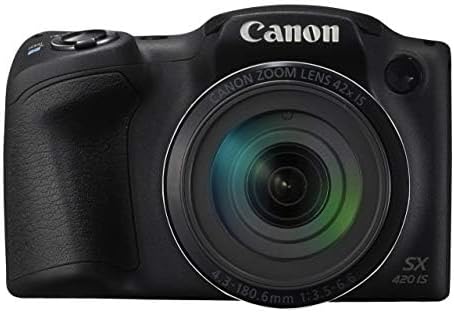
Image: Front view of the Canon PowerShot SX420 IS, highlighting the lens and zoom capabilities.
2. Taking Photos
- Turn on the camera and select your desired shooting mode using the mode dial. For general use, select Auto mode.
- Frame your shot using the 3.0-inch LCD screen.
- Use the zoom lever to adjust the focal length.
- Press the shutter button halfway down to allow the camera to focus. The focus frame will turn green when focus is achieved.
- Press the shutter button fully to capture the image. The camera's optical image stabilizer helps reduce blur from camera shake.
3. Recording Videos
- Set the mode dial to Movie mode.
- Press the dedicated movie button to start recording. The camera records in HD 720p resolution in MP4 format.
- Press the movie button again to stop recording.
4. Reviewing Images and Videos
- Press the Playback button (usually indicated by a play icon).
- Use the directional buttons to navigate through your captured images and videos.
- Press the MENU button to access playback options.
5. Wi-Fi and NFC Connectivity
The camera features built-in Wi-Fi and NFC for easy sharing and transferring of images and videos.
- Enable Wi-Fi or NFC from the camera's menu.
- Follow the on-screen instructions to connect to a compatible smartphone, tablet, or computer.
- Use the Canon Camera Connect app (available for iOS and Android) for remote shooting and image transfer.
Maintenance
1. Cleaning the Camera
- Camera Body: Wipe with a soft, dry cloth. For stubborn dirt, use a slightly damp cloth and then dry thoroughly.
- Lens: Use a lens brush to remove dust, then gently wipe with a lens cleaning cloth and lens cleaning solution. Avoid touching the lens surface with your fingers.
- LCD Screen: Use a soft, dry cloth. For smudges, use a screen cleaner specifically designed for electronics.
2. Battery Care
- Always use genuine Canon battery packs and chargers.
- Avoid exposing the battery to extreme temperatures.
- If not using the camera for an extended period, remove the battery and store it in a cool, dry place.
3. Storage
Store the camera in a dry, well-ventilated area, away from direct sunlight, high temperatures, and humidity. Use a camera bag or case to protect it from dust and physical damage.
Troubleshooting
If you encounter issues with your camera, refer to the following common solutions:
| Problem | Solution |
|---|---|
| Camera does not power on. | Ensure the battery is fully charged and correctly inserted. Try using a different charged battery if available. |
| Images are blurry. | Check that the lens is clean. Ensure the camera is focusing correctly (press shutter halfway). Use the optical image stabilizer and hold the camera steady. Consider using a tripod in low light. |
| Cannot connect via Wi-Fi/NFC. | Ensure Wi-Fi/NFC is enabled on both the camera and the connecting device. Check network settings and password. Restart both devices. |
| Memory card error. | Ensure the memory card is inserted correctly. Try formatting the card (this will erase all data). Use a different compatible memory card. |
| Flash does not fire. | Check flash mode settings. Ensure the flash is not set to 'Off'. The flash may not fire if the battery is low or in certain shooting modes. |
Specifications
| Feature | Detail |
|---|---|
| Model Name | PSSX420IS |
| Effective Still Resolution | 20 MP |
| Optical Zoom | 42x |
| Image Stabilization | Optical |
| Photo Sensor Technology | CMOS |
| Screen Size | 3 Inches |
| Display Type | LCD |
| Connectivity Technology | NFC, Wi-Fi |
| Supported File Format | JPEG, RAW |
| Video Resolution | HD 720p |
| Video Capture Format | MP4 |
| Flash Memory Type | SDHC or SDXC |
| Maximum Aperture | 3.5 f |
| Expanded ISO Range | 100 - 1600 |
| Item Weight | 1.5 Pounds |
| Color | Black |
Warranty Information
This Canon PowerShot SX420 IS camera comes with a 90 days limited warranty. Please retain your proof of purchase for warranty claims. For detailed terms and conditions, refer to the warranty documentation provided with your product or visit the official Canon website.
Customer Support
For further assistance, technical support, or service inquiries, please visit the official Canon support website or contact their customer service. You can typically find contact information and FAQs on the manufacturer's website.
Official Canon Website: www.usa.canon.com


