
Introduction
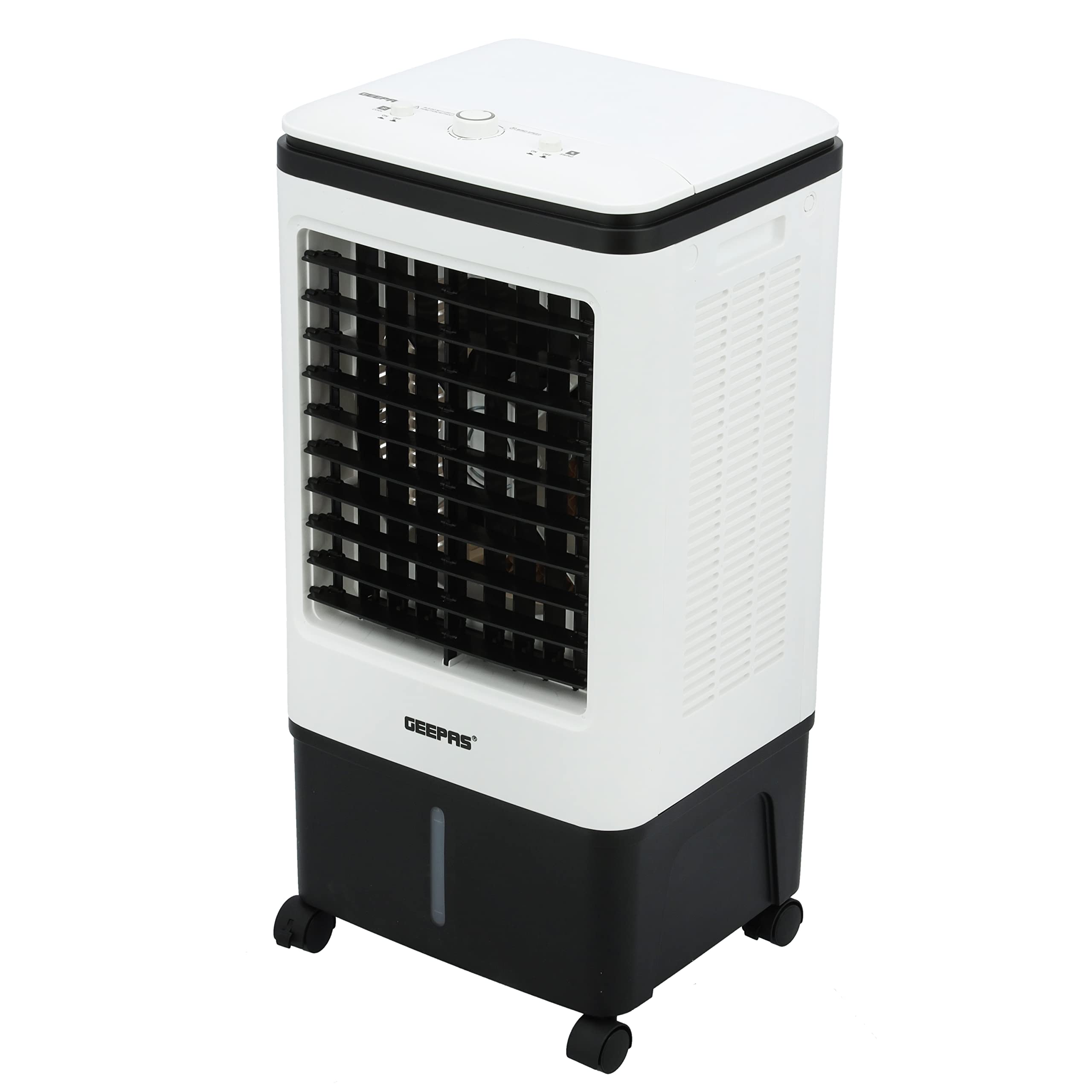
The Geepas GAC9576N Air Cooler is designed to provide cooling relief in hot weather. Featuring a 20-liter water tank, three wind speeds, and both manual up/down and automatic left/right oscillation, it efficiently circulates cool air. Its compact and portable design, complete with wheels, allows for easy movement between rooms. This evaporative cooler operates with low power consumption (80W) and includes a water filter system and ice packs to enhance cooling and air quality.
Safety Instructions
Please read and understand all safety instructions before operating this appliance. Failure to follow these instructions may result in electric shock, fire, or serious injury.
- Always ensure the appliance is unplugged from the power outlet before cleaning, maintenance, or when not in use.
- Do not operate the cooling function without sufficient water in the tank.
- Keep the appliance away from children and pets.
- Do not immerse the appliance, power cord, or plug in water or other liquids.
- Place the air cooler on a stable, level surface to prevent tipping.
- Ensure there is adequate ventilation around the unit. Do not block air inlets or outlets.
- Do not use the appliance if the power cord or plug is damaged. Contact qualified service personnel for repair.
- Avoid placing objects into the air outlets or inlets.
- This appliance is for indoor use only.
Product Overview
Components
- Main Unit
- Water Tank (20 Liters capacity)
- Control Panel
- Remote Control
- Caster Wheels
- Ice Packs (4 pieces)
- Water Filter System
Control Panel
The control panel is located on the top of the unit and features the following:
- WIND SPEED Knob: Adjusts fan speed (0 - Off, 1 - Low, 2 - Medium, 3 - High).
- COOL Switch (ON/OFF): Activates or deactivates the evaporative cooling function.
- SWING Switch (ON/OFF): Activates or deactivates the automatic left-right oscillation of the louvers.

Setup
- Unpacking: Carefully remove the air cooler from its packaging. Retain all packaging materials for future storage or transport.
- Placement: Position the air cooler on a firm, level surface. For optimal cooling performance, place the unit near an open door or window to allow for proper air circulation.
- Fill Water Tank:
- Open the top lid of the air cooler.
- Carefully pour clean, cool water into the water tank. Do not exceed the 'MAX' fill line indicated on the water level indicator.
- For enhanced cooling, place the provided ice packs (after freezing them) into the water tank.
- Close the top lid securely.

Side view of the air cooler with the top lid open, showing access to the water tank. 
Water level indicator on the side of the unit, showing MIN and MAX fill lines. 
Ice packs placed inside the water tank for enhanced cooling. - Power Connection: Plug the power cord into a standard 240V AC electrical outlet.
Operating Instructions
Once the unit is set up, follow these steps to operate your air cooler:
- Power On: Ensure the unit is plugged in. The unit will be in standby mode.
- Adjust Wind Speed: Turn the WIND SPEED knob on the control panel to your desired setting: 1 (Low), 2 (Medium), or 3 (High). The fan will start operating.
- Activate Cooling Function: To use the evaporative cooling feature, switch the COOL switch to the 'ON' position. Ensure there is water in the tank. The unit will begin to circulate cooler, humidified air.
- Activate Swing Function: To enable automatic left-right oscillation of the air flow, switch the SWING switch to the 'ON' position. You can manually adjust the up/down louvers to direct the airflow vertically.
- Using the Remote Control: The included remote control allows you to adjust settings from a distance. Refer to the remote control section in the full manual for specific button functions.
- Power Off: To turn off the unit, turn the WIND SPEED knob to '0' (Off) and switch both COOL and SWING to 'OFF'. Unplug the unit from the power outlet for complete power disconnection.


Maintenance
Regular maintenance ensures optimal performance and extends the lifespan of your air cooler.
- Cleaning the Exterior: Unplug the unit. Wipe the exterior surfaces with a soft, damp cloth. Do not use abrasive cleaners or solvents.
- Cleaning the Water Tank: The water tank should be cleaned regularly (at least once a week, or more frequently with heavy use) to prevent mold, mildew, and odors. Drain any remaining water, then wipe the inside with a damp cloth and mild detergent. Rinse thoroughly before refilling.
- Cleaning/Replacing the Water Filter: The water filter (honeycomb cooling pad) should be inspected periodically. If it appears dirty or clogged, gently rinse it under running water. If heavily soiled or damaged, it may need replacement. Ensure the filter is completely dry before reinserting.
- Storage: Before storing the air cooler for an extended period, ensure the water tank is completely empty and clean. Clean the entire unit and allow it to dry thoroughly. Store in a cool, dry place, preferably in its original packaging.

Troubleshooting
If you encounter issues with your air cooler, refer to the following common problems and solutions:
| Problem | Possible Cause | Solution |
|---|---|---|
| Unit does not turn on | No power supply Power cord not properly connected | Check if the unit is plugged into a working outlet. Ensure the power cord is securely connected. |
| No cooling effect | Water tank is empty COOL function is off Ice packs not used or frozen | Fill the water tank with clean water. Switch the COOL function to 'ON'. Freeze and place ice packs in the water tank. |
| Weak airflow | Air inlets/outlets blocked Water filter clogged | Ensure no obstructions are blocking the air vents. Clean or replace the water filter. |
| Unusual noise | Unit not on a level surface Loose internal component | Place the unit on a stable, flat surface. If noise persists, contact customer support. |
| Water leakage | Water tank overfilled Water tank not properly sealed | Do not fill water above the 'MAX' line. Ensure the water tank lid is closed correctly. |
Specifications
| Feature | Detail |
|---|---|
| Brand | Geepas |
| Model Number | GAC9576N |
| Product Dimensions (L x W x H) | 37 x 32 x 70 cm |
| Item Weight | 5.5 kg |
| Material | Plastic |
| Color | White and Black |
| Installation Type | Floor Standing |
| Control Type | Knob |
| Tank Capacity | 20 Liters |
| Number of Speeds | 3 |
| Voltage | 240 Volts |
| Power | 80 Watts |
| Operating Mode | Automatic |
| Special Features | Portable with wheels, Remote control, Honeycomb waterfall system |
| Recommended Uses | Cooling small to medium-sized rooms, portable spot cooling, alleviating dry heat and low humidity |
| Included Components | Remote control, User manual, Warranty card |
| GTIN/UPC | 001734421710 |
Warranty and Support
This Geepas GAC9576N Air Cooler comes with a 2-year manufacturer warranty from the date of purchase. Please retain your proof of purchase for warranty claims.
For technical support, troubleshooting assistance beyond this manual, or warranty service, please contact your retailer or the Geepas customer service department. Contact information can typically be found on the product packaging or the official Geepas website.