
Introduction
This manual provides essential information for the safe and effective use of your EXERPEUTIC 2500 ExerWork Recumbent Exercise Bike. Please read all instructions carefully before assembly and operation. Retain this manual for future reference.
Safety Information
- Consult your physician before starting any exercise program.
- Ensure all parts are securely fastened before each use.
- Place the exercise bike on a flat, stable surface.
- Keep children and pets away from the equipment during use.
- Do not exceed the maximum user weight of 250 pounds (113 kg).
- Wear appropriate exercise attire and footwear.
- Stop exercising immediately if you feel faint, dizzy, or experience pain.
- Keep hands and feet clear of moving parts.
Package Contents
Verify that all components are present before beginning assembly. If any parts are missing or damaged, contact customer support.
- Main Frame Assembly
- Adjustable Desktop
- Airsoft Seat and Backrest
- Pedals (Left and Right)
- Stabilizer Bars (Front and Rear)
- Hardware Kit (bolts, washers, nuts, tools)
- Multifunction Computer Console
- 2 AAA Batteries (for console)
- Instruction Manual
Setup and Assembly
Follow these steps for proper assembly. It is recommended to have two people for certain assembly stages.
- Unpacking: Carefully remove all components from the packaging. Place them on a clear, flat surface.
- Attach Stabilizer Bars: Secure the front and rear stabilizer bars to the main frame using the provided bolts and washers. Ensure they are tightened firmly.
- Install Pedals: Identify the left (L) and right (R) pedals. The left pedal threads counter-clockwise, and the right pedal threads clockwise. Tighten securely.
- Assemble Seat and Backrest: Attach the Airsoft seat cushion and backrest to the seat post assembly. Adjust the seat position as desired.
- Mount Desktop: Attach the adjustable desktop to its support post. Ensure it slides smoothly and locks into position.
- Connect Console: Install the 2 AAA batteries into the multifunction computer console. Connect any necessary sensor wires from the main frame to the console. Mount the console onto the desktop or handlebar assembly.
- Final Check: Verify that all bolts, nuts, and connections are tight and secure. Ensure the bike is stable and does not wobble.
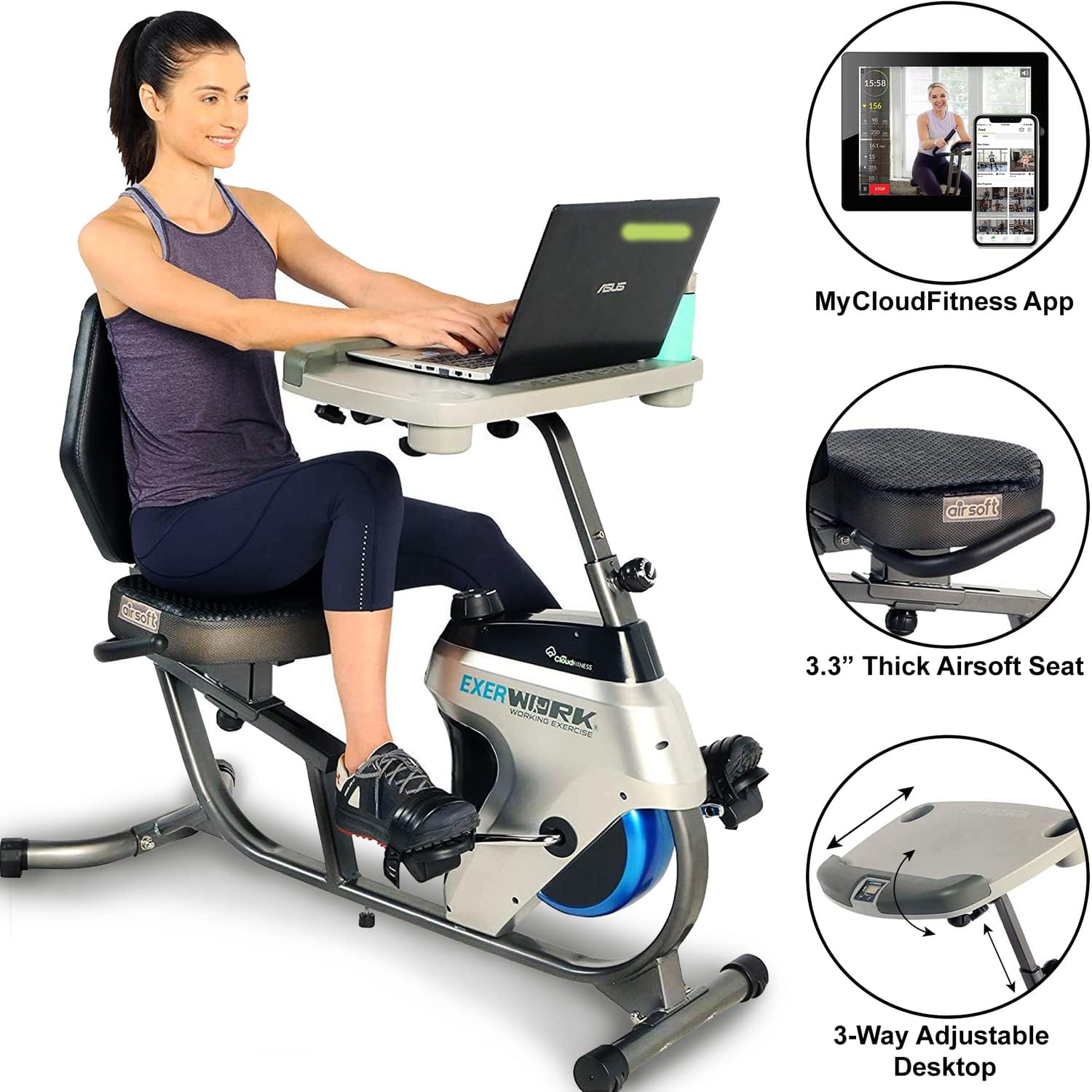
Image: The EXERPEUTIC 2500 ExerWork Recumbent Exercise Bike fully assembled, showing a user on the bike with a laptop on the adjustable desk. Insets highlight the MyCloudFitness App, 3.3-inch thick Airsoft seat, and 3-way adjustable desktop.

Image: A woman standing next to the EXERPEUTIC 2500 ExerWork Recumbent Exercise Bike, providing a sense of scale for the product's overall size and design.
Operating Instructions
Adjusting the Seat
The seat can be adjusted forward or backward to accommodate different user heights. Loosen the adjustment knob located under the seat, slide the seat to the desired position, and then tighten the knob firmly to secure it.
Adjusting the Desktop
The large sliding desktop offers 3-way adjustability: height, forward, and backward tilt. Use the adjustment levers or knobs on the desktop support post to set the desk to a comfortable working or viewing position. Ensure the desk is locked securely before placing items on it.

Image: A top-down view of the EXERPEUTIC 2500 ExerWork's 3-way fully adjustable desktop, showing the integrated console and cup holders.
Adjusting Resistance
The EXERPEUTIC 2500 features 14 levels of magnetic resistance. To increase or decrease the pedaling difficulty, turn the resistance knob located on the main frame. Turn clockwise to increase resistance and counter-clockwise to decrease it.

Image: A close-up view of the resistance adjustment knob on the EXERPEUTIC 2500 ExerWork Recumbent Exercise Bike, used to select one of the 14 resistance levels.
Multifunction Computer Console
The console displays various workout metrics. Press the 'MODE' button to cycle through different functions such as:
- Speed: Current pedaling speed.
- Time: Duration of your workout.
- Distance: Total distance covered.
- Calories: Estimated calories burned.
- Pulse: Heart rate (if pulse sensors are used).
Press and hold the 'MODE' button to reset the values.
MyCloudFitness App Connectivity
The EXERPEUTIC 2500 is compatible with the free MyCloudFitness App (available for iOS and Android devices). Download the app and follow the in-app instructions to connect your exercise bike. The app allows you to track your workout data, including time, distance, and calories, and set fitness goals.

Image: A cutaway diagram illustrating the multi-layered construction of the Airsoft Technology Seat, designed for enhanced comfort and airflow during workouts.
Maintenance
Regular maintenance ensures the longevity and optimal performance of your exercise bike.
- Cleaning: Wipe down the bike with a damp cloth after each use to remove sweat and dust. Avoid abrasive cleaners.
- Inspection: Periodically check all bolts, nuts, and moving parts for tightness and wear. Tighten any loose fasteners.
- Lubrication: The magnetic resistance system is generally maintenance-free. Do not lubricate internal components unless specifically instructed by customer support.
- Storage: Store the bike in a cool, dry place away from direct sunlight and extreme temperatures.
- Battery Replacement: Replace the console batteries (2 AAA) when the display becomes dim or unresponsive.
Troubleshooting
| Problem | Possible Cause | Solution |
|---|---|---|
| Console display is blank or erratic. | Low or dead batteries; Loose sensor connection. | Replace AAA batteries; Check all console cable connections. |
| Pedals are difficult to turn or make noise. | Resistance set too high; Loose pedal or crank arm; Internal issue. | Decrease resistance; Ensure pedals and crank arms are tightened; Contact customer support if problem persists. |
| Bike wobbles during use. | Uneven surface; Loose stabilizer bolts. | Move bike to a level surface; Tighten all stabilizer bolts. |
| Resistance adjustment not working. | Cable disconnected or damaged; Internal mechanism issue. | Check resistance cable connection; Contact customer support. |
Specifications
| Feature | Detail |
|---|---|
| Model Name | 2500 |
| Item Model Number | 7170 |
| Brand | EXERPEUTIC |
| Resistance Mechanism | Magnetic |
| Number of Resistance Levels | 14 |
| Drive System | Belt |
| Maximum User Weight | 250 Pounds (approx. 113 kg) |
| Product Dimensions (L x W x H) | 135.89 x 63.5 x 101.6 cm (53.5 x 25 x 40 inches) |
| Item Weight | 1 Kilogram (2.2 lbs) |
| Power Source (Console) | 2 AAA Batteries (included) |
| Recommended Use | Indoor |
| Special Feature | Adjustable Desk, Airsoft Seat |
| Material | Foam (for seat/backrest) |

Image: A visual representation of the EXERPEUTIC 2500 ExerWork Recumbent Exercise Bike with its key dimensions labeled: 135.89 cm (length), 63.5 cm (width), and 101.6 cm (height).
Warranty and Support
For warranty information, product support, or to order replacement parts, please refer to the contact information provided with your purchase documentation or visit the official EXERPEUTIC website. Keep your purchase receipt as proof of purchase.


