1. Introduction and Overview
The KRK ROKIT Generation 4 (G4) line of professional monitors represents a significant advancement in audio monitoring technology. Designed for modern artists and producers across all genres and environments, the ROKIT103G4 offers a balanced listening experience with precise sound reproduction. This manual provides essential information for setting up, operating, and maintaining your KRK ROKIT103G4 studio monitor.

Image: Front view of the KRK ROKIT103G4 Studio Monitor, showcasing its black enclosure and signature yellow drivers.
Key Features:
- Built-in efficient Class D power amplifier.
- Proprietary speaker drivers constructed from Kevlar for consistent sonic integrity.
- Onboard LCD visual DSP-driven EQ for precise room tuning.
- 25 Visual Graphic EQ settings to adapt to various acoustic environments.
- KRK app compatibility with room correction tools for optimized placement and sound.
2. Package Contents
Please verify that all items listed below are included in your product packaging:
- KRK ROKIT103G4 Studio Monitor
- Power Cable
- Quick Start Guide

Image: The included Quick Start Guide and power cable, essential accessories for initial setup.
3. Initial Setup
Placement:
Proper placement of your studio monitors is crucial for accurate sound reproduction. Position the monitors to form an equilateral triangle with your listening position. The ROKIT103G4 includes high-density open-cell acoustic iso-foam pads to decouple the speaker from the surface, minimizing vibration transmission and improving clarity. Ensure adequate space around the monitor for proper airflow, especially around the rear panel.
Connections:
Connect your audio source to the monitor's balanced input using appropriate XLR or TRS cables. Ensure all connections are secure before powering on the unit. The ROKIT103G4 features a newly-designed front-firing port, offering exceptional low-end extension and flexible room-positioning.
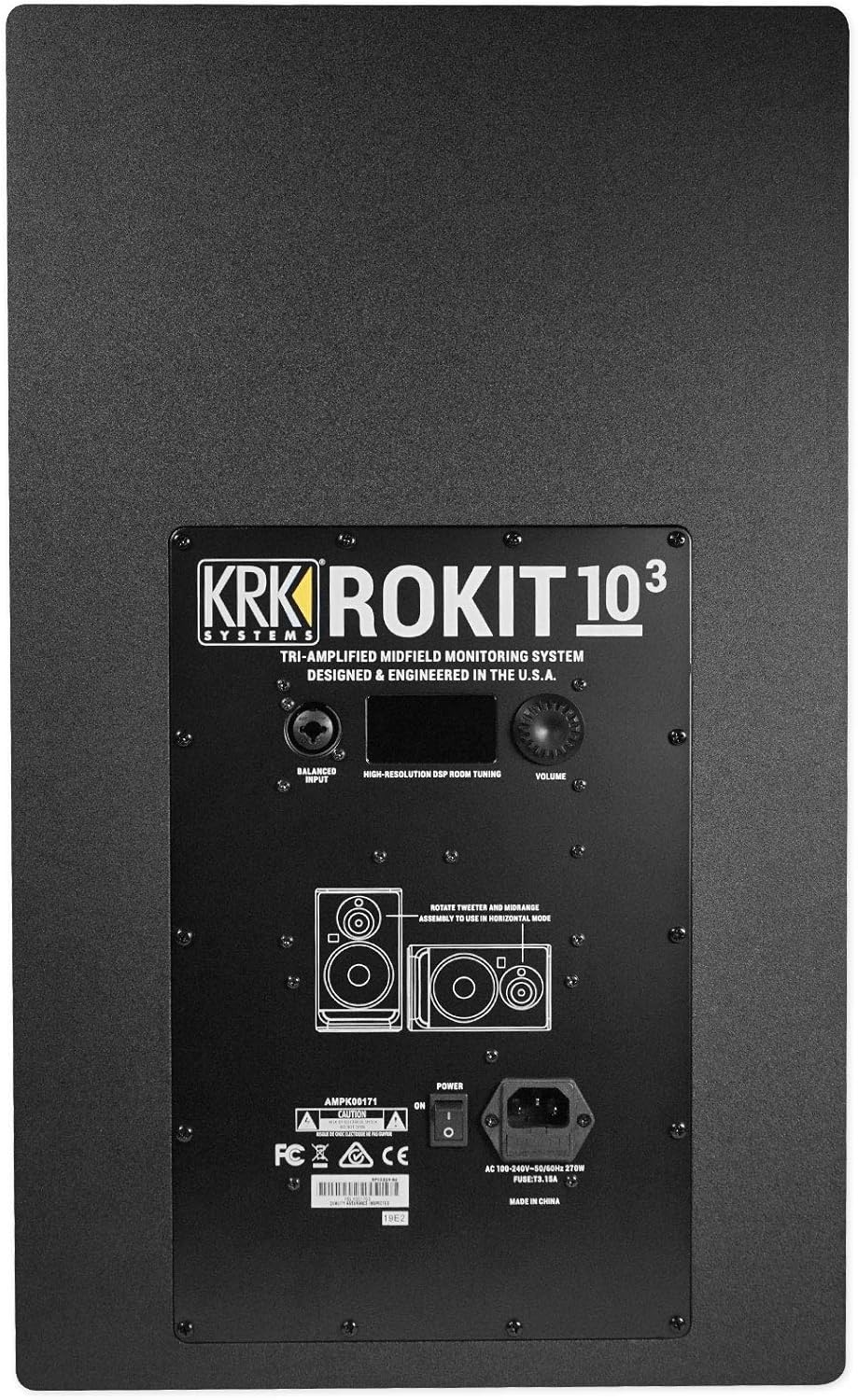
Image: Rear panel of the KRK ROKIT103G4 Studio Monitor, showing the balanced input, DSP controls, and power connection.
4. Operating Instructions
Powering On/Off:
Locate the power switch on the rear panel of the monitor. Flip the switch to the 'ON' position to power on the unit. Always power on your monitors after your audio source and power them off before your audio source to prevent sudden loud noises.
DSP-Driven EQ and Room Correction:
The ROKIT103G4 features an onboard LCD visual DSP-driven EQ. This allows you to fine-tune the monitor's frequency response to compensate for your acoustic environment. Use the control knob to navigate through the 25 visual graphic EQ settings. For advanced room correction and analysis, download the official KRK app (available for Android and iPhone). The app assists with monitor placement, level matching, subwoofer level and crossover setting assistance, polarity, EQ, and includes a signal generator.
Volume Control:
Adjust the overall output volume using the dedicated volume knob on the rear panel. Start with a low volume setting and gradually increase it to a comfortable listening level. Avoid operating the monitors at excessively high volumes for prolonged periods to prevent hearing damage and potential speaker damage.
5. Care and Maintenance
To ensure the longevity and optimal performance of your KRK ROKIT103G4 monitors, follow these care guidelines:
- Cleaning: Use a soft, dry cloth to clean the exterior surfaces of the monitor. Avoid using abrasive cleaners, solvents, or waxes, as these can damage the finish.
- Environment: Operate the monitors in a stable environment, away from direct sunlight, excessive heat sources, moisture, and dust.
- Handling: Handle the monitors with care. Avoid dropping or subjecting them to strong impacts.
- Power: Always disconnect the power cable from the wall outlet before cleaning or if the unit will be unused for an extended period.
6. Troubleshooting Guide
This section addresses common issues you might encounter with your KRK ROKIT103G4 monitor. If the problem persists after following these steps, please contact KRK customer support.
| Problem | Possible Cause | Solution |
|---|---|---|
| No Sound Output | Power cable disconnected; Volume too low; Input cable faulty; Audio source issue. | Check power connection; Increase volume; Test with a different input cable; Verify audio source is functioning. |
| Distorted Sound | Input level too high; EQ settings incorrect; Damaged speaker driver. | Reduce input level from source; Adjust DSP EQ settings; Contact support for service. |
| Humming or Hissing Noise | Ground loop; Unbalanced cables; Interference from other electronics. | Use balanced cables; Try a ground loop isolator; Move monitor away from interfering devices. |
| Monitor Not Powering On | No power to outlet; Faulty power cable; Internal fuse blown. | Check power outlet; Try a different power cable; Contact support for fuse replacement or service. |
7. Technical Specifications
Detailed specifications for the KRK ROKIT103G4 Studio Monitor:
| Specification | Value |
|---|---|
| Model Name | ROKIT103G4 |
| Speaker Type | Monitor |
| Speaker Maximum Output Power | 300 Watts |
| Woofer Diameter | 10 Inches |
| Tweeter Diameter | 1 Inch |
| Frequency Response | 40 Hz (Lower limit, adjustable via DSP) |
| Material | Kevlar (Drivers) |
| Connectivity Technology | Auxiliary, Bluetooth (for App control) |
| Power Source | Corded Electric |
| Product Dimensions | 27"D x 19"W x 20"H |
| Item Weight | 35.1 Pounds |
| Color | Black |
| Control Method | App, Corded Electric |
| Included Components | Monitor |
8. Warranty and Customer Support
Your KRK ROKIT103G4 Studio Monitor comes with a limited warranty. For specific details regarding warranty coverage, duration, and terms, please refer to the warranty card included with your product or visit the official KRK website. For technical assistance, troubleshooting beyond this guide, or to inquire about repairs, please contact KRK customer support through their official channels.
Online Resources: For the latest drivers, software updates, and additional support documentation, please visit the official KRK website.


