
Colosus NDL319
COLOSUS NDL319 Electronic Digital Keyless Door Lock User Manual
Model: NDL319
1. Introduction
The Colosus NDL319 Electronic Digital Keyless Door Lock provides enhanced security and convenient access for homes and offices. This lock offers multiple entry methods including PIN codes, key fobs, remote control, and traditional keys. This manual provides detailed instructions for installation, operation, and maintenance to ensure optimal performance and security.

Image 1.1: Overview of the Colosus NDL319 lock, highlighting its bright backlit display, sensitive touchscreen, sturdy zinc alloy exterior, reversible handle, and hidden keyhole.
2. Package Contents
Verify that all components are present before beginning installation:
- Colosus NDL319 Electronic Digital Keyless Door Lock (Main Unit)
- Standard Latch 60MM (Note: 70MM elongated latch available for separate purchase)
- 4 Key Fobs (RFID)
- 1 Remote Control
- 2 Metal Keys
- Installation Hardware (screws, spindle, etc.)
- User Manual (this document)
3. Important Notes Before Installation
Review the following requirements and considerations to ensure proper installation and function:
- Door Thickness: The lock is compatible with door thicknesses between 35mm (1.38") and 60mm (2.36").
- Drilling Requirement: One non-standard 10mm hole must be drilled through the existing door to secure the Colosus NDL319 in place.
- Batteries: Requires 4 new AA alkaline batteries (not included). Avoid using used or discount/off-brand batteries for optimal performance.
- Outdoor Use: This lock is NOT WATERPROOF. If used as an exterior door lock, ensure there is a roof or cover to shield the lock from direct water exposure.
- Door Material: Compatible with standard wood doors. Metal doors may require specific drilling tools.
- Temperature Range: The operating temperature range for the Colosus NDL319 is between 14°F (-10°C) and 122°F (50°C).
- Deadbolt Placement: If your existing deadbolt is located above the handle, the Colosus NDL319 must be installed in the upper position, and the deadbolt in the lower position. This is because the NDL319 unit is too long to be installed in the lower position if a deadbolt is already present above it.

Image 3.1: Illustration demonstrating the required placement of the Colosus NDL319 lock relative to an existing deadbolt, with the NDL319 installed above the deadbolt.

Image 3.2: A checklist detailing door thickness requirements, drilling needs, battery type, outdoor exposure warning, door material compatibility, and temperature range for the Colosus NDL319.
4. Setup and Installation
This section guides you through the physical installation of the Colosus NDL319 lock. Refer to the included installation video for visual assistance.
4.1 Mechanical Installation
- Prepare the Door: Ensure your door meets the thickness requirements (35mm-60mm). If necessary, drill the required 10mm hole for the electrical connection as indicated in the template.
- Install the Latch: Insert the standard 60mm latch into the door edge. Ensure the latch bolt faces the correct direction for your door swing.
- Install Exterior Unit: Place the exterior keypad unit onto the door, aligning the spindle with the latch mechanism and feeding the electrical cable through the drilled hole.
- Install Interior Unit: Connect the electrical cable from the exterior unit to the interior unit. Secure the interior unit to the door using the provided screws, ensuring a snug fit without overtightening.
- Test Handle Operation: Verify that both the interior and exterior handles operate smoothly and retract the latch bolt.
4.2 Battery Installation
- Remove the battery cover on the interior unit.
- Insert 4 new AA alkaline batteries, observing the correct polarity (+/-).
- Replace the battery cover. The lock will typically emit a sound or light to indicate it has powered on.
5. Operating Instructions
The Colosus NDL319 offers multiple ways to unlock and secure your door.

Image 5.1: Visual representation of the four access methods for the NDL319 lock: touchscreen PIN entry, key fob scan, remote control activation, and traditional key usage.
5.1 Access Methods
- PIN Code: Enter your programmed code on the touchscreen keypad.
- Key Fob (RFID): Present a programmed key fob to the designated sensor area on the lock.
- Remote Control: Press the unlock button on the remote control. The remote has a range of up to 30 meters.
- Physical Key: Use one of the provided metal keys in the hidden keyhole (located under a removable metal cap on the handle).
5.2 Programming User Codes, Key Fobs, and Remotes
The lock supports up to 50 user codes, 50 key fobs, and 5 remote users. Refer to the detailed programming manual included in the package for specific steps. Generally, programming involves entering a master code followed by a sequence to add or delete user credentials.
5.3 Key Features
- Auto Lock: The door will automatically lock after a set period once it has been unlocked. This feature can typically be configured or disabled.
- Open Mode: Allows the lock to remain temporarily unlocked until manually re-locked or after a specific duration.
- Anti-Peeking: To prevent others from guessing your code, you can enter a series of random numbers before or after your actual PIN code. The lock will still recognize the correct sequence within the longer entry.
- Anti-Theft (Wrong Entry Alarm): If 3 incorrect entries are made consecutively, the lock will disable for 5 minutes and emit an alarm.
- Multi-Sync: If you have multiple Colosus NDL319 locks, you can sync codes, key fobs, and remotes to work with all of them.
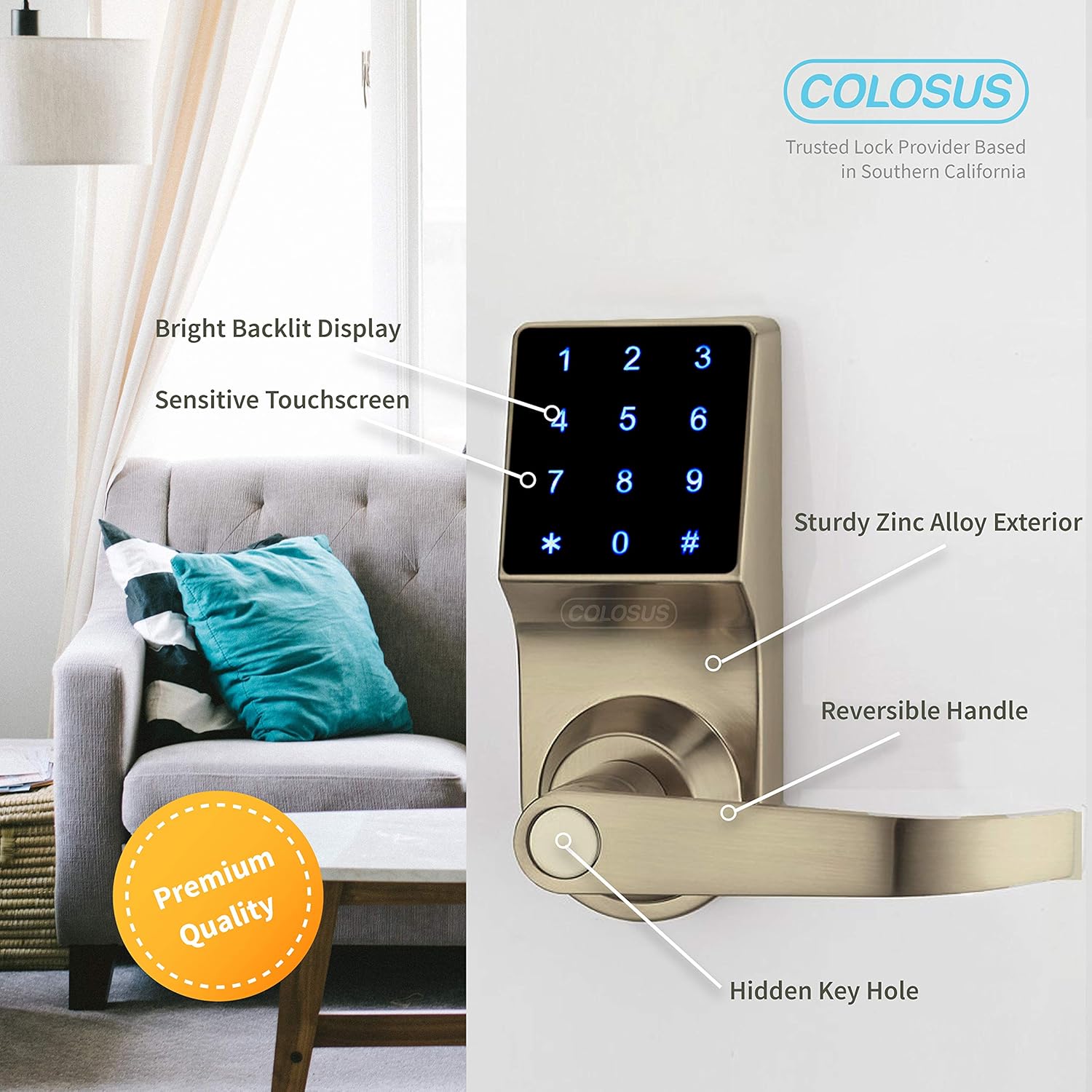
Image 5.2: A summary of the Colosus NDL319's key features, including its multiple unlocking methods, automatic locking, temporary open mode, low battery warning, support for numerous users, security against unauthorized access attempts, and multi-lock synchronization capability.
6. Maintenance
6.1 Battery Replacement
The lock features a Low Battery Alert, indicated by a flashing light when the battery level is low. Replace all 4 new AA alkaline batteries promptly when this alert appears to ensure continuous operation. Refer to Section 4.2 for battery installation steps.
6.2 Cleaning
Clean the lock's exterior with a soft, dry cloth. Avoid using abrasive cleaners, solvents, or harsh chemicals, as these can damage the finish and electronic components. Do not spray cleaning solutions directly onto the lock.
7. Troubleshooting
| Problem | Possible Cause | Solution |
|---|---|---|
| Lock does not respond to input. | Dead or low batteries. | Replace all 4 AA alkaline batteries. |
| PIN code not working. | Incorrect code entered; code not programmed; lock disabled due to multiple wrong entries. | Verify the correct code. Reprogram the code if necessary. Wait 5 minutes if the lock is disabled. |
| Key fob or remote not working. | Key fob/remote not programmed; remote out of range; remote battery low. | Ensure key fob/remote is programmed. Move closer to the lock for remote use. Replace remote battery if applicable. |
| Door does not lock/unlock smoothly. | Misalignment during installation; latch mechanism obstruction. | Check door alignment and ensure no obstructions in the door frame or latch area. Re-check installation steps. |
| Lock beeps continuously or flashes light. | Low battery alert; error condition. | Replace batteries. If the issue persists, contact customer support. |
8. Specifications
| Model Name | COLOSUS NDL319 |
| Model Number | DSLTS01 |
| Brand | Colosus |
| Lock Type | Keypad |
| Material | Metal (Sturdy Zinc Alloy Exterior) |
| Door Thickness | 35mm (1.38") - 60mm (2.36") |
| Latchbolt | Standard Latch 60MM (Not a deadbolt) |
| Temperature Range | 14°F (-10°C) - 122°F (50°C) |
| Battery Type | 4 AA Alkaline Batteries (not included) |
| User Codes Supported | Up to 50 |
| Key Fobs Supported | Up to 50 |
| Remote Users Supported | Up to 5 |
| Remote Control Range | Up to 30 meters |
| Special Features | Touchscreen, Auto Lock, Anti-Peeking, Anti-Theft, Low Battery Alert, Multi-Sync |
| UPC | 818073009482 |
9. Warranty and Support
For warranty information and customer support, please refer to the documentation included with your purchase or contact Colosus directly. Colosus offers customer service support 7 days a week.
Contact Information: Please refer to the contact details provided on the Colosus website or in your product packaging for the most up-to-date support options (phone, email, etc.).
Ask a question about this manual
Ask about setup, troubleshooting, compatibility, parts, safety, or missing instructions. Manuals+ will review the question and use this page’s manual context to help answer it.